Showing posts with label Fine Arts Education. Show all posts

Monday, October 24, 2022

The Pike Panther Band is Hitting All the Right Notes with Technology

EdPuzzle,Fine Arts Education,Band,Gene Pike Middle School,Pike Middle School,Jack Forbis, Jennifer Haden, Ningenius,Differentiation,Middle School,6-8

Like most teachers at the start of the pandemic, Jack Forbis and Jennifer Haden, the band directors at Gene Pike Middle School, found themselves wondering how they were going to engage students remotely and transition their skills-based content to an online environment.  When teaching over Zoom, according to Haden, they quickly ran into several unexpected hurdles including a lag time that wouldn’t allow the whole group to play together effectively, and unreliable sound where “kids would play and there was no sound coming back, so the only way to tell if they were playing right was by watching their faces and fingers.”  Desperate for better ways to engage their learners, Forbis and Haden scoured posts made by other band directors in online forums and on social media.  Eventually they came across a post touting the benefits of EdPuzzle, which allows teachers to add questions throughout videos to gauge student learning.  They decided to dive in, recording videos that covered everything from an introduction to the staff and how to read music, to videos fully differentiated for each instrument demonstrating finger positions for notes and what they should sound like when played.  They then uploaded these videos to EdPuzzle where they added questions to aid and reinforce student understanding. 

EdPuzzle,Fine Arts Education,Band,Gene Pike Middle School,Pike Middle School,Jack Forbis, Jennifer Haden, Ningenius,Differentiation

When the district transitioned back to in-person learning, Forbis and Haden decided to continue incorporating EdPuzzle videos in their curriculum, finding innumerable benefits including differentiated instruction, increased student accountability, and greater consistency in the way that content is delivered.  As Haden explains, “they’re getting the same content delivered the same way every time without us having to repeat it five times every period … and if a student misses class or there’s a substitute, those students are going to get the same level of instruction as everyone else.” 

EdPuzzle,Fine Arts Education,Band,Gene Pike Middle School,Pike Middle School,Jack Forbis, Jennifer Haden, Ningenius,Differentiation

Recording and uploading EdPuzzles has not only allowed the band directors to differentiate instruction by instrument group, it has also allowed them to accommodate the diverse needs of their learners.  Forbis points out that not every student has the same access to transportation for before and after school tutorials, and these EdPuzzles are “like an extra tutorial the kids can have at home.”  If students are struggling with a particular skill and need additional support, they can pause, rewind, and rewatch the EdPuzzle as many times as they need to since, Forbis says, “the first part of learning is often modeling and mimicking, and that’s what this allowed us to do.”  Before EdPuzzle, Forbis and Haden would go over the lesson in class and students would practice together, but at home they were practicing on their own.  This meant, explains Haden, that “even if they were diligently practicing, if they were diligently practicing wrong, it wasn’t helping them.”  The EdPuzzles give students something they can go back to and practice with over and over.  Eduardo, a 6th grade clarinet player, finds value in this because he can rewatch the video at home before he records an assignment “and then try to match the same as Miss Haden.”

EdPuzzle,Fine Arts Education,Band,Gene Pike Middle School,Pike Middle School,Jack Forbis, Jennifer Haden, Ningenius,Differentiation

This ability to watch and rewatch is a key component in what Forbis and Haden say is perhaps the biggest benefit of using EdPuzzle in band -- increased student accountability.  They can easily see whether or not a student has accessed a video, their current progress, and how long they interacted with the content.  It’s also helpful for parents who often want to provide support by reinforcing practice at home, but, points out Haden, if they’re not familiar with the content “it can just sound like their kid is making sound at the house.”  The EdPuzzles help parents see exactly what Forbis and Haden are asking their students to do.  This has been further underscored by the move to Canvas, where Forbis and Haden embed the EdPuzzles directly in the instructions for their Media Recording assignments where students record and upload videos of themselves playing.  With Observer access, parents can see the expectations set in the EdPuzzle and compare them with the video their student has submitted.  This provides a clear picture of how well their student is performing, in terms of grades as well as ability.


While the benefits of transitioning to guided practice through EdPuzzle have been myriad, Forbis and Haden are the first to admit it took a lot of time and effort to set up.  When asked what advice they’d have for teachers considering bringing in new tools, Forbis and Haden recommend adding things in a little at a time to give teacher and students time to adjust, and to keep in mind that while it may feel like a lot of work up front, it pays off when that content is ready to go the next year.  The band directors are embodying this philosophy themselves, growing their EdPuzzle libraries as needed while also exploring new ways to boost student engagement and learning.  This year they’ve incorporated Ningenius to transform learning notes and finger positions into a game, building a reward system where students compete to earn belts that earn them access to parties and other fun activities.  Kelcie, another 6th grade clarinetist, appreciates how her teachers make learning and reviewing information fun using exciting online tools, adding that “people really want to get those belts!”

EdPuzzle,Fine Arts Education,Band,Gene Pike Middle School,Pike Middle School,Jack Forbis, Jennifer Haden, Ningenius,Differentiation

To get started with EdPuzzle in your own classroom, go to edpuzzle.com!


Pro Tip: Sharing content with another teacher on your campus?  Bookmark their content page so you can find all of their videos easily!  

My Network → Select School → Select Teacher → Bookmark in your browser!

EdPuzzle,Middle School,Pike Middle School,6-8,Ningenius,Jack Forbis,Band,Gene Pike Middle School,Differentiation,Fine Arts Education,Jennifer Haden,


Monday, November 18, 2019

Answering "Am I Doing This Right?" with Tech-Facilitated Feedback

"Am I doing this right?"
"I'm stuck!"
"I don't know how else to make it better."
"I think I have the hang of it?"

These phrases are ones that are muttered on a daily basis in every content and at every grade. Students are learning new material and are trying their best to show mastery, but are often unsure if they are on the right track or are meeting expectations. Unfortunately, these questions typically don't get answered until the end of a unit through some sort of summative assignment in which the student gets a grade, sees their marked errors, and then immediately moves on to the next topic of study instead of using the feedback for growth towards improvement.

You can't blame the teacher though, right? With 30+ students per class and having several class periods in a day, the shear combined class load of 150+ students to grade is overwhelming, not to mention and it's near impossible to hold a meaningful conference with every student within a 45 minute class period. To add, many teachers are already spending several hours after school preparing for the next school day. Is all hope lost? Do we accept that's just how it is? Is there a better way? YES! 

Check out these highly effective ways to maximize use of technology in delivering immediate, personalized feedback to every student. 

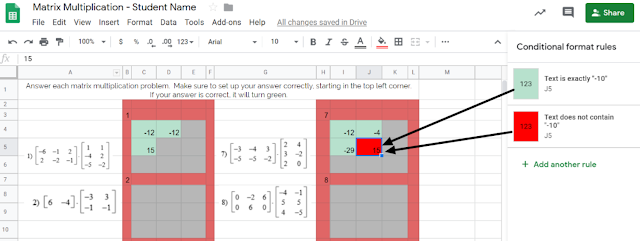
Tip #1: Incorporate tools that automate the process of providing immediate feedback. Check out this example from Carla Dalton's AQR (Advanced Quantitative Reasoning) class in which she maximized the 'conditional formatting' function within Google Sheets to efficiently check progress towards mastery. This auto-coloring box allows the student to know immediately if their calculation was right or wrong. Immediate feedback of this nature enables students to self-monitor the need for referring back to notes or self-regulation of knowing when to ask for help. This also is intended to correct misunderstandings as they occur, rather than addressing misunderstandings the next day after a worksheet's worth of doing it wrong and solidifying incorrect thinking.


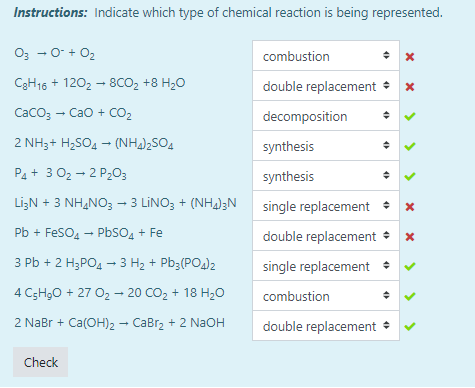
Another example of this automated immediate feedback is done through the use of Moodle quizzes when set to behave in Adaptive Mode, such as this example from Tiffany Mackerley's Chemistry class. This mode turns a traditional quiz into a series of formative questions that has a "check" button which allows students to immediately see which answers are right or wrong. Based on the immediate feedback, students can adjust their response accordingly; the teacher can additionally have it be set up to lose a certain percentage of points with each incorrect answer to minimize random, blind guesses.


Tip #2: Empower your students have their voices be heard as a welcomed source of feedback. In April Heffley's Art IV class, students gave anonymous, critical feedback to their peers' artwork in order to make improvements on what was considered "final" artwork for the time-being. The anonymity allows students to be honest about their thoughts while the teacher is able to monitor students responses through the Teacher Dashboard. Though it does save the teacher time from not being the sole giver of feedback, but it it also valuable to the student receiving the feedback as this process allows varied opinions and perspectives that might not have been considered. Not to mention, it also targets higher order thinking skills by those giving the feedback considering evaluation is the second highest cognitive level in Bloom's Taxomony. Beyond collecting the feedback, Mrs. Heffley then uses the peer's feedback to hold individual conferences with each student artist as they review the feedback together; during this time, the teacher assumes a partner position, rather than evaluator position, in supporting the students' growth.


Tip #3: Seek new opinions from audiences outside the walls of your classroom.
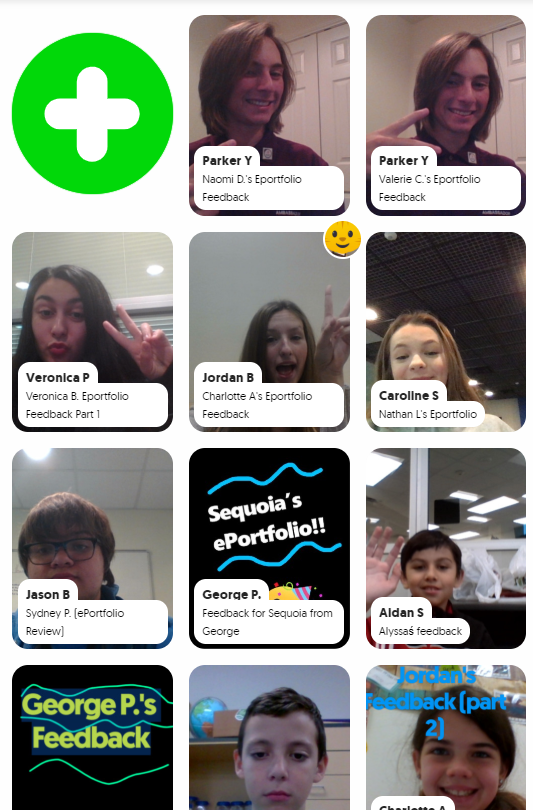
Opening the virtual-doors to your classroom does not have to mean you are connecting with people literally across the globe or are blindly matching with unknown audiences. Patti Hayes' 10th-12th graders at Steele Accelerated High School partnered up with Sandra Champion's GT 5th graders at Hughes Elementary School to review each other's ePortfolios and provide feedback to one another. Google Slides were used to pair up the students, collect written feedback, and link to a FlipGrid that facilitated introductions and oral feedback. This partnership benefited both audiences as the younger students were able to hear from more experienced students in this area, while the older students had their content viewed from true 'outsiders' which helped pinpoints things to be explained or clarified. For more information on this partnership, stay tuned for a blog post detailing this experience set to publish here on 12/9/19!
While all of these tips require time to be invested on the front end to prepare and set up, changing when and how feedback is given maximizes a student's understanding of the material by shifting mindset to viewing feedback as a tool for growth as opposed to a numerical final evaluation. Also note that giving quality feedback is a skill that is developed over time and you can't assume any student, regardless of age, should automatically 'know' how to give good feedback. When asking students to give each other qualitative feedback, sentence stems help focus thinking. Lastly, because feedback is a skill, the more times you ask students to give feedback, the more developed they will become in this area.

This post highlights examples of the following ISTE standards:
  • Students use technology to seek feedback that informs and improves their practice and to demonstrate learning in a variety of ways. (ISTE Student Standard 1c)
  • Use technology to design and implement a variety of formative and summative assessments that accommodate learner needs, provide timely feedback to students, and inform instruction (ISTE Teacher Standard 7b)

Tuesday, September 11, 2018

A Recipe for Success: "Stringing" A Rhythmic Pattern


Learn.
Act.
Reflect.
Goal Set.

Repeat.


Is nailing down this process a Science or an Art? I'd argue it’s an Art - Fine Arts to be exact. Students in Gary Keller and Sessalie Shapley’s Orchestra class at Byron Nelson High School have perfected this process on a continual, weekly basis to improve students' overall abilities. One might think that Technology doesn’t doesn't have a logical place in an instrumental-based class, but that's far from the truth as this Orchestra class is fully dependent on the technology used in preparation for and reflection of daily performance.


Each class is infused with technology from start to end. For example, students are tasked with the responsibility of tuning their own instrument at the start of class each day; they use readily available, free, phone-based tuning apps such as DaTuner and InsTurner to put the accountability on themselves rather than the teacher to ensure the instrument is in the right key. This process is critical to harmonizing as an Orchestra and developing a natural ear for the correct sounding notes.


To continue in the lesson design, classes often provide traditional opportunities such as learning new music and practicing as a full Orchestra. However, the power of technology is truly evident in the individual practice times. During these times, students participate in the general format as follows:


Recipe for Success:
  1. Students create a video of themselves playing a specific song or section of a song determined by the instructor. During this time, students use a combination of their phone and their computer to have both the online metronome and video camera co-functioning. This video serves as a pre-assessment to create a base-line of performance and needs assessment for the week.
  2. Self-critique that video to identify one specific goal to work towards throughout the week. This then becomes the targeted focus for all practice times throughout the week. Topics of suggested focus include intonation, bow placement, vibrato, dexterity confidence, or other of choice.
  3. The student then creates an end of week video over the same content and again uses that as direct evidence to self-assess progress towards goals.
  4. Upload and reflect upon these artifacts in Google Classroom. The Orchestra instructors then review each student's performance to provide individualized attention and feedback focused specifically on the students' performance and self-set goal.
  5. Based on their self-assessment and teacher feedback, the student then goal-sets via a Google Doc for the following week to continually focus on targeted instruction and self-improvement.

Each of these weekly goal sheets provide evidence for the student to reflect up on their progress towards goals and make new objectives based on previous performance. Since the evidence gets uploaded to Google Classroom, students have a personal Google Folder within their own Google Drive which serves as a private portfolio that stores their yearly progress. Students then have the ability to select which pivotal pieces they would like to showcase within their published ePortfolio.

Assistant Orchestra Director, Sessalie Shapley, comments on the power of infusing technology into their classroom, "Google Classroom video recordings allow me to give feedback to every student based on what I see and hear in their recordings. It is a far more efficient use of time letting the recording and grading happen outside of class instead of one at a time, in class, while all of the other students are waiting;" furthermore, "The video recording assignment allows and even encourages students to record themselves multiple times in order to get their “best” recording" which is the ultimate goal: student-driven success fueled by continual practice in perfecting their art. Best of all, the power of technology has helped Mr. Keller and Ms. Shapley build connections beyond what would be traditionally capable with a large Orchestra on a time-restricted class period as Sessalie continues, "The goal sheets and comments have given me several opportunities to discover something about the student’s expectations and other musical talents, gifts and thoughts, which then allowed for deeper discussion about their playing and their musicianship."

As a natural final step, students reflect on their year in an open-ended format. The power of reflection, goal-setting, and improvement shine through in the following student final responses:

Student 1:
“I thought that the goals were a great way to stay conscious of our playing abilities - to constantly be reminded of our strengths and weaknesses so that we can improve on them over time. I also believe that the exercises we were given are great practice strategies for improving many aspects of musicianship like dexterity and intonation.  I think I have certainly seen evidence of our goals in action as the progressed. Some of the goals on the goal sheets did not always pertain to me, but still having to look at them on a regular basis caused me to think more upon how I can always channel my actions in class and practice towards furthering the goals and the overall quality of our orchestra.”


Student 2:
“This year I have heard and felt so much progress in my playing. This was the first year I took private lessons, and I think that was extremely beneficial by itself. But beyond that I have felt so much more confidence in my playing. This was the first year I made it through a solo contest without crying, and the first year I came out of an audition room feeling proud of myself. And confidence alone has made a world of difference in my playing. I have also noticed a lot of progress related to our goals and goal videos. I didn’t realize it in the beginning, but when we came back near the end of the year and redid the dexterity video, it was actually really cool to find how much easier it was for me to do and how much clearer I sounded than in the beginning of the year. It was also useful to see the goals and realize that it’s okay to experiment with the bow and with the left hand, and just that everyone is doing what they can to make beautiful music in the outcome. I have seen so much progress this year in my playing and how I feel about it and I hope to see even more in years to come.”

The presence of technology has empowered these students to find value in the daily struggle of learning, trying, and occasionally failing all while appreciating their own growth that would otherwise not be as apparent strictly as perceptions and memories.

This intentional goal-setting and reflection process meets the following Student ISTE Standards:
Empowered Learner: Students leverage technology to take an active role in choosing, achieving and demonstrating competency in their learning goals, informed by the learning sciences.
  • 1a: Students articulate and set personal learning goals, develop strategies leveraging technology to achieve them and reflect on the learning process itself to improve learning outcomes.
  • 1c: Students use technology to seek feedback that informs and improves their practice and to demonstrate their learning in a variety of ways.
This also exemplified the following TEA Music Level 1 TEKS in which the student is expected to develop processes for self-evaluation and select tools for personal artistic improvement (6c).

Monday, October 31, 2016

Triple Threat… Culture, Creativity, and Technology

When you think of a traditional art class in elementary, what comes to mind? Pencil, paper, paint, pottery and maybe a few other ways to create. At Peterson Elementary, Mrs. Mock and Mrs. Ericsson’s 5th grade art classes are taking it up a notch. They are incorporating 21st Century Skills and school culture into Fine Arts Education.  

Making of the movie...ACTION!
After viewing a variety of stop motion animation videos, a technique that makes inanimate objects appear to be moving, the students were given the task to create their own. They were given the prompt “How We Do Things at Peterson” and were able interpret that idea however they saw fit, giving students ownership and choice. Once they were in their groups, students assigned roles and split up tasks.  Being able to develop, implement and communicate new ideas to others effectively is an important skill to learn at this age. Everyone had different ideas on what they thought the video should be about. Presley pointed out, “We had to work together to come up with a plan. We knew we wanted to make sure that we represented what we do here at Peterson, so something that is really big here is our assemblies.”

Once the plan was in place, the groups created comic strips of the story they wanted to tell in the stop motion video. Mrs. Mock and Mrs. Ericsson gave them all different types of materials to to choose from for the creation of the background scene and characters.

Now it was time for the making of the movie! Students took images of their characters, moved the objects frame by frame, and created an illusion of movement in the iMotion app on the iPad. For many of the students, it was their first trying stop motion animation, and they were surprised how easy it was to create. Some groups wanted to take their movie up a level and add sound. They decided to smash the app Shadow Puppet Edu to voice over their video. Sydney commented, “Adding the second app was fun, it made our video more exciting and we were able to tell our story better.”

Mrs. Mock and Mrs. Ericsson found a way for 21st Century Learners to explore creativity, find the value of the importance of school culture, and actively use technology in the Fine Arts classroom.

Wednesday, March 2, 2016

Virtual Feedback

The Wind Ensemble and Symphonic Band at Gene Pike Middle School have been busy preparing for UIL.  In search for authentic feedback their director, Mr. Forbis, reached out to the two composers of the pieces that will be playing for their UIL competition. Using the video conferencing tool Zoom Wind Ensemble students were able to connect with Mr. Randall Standridge in Arkansas about his piece titled: Darklands March.  The Symphonic Band zoomed with Mr. Vince Gassi in Canada about the piece titled Crusade.  Both composers were able to listen to the band play their piece and then spend some time giving them particular measures to work on.  When talking with Mr. Gassi, students were able to tweak portions of the piece and have him listen each time to provide immediate suggestions for them. These composers took an opportunity to talk with students about the piece they were playing and how or why they chose to write that piece.  At the end of the session, students were able to ask questions that they had prepared the day before.  It was such an awesome experience for everyone involved.


Mr. Forbis has since been in contact with both composers and they plan to virtually meet again next month for last minute tips for UIL.

Monday, February 8, 2016

Surfing The Great Wave

Fourth grade students in Mrs. Rhoads Art classroom, at Haslet Elementary, have added a digital component to their most recent artwork. As an introduction to this project, discussions were had about various career opportunities in the “tech art” field. Students were familiar with the process of combining art with the digital world. They were able to make connections to this type of art by referencing popular movies, like Harry Potter, as examples.

Their project began with a study on the Japanese artist, Katsushika Hokusai. He is most famous for his print “The Great Wave Off Kanagawa”, part of the series Thirty-Six Views of Mount Fuji. Students were inspired to create their own version of the print using watercolors. Students worked on drawing and painting skills as they layered colors to create depth in their piece. Students discussed the way movement is suggested by the repetition of curved lines.

Then it was time to turn their artwork digital by adding not just the suggestion of movement but actual movement as they surfed their wave. Using the Green Screen app by DoInk, students worked in groups to insert themselves into their own “great wave”. This process involved taking a still shot of the painting and importing it into the Green Screen app. With their background set, the artists brushed up on their surfing skills and pretended they were surfing on the wave they painted.

Emily said, “It was fun to draw my own waves and it took a lot of time. When Mrs. Rhoads told us we were going to use the green screen I couldn't wait”. Riley added, “Adding the technology made me like art more and made it more interesting. I liked seeing myself in the picture I drew”. Emily and Riley, two of the fourth graders who will be presenting this project at Techno Expo 2016, were excited to talk about this project and are looking forward to showcasing their talents.


Monday, November 9, 2015

More Than Just a Pretty Voice

Today, technology is advancing into every nook and cranny of our daily life.  The same can be said of our schools.  The use of technology in most classrooms is evident, even in the most surprising places, such as the Wilson Middle School Choir classroom. Choir teachers Mrs. Wilemon and Mr. Quinene were asked, “Has your instruction been dramatically different in a classroom where the students all have devices versus in a classroom where they didn’t?”
Mr. Q states, “It is great that kids can have their recordings to practice with them at all times. They can practice in the car, at home, or at school.  We can update them with reminders and news almost instantly.  We also can record assessments and submit them so we lose as little class time as possible.” 

Mrs. Wilemon replied, “I’ve only ever taught in this district where students all have devices so my instruction has not changed, but it is definitely different than when I was growing up in choir. The technology helps me assess in class much easier and it gives the students a greater opportunity to accurately practice at home with practice tracks. When students go home and practice their parts – it makes for a much more successful joint rehearsal."

Students use a variety of tools to enhance their learning in this music class.  Teachers allow the students to choose their voice recorder that they find the most beneficial and easy to use.  Some of the tools that students use are: Windows Sound Recorder, Voice Recorder, Audacity, and Windows Movie Maker.

“Technology is very important in choir for we use it to record and listen to ourselves so we can work on improvements.” states Halen. “This saves the students and teacher time so they do not have to listen to us one at a time in their office.”     

Emmarie likes that her teachers use technology and apps like Remind and Moodle to help her stay organized.  “Middle school students are busy so the text messages are great reminders to turn in assignments when they are due. I also like our it when our teacher creates an assignment dropbox in Moodle for us to turn in work - even from home. The teacher can grade and give us direct feedback in Moodle." 

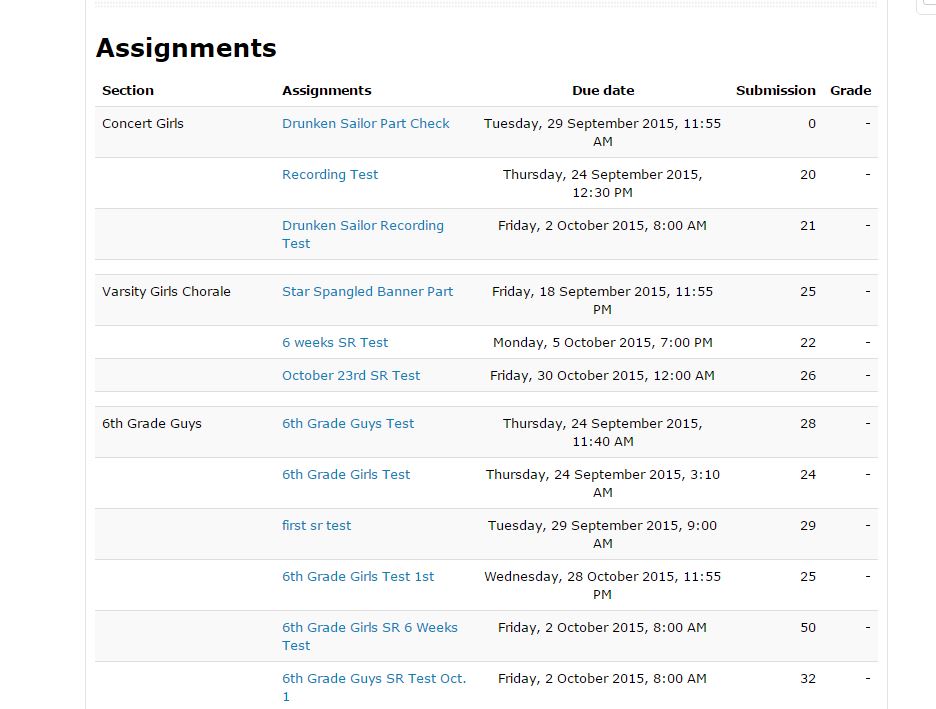
Below is a screenshot straight from her Moodle page.  Notice the number of students using this feature. .”


Choir, Voice Recording, Audacity, Microsoft Movie Maker, Collaboration, Moodle, Middle School, Wilson Middle School, Feedback, Music, Electives

Student Olivia says, “ By using the recording apps of our individual voices the teacher can give us feedback to work on things. Many choir students use the application called Audacity to create a parody to a song; while another project that we are assigned is a lip sync video which was a very fun project where we used our video camera and Windows Movie Maker.”

Using technology in the choir classroom has so many benefits for students and teachers. Click below to here a sample of their work.  


choir 1.JPGThe average person might think that technology in a choir room is surprising -  after all, what other tools would be required for music education besides a piano and some voices? However, by using technology resources available to them, these students have made their classroom come alive both at school and at home, making it easy to see that music and technology can work together in perfect harmony.

This blog post was written in collaboration with Wilson Middle School students Halen, Olivia, and Emmarie using Google Docs.  


Monday, September 7, 2015

Claymation Creations

From creating their own set, modeling their characters, and writing their scripts, 5th grade students at Cox Elementary got to experience what it is like to create a claymation short film.  Using the Stop Motion app, students were able to capture picture by picture each action in their story.  


Mallory, Kaylea, and Paige's group truly enjoyed this project.  "We started with the idea of creating our set in space," mentioned Mallory.  "This was a crazy idea, but Mrs. Ascher helped direct us to some tools that we had in the art room that could help. Paige added, "We learned  how to make a background that looked realistic.  We used shiny stars and made a planet out of a 
plastic ball and pipe cleaners.  We used glitter, so with the black light, everything appeared to be glowing in space." The team agreed that planning an entire story requires organization, time, and attention to detail. They team had 304 pictures to put into their film. 

Kaylea points out, "The most challenging part of this project was moving the pictures just the right amount so that that movie was smooth and not choppy."  The group agreed that planning the script and assigning roles was important to getting things done on time.  "We helped each other think of new ideas to add on to our story.  Two people worked on the background, while the other worked on props and organizing the pictures," stated Mallory. This project required much communication and collaboration.

In art, these students were introduced to several famous paintings. They decided to include The Mona Lisa, Starry Night, and Dancing Lady in their film. "These are paintings in our classroom and we’ve talked about them as a class," said Paige. "This is why we decide to have our characters talk about each of these in space. We wanted to do space to be different and think outside the box." Overall, these students and the entire class learned not only about story creation, but organization, communication, and how to publish entertaining work for a target audience. In fact, it's not just the students at Cox Elementary that felt this project had impact. The University of Southern California featured this project in the Toolkit for Digitally-Literate Teachers.


Monday, March 30, 2015

Students create virtual backstage pass to "Cinderella" musical

If you had a virtual backstage pass to your favorite theatrical production where you could see the cast and crew preparing in the weeks leading up to the event, would you feel a deeper connection to the performance? 

Northwest High School fine arts performed Rogers and Hammerstein's "Cinderella" last month. Students involved in the production collaborated together to produce and publish a series of videos as part of a backstage vlog (video blog) to connect the audience to the performers. Prior to the performance date, the students captured video footage of the cast and crew as they prepared for the event. Other students also contributed their backstage footage, so the vlog included many aspects of the massive preparation that goes into a musical, including set production, choral practice, choreography practice, short interviews with the cast and crew, and much more.

Each week, Emma and Kaylon, students who spearheaded the vlog, collected videos during the week and edited the videos over the weekend to post on YouTube. They posted five videos total, giving five weeks of backstage access, all the way up to three days before the performance began. To gain exposure, the videos were advertised on social media and included in the "Cinderella" playbill via QR Codes. According to Emma and Kaylon, the feedback they received from people about the videos was positive, especially since "most people don't realize how much work we actually do backstage, they just usually see the final product." This gave the audience a deeper connection to the performance by seeing all the hard work being done in preparation. Additionally, making the videos allowed the entire cast and crew to interact on a deeper level as well, giving a more meaningful experience as they worked together to produce "Cinderella".

Click on the video below to see an example:


Link to all 5 videos: Cinderella NHS YouTube channel


Monday, December 15, 2014

When PBL meets App Smashing Field Day Fun

When the second grade at Hatfield Elementary was asked by their PE teacher to plan and design a new field day game that incorporates force, motion and/or balance, students jumped at the chance to create a great solution to this Problem Based Learning (PBL) challenge. 

To build schema students worked in groups with hands-on activities to learn about balance, rolling, spinning, and sliding. They researched various field day games using books and iPads (internet).

After students had collected enough information and understood with mastery the concepts of force, motion and balanced, they worked together to design a new game using what they learned.

Throughout the project, to cement their learning and connect ideas, students used iPads to collect observations via several apps including the camera and other platforms. Once the teams completed their research, they used Educreations to draw out a blue print of their activity. Then they worked as a team to build a model using various materials in the classroom and donated by families. In order to collect all of the information and the process, students created a PicCollage of their learning activities. They also created a Tellagami to explain how their game would be played. 

Once all of the pieces were finished, the teams created a video using Videolicious, inserting all of their previous files and recording their voices to explain the project in order to present their ideas to the PE teacher and to the rest of the school. 

The final presentation not only showcased the solution students came to for the initial problem, but captured the learning and integration that happened throughout the entire learning event.

Here is one example of the many projects completed by Hatfield Elementary's second grade led by Nicole Wallis: