
Showing posts with label Multimedia. Show all posts
Showing posts with label Multimedia. Show all posts
Monday, October 23, 2023

Monday, March 6, 2023
Monday, January 29, 2018
Teaching Your Future Forgetful Self
From homework, to extra-curriculars, lunch, friendships/other relationships, as well as chores and other duties at home, so much "life" happens in between today's class period and tomorrow's. Units of study are typically scheduled to end on Fridays so that students can cultivate skills throughout the week and test on Friday with the weekend being a mental break and a new unit/topic starting the following Monday. As much as a week-long Thanksgiving Break is desired, it occurred in the middle of a 7th Grade Math Unit causing Medlin Middle School teachers, N. James and B. Salazar, to get creative in overcoming this potential forgetfulness.

Following a rigorous Scope-and-Sequence, students began studying TEKS 11A (model and solve one-variable, two-step equations and inequalities) and 11B (determine if the given value(s) make(s) one-variable, two-step equations and inequalities true) with only three days remaining before Break. In having this unit resume upon return, James and Salazar wanted to find a way for students to not only learn the foundational skills within the limited time, but also retain the information post-break to maximize instructional time focused on next-steps with minimal review.
What better way to remember content than become your own future self's tutor! To do so, students were tasked with creating a video tutorial utilizing Sketch IO and Screencastify that included the following requirements.
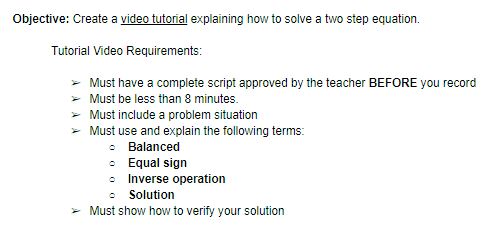
Multiple scaffolds were put in place to ensure students were reinforcing correct information. To start, these on-level students were allowed to be in groups no larger than 3 so peer-teaching could be utilized to support and clarify learning. Additionally, students were tasked with prewriting a script which encouraged planning and preparation instead of an on-the-fly performance; furthermore, this script had to include a few Key Terms in order to provide structure to the video whose remaining components were largely decided by student-choice.
Upon return from the week-long Thanksgiving Break, students had access to their own tutorial as well as a shared Google Folder containing their classmate's videos. This repository was valuable because students could hear and see explanations in student-friendly language from multiple viewpoints and problem sets. Creation of this video is at the highest level of Blooms Taxonomy in which students must synthesize information to create their own original work. Through creating a tutorial to teach yourself and others, students not only had to remember, understand, and apply these math concepts, but then use this to analyze the required steps and evaluate their order and purpose so that they could formulate this video. Applying higher level thinking commonly solidifies the learning to long-term memory so that instruction could resume right where they left off before Break with the tutorial videos available for memory jogging and review.
This activity meets ISTE's standard of being a 'Knowledge Constructor' in which "Students curate information from digital resources using a variety of tools and methods to create collections of artifacts that demonstrate meaningful connections or conclusions." (3c)
Tuesday, January 3, 2017
Frankenstein Project Based Learning: It's ALIVE!
Students in Mrs. Day's English I GT class recently completed work on an amazing project based lesson over Mary Shelley's classic novel, Frankenstein. According to the project instructions, students were tasked with creating a portfolio of artifacts that answered the driving question: Does knowledge or progress ever become a moral liability? Student groups chose their own area of scientific advancement to research, then explored the driving question from different perspectives and considered both the positive and negative effects of advancement. Based on their subject they created four products of their choosing to represent their findings and related them to the themes found in Frankenstein and how they apply to the world today.
The group of Michael, Matthew, Marcos, and Jonathan chose to do their project on robots and the future of artificial intelligence. "This project was fun because we got to put our own spin on it, both by choosing our own products and in how we did the presentation, which we did as a skit," said Michael. Jonathan elaborated that they "appreciated the product list Mrs. Day gave us because we got to choose what digital tools to use in order to more efficiently represent our topic." This way, students not only got to choose the topic themselves, but they also chose what tools to use. This allowed them to represent their thoughts on the subjects they chose as they related them to the lessons in the book. Michael explained that their research gave them a different "perspective on whether people should do things rather than if they could do things."
The group used multiple tools to create their products. For example, Matthew used Lucidpress to create their preparing for a Robot Uprising pamphlet "because it had lots of built-in design options for making pamphlets." They used Imgur to create a Wanted poster for a rogue robot. Marcos said the ability to choose their own tools, like Canva, and create their own products was very helpful. He explained that it "gave us ideas how to connect things back to the book. I chose the Survivor Shopping List because I thought that people would need to know what they'd need to survive, similar to what Frankenstein needed."
Check out the presentation above to see all the products as they were presented, which was in the form of an interactive skit. The ability of these students to choose their route of learning was evident in every step of this project, and is represented in the quality of their products. "I love the way these students draw comparisons between a novel from 1818 and modern day technology," said Mrs. Day. "These students prove that literature and the lessons it teaches are always relevant."
The group of Michael, Matthew, Marcos, and Jonathan chose to do their project on robots and the future of artificial intelligence. "This project was fun because we got to put our own spin on it, both by choosing our own products and in how we did the presentation, which we did as a skit," said Michael. Jonathan elaborated that they "appreciated the product list Mrs. Day gave us because we got to choose what digital tools to use in order to more efficiently represent our topic." This way, students not only got to choose the topic themselves, but they also chose what tools to use. This allowed them to represent their thoughts on the subjects they chose as they related them to the lessons in the book. Michael explained that their research gave them a different "perspective on whether people should do things rather than if they could do things."
The group started by using a Google Doc to plan out the project, including their subject, research, pros/cons of the subject, links to resources and products, and even a script for their presentation. They decided to use a Google Slides presentation to present their portfolio of artifacts, which can be seen here:
The group used multiple tools to create their products. For example, Matthew used Lucidpress to create their preparing for a Robot Uprising pamphlet "because it had lots of built-in design options for making pamphlets." They used Imgur to create a Wanted poster for a rogue robot. Marcos said the ability to choose their own tools, like Canva, and create their own products was very helpful. He explained that it "gave us ideas how to connect things back to the book. I chose the Survivor Shopping List because I thought that people would need to know what they'd need to survive, similar to what Frankenstein needed."
Check out the presentation above to see all the products as they were presented, which was in the form of an interactive skit. The ability of these students to choose their route of learning was evident in every step of this project, and is represented in the quality of their products. "I love the way these students draw comparisons between a novel from 1818 and modern day technology," said Mrs. Day. "These students prove that literature and the lessons it teaches are always relevant."
Tuesday, February 23, 2016
Science and Technology- Engineering the Force
So, how does a middle school teacher motivate students to
continue learning with enthusiasm and encourage the motivation to take their learning
deeper? Mr. Jason Deardorff, 6th
Grade Science teacher, challenged his students with just a few simple questions
to get their creative juices flowing about the topics of mechanical energy and
force.
What is the relationship between
potential energy and kinetic energy?
Based on what you know; how would you explain the change in
motion when potential energy is changed into kinetic energy?
How could you determine the push or pull on an
object?
Based on what you know, how would you explain the
differences between balanced, unbalanced, and net forces?
Choice was all over this project and every part was student
driven once the student received the rubrics from the teacher. Four students
at Wilson Middle School wanted to prove to their teacher their knowledge of energy
in a creative way. With a
bit of imagination, planning, and some technology tools Mr. Deardorff was not
disappointed. The tools of choice were:
PowerPoint, Movie Maker, Smore, a Drone, and a video camera. The students uploaded their projects onto
their ePortfolio for presenting in front of the class and to showcase at
TechnoExpo 2016.


Subscribe to:
Posts (Atom)