Showing posts with label Voice and Choice. Show all posts

Monday, January 27, 2020

A “Different” Approach to “Leaving No Student Behind”

Educators are always looking for new ways to reach students and help them find methods or paths for acquiring success in the classroom. However, it seems that there are some students who, despite our best efforts (and their own), struggle with the institutional process of acquiring knowledge and skills necessary to meet traditional measures of success. After recently reading the words of Katie Usher, a Texas elementary school teacher, it became clear that well-known classroom differentiation practices, although very effective and successful for some, may not be enough for students who need a completely different learning environment in order to access the content needed for mastery. Although Katie’s experiences are based on a gifted classroom, her words are important for all students. She asserts that “In the digital era, we can provide all of our students with technological ways to enhance their learning, no matter their academic label. Every student is different and needs to be offered a variety of ways to show what they’ve learned in a way that reflects their individuality.” This is exactly the philosophy behind the ever growing "Eagle Strong" cycle recovery program offered at Eaton High School (EHS). 

Alicia Dunson, a Professional Communication teacher at Eaton, has spent a majority of her career working to find ways to reach students where they are and to help them progress and find methods for success that work for them. Alicia starts by learning about her students and building relationships with them that allow her to not only ask her students some tough questions about previous academic patterns but she is also able to use her positive relationships to push these students to develop levels of accountability and self-sufficiency that gives them ownership in their own learning moving forward. This philosophy of teaching made Alicia a perfect fit to help develop the "Eagle Strong" cycle recovery program at EHS and to begin working with students to access systems and methods more appropriate for their individual learning needs.

In this program, students are identified as needing intervention before completely failing a course and they are not only given an opportunity to access narrowed and unmastered course content through a self-paced online platform, but they also have the support of certified educators working on campus that can assist as needed. Mrs. Dunson facilitates student progress by helping them learn ways to record and track their own mastery of coursework that work for them and by connecting students with teachers and tutors before, during, and after school hours. Through use of these online tools and content, qualifying students can showcase existing knowledge that might previously have been a struggle for them to display and to do so in a timely fashion without getting behind in credits and while receiving both built-in and in-person remediation. The ability to digitally self-accelerate beyond concepts already mastered and to slow down to focus on more difficult areas of the curriculum make this educational experience unique and more effective for some than a traditional environment.

One student in Mrs. Dunson’s "Eagle Strong" program credits this experience with helping her to revisit and master content from multiple courses without the stress and pressure she typically experiences in a regular classroom environment. She feels that the ability to move through material at her own pace puts the responsibility on her and she says that “You have to learn. You cannot just zone out or not pay attention. It’s all on you.” Another student said that she has learned study skills that can help her in other courses and she feels the online coursework helps her because the courses “have a different way of teaching and gives students different ways to learn the material.” She likes the ability to watch and re-watch a lot of videos that show her examples and also enjoys the freedom to go through curriculum on her own.

While many students thrive in a traditional school environment, some need more than tradition can offer or they may have experienced circumstances that hinder their progress in all or parts of a particular course. In some situations, students simply need other ways to access content in order to master the skills and knowledge necessary to grow and thrive. EHS is providing a method for students to do just that through the development of their cycle recovery program and they are creating options for students to learn and excel that allow flexibility and choice while not compromising student time, interests, and most importantly, confidence. This program, in essence, is an example of differentiation at its best and as our fellow Texas educator, Katie Usher, put it, “Differentiating allows students to have their voice heard, which can lead them to become self-motivated learners. And that in turn can help increase both their learning growth and their self-awareness of that growth.” These achievements in differentiation are much needed components of our educational system that truly provide for a future where fewer students are “left behind.”

          Usher, Katie. “Differentiating by Offering Choices.” Edutopia, George Lucas Educational Foundation, 10 Apr. 2019, www.edutopia.org/article/differentiating-offering-choices.

Monday, December 16, 2019

Breakout: It's a Celebration!

As semester exams draw nearer, students in Mrs. Butler, Mrs. Harris, and Coach Smith’s 6th/7th Compacted Advanced Math classes at Medlin Middle School have been hard at work. Over the last week they have worked together to create an epic digital breakout experience to review all content from the semester. The idea of using a breakout to review or interact with math concepts is not new. In fact, these students have experienced the use of digital breakout type activities created by their teachers all semester.

Throughout the fall semester, students have had the opportunity to participate in several digital breakout experiences. Similar to an escape room, a variety of puzzles and scenarios lead students through an engaging interaction with content. Along the way codes are revealed that, in the end, unlock the “locks”. Digital breakouts can be used across content areas and grade levels. When asked about learning through breakouts, Gage was excited to share. “I like the technology experience. It's a new way to look at math and it makes it more fun. It’s definitely more interesting because it makes math a part of our real world." 

And now the tables have turned. The secrets to creating an engaging digital breakout have been revealed and students have been equipped with the tools to create. Ify has enjoyed the process because she says it’s given her a “behind the scenes look" at creating activities like her teacher. It has also inspired her to explore career paths that may involve coding or creating digital materials for others. After being given the content to be used, Google Forms, Google Slides, and Flippity were the platforms selected by most students. Their teachers helped organize all created breakouts on a Google Site that was then shared with students as their semester review. 

Click HERE to access the student created breakouts

So, why use digital breakouts? The better question may be, why not? Digital breakouts...
  • Promote collaboration and communication within the classroom
  • Enhance problem solving and critical thinking skills
  • Reinforce grade appropriate Technology Application TEKS and Digital Citizenship curriculum
  • Motivate and spark new learning opportunities
  • Empower students to own and apply their learning

Mrs. Butler also gives a compelling testimony for the integration of Digital Breakouts in the classroom. “There is a special energy that fills the room when students are completing a breakout session. Students are engaged and eager to advance through the activities. Students enjoy taking on a challenge and competing to be the first group done. Best of all, students receive immediate feedback on their content knowledge which is huge for a learner's success.”

If you are considering the use of digital breakouts with your students, reach out to your campus Instructional Technology or Library Media Specialist for help. There are many resources available to help make your breakout dreams a reality. 

This project will be submitted as an interactive presentation and considered by the campus committee to represent Medlin at Expo 2020. For more information about Northwest ISD Expo event, please visit expo.nisdtx.org.

Wednesday, October 16, 2019

Comprehending WILD Literature


Back to school in the FALL at Justin Elementary is all about policies, procedures, routines, and setting expectations with students.  One of the goals for 5th-grade teachers Ms. Haley Donaldson and Mrs. Becky Carlson is for students to take risks and try new things to enhance their reading comprehension. With that goal, both teachers are committed to incorporating relevant technology into her lessons to help students reach their goals across multiple literary elements.  After finishing the read-aloud Hatchet by Gary Paulsen, students were given the choice to produce a technology-infused product that represented: Theme, Character, Comparing, Setting, and Plot.

Emma N. from Mrs. Donaldson’s class really enjoyed making the WILD Wordcloud project.  She stated, “ I liked doing this project digitally because I got to be creative to choose my own words, design my own colors, and I chose a plane as the background. I found my idea to make the flipbook on Youtube.”

3-5, Becky Carlson, Canva, Chromebooks, ELA, google docs, Google Drawings, Hailey Donaldson, Justin Elementary, literacy, Literary Elements, Reading, Voice and Choice, WeVideo, Writing,


Students were challenged to capture the essence of the novel and give the reader a good idea of what the book was about.  In this novel, thirteen-year-old Brian is flying on a bush plane when the pilot suddenly has a heart attack and dies. Brian manages to keep the plane level until it crashes into a lake in the Canadian wilderness. Brian survives the crash, but that was just the beginning. Characters in many novels go on adventures and through their journeys teach the reader much about life and themselves. Below are more projects that follow Brian’s WILD  journey into the wilderness. Students used their Chromebooks and were given the choice of four types of tools to elaborate on their literary elements: Google Draw, Canva, Adobe Spark, and Wordcloud.  

In this video, Seth L. from Mrs. Carlson's class wanted to publish a video about what the WILD Canadian setting looked like to him after reading the book. Click here to view


Cameron L. said, “My favorite part was typing my paper in Google Docs since I have bad handwriting. I am really proud when I get my papers typed up, they look professional.”

Emory H. from Ms. Donaldson’s class chose to show the reader about the WILD setting of the book by using Google Draw.
3-5, Reading, Literacy, Goals, Becky Carlson, Hailey Donaldson, Justin Elementary, Google Docs, Google Draw, Canva, WeVideo, Writing, Creative, Expo, Voice and Choice


Brady T. from Mrs. Carlson’s class showed voice and choice by producing a WILD monthly newscast in WeVideo about the book. To show his creative side he even interviewed his teacher as if she had the main character Brian in her class.  To watch the video - click here


Haley B. from Ms. Donaldson’s class used Canva to entice readers to come to visit WILD Hatchet by creating a magazine about the book. Click here to view the project.


These projects are showcased on the board outside the classroom in the hallway for all visitors to see. Also, they will be submitted to our district's learning showcase event EXPO in February.  More information can be found at http://expo.nisdtx.org  In closing, students demonstrated content-specific skills. This project utilized technology in a way that enabled students to demonstrate how they have empowered learners and creative communicators, crucial skills for being future-ready. (ISTE Student Standards)


Sunday, September 29, 2019

You've DOT to Read This Book!

We love reading at Hughes Elementary! With a campus and district focus on literacy, 5th grade ELA teachers decided to create a platform for students to recap, rate, and review books they were reading. This idea came up during “Dot Day” when students were learning that they can leave a mark and inspire others in the process. Teachers wanted students to be able to recommend books to their classmates and inspire them to pass their love of specific books on to others in the class. 

Writing about books and recommending them to others was a skill that these students got to learn throughout the process. Mrs. Covarelli points out, “Some students didn’t understand the difference between writing a book blurb and a review.  We got the chance to model how to write a book blurb to hook the reader versus writing a review. We’re continually teaching students how to give specific text details to support a review rather than just writing 'it was fun, funny, or enjoyable.’”  Mrs. Covarelli adds, “ I love seeing which books my students have felt impacted by in their independent reading time. I enjoyed seeing my students give a book 4/5 stars rather than 5, but still highly recommend it.” 
Mrs. Bass adds, “Students were excited to create a review of the book they had read and share it with a wider audience than their class. It allowed them to express their opinion and encourage others to read.”

Teyla, McKenna, and Addie were three students that were particularly excited about writing reviews and reading reviews from others. “The One and Only Ivan is a book that I feel should get more attention than it does,” said Teyla. “This book made me feel lots of emotions such as sadness, loss, excitement, surprise, and joy. The cover doesn’t show what the book is really about." She noted, "It may look like a picture book for first or second grade, but it’s actually great for fourth or fifth graders. Writing a blurb and review helped me share these details with others.” 

McKenna read “Because of Mr. Terupt.” She admits, “It took me a while to get into the book, but then it got very intense. I loved the author’s craft. I also noticed that the main character switches between having a growth and fixed mindset.” It was neat hearing how McKenna was able to relate her learning from school to the characters in her book and how she developed empathy for each character their situation. 

When asked about reading reviews from classmates, Addie claimed, “Lots of people in our class want to read a book called ‘Pax.’ I was drawn to the review by Veronica. Her blurb described how the book was about the fox and a boy who get separated and their journey of getting back together. She said it was really emotional. When I read her rating, I could tell she was being very honest. I want to read the book even more after reading her review.”

Teyla and McKenna gave their books a five star rating while Addie gave her book a 4. She claimed, “I gave my book a 4 because, you can get confused at times. Multiple languages are used in the book along with multiple scenes. It is very descriptive and makes me feel like I’m part of the story.” Students learned how to separate their opinion from fact. “I learned to be honest about my experience in the review. To think deeper about how to get other readers to read my book. You don’t want to leave spoilers, but it helps to have a big question or a hook to get them excited,” says Addie. McKenna adds, “In our writing right now, we’re learning about going deeper with our words. I tried to leave a cliff hanger, so that others would read my book.”

All in all, this project truly did get students talking about books! Mrs. Brewton claims, “When students were looking for books the other day in our classroom library, I heard them pointing out books that they had seen on the Padlet. They were checking out their friend’s recommendations! It was exciting to see my students engaged in their book selection rather than having them come to me because they couldn’t find anything they liked.” Addie also mentioned, “I think our class talks more about books when we’re doing book reviews. The talk has died down a bit, so I think it’s time to write another review. My friend Abby told me that she read my review and liked it. I was happy that she took the time to tell me that she wants to read my book, 'Resistance' because of my review.” 


x
It will be fun to see who students get to share their book recaps and reviews with. Mrs. Alvis, the Hughes librarian has plans to showcase specific student reviews by their corresponding books in the library. This will allow students to read reviews from other students when they are choosing what they want to read.


Student ISTE Standard - Creative Communicator: 
Students communicate clearly and express themselves creatively for a variety of purposes using the platforms, tools, styles, formats and digital media appropriate to their goals.
  • 6D: Students publish or present content that customizes the message and medium for their intended audiences.

Monday, May 6, 2019

Philanthropy Partners: A Collaboration Between Elementary Schools

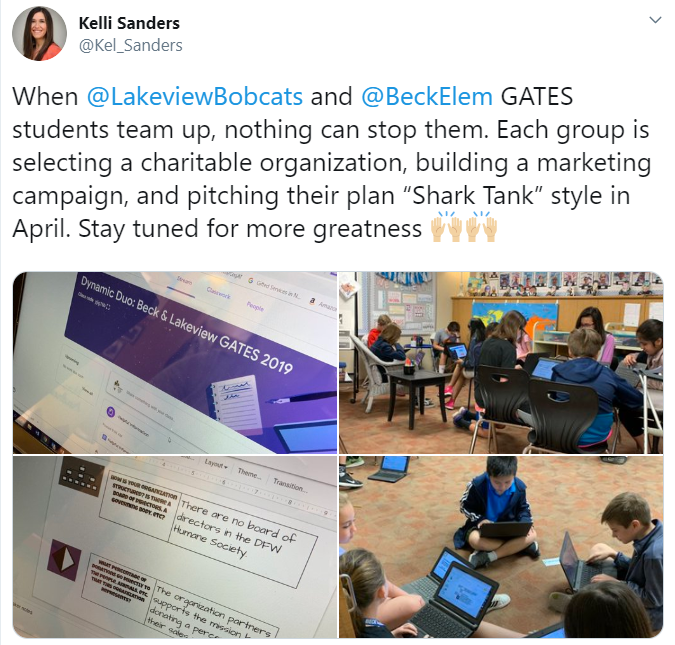
The spring semester brings about a lot of change. One of the biggest changes is the anticipation for current fifth graders, as they begin to think about and prepare for middle school. The transition into middle school can be challenging. To help ease that transition, the GATES teachers at Lakeview Elementary (Mrs. Andrews & Mrs. Blake) and Beck Elementary (Mrs. Moses & Mrs. Pickett) teamed up for a dual campus philanthropy project. 
By definition, a philanthropy project promotes the welfare of others, expressed especially by the donation of money and goods. Students were tasked with choosing a nonprofit organization within the community that aligned with their own unique passions and interests. For Ella, having a voice and choice was very important. “I like that we got to pick our own interests and that we didn’t have to do one thing and one thing only.” A variety of organizations were researched, with the primary focus being children, women, senior citizens, the homeless, veterans, animals (domestic and wild), literacy, environmental issues, and sports. Once students had a general idea on the type of organization they wanted to pursue, they completed a Google Form which helped teachers group them with peers. 


The groups were made up of students from both campuses. This meant some of their group members would not be available for face to face collaboration on a daily basis because they were at another school. Nakkitha was especially excited about the cross-campus collaboration. “I loved how we got to collaborate with people outside of our school because we got to meet new people and make new friends”. As group members dove into more specific research on their common interests, they utilized Flipgrid and Google Slides to communicate. These platforms allowed group members to continue the “conversation” even after their scheduled GATES time was over. Check out this Mixtape to hear a sampling of the group interactions. A walking field trip from Lakeview to Beck was also planned into their work time to allow groups face to face interaction.

Click the image above to view Shark Tank presentation
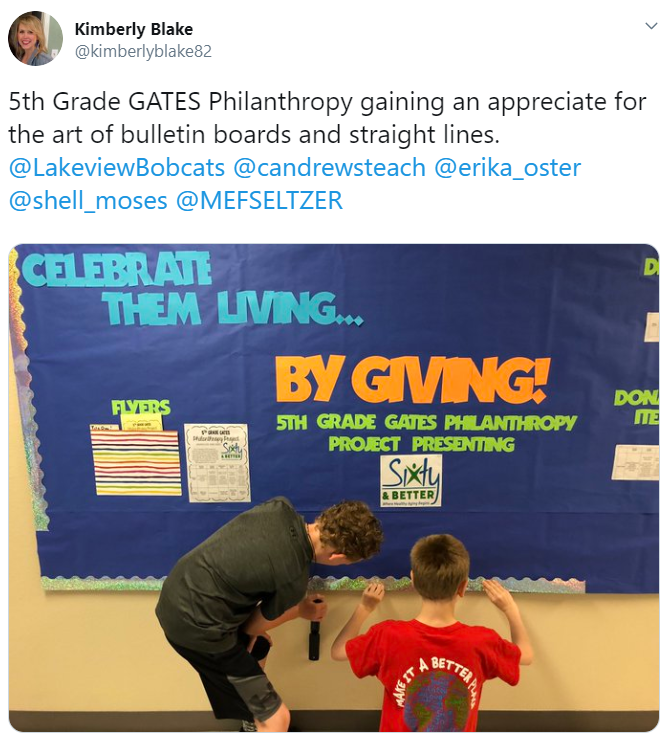
Groups were tasked with creating a digital presentation and pitch to be presented Shark Tank style. Their presentation would introduce the organization, explain why that organization was selected, and share how the community could get involved. They would also have an opportunity to present their marketing plan, which would include plans for advertising their project at both campuses. Groups created mockup flyers, commercials, scripts for announcements, dress up day calendars, bulletin board plans, and social media posts for the panel of “sharks” to consider. 

Click image to view the student created commercial
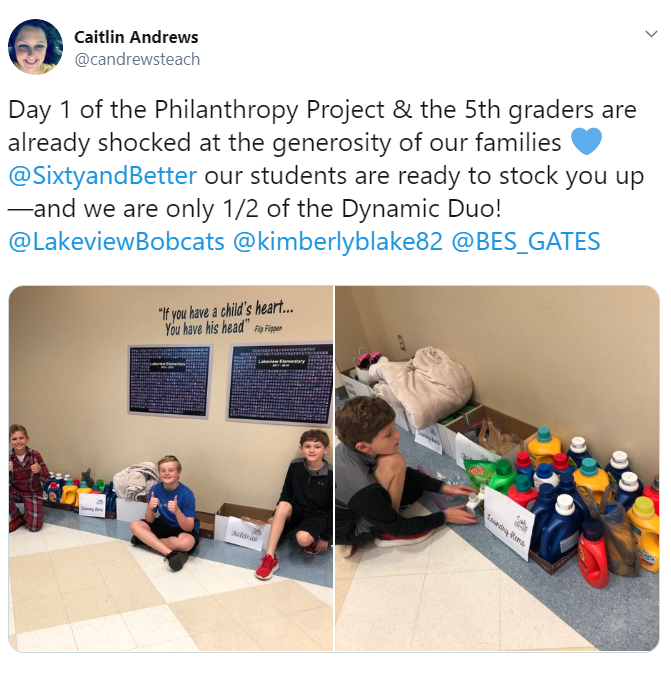
Both campuses came together for pitch day. Groups were able to share their presentation with the panel and their peers. The shark vote, coupled with the student vote, determined which project would be selected and rolled out at both campuses. The group representing the organization Sixty and Better was selected. At that point, the marketing plan from the student presentation began coming to life at Beck and Lakeview through campus-wide dress up days and a donation drive. Students in the GATES classes were each assigned a role in ensuring the logistics for the project were handled appropriately on their campus. Shashwat was one of the project managers. “I was in charge of keeping everything organized and well managed. This has taught me how to be a good leader and that as a good leader, patience is important”. It did not take long for all students involved to get plugged in. They were eager to be a part of something bigger than themselves. Check out what some of these students at Lakeview had to say. They made their podcast debut with an episode dedicated to the work being done for Sixty and Better.


Service learning projects are powerful learning experiences for all students. As Social Emotional Learning becomes a bigger focus throughout the district, these types of projects help students become responsible decision makers. They build social awareness, self-awareness, and relationship skills. They foster one’s personal well-being and the importance of self-management. They impact the whole child. For more information on other service learning projects happening at Beck Elementary, take a listen to the latest episode of the Bulldog Bulletin.

Final numbers from the campus donations will be posted to the blog upon the project’s completion. Please check back soon!

Wednesday, April 17, 2019

These Documentaries Are KILLER!

We are led by example. 

Think about it: Have you ever... Put together a puzzle without first looking at the cover to see what it's supposed to look like once complete? Made a craft or home improvement project without first looking up inspiration or instructions on Google or Pinterest? Saw a movie without watching the trailer or reading the synopsis? The answer is mostly likely no, as we are driven by seeing something that we can connect with.

Because of this need for inspiration to draw from and even deviate from, it is often challenging to ask our students to create - the highest level of Bloom's - without giving them any sort of frame of reference. Couple that with asking students to use a new tech tool, conduct a research project on an unknown individual, and apply taught curricular concepts to a new creation may feel daunting for even our traditionally higher performing students. 

Recognizing all of these factors, Becky Ainsworth - Forensics Science teacher at Byron Nelson High School, created multiple resources to set her students up for success. Students in this upper level class were tasked with creating a mini-documentary that detailed the forensic psychology of an infamous serial killer, and were to present the information in a video format using Adobe Spark to make it view like a true documentary. 

Click to view Mrs. Ainsworth's Spark Project Instructions.
In previous years, students presented this content in a traditional format by standing in front of the class and retelling their information. This type of presentation lacked student engagement, was time consuming, and the success of a exemplar product was confined to that class periods' limited audience. To elevate this experience, Becky then replaced the traditional presentation format with the documentary style project requirement. With any first year project, there aren't a bank of examples to pull from, so it was a genius idea that Mrs. Ainsworth created and delivered the project instructions using the exact tool, Adobe Spark Video, she was asking students to use. Additional relevant information, including required content and the grading rubric, were showcased on a traditional document project outline.

Next, students were empowered with full creative freedom to add content from any reliable source (with a minimum of at least 3) as they conducted their own research. The documentary is a visual, video presentation, so the main premise requires a series of photos and videos that have a voice-over to tell the story using very little, if any, text on screen. Students used sites such as Pixabay to find free stock photo and video clips, as well as truly realistic clips that depicted the actual serial killer in photo or video. Check out these top two mini-documentary creations:

Ian Brady: As told by Lauren
Jeffrey Dahmer: As told by Kai and Tony

Once video creation was complete within Adobe Spark, students downloaded their videos and then uploaded them onto a collaborative YouTube Playlist that would house projects for all Forensic Science students at BNHS. By uploading to this platform, students were able to share their creation beyond the walls of their class period and could in turn view documentaries created by students studying the same content in a completely different class period. Publishing to YouTube allowed students to have a broader audience, made the presentation format more engaging as students got to watch multiple mini-documentaries, and created a wealth of examples to draw from for the following school year. Since Mrs. Ainsworth's classes in all had 57 videos on their Playlist, Mrs. Ainsworth plans to pick the top exemplars, as well as non-examples, from this collaborative playlist to make a new, shortened, and focused playlist to support next year's students as they, too, begin this exciting creative project.

This project meets ISTE Student Standard of being a Knowledge Constructor (3) in which students
  • 3a: Students plan and employ effective research strategies to locate information and other resources for their intellectual or creative pursuits.
  • 3b: Students evaluate the accuracy, perspective, credibility and relevance of information, media, data or other resources.
  • 3c: Students curate information from digital resources using a variety of tools and methods to create collections of artifacts that demonstrate meaningful connections or conclusions.


Monday, November 12, 2018

Juxtaposing Student Voice & Choice w/ AP Exam Test Prep

When your Senior level AP course doesn’t have TEKS and is primarily focused on preparing for the AP exam, there is not much room for student creation and choice, right? WRONG! AP English IV (AP Literature and Composition) teachers Denise Tennison and Brittany Harper at Byron Nelson High School look for innovative ways to prepare the student, while engaging them in the learning that goes beyond traditional test prep. What better way for students to learn question analysis than to create AP-level questions themselves. Futhermore, they stepped into the teacher role and used formative assessment websites, like Quizizz, Socrative, and Mentimeter, to create student-made quizzes with a future audience of their own peers. Talk about real world application, authentic audience, collaboration, and student choice - all wrapped up into one!


This task’s purpose was multifaceted as it aimed to 1. Analyze Othello, and 2. Apply knowledge and syntax of the 12 English Literature and Composition Question Types. Specifically, it challenged students to CONSTRUCT AP questions in order to be more prepared to DECONSTRUCT them on the exam as it will be easier to answer high-level questions if students have an understanding of how they are originally developed.  


Project Instructions:


In the past, this project stopped at Step #4 above in which the student solely created the questions on a collaborative Google Doc. Although these did provide a sample set of study questions, they weren’t interactive, thus many peers read over them without truly applying their thinking to answer and engage with the content. Furthermore, there wasn’t an authentic audience since it was simply a paper turned in to be graded by the teacher. To provide a more engaging experience and incorporate student choice, Tennison and Harper brainstormed applicable product choice websites using the Tools that Make IT Click resource to identify a set of options that would work well for this assignment.


Benefits of designing student choice lessons with multiple tool options:
  • Students have power over the tool they chose.
  • They are more engaged in the process because they were able to break out of the “one-size-fits-all” approach in which every students' experience is identical.
  • Students can apply prior experience with tools they have used in other classes to understand which tool most appropriately applies to their content.
  • Neither the teacher or students need to be “tool-expert.” There are so many resources that are Google-able to understand how a tool works; plus, students typically are able to figure site features out quicker than many adults.
  • If a tool doesn’t fit one groups’ needs or isn’t as easy to understand, just pick another platform!


Example #1:
Students: Cavnar, Dumble, Felten, Pham, Cobb, Hinshaw
Formative Assessment Tool: Socrative
Play along HERE! Room Name: CAVNAR


Example #2:
Students: Edwards, Ye, Holt, Plocek, Mauer, Young
Formative Assessment Tool: Quizizz


Students’ feedback on this project was very positive. Because of the collaborative group nature, these teachers overheard really good conversations taking place as students discussed Othello, compared the 12 question types to best assign various formats to their content, and wrote a challenging question and designed relevant distractors. When it came time to enter these into the formative assessment site, students were able to collaborate in discussing their prior experience with various sites as they weighed the benefits and downfalls of each in order to connect the best type of tool to their content needs. Additionally, they were able to design the type of experience they would most like to participate in such as choosing sites that use gamification, whole class/group vs. individual quizzes, and embedded opportunities for detailed student feedback. The final products will support students two-fold: allowing the student to be the “teacher” in designing the content, as well as letting the student be another peer's student by taking each other’s assessment’s now and in the Spring to prepare for the exam. Adios traditional, boring test prep!

Wednesday, October 10, 2018

Supporting the #Wildcatway Reading Initiative


The Wildcat Way is more than just a motto at Wilson Middle School.  Over the summer, teachers put down their beach reads and picked up Disrupting Thinking: Why How We Read Matters by G. Kylene Beers and Robert E Probst in an effort to better understand ways to foster a culture of  reading across campus and provided opportunities for collaboration through ways to disrupt our thinking about reading.  

It was from this book study, teachers Helen Read, 7th grade ELA, and Matt Norris, 7th grade Math, crafted “The Wilson Review.”   The Wilson Review is a process of creating and posting digital video reviews for students and staff. The goal of the showcase board is to get students interested in books as well as to share the books they love so that they can get inspired to read. Students can access the reviews via teacher Moodle pages and Google Classroom courses. The Reviews are also on display outside Ms. Read’s and Mr. Norris’ classrooms on a large bulletin board where students and teachers can use their mobile device to scan the QR codes.  

Middle School, Wilson Middle School, Flipgrid, Book Recommendations, Book Review, Chromebooks, 6-8, Ms. Helen Read, Mr. Matt Norris, Summer Reading, Reading, Cross-Curricular, Voice and Choice, Voice Recording,


While the activity of having students submit book reviews might seem somewhat mundane,
these two teachers took it up a notch by allowing students to use FlipGrid as a tool for recording
their review.  In the world of Instagram and SnapChat selfies, what a better way to relate to
students than asking them to record their book review. 


Flipgrid is place where you can verbalize your learning.  Flipgrid was purchased by Microsoft and provides a moderated and easy to use platform to create up to 5 minute videos and showcase the videos for only NISD users to view.  Flipgrid along with the cameras on student’s Chromebooks were a great pair for this project. “With the integration of Flipgrid students get excited about sharing their books using the Book, Head, and Heart Model.  As they are creating they can investigate what others have said about books they might be interested to read.  Find a review you enjoy, students can leave a thumbs up to the creator and check out the book in the library.” This type of interaction motivates students to continue reading so they can make additional post.  WOW,  so far The Review board has 26 hours of engagement time and growing. 


Student Raul shared, “Flipgrid allows you to express what you think about a book, you can
say what you want.”  Students enjoy the freedom and creativity this outlet offers.  The ability to
record something for others to watch later is also an aspect of the tool students appreciate.
Gracie Clair reflects, “My flip grid experience has really put it in a way for me that I can speak
up and prove my thinking, with people watching it after I film it, not while I film it.”

Staff have already seen an increase in student engagement during daily reading and this is
only the beginning!  Ms. Read and Mr. Norris hope to continue utilizing Flipgrid throughout
the year for book reviews.  Even teachers have benefited from the program!  As Ms. Read
reflected on her experience she shared, “Making my own Flipgrid video was an interesting
experience because it put me in the shoes of my students. I was a bit nervous recording myself.
It also solidified what I wanted my students to be able to share about their reading. I’ve learned
about some books I have definitely added to my own TO BE READ list.”  Mr. Norris has also
enjoyed the experience and was pleased to see, “With showcasing of teacher examples and as
more students recorded their reviews, students overcome their hesitations.”


In today’s schools, technology can be seen as an enemy of reading, however these two innovative teachers have uncovered a strong ally in growing passionate readers.  The Wildcat Way Reading Initiative is off to a strong start. 

Monday, April 23, 2018

There are Actually Three Sides to Every Story!

6th grade students at Tidwell MS will not forget this year's triangle unit! This unit was not only informative, but also hands on and  engaging. Students started the unit by learning how to use Geogebra to create triangles. Then, students created a product of their choice (book, comic strip, brochure, etc.) that would allow them to share their learning of triangles with others. Another neat aspect of this project was that students learned how to construct and build triangles from other students. Students in the 6th GT math class created video screencasts showing how to use Geogera and how to create triangles with the correct angles. They compiled their videos on a Padlet wall that was shared with the rest of the 6th grade math classes.

Taidghen, Taylor, Elijah, and Yaleiza from Mrs. Lahit's class got a lot out of this project. "I really enjoyed creating the triangles on Geogebra," said Yaleiza. "I learned that triangles are more than just a shape with three sides. There are many different types of triangles, but you only know the type based on the angle sizes. I also learned that you can not have two obtuse angles within a triangle, or two right angles." This project made students think about triangle properties during creation. Elijah points out, "The most difficult part of the project was making the equilateral triangle in Geogebra because you had to make sure to get all of the sides the same."

Creating Specific Triangles in Geogebra
Taylor and Taidghen loved the choice and creation aspect of the project. Taidghen comments, "I liked making my project stand out. I came up with statements for my book that would help others understand triangles in kid friendly words." Taidghen enjoyed Book Creator as his creation platform because it gave him plenty of options such as inserting images and shapes, as well as choosing specific fonts, backgrounds, and colors. Taidghen even utilized the drawing feature to point out matching and opposing angles within his book.

Projects were turned in on a Padlet wall, which allowed students to see each other's work. "I enjoyed seeing how other students used Book Creator differently than I did," said Taidghen. Yaleiza added, "I enjoyed looking at the Powtoons that some of my other classmates created. The Padlet helped us see all of the ways that we could have shared our knowledge."

All four of these students agreed that next year's 6th graders should complete this project. Taylor mentions, "Next year's class should do this project because it's a chance to be creative while learning." Elijah concludes,"This is a great project because you really learn about all of the triangles and the theorems."


Student Created Tutorials for Using Geogebra:
Made with Padlet

Student ISTE Standards:
Creative Communicator: Students communicate clearly and express themselves creatively for a variety of purposes using the platforms, tools, styles, formats and digital media appropriate to their goals.

  • 6a:Students choose the appropriate platforms and tools for meeting the desired objectives of their creation or communication.
  • 6c: Students communicate complex ideas clearly and effectively by creating or using a variety of digital objects such as visualizationsmodels or simulations.
  • 6d: Students publish or present content that customizes the message and medium for their intended audiences.

Empowered Learner: Students leverage technology to take an active role in choosing, achieving and demonstrating competency in their learning goals, informed by the learning sciences.

  • 1c: Students use technology to seek feedback that informs and improves their practice and to demonstrate their learning in a variety of ways.

Monday, January 29, 2018

Teaching Your Future Forgetful Self

From homework, to extra-curriculars, lunch, friendships/other relationships, as well as chores and other duties at home, so much "life" happens in between today's class period and tomorrow's. Units of study are typically scheduled to end on Fridays so that students can cultivate skills throughout the week and test on Friday with the weekend being a mental break and a new unit/topic starting the following Monday. As much as a week-long Thanksgiving Break is desired, it occurred in the middle of a 7th Grade Math Unit causing Medlin Middle School teachers, N. James and B. Salazar, to get creative in overcoming this potential forgetfulness.

Following a rigorous Scope-and-Sequence, students began studying TEKS 11A (model and solve one-variable, two-step equations and inequalities) and 11B (determine if the given value(s) make(s) one-variable, two-step equations and inequalities true) with only three days remaining before Break. In having this unit resume upon return, James and Salazar wanted to find a way for students to not only learn the foundational skills within the limited time, but also retain the information post-break to maximize instructional time focused on next-steps with minimal review.

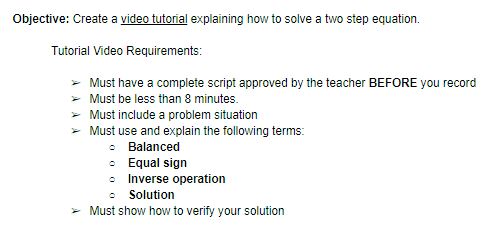
What better way to remember content than become your own future self's tutor! To do so, students were tasked with creating a video tutorial utilizing Sketch IO and Screencastify that included the following requirements.


Multiple scaffolds were put in place to ensure students were reinforcing correct information. To start, these on-level students were allowed to be in groups no larger than 3 so peer-teaching could be utilized to support and clarify learning. Additionally, students were tasked with prewriting a script which encouraged planning and preparation instead of an on-the-fly performance; furthermore, this script had to include a few Key Terms in order to provide structure to the video whose remaining components were largely decided by student-choice.


Upon return from the week-long Thanksgiving Break, students had access to their own tutorial as well as a shared Google Folder containing their classmate's videos. This repository was valuable because students could hear and see explanations in student-friendly language from multiple viewpoints and problem sets. Creation of this video is at the highest level of Blooms Taxonomy in which students must synthesize information to create their own original work. Through creating a tutorial to teach yourself and others, students not only had to remember, understand, and apply these math concepts, but then use this to analyze the required steps and evaluate their order and purpose so that they could formulate this video. Applying higher level thinking commonly solidifies the learning to long-term memory so that instruction could resume right where they left off before Break with the tutorial videos available for memory jogging and review.

This activity meets ISTE's standard of being a 'Knowledge Constructor' in which "Students curate information from digital resources using a variety of tools and methods to create collections of artifacts that demonstrate meaningful connections or conclusions." (3c)