
Showing posts with label Google Slides. Show all posts
Showing posts with label Google Slides. Show all posts
Monday, January 22, 2024

Monday, November 8, 2021
Growing Beyond "Normal" with Digital Feedback


Patricia Smith in Eaton’s Business Management and Entrepreneurship Academy stated that she is “very excited to try out Mote,” an audio recording tool, as a different way to provide feedback for her Academy students. Not only is she using Mote to help record feedback for her students as part of an upcoming assignment but she is also having her students use it in Google assignments to comment and reflect on their work and provide peer feedback within their groups. Using resources like Mote allows teachers the ability to spend less time grading by hand and also engages the students directly in the feedback process. By incorporating a digital feedback resource into her lessons, Mrs. Smith has saved herself valuable time and empowered her students to become more active in the learning process.
Over the course of the last year, as responsibilities and approaches to classroom instruction have been forced to evolve, each of these educators are meeting their classroom needs by adapting the ways they give students feedback. These efforts not only save them time, in comparison to traditional forms of feedback, but the strategies implemented have provided their students with timely, meaningful, and actionable feedback that can be used for reflection and growth, allowing both teachers and students to spend more time creating and learning and realizing “how amazing they can be.”
Over the course of the last year, as responsibilities and approaches to classroom instruction have been forced to evolve, each of these educators are meeting their classroom needs by adapting the ways they give students feedback. These efforts not only save them time, in comparison to traditional forms of feedback, but the strategies implemented have provided their students with timely, meaningful, and actionable feedback that can be used for reflection and growth, allowing both teachers and students to spend more time creating and learning and realizing “how amazing they can be.”
Monday, April 6, 2020
Adapting to a New Technological Environment

While biological adaptation happens due to environmental stressors over long periods of time, mental and social adaptations can happen much faster under certain conditions. What we are currently witnessing in relation to teaching and learning is a change that not only shows what we, as humans, are capable of but also the degree to which our schools are capable of serving students. While education reform seems somewhat out of reach most days, times like this, although unfortunate in many ways, can force our constructs and viewpoints to change and ultimately result in natural and positive reforms. Dr. Derek Voiles put it best in a recent tweet when he said, “The schools we walked out of won’t be the same schools we walk back into when this is all over. Our schools won’t just be different, they’ll be better.”

Northwest ISD is fortunate to have many resources already in place to help make our staff and students successful during times like this. However, the particular challenge brought about by Covid-19 has shined a light on areas of need and allowed us to take steps to help improve things like online access, technology training, and remote communication. In addition, educators in our district have been given the challenge of using this time to really focus on student relationships, learning, and growth in very innovative ways.
Math typically takes a lot of practice and, traditionally, practice looks a lot like plugging away with a pencil, paper, and a calculator to work out a solution. While that pencil and paper practice is an important part of understanding the way math works, NISD Algebra II teachers took it a step further by trying their hands at an app called Explain Everything on the iPad where they smashed it together with Zoom to create incredible videos that bring calculations off the page for students.

When NISD teachers began looking at the shift to remote learning, many wondered how elementary students would be able to learn without being physically present with their teacher and classmates. How could our youngest children possibly manage their own learning tasks? It became apparent very quickly that most of our elementary teachers were teaching a level of independent learning prior to the break and that many of these students were able to adapt very quickly to a remote situation.

Although the changes in the trajectory of society due to Covid-19 are some that we will be navigating for years to come, the world of education is one that is capable of mastering this shift and the obstacles that come with it. Educators are meeting this challenge head on with every bit of creativity and determination they have for the sake of their students. Some critics are predicting that this change will automate learning in a way that will make teaching an obsolete profession. However, through this, we are not only learning how much technology can help produce student independence but we are also learning how necessary human beings are in making the use of these tools relevant to learning and student success. Without previously established expectations and student relationships, these teachers would be dealing with completely different results. Educators are a necessary element to making learning meaningful for each and every one of their students and they cannot be replaced by technology. Circumstances like this will only enhance skills of both teachers and their students and everyone will grow as a result.
Monday, December 16, 2019
Breakout: It's a Celebration!

As semester exams draw nearer, students in Mrs. Butler, Mrs. Harris, and Coach Smith’s 6th/7th Compacted Advanced Math classes at Medlin Middle School have been hard at work. Over the last week they have worked together to create an epic digital breakout experience to review all content from the semester. The idea of using a breakout to review or interact with math concepts is not new. In fact, these students have experienced the use of digital breakout type activities created by their teachers all semester.
Throughout the fall semester, students have had the opportunity to participate in several digital breakout experiences. Similar to an escape room, a variety of puzzles and scenarios lead students through an engaging interaction with content. Along the way codes are revealed that, in the end, unlock the “locks”. Digital breakouts can be used across content areas and grade levels. When asked about learning through breakouts, Gage was excited to share. “I like the technology experience. It's a new way to look at math and it makes it more fun. It’s definitely more interesting because it makes math a part of our real world."
Throughout the fall semester, students have had the opportunity to participate in several digital breakout experiences. Similar to an escape room, a variety of puzzles and scenarios lead students through an engaging interaction with content. Along the way codes are revealed that, in the end, unlock the “locks”. Digital breakouts can be used across content areas and grade levels. When asked about learning through breakouts, Gage was excited to share. “I like the technology experience. It's a new way to look at math and it makes it more fun. It’s definitely more interesting because it makes math a part of our real world."

And now the tables have turned. The secrets to creating an engaging digital breakout have been revealed and students have been equipped with the tools to create. Ify has enjoyed the process because she says it’s given her a “behind the scenes look" at creating activities like her teacher. It has also inspired her to explore career paths that may involve coding or creating digital materials for others. After being given the content to be used, Google Forms, Google Slides, and Flippity were the platforms selected by most students. Their teachers helped organize all created breakouts on a Google Site that was then shared with students as their semester review.

Click HERE to access the student created breakouts
So, why use digital breakouts? The better question may be, why not? Digital breakouts...
- Promote collaboration and communication within the classroom
- Enhance problem solving and critical thinking skills
- Reinforce grade appropriate Technology Application TEKS and Digital Citizenship curriculum
- Motivate and spark new learning opportunities
- Empower students to own and apply their learning
Mrs. Butler also gives a compelling testimony for the integration of Digital Breakouts in the classroom. “There is a special energy that fills the room when students are completing a breakout session. Students are engaged and eager to advance through the activities. Students enjoy taking on a challenge and competing to be the first group done. Best of all, students receive immediate feedback on their content knowledge which is huge for a learner's success.”

This project will be submitted as an interactive presentation and considered by the campus committee to represent Medlin at Expo 2020. For more information about Northwest ISD Expo event, please visit expo.nisdtx.org.
Monday, May 6, 2019
Philanthropy Partners: A Collaboration Between Elementary Schools
The spring semester brings about a lot of change. One of the biggest changes is the anticipation for current fifth graders, as they begin to think about and prepare for middle school. The transition into middle school can be challenging. To help ease that transition, the GATES teachers at Lakeview Elementary (Mrs. Andrews & Mrs. Blake) and Beck Elementary (Mrs. Moses & Mrs. Pickett) teamed up for a dual campus philanthropy project.
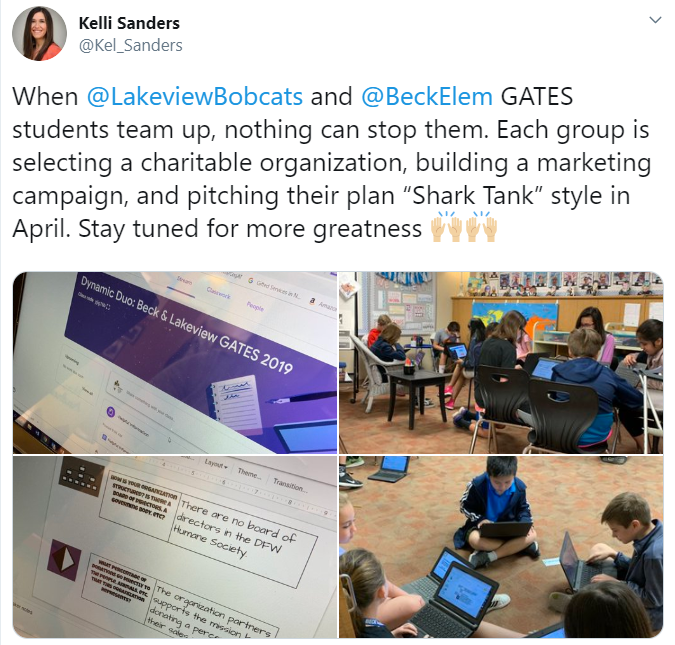

The groups were made up of students from both campuses. This meant some of their group members would not be available for face to face collaboration on a daily basis because they were at another school. Nakkitha was especially excited about the cross-campus collaboration. “I loved how we got to collaborate with people outside of our school because we got to meet new people and make new friends”. As group members dove into more specific research on their common interests, they utilized Flipgrid and Google Slides to communicate. These platforms allowed group members to continue the “conversation” even after their scheduled GATES time was over. Check out this Mixtape to hear a sampling of the group interactions. A walking field trip from Lakeview to Beck was also planned into their work time to allow groups face to face interaction.
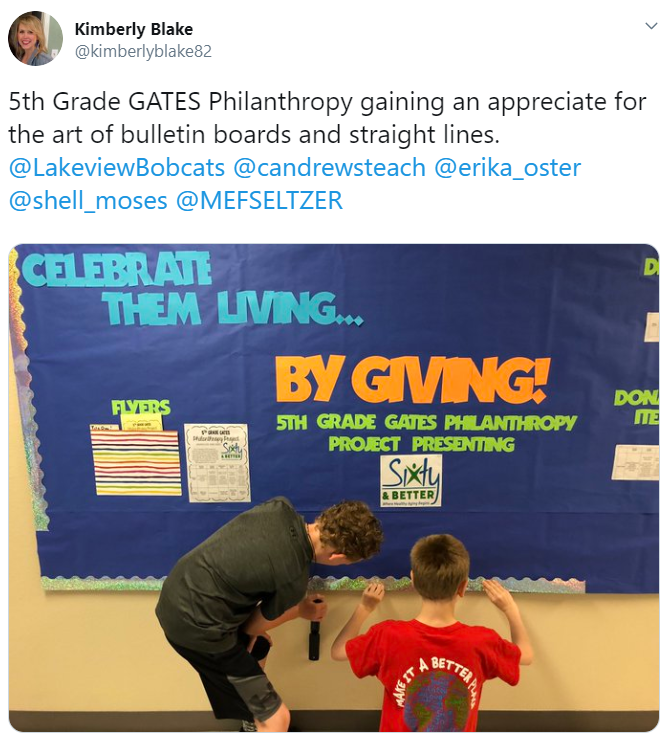
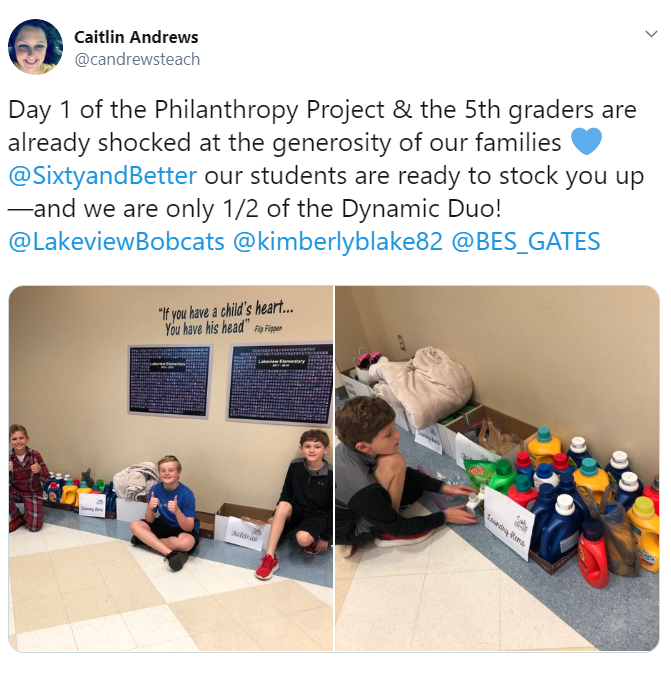
Both campuses came together for pitch day. Groups were able to share their presentation with the panel and their peers. The shark vote, coupled with the student vote, determined which project would be selected and rolled out at both campuses. The group representing the organization Sixty and Better was selected. At that point, the marketing plan from the student presentation began coming to life at Beck and Lakeview through campus-wide dress up days and a donation drive. Students in the GATES classes were each assigned a role in ensuring the logistics for the project were handled appropriately on their campus. Shashwat was one of the project managers. “I was in charge of keeping everything organized and well managed. This has taught me how to be a good leader and that as a good leader, patience is important”. It did not take long for all students involved to get plugged in. They were eager to be a part of something bigger than themselves. Check out what some of these students at Lakeview had to say. They made their podcast debut with an episode dedicated to the work being done for Sixty and Better.
Service learning projects are powerful learning experiences for all students. As Social Emotional Learning becomes a bigger focus throughout the district, these types of projects help students become responsible decision makers. They build social awareness, self-awareness, and relationship skills. They foster one’s personal well-being and the importance of self-management. They impact the whole child. For more information on other service learning projects happening at Beck Elementary, take a listen to the latest episode of the Bulldog Bulletin.
 Final numbers from the campus donations will be posted to the blog upon the project’s completion. Please check back soon!
By definition, a philanthropy project promotes the welfare of others, expressed especially by the donation of money and goods. Students were tasked with choosing a nonprofit organization within the community that aligned with their own unique passions and interests. For Ella, having a voice and choice was very important. “I like that we got to pick our own interests and that we didn’t have to do one thing and one thing only.” A variety of organizations were researched, with the primary focus being children, women, senior citizens, the homeless, veterans, animals (domestic and wild), literacy, environmental issues, and sports. Once students had a general idea on the type of organization they wanted to pursue, they completed a Google Form which helped teachers group them with peers.
 |
| Click the image above to view Shark Tank presentation |
Groups were tasked with creating a digital presentation and pitch to be presented Shark Tank style. Their presentation would introduce the organization, explain why that organization was selected, and share how the community could get involved. They would also have an opportunity to present their marketing plan, which would include plans for advertising their project at both campuses. Groups created mockup flyers, commercials, scripts for announcements, dress up day calendars, bulletin board plans, and social media posts for the panel of “sharks” to consider.
 |
| Click image to view the student created commercial |
Service learning projects are powerful learning experiences for all students. As Social Emotional Learning becomes a bigger focus throughout the district, these types of projects help students become responsible decision makers. They build social awareness, self-awareness, and relationship skills. They foster one’s personal well-being and the importance of self-management. They impact the whole child. For more information on other service learning projects happening at Beck Elementary, take a listen to the latest episode of the Bulldog Bulletin.

Monday, April 29, 2019
Raiders of the Lost STAAR

For many NISD teachers, Spring has been marked by the self-paced BINGO challenge. Cassie Brewton, a fifth grade teacher at Hughes elementary especially enjoyed the choice, self pacing, and excitement that came along with the challenge. Cassie soon began to think, “My students would enjoy a challenge like this, especially as they get ready for STAAR.” Using the format created by IT Coaches Jillian, Kelli, and Shelly, Cassie began creating tasks that would help students review for their upcoming STAAR test.
The tasks that Cassie created were an intentional hybrid of individual and group collaboration, digital and face to face work, and all levels of rigor. When walking into Cassie’s class during review, it was clear that each student was working at their own pace and that the tasks were differentiated for all of her learners. It was also evident that the students were enjoying the challenge.
Ethan, Kellon, and Makena all agreed that the BINGO board was a fun way to prepare for STAAR. Not only was the challenge fun, but it pushed students to work through questions and problems that they may find difficult. Kellon points out, “My favorite part was the challenge in general.” Makena states, “B4 was really challenging. The picture was really hard to figure out. You have to figure out what’s happening and make observations and a claim. I skipped a few, but then made a note to go back.” Kellon added, “I don’t like skipping a challenge, so I kept trying until I figure it out.”
Each student was eager to share their favorite task on the board. For Makena, this was N3. “We made several STAAR questions and created a quiz on Google Forms for the class.” Ethan enjoyed I3 which prompted him to create a Tweet from a template in Google Classroom. The tweet would sum up the main idea and supporting details from the story "Library Lion." Ethan would have an authentic audience as the tweet was posted to the class Twitter Feed (AKA: Padlet Wall). What Ethan may not have realized, was that I3 provided scaffolding for him as he decided to complete G5 first. G5 helped students define main and supporting details to give them a better understanding of the concept.
Other tools integrated into the tasks include: Prism, Pear Deck, Epic, News ELA, and a variety of GSuite tools (Docs, Slides, Forms).
Other tools integrated into the tasks include: Prism, Pear Deck, Epic, News ELA, and a variety of GSuite tools (Docs, Slides, Forms).

Differentiation was a key aspect of this challenge. Cassie points out, “I made changes to the board daily based on student responses. For example, After noticing kids struggling on I3, one student realized that another task on the board was a great scaffolding activity, so we created a few additions to the ‘task card’ to explain where they could go to practice the skill before completing that specific activity.”

While the Raiders of the Lost STAAR was a student centered and student paced challenge, it was the intentionality of Mrs. Brewton that made it a success. The articles that she choose for students to read were at the appropriate lexile level, the resources that students used to answer questions encompassed relevant information that they needed to know, and the independent reading time helped with literacy and comprehension.
Not only were students review key terms, concepts, and skills for STAAR, but they were also becoming problem solvers. Mrs. Brewton states, ”I think my favorite part about the Bingo board was seeing the students work so well with their self-management. They were great at managing their time, choosing tasks that fit their schedule, and taking time to stop and reflect on their work before coming to me for a code. They wanted to make sure it was their best before asking for a code because they knew the expectations were high, so the incentive to work hard was powerful!”
Twenty Five task challenges can be quite a bit to create, but the aspect of self-paced lessons and units, can be created on any scale using Hyperdocs. Check out this Basic Hyperdoc Lesson Plan Template (The HyperDoc Girls)
Monday, April 22, 2019
The Game of Life: A Financial Literacy Project

At Adams Middle School, Hanna Patredis and Ashley Dacus wanted to turn their financial literacy project that was all paper and pencil into a interactive hyperdoc for the students to really engage in real world situations. They wanted their students to truly see how their choices affect their future wealth. Students were asked to estimate the cost of a college education, calculate the school loans, determine simple and compound interest formulas, and make a household budget.
The lesson was created on a hyperdoc where students were able to interact and input their answers in the google slide that was copied for each student. The teachers used the grey space in slides to give instructions and place extra information needed. A YouTube video of dice being rolled was used when the students were asked to roll dice. All of these intentional moves set up by the teachers, created an experience for the students that was interactive. Lucy, a student on Mrs. Dacus’ class said, “I like designing my own life using math skills throughout the year. The digital format helped my

At the end of the experience, students had voice and choice in how they wanted to represent their knowledge of the financial literacy unit. Students choose from a menu board on how they want to present their work creatively. Check out some of their work below:
Thursday, March 21, 2019
The Spotted Article - Justin ES Newspaper
Tuesday afternoons, the library at Justin Elementary quickly fills with Chromebooks and excited
students. Anyone who has spent any amount of time in the world of education knows, the greatest
idea factories in the school are; the students. When 3rd grade student, Leyton, approached
Ms.Thorne about starting a school newspaper club, she immediately saw the potential for student
voice and choice through this activity. With a little research on the ins and outs of a successful school
paper, the club quickly began to take life. In an effort to provide student ownership of the paper,
Ms. Thorne allowed students to be involved from the start; selecting their own name for the
publication as well as self selecting topics of interest to be featured. Students chose to
include: Teacher of the Month, Book of the Month, History of the Month, Challenge of the Month,
just to name a few. Ms. Thorne shared, “They have free reign - for the most part - on what they’d
like to write about and are able to collaborate with their peers on ideas to include in their article.”
students. Anyone who has spent any amount of time in the world of education knows, the greatest
idea factories in the school are; the students. When 3rd grade student, Leyton, approached
Ms.Thorne about starting a school newspaper club, she immediately saw the potential for student
voice and choice through this activity. With a little research on the ins and outs of a successful school
paper, the club quickly began to take life. In an effort to provide student ownership of the paper,
Ms. Thorne allowed students to be involved from the start; selecting their own name for the
publication as well as self selecting topics of interest to be featured. Students chose to
include: Teacher of the Month, Book of the Month, History of the Month, Challenge of the Month,
just to name a few. Ms. Thorne shared, “They have free reign - for the most part - on what they’d
like to write about and are able to collaborate with their peers on ideas to include in their article.”
While the task of getting things rolling wasn’t too much to tackle, deciding on the best way for students
to write and publish the paper, proved to be more of a challenge. Ms. Alyssa Thorne knew she wanted to
use technology to provide students a platform for effective collaboration and meaningful creativity,
however she wanted to be careful in her selection of tools. “I value independence and desired
for this club to be student-led. Finding tools that the students could explore and easily figure out
without my constant guidance was important to me, and I’m pretty sure the students appreciate
it, too!” Ultimately, she selected Google Slides, Canva, MakeBeliefsComix, and Google Sites.
Students utilize each tool for a different part of their process. Google Slides is used for drafting,
revising, peer editing, and collaboration. Canva provides a template for the design of the newspaper
and advertisements that appear in the paper. To add a little fun, MakeBeliefsComix is used to
create entertaining comic strips.

With the help of technology, these young writers are now published authors! Students are enjoying
to write and publish the paper, proved to be more of a challenge. Ms. Alyssa Thorne knew she wanted to
use technology to provide students a platform for effective collaboration and meaningful creativity,
however she wanted to be careful in her selection of tools. “I value independence and desired
for this club to be student-led. Finding tools that the students could explore and easily figure out
without my constant guidance was important to me, and I’m pretty sure the students appreciate
it, too!” Ultimately, she selected Google Slides, Canva, MakeBeliefsComix, and Google Sites.
Students utilize each tool for a different part of their process. Google Slides is used for drafting,

revising, peer editing, and collaboration. Canva provides a template for the design of the newspaper
and advertisements that appear in the paper. To add a little fun, MakeBeliefsComix is used to
create entertaining comic strips.
Google Sites allows students to easily organize and share each completed publication. Click the
image below to see the monthly newsletters.
With the help of technology, these young writers are now published authors! Students are enjoying
the club and learning a lot along the way. Reagan shared, “I like Newspaper Club because I like to
have the freedom to write what I feel like writing.” Another student expressed, “I love how everyone
can cooperate, and it’s always fun to make articles!” The words of these students are evidence
enough of the overall success of the project. Ms. Alyssa Thorne is passionate about this endeavor and
would love to collaborate with any other educators who might be interested in starting a newspaper
club at their own campus.
have the freedom to write what I feel like writing.” Another student expressed, “I love how everyone
can cooperate, and it’s always fun to make articles!” The words of these students are evidence
enough of the overall success of the project. Ms. Alyssa Thorne is passionate about this endeavor and
would love to collaborate with any other educators who might be interested in starting a newspaper
club at their own campus.
Monday, February 25, 2019
Let's Be (proportionally) Reasonable
 When was the last time you stopped to think about ratios and proportions? It’s a strong possibility that you’re reading this and are actually questioning yourself. You probably haven’t consciously thought about these two math terms since you were introduced to them in one of your math classes. The reality is, knowledge of proportions can play a bigger role in your daily life than you even realize. Mrs. Harris and Mrs. Butler at Medlin Middle School are on a mission to find real world application for these standards.
 So, naturally, the most commonly asked question by students in a math class gets asked: “When will I ever use this in the real world”? In an attempt to begin answering that question, let’s think about a recent Target run or trip to Costco. Knowledge of ratios and proportions likely played a role in some of the decisions made. Even the car being driven down the highway to these two stores is being driven a certain number of miles per hour. Think about the ads seen online or in store. Many things are advertised as 2 for $5. Or the consumer doing math to figure out the better deal on paper towels and toilet paper. Maybe it’s a recipe that needs to be doubled. These are all just a sampling of the unit rate proportions one might encounter on any given day.
 |
| (Click to view project) |
Students were challenged to apply their learning about proportions from their 6th/7th grade compacted math class to real life. This meant it was time to identify which routines and decisions throughout their day involved proportions. From the time they woke up until it was time to go to bed, where could they apply this mathematical skill to real life? It was their teacher’s hope that it wouldn’t take long for students to come to the understanding that proportional reasoning is not just stuck in their math book. It is literally playing a part in many areas of their everyday life. The better question just might be, “When will I NOT use in the real world”?
 |
| (Click to view project) |
Projects would need to include six examples of real world proportional situations presented in the form of a question for their peers to work out. Their work would also need to include a fully worked out answer key for their proportional situation examples. It was up to the students to determine how they would present their work. Many chose to create an interactive presentation using hyperlinked Google Slides and some even decided to bring theirs to life through video. Others created a Google Site. Some chose a more traditional style route and created a poster board that represented their proportional reasoning. Harrison and his partner, Drew created a video. He said, “We used my editing software and green screen from home. We enjoyed this project because we were able to show everything we know about proportions and ratios while also showing the things we enjoy doing”.
 |
| (Click image to view project) |
At the end of the unit, students were equipped to recognize ratios and proportions all around them. They’re more prepared for the real world because they understand the importance of being a smart consumer and how simply paying attention to advertisements and unit ratios can influence purchasing decisions. There was definitely buy in for the importance of math outside the classroom. The habit of proportional reasoning was there all along, they just simply needed to see it applied and made personal to them. “I enjoy using technology because it gives you more options on projects, and allows you to be more creative with how you do things”. The added layer of integrating technology was definitely a highlight for Drew.
Some of the projects created during this unit will be showcased at the district’s Expo event on the evening of February 28th. Students are eager to share their “math in the real world” experience with an authentic audience.
Tuesday, February 19, 2019
Collaboration that BLEW our Mind and FLOODED our Learning!
“This project was so cool! We got do our own research and meet 7th graders who learned about tornadoes and floods too.” -Alondra (4th Grade Hughes Elementary)
From research to organization to collaboration, and then feedback and revision, students in Mrs. Turner and Mrs. Covarelli’s class had a learning experience that they won’t forget!
It just so happened that 7th grade students at Tidwell Middle School were learning about catastrophic events the same time that these 4th grade students were doing research. Mrs. Wellborn and Mrs. Christian's were part of a scheduled ZOOM meeting that allowed them to provide feedback for 4th grade and share a little about what they learned about tornadoes, floods, and the effects these disasters had on the environment. “It was nice to hear feedback so that we could fix parts of our website," Said Alondra. She added, "it was also nice because when we were texting (AKA: typing on collaborative Google Slides), my partner sent us a link to their 7th grade project. It was cool to learn more facts from them.” Naomi added, “I liked that we got to learn with the 7th graders that we got to see some of what we are going to learn in 7th grade. We even got to meet our future 7th grade teachers!”
Global Collaborator
 |
| Virtual Connection via Zoom |
From research to organization to collaboration, and then feedback and revision, students in Mrs. Turner and Mrs. Covarelli’s class had a learning experience that they won’t forget!
As a part of a Lucy Calkins unit, students were put into groups based on interested level to research a natural disaster or weather event. They were responsible for taking the overarching topic and creating subtopics within that. They did their own research, took notes, and cited sources to write a final essay with their research. After writing the essay, groups then created videos using FlipGrid to share what they learned about their event.
RESEARCH AND WRITING:
According to Alondra, the most challenging parts of this project was the research. “When you type too much in your search, sometimes you don’t get what you need. We had a hard time finding just the right information.” Mrs. Covarelli agreed that research was the most difficult part for her students. She points out, “Students struggled with how to use keywords in search engines to find the results they were hoping for. We did mini lessons on how to use keywords when researching. Some students also had a hard time finding research on their subtopic, so they changed subtopics based on the research they were finding online.” Alondra added, “Our teachers helped us by giving us safe search websites. It was nice that Mrs. Covarelli was protecting us from any bad websites.”
ORGANIZING AND PUBLISHING:
Two specific groups took their information and organized it within a Google Site to submit for Expo 2019. Naomi's group researched floods. She states, “I liked creating a Google Site with my group because we could all work together. We could see each other’s work and get feedback from each other. If someone was absent we could still see their work.” Mrs. Turner helped students learn the importance of organizing a website and making information engaging and clear for others. Students added their Flipgrid video to the website along with photos, and even maps to bring their research to life for their audience.
COLLABORATING AND RECEIVING FEEDBACK:
 |
| 7th Grade and 4th Grade Partner Up on Collaborative Slides |
 |
| Mrs. Wellborn and Mrs. Christian Meeting 4th Grade Students at Hughes Elementary |
SHARING: Not only did these students share their site with 7th graders, but they have also been selected to present at Expo 2019! Come learn more about their experience on February 28th! "I'm so excited about Expo. I went in 2nd grade, but I’m glad to get to share my project again this year," said Aislynn. “I’m very excited about Expo. It’s my first time doing it,” added Naomi. For Adelais, this will be her second time at Expo. “ I went in 2nd grade, but I’m glad to get to share my project this year and even see other people’s projects.” Presentation times can be found at: https://expo.nisdtx.org/
Click the images below to view student websites:
ISTE STANDARDS:
 |
| Floods by Aislynn, Landon, Yosari, Lia, Rachel, and Naomi |
 |
| Tornadoes by Adelais, Alondra, and Bella |

ISTE STANDARDS:
Knowledge Constructor:
- 3a - Students plan and employ effective research strategies to locate information and other resources for their intellectual or creative pursuits.
- 3b - Students evaluate the accuracy, perspective, credibility and relevance of information, media, data or other resources.
- 3c - Students curate information from digital resources using a variety of tools and methods to create collections of artifacts that demonstrate meaningful connections or conclusions.
Creative Communicator
- 6a - Students choose the appropriate platforms and tools for meeting the desired objectives of their creation or communication.
- 6b - Students create original works or responsibly repurpose or remix digital resources into new creations.
- 6c -Students communicate complex ideas clearly and effectively by creating or using a variety of digital objects such as visualizations, models or simulations.
- 6d - Students publish or present content that customizes the message and medium for their intended audiences.
Global Collaborator
- 7a - Students use digital tools to connect with learners from a variety of backgrounds and cultures, engaging with them in ways that broaden mutual understanding and learning.
- 7b - Students use collaborative technologies to work with others, including peers, experts or community members, to examine issues and problems from multiple viewpoints.
- 7c -Students contribute constructively to project teams, assuming various roles and responsibilities to work effectively toward a common goal.
Tuesday, February 12, 2019
"If I could learn about anything in the world, I would learn about...."
Walking into Mrs. Dwyer’s first grade classroom to find they were working on their passion projects, made my heart smile! First graders planning, researching, and creating a product to show off their learning about their self-selected passion is a dream come true. Passion projects are a way of investing in each child by naturally differentiating because the whole process and product is about them.
Read more to find out what Mrs. Dwyer, a teacher at Schluter Elementary had to say about launching passion projects in 1st grade:
I was determined to bring passion projects to life despite the differences in age and independence. It was important to me to engage them in relevant work that inspired them. I never want to limit my students, especially their beliefs about themselves. Back in October, I finally got brave enough to voice my vision aloud to one of my mentors, Liz Smith, GATES teacher. She came alongside me, helped me launch the project and pitch it to my kids to get their buy-in. We got down on the floor together and conferred with kids, to understand their passion, listen to them, and help them struggle to find their voice.

In the planning process, students chose how they would share their learning and what product they would create. When we finally got to that stage, it got even more fun. It was also a dance, going back and forth between guiding and allowing student-independence. For example, one student would decide on making a video. The next student automatically wanted a video to be like a peer. We had to spend time talking about purpose and audience to help kids understand that a video may not be the best fit for every project. I thought I would get tears, but I did not. I think they felt so empowered, they would nod and say, “Maybe on my next project.”
 There were a few projects where we had to get parent involvement in order for it to be a success for the student. Talk about engagement! I actually received an email from a parent, thanking me for the project because she saw her daughter light up in the process. Media was following her around with cameras thinking she was a big time YouTuber. I ran into another family at the indoor soccer fields, and it was awesome because I “caught” my student working on his passion. He was so proud! Another student, who wanted to learn all about ballet, came back to school in January excited because her mom agreed to sign her up for ballet class.
It fills me with so much joy to see how far my kids have come in this process. The difficult parts for me of managing 20 individual projects, scaffolding, and differentiating for each child, and mostly understanding exactly what they wanted to be the outcome of their work, were more than worth it. It was a definite growing experience for me as an educator. We can’t wait to share the finished products at EXPO and Open House. We are hopeful to get another project in before the end of the year now that we, as a class, have more skills and practice!

As you can see, Mrs. Dwyer and her students both gained substantial knowledge during this experience. Schluter Elementary set a goal at the beginning of the year as a campus for each student to take ownership of their learning process in planning, monitoring, and reflecting on individual and/or collective work in order to meet their highest potential. This learning definitely showcases the students ownership of their learning process and what high potential they each have. Check out all of Mrs. Dwyer’s students learning here.
Wednesday, March 21, 2018
The Basics of Blending
In the book, Blended
Learning in Action, Catlin Tucker, Tiffany Wycoff, and Jason Green hit the “pulse”
of the blended learning movement as they discuss the need for a shift in the
way schools “puree” and present content to meet the needs of today’s learners.

They explain this by saying, “We are at the moment in education when our schools can determine if they are Netflix or Blockbuster, Amazon or Borders, Samsung or Blackberry. In each of these cases, the successful organization saw that the entire world was changing and decided they were going to change to be ready for it…shifting vision and culture at the time when it was most critical to their survival.” The point here is that current education models are “crushing” student opportunity by “chopping” key elements needed to engage students and prepare them for “shredding” the future demands of a global marketplace. In an effort to address this need, Northwest ISD has begun piloting blended learning courses where that missing link is helping to fill the gap and expose students to nontraditional forms of instruction by providing learning experiences that aid in better acquisition of future ready skills.
There are common misconceptions about blended learning and
what it entails. It is not only integrating technology into the classroom, “flipping”
lessons, or even implementing problem based learning strategies. Blended
learning includes a “mixture” of those things and more! An article by Michael
B. Horn and Heather Staker described blended learning as, “any time a student
learns at least in part at a supervised brick-and-mortar location away from
home and at least in part through online delivery with some element of student
control over time, place, path, and/or pace.” Successfully implementing blended
learning requires a complete shift of culture that empowers both teachers and
students to be active participants in creating learning opportunities. Horn and
Staker explain that making blended learning a reality requires “letting go of
the idea that we always have to teach something in order for students to have
learned it.” Empowering students by allowing them choice and independence within
the pace and structure of the course as well as connecting the traditional,
face-to-face learning time with digital learning time is all key to the success
of blended learning courses and eventually strengthens student capacity for independent
problem solving and critical thinking.
 Jennifer Hamzy, a teacher at V.R. Eaton High School, facilitates
the current blended AP Psychology course there and she feels that the digital
days incorporated into the course create an opportunity for “differentiation and
for students to decide what works best for them.” She also appreciates how the
blended format puts more responsibility on the students to develop “better
study skills” and to “learn how to independently read a college text.” Jennifer
frequently encourages collaborative strategies to help guide students on
digital days. They are encouraged to utilize Google Suite tools as well as various
digital study aids like Quizlet, YouTube videos, and online practice
assessments to learn and reinforce concepts on their own while allowing more in
person class time for discussion, teacher guidance, and whole group activity. AP
Psychology students, Anya and Patricia, stated that they enjoyed having “more
time to get work done” independently while also having the option to “meet up to
work together” with other students either digitally or in person.
Jennifer Hamzy, a teacher at V.R. Eaton High School, facilitates
the current blended AP Psychology course there and she feels that the digital
days incorporated into the course create an opportunity for “differentiation and
for students to decide what works best for them.” She also appreciates how the
blended format puts more responsibility on the students to develop “better
study skills” and to “learn how to independently read a college text.” Jennifer
frequently encourages collaborative strategies to help guide students on
digital days. They are encouraged to utilize Google Suite tools as well as various
digital study aids like Quizlet, YouTube videos, and online practice
assessments to learn and reinforce concepts on their own while allowing more in
person class time for discussion, teacher guidance, and whole group activity. AP
Psychology students, Anya and Patricia, stated that they enjoyed having “more
time to get work done” independently while also having the option to “meet up to
work together” with other students either digitally or in person.
Although blended learning has been largely successful in
Mrs. Hamzy’s class and she is extremely well-versed in problem based learning
strategies, student goal setting, and differentiation, she feels that she can improve
her blended learning course by providing more specific expectations to students
early on in order to guide them in productive ways to spend their digital days
as well as by incorporating more flipped techniques to help ensure that
students have the necessary background knowledge and preparation to complete
problem-based tasks and projects. Mrs. Hamzy regularly utilizes Google Suite,
Moodle, and other digital resources to engage students with content independently
and collaboratively but is constantly making adjustments and trying new tools
to help her create additional independent learning opportunities for students.
Online resources such as Pear Deck, edpuzzle, FlipGrid, Formative,
Screencastify, and even digital badging can all increase student engagement
with content while allowing students room to individually and collaboratively remediate,
accelerate, or manipulate their own interactions with concepts and skills. Hamzy
describes the transition to a blended learning course as “a process” and says
that teachers new to it should “give themselves a break the first year” as they
take risks with a new role, different strategies, and unfamiliar resources. She
says that as you progress, “you discover that some things work and some do not
but that’s okay” because you adjust and improve for the next time.
As the availability of blended learning courses to NISD
students increase over the next few years, other EHS teachers, like Renata
Schlotzhauer and Ashley Harden, will be expanding this course structure to
other content areas such as science and World Languages. Mrs. Harden says that
she is looking forward to “students growing academically and personally as they
are given more responsibility.” She also feels that it will help to deepen
student understanding in science because they are allowed to cover more
information at a more personalized pace.”

Subscribe to:
Posts (Atom)