

Showing posts with label 6th grade. Show all posts
Showing posts with label 6th grade. Show all posts
Monday, February 27, 2023

Monday, December 16, 2019
Breakout: It's a Celebration!

As semester exams draw nearer, students in Mrs. Butler, Mrs. Harris, and Coach Smith’s 6th/7th Compacted Advanced Math classes at Medlin Middle School have been hard at work. Over the last week they have worked together to create an epic digital breakout experience to review all content from the semester. The idea of using a breakout to review or interact with math concepts is not new. In fact, these students have experienced the use of digital breakout type activities created by their teachers all semester.
Throughout the fall semester, students have had the opportunity to participate in several digital breakout experiences. Similar to an escape room, a variety of puzzles and scenarios lead students through an engaging interaction with content. Along the way codes are revealed that, in the end, unlock the “locks”. Digital breakouts can be used across content areas and grade levels. When asked about learning through breakouts, Gage was excited to share. “I like the technology experience. It's a new way to look at math and it makes it more fun. It’s definitely more interesting because it makes math a part of our real world."
Throughout the fall semester, students have had the opportunity to participate in several digital breakout experiences. Similar to an escape room, a variety of puzzles and scenarios lead students through an engaging interaction with content. Along the way codes are revealed that, in the end, unlock the “locks”. Digital breakouts can be used across content areas and grade levels. When asked about learning through breakouts, Gage was excited to share. “I like the technology experience. It's a new way to look at math and it makes it more fun. It’s definitely more interesting because it makes math a part of our real world."

And now the tables have turned. The secrets to creating an engaging digital breakout have been revealed and students have been equipped with the tools to create. Ify has enjoyed the process because she says it’s given her a “behind the scenes look" at creating activities like her teacher. It has also inspired her to explore career paths that may involve coding or creating digital materials for others. After being given the content to be used, Google Forms, Google Slides, and Flippity were the platforms selected by most students. Their teachers helped organize all created breakouts on a Google Site that was then shared with students as their semester review.

Click HERE to access the student created breakouts
So, why use digital breakouts? The better question may be, why not? Digital breakouts...
- Promote collaboration and communication within the classroom
- Enhance problem solving and critical thinking skills
- Reinforce grade appropriate Technology Application TEKS and Digital Citizenship curriculum
- Motivate and spark new learning opportunities
- Empower students to own and apply their learning
Mrs. Butler also gives a compelling testimony for the integration of Digital Breakouts in the classroom. “There is a special energy that fills the room when students are completing a breakout session. Students are engaged and eager to advance through the activities. Students enjoy taking on a challenge and competing to be the first group done. Best of all, students receive immediate feedback on their content knowledge which is huge for a learner's success.”

This project will be submitted as an interactive presentation and considered by the campus committee to represent Medlin at Expo 2020. For more information about Northwest ISD Expo event, please visit expo.nisdtx.org.
Monday, November 11, 2019
Bringing Seesaw to Secondary: Why Seesaw isn't just for Elementary classrooms

As a platform, Seesaw lets students blend pictures, video, voice-over, annotation tools, and external resources. It can be a powerful platform for both creation and reflection. Typically, Seesaw is used by elementary educators because it caters to kids -- it’s icon heavy, makes providing voice and video instructions easy, and because it is web-based, is easily accessed on Chromebooks. Secondary teachers, don’t stop reading yet…
Middle School teacher Kristy Fair at Gene Pike Middle School is engaging her 6th-grade students through Seesaw. For Veterans Day and as a part of their nonfiction unit, she had her students read an article from Wonderopolis and then create a presentation about what they learned. Beginning with a lesson from Seesaw’s Activity library, which is filled with pre-created activities for K-12 for all contents, Mrs. Fair modified the assignment and instructions to better meet her students' needs. She added voice instructions and asked her students to make personal connections to Veterans day before sharing their research with the class.
What I love about this lesson is that she asks her students to reflect, make connections, and create a resource to share with their classmates all based on what they read. A lesson like this is flexible -- it can easily be made more or less challenging depending on the article linked in and on the level of critical thinking students are being asked to show in their evidence of learning. She modified the task to meet her students' needs. Regardless, Seesaw and Google Slides are simply the tools through which Mrs. Fair assigned and assessed student's comprehension and learning.
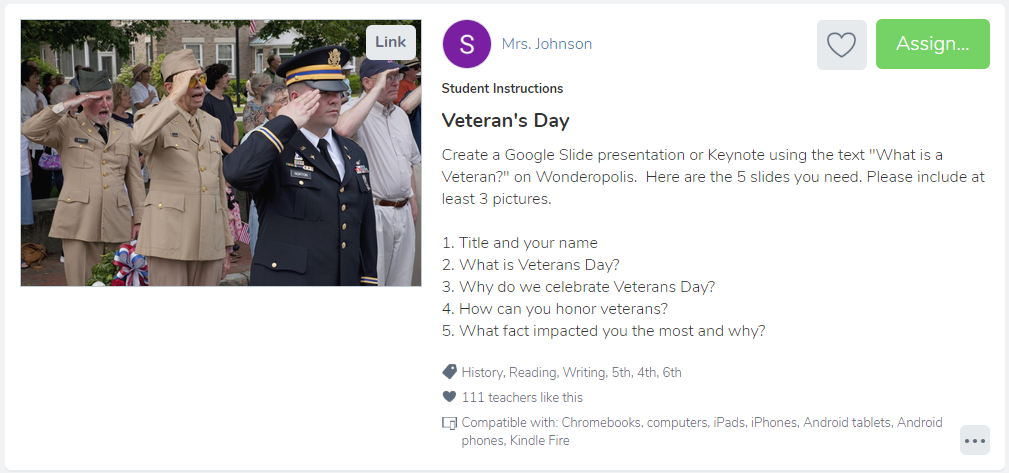
I observed her classes using Seesaw and witnessed first-hand how excited and engaged her middle schoolers were while using Seesaw. They loved sharing their work so that their classmates could see it, and were quick to leave each other positive feedback on what they shared. They were eager to participate -- one student went so far as to respond to the Veterans Day assignment from home the morning before class, sharing a video reflection about how his great-great-grandfather was a veteran.
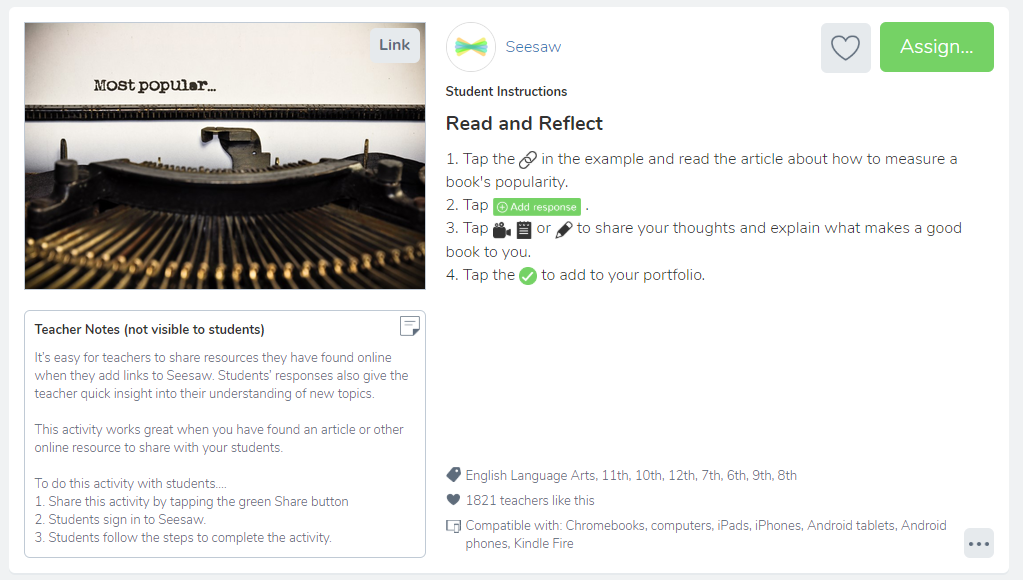
As a former-high-school-teacher-turned-Instructional-Coach, I had admittedly written this tool off as an elementary-only resource, but working with secondary teachers and students in Seesaw quickly showed me how useful this platform can be for meeting the needs of students of all ages and ability. At its core, Seesaw is a platform for sharing and curating work, for synthesizing thinking and evidence of learning in one easy-to-use and easy-to-share place. As an added bonus it seamlessly integrates with Google Classroom, which many secondary teachers are already using. Seesaw creates choice and flexibility in how students share their learning. Whether asking students to snap a picture of their journal, annotate and reflect on what they wrote or asking students to upload their lab data and reflect on the implications of their scientific findings using videos, Seesaw can amplify the reflections and learning that happens in secondary classrooms.
Below are a few pre-created secondary Seesaw lessons for various contents that can all be found in the Activity Library. How will you use Seesaw in your secondary classroom?


Monday, April 8, 2019
How to Turn 6th Graders Into World Travelers

 At Gene Pike Middle School, 6th grade World Cultures teachers Connie Garza and Dawn Goldstein want to do more than teach their students about other places -- they want to show their students the world. Consider for a moment that 2018 research discovered 1 in 10 Americans has never left their home state, for financial or other reasons. With this in mind, it's safe to assume not all of our students will have the opportunity to visit many of the far-off places they're learning about in school.
Still, we know that learning to understand other cultures and gaining perspective on how other people live is an important part of succeeding in our global society and in learning to be a well-rounded individual. Thanks to Google’s Virtual Reality (VR) Tour Builder, even if Garza and Goldstein can't fly their students abroad, they can still take them to places all over the world.
For context, Google’s Virtual Reality platform relies on Google Earth’s existing 360-degree footage, making it possible to virtually explore any place in the world through your computer screen or a pair of VR Goggles. What’s even better? Their VR Tour Creator allows people (in this case 6th graders) to design a virtual tour with stops anywhere around the globe and lets them embed their own photos or written details into the tour.
 After explaining their task to students, Goldstein and Garza used student-led stations to guide their learning about Europe. During their stations, students used hyper docs and other printed and digital resources to learn about European countries overall, documenting what they learned in their “travel journals” and earning stamps in their “passports” for visiting each country. Throughout this step, students gained important insight into the countries and cultures that would ultimately help them build their tour during work-time.
A major challenge in a project like this -- where students are focusing on only one from a list of topics they need to be experts on -- is making sure students master their overall learning about European culture and geography, while still highlighting the country they are most interested in learning more about. To address this, Garza and Goldstein made sure students visited each country through the exploratory stations, but they also gave students a peer audience. Because students would be sharing their projects with each other, they were motivated to do their best work; meanwhile, students were exposed to numerous European countries through their peers' student-created virtual tours.

Through this project, Garza and Goldstein undoubtedly created a few travel-bugs, but even more, they gave students the opportunity to imagine themselves going on great adventures. They gave this group of sixth graders the chance to be (virtual) world-travelers.
Monday, April 23, 2018
There are Actually Three Sides to Every Story!

Taidghen, Taylor, Elijah, and Yaleiza from Mrs. Lahit's class got a lot out of this project. "I really enjoyed creating the triangles on Geogebra," said Yaleiza. "I learned that triangles are more than just a shape with three sides. There are many different types of triangles, but you only know the type based on the angle sizes. I also learned that you can not have two obtuse angles within a triangle, or two right angles." This project made students think about triangle properties during creation. Elijah points out, "The most difficult part of the project was making the equilateral triangle in Geogebra because you had to make sure to get all of the sides the same."
 |
| Creating Specific Triangles in Geogebra |
Projects were turned in on a Padlet wall, which allowed students to see each other's work. "I enjoyed seeing how other students used Book Creator differently than I did," said Taidghen. Yaleiza added, "I enjoyed looking at the Powtoons that some of my other classmates created. The Padlet helped us see all of the ways that we could have shared our knowledge."
All four of these students agreed that next year's 6th graders should complete this project. Taylor mentions, "Next year's class should do this project because it's a chance to be creative while learning." Elijah concludes,"This is a great project because you really learn about all of the triangles and the theorems."
Student Created Tutorials for Using Geogebra:

Student ISTE Standards:
Creative Communicator: Students communicate clearly and express themselves creatively for a variety of purposes using the platforms, tools, styles, formats and digital media appropriate to their goals.
- 6a:Students choose the appropriate platforms and tools for meeting the desired objectives of their creation or communication.
- 6c: Students communicate complex ideas clearly and effectively by creating or using a variety of digital objects such as visualizations, models or simulations.
- 6d: Students publish or present content that customizes the message and medium for their intended audiences.
Empowered Learner: Students leverage technology to take an active role in choosing, achieving and demonstrating competency in their learning goals, informed by the learning sciences.
- 1c: Students use technology to seek feedback that informs and improves their practice and to demonstrate their learning in a variety of ways.
Wednesday, May 10, 2017
Interactive Periodic Table of Elements Using #GAFE
Sixth
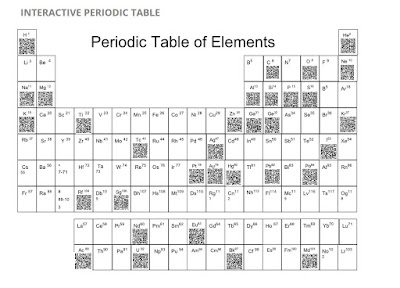
graders at Wilson Middle School were challenged to design and create digital
posters of a chosen element from The Periodic Table of Elements using
Google Draw. Google Draw allows its’ users to collaboratively design
their element posters. Students were advised of the rubric
and each element poster was shared.


After creating their own unique QR
Code for each element, the students were able to embed them on the digital
table.
Sydney and Reese both
said, “This surely wasn't an individual project. We had a team that worked hard
together and completed this project as fast and precisely as we could.” Gabriel
and Jenna summed it up well, "We loved this project because we got to
learn facts about the Periodic Table of Elements in a fun way. We didn’t just
have to listen to the teacher talk, we got to create and learn at the same
time." They both agreed that next year's class should do this project.
"I think they’ll have fun," said Carson.


Mrs. Lindsey loves how Google tools make quick, effective collaboration and
communication a snap. “It frees more time to spend on teaching and
learning which makes this an ideal environment for the 21st century classroom,”
she stated. This
completed site was posted onto Mrs. Warren’s Moodle page to allow students to
access 24/7 for reflection and review.
1. Empowered Learner - Students leverage technology to take an active role in choosing,
achieving and demonstrating competency in their learning goals, informed by the
learning sciences. Students: a. Build networks and customize
their learning environments in ways that support the learning process.
b. Use technology to seek feedback that informs and improves their practice and to demonstrate their learning in a variety of ways.
b. Use technology to seek feedback that informs and improves their practice and to demonstrate their learning in a variety of ways.
2. Digital Citizen - Students recognize the rights, responsibilities and opportunities of living, learning and working in an interconnected digital world, and they act and model in ways that are safe, legal and ethical. Students:a. Engage in positive, safe, legal and ethical behavior when using technology, including social interactions online or when using networked devices.
3. Knowledge Constructor - Students critically curate a variety of resources using digital tools to construct knowledge, produce creative artifacts and make meaningful learning experiences for themselves and others. Students:
a. Plan and employ effective research strategies to locate information and other resources for their intellectual or creative pursuits.
b. Curate information form digital resources using a variety of tools that methods to create collections of artifacts that demonstrate meaningful connections or conclusions.
4. Innovative Designer - Students use a variety of technologies within a design process to identify and solve problems by creating new, useful or imaginative solutions. Students:
a. Select and use digital tools to plan and manage a design process that considers design constraints and calculated risks.
6. Creative Communicator - Students communicate clearly and express
themselves creatively for a variety of purposes using the platforms, tools,
styles, formats and digital media appropriate to their goals. Students:
a. Choose the appropriate platforms and tools for meeting the desired objectives of their creation or communication.
a. Choose the appropriate platforms and tools for meeting the desired objectives of their creation or communication.
b. Create original works or responsibly re purpose or remix
digital resources into new creations.
c. Communicate complex ideas clearly and effectively by creating or using a variety of digital objects such as visualizations, models or simulations.
c. Communicate complex ideas clearly and effectively by creating or using a variety of digital objects such as visualizations, models or simulations.
d. Publish or present content that customizes the message and
medium for their intended audiences.
7. Global Collaborator - Students use digital tools to broaden their perspectives and enrich their learning by collaborating with others and working effectively in teams locally and globally. Students:
a. Use
digital tools to connect with learners from a variety of backgrounds and
cultures, engaging with them in ways that broaden mutual understanding and
learning.
b. Use
collaborative technologies to work with others, including peers, experts or
community members, to examine issues and problems from multiple viewpoints.
c. Contribute
constructively to project teams, assuming various roles and responsibilities to
work effectively toward a common goal.
Subscribe to:
Posts (Atom)