Showing posts with label GAFE. Show all posts

Monday, April 29, 2019

Raiders of the Lost STAAR

For many NISD teachers, Spring has been marked by the self-paced BINGO challenge. Cassie Brewton, a fifth grade teacher at Hughes elementary especially enjoyed the choice, self pacing, and excitement that came along with the challenge. Cassie soon began to think, “My students would enjoy a challenge like this, especially as they get ready for STAAR.” Using the format created by IT Coaches Jillian, Kelli, and Shelly, Cassie began creating tasks that would help students review for their upcoming STAAR test.


The tasks that Cassie created were an intentional hybrid of individual and group collaboration, digital and face to face work, and all levels of rigor. When walking into Cassie’s class during review, it was clear that each student was working at their own pace and that the tasks were differentiated for all of her learners.  It was also evident that the students were enjoying the challenge.


Ethan, Kellon, and Makena all agreed that the BINGO board was a fun way to prepare for STAAR. Not only was the challenge fun, but it pushed students to work through questions and problems that they may find difficult. Kellon points out, “My favorite part was the challenge in general.” Makena states, “B4 was really challenging. The picture was really hard to figure out. You have to figure out what’s happening and make observations and a claim. I skipped a few, but then made a note to go back.” Kellon added, “I don’t like skipping a challenge, so I kept trying until I figure it out.”


Each student was eager to share their favorite task on the board. For Makena, this was N3. “We made several STAAR questions and created a quiz on Google Forms for the class.” Ethan enjoyed I3 which prompted him to create a Tweet from a template in Google Classroom. The tweet would sum up the main idea and supporting details from the story "Library Lion." Ethan would have an authentic audience as the tweet was posted to the class Twitter Feed (AKA: Padlet Wall). What Ethan may not have realized, was that I3 provided scaffolding for him as he decided to complete G5 first. G5 helped students define main and supporting details to give them a better understanding of the concept.

Other tools integrated into the tasks include: Prism, Pear Deck, Epic, News ELA, and a variety of GSuite tools (Docs, Slides, Forms).


Differentiation was a key aspect of this challenge. Cassie points out, “I made changes to the board daily based on student responses. For example, After noticing kids struggling on I3, one student realized that another task on the board was a great scaffolding activity, so we created a few additions to the ‘task card’ to explain where they could go to practice the skill before completing that specific activity.”


While the Raiders of the Lost STAAR was a student centered and student paced challenge, it was the intentionality of Mrs. Brewton that made it a success. The articles that she choose for students to read were at the appropriate lexile level, the resources that students used to answer questions encompassed relevant information that they needed to know, and the independent reading time helped with literacy and comprehension.


Not only were students review key terms, concepts, and skills for STAAR, but they were also becoming problem solvers. Mrs. Brewton states, ”I think my favorite part about the Bingo board was seeing the students work so well with their self-management. They were great at managing their time, choosing tasks that fit their schedule, and taking time to stop and reflect on their work before coming to me for a code. They wanted to make sure it was their best before asking for a code because they knew the expectations were high, so the incentive to work hard was powerful!”


Twenty Five task challenges can be quite a bit to create, but the aspect of self-paced lessons and units, can be created on any scale using Hyperdocs. Check out this Basic Hyperdoc Lesson Plan Template (The HyperDoc Girls)

Thursday, March 21, 2019

The Spotted Article - Justin ES Newspaper


Tuesday afternoons, the library at Justin Elementary quickly fills with Chromebooks and excited
students. Anyone who has spent any amount of time in the world of education knows, the greatest
idea factories in the school are; the students. When 3rd grade student, Leyton, approached
Ms.Thorne about starting a school newspaper club, she immediately saw the potential for student
voice and choice through this activity. With a little research on the ins and outs of a successful school
paper, the club quickly began to take life. In an effort to provide student ownership of the paper,
Ms. Thorne allowed students to be involved from the start; selecting their own name for the
publication as well as self selecting topics of interest to be featured. Students chose to
include: Teacher of the Month, Book of the Month, History of the Month, Challenge of the Month,
just to name a few. Ms. Thorne shared, “They have free reign - for the most part - on what they’d
like to write about and are able to collaborate with their peers on ideas to include in their article.”


While the task of getting things rolling wasn’t too much to tackle, deciding on the best way for students
to write and publish the paper, proved to be more of a challenge.  Ms. Alyssa Thorne knew she wanted to
use technology to provide students a platform for effective collaboration and meaningful creativity,
however she wanted to be careful in her selection of tools.  “I value independence and desired
for this club to be student-led. Finding tools that the students could explore and easily figure out
without my constant guidance was important to me, and I’m pretty sure the students appreciate
it, too!” Ultimately, she selected Google Slides, Canva, MakeBeliefsComix, and Google Sites.  
Students utilize each tool for a different part of their process.  Google Slides is used for drafting,
ELA, Justin Elementary, Newspaper, Clubs, Canva, GAFE, Google Slides, Google Sites, MakeBeliefsComix, AppSmashing, 3-5, Community, Mrs. Alyssa Thorne, Rene' Egle

revising, peer editing, and collaboration.  Canva provides a template for the design of the newspaper
and advertisements that appear in the paper.  To add a little fun, MakeBeliefsComix is used to
create entertaining comic strips.


Google Sites allows students to easily organize and share each completed publication. Click the
image below to see the monthly newsletters.


With the help of technology, these young writers are now published authors!  Students are enjoying
the club and learning a lot along the way. Reagan shared, “I like Newspaper Club because I like to
have the freedom to write what I feel like writing.”  Another student expressed, “I love how everyone
can cooperate, and it’s always fun to make articles!” The words of these students are evidence
enough of the overall success of the project.  Ms. Alyssa Thorne is passionate about this endeavor and
would love to collaborate with any other educators who might be interested in starting a newspaper
club at their own campus.


Tuesday, November 14, 2017

Academic Social Media

Students long for a platform to make their voices heard. So much so that 94% of all teens ages 13-17 are on social media. While various negative factors have influenced an adult’s perception of the value of social media, “new research is shedding light on the good things that can happen when kids connect, share, and learn online” according to this article from Common Sense Media which identifies the following benefits of students being social media-savvy: 1. It strengthens friendships, 2. It offers a sense of belonging, 3. It provides genuine support, 4. It helps them express themselves, 5. It lets them do good.


Jenny Kinzbach and Frank Ceresoli, two CTE teachers at Byron Nelson High School, are honing into these benefits by using collaborative discussion boards via Google Classroom within their Health Science Theory classes. Opinion-based, open ended questions are posed one week before the material is covered in class in order to prompt thinking; additionally, it is used to gauge prior knowledge as well as perception of topics related to the field. Based on the responses, the teachers then direct their instruction towards the needs and interests that the discussion brought about.  


According to the Health Science TEKS, TEK b4 states “To pursue a career in the health science industry, students should recognize, learn to reason, think critically, make decisions, solve problems, and communicate effectively. Students should recognize that quality health care depends on the ability to work well with others.”


While it’s important for students to have a platform to express their content-based opinions, it is equally important that students sharpen the life skills that are associated with the task. Below are examples in which students respond in agreement or disagreement to their peers, as well as ask each other probing questions and foreseeing and understanding opposing viewpoints on the same topic.


Teacher-posed Question: "To combat doctor shortages, should their medical school tuition be free? (Paid for by taxpayer dollars). Explain."


Student initial response with peer agreement:

Student initial response with peer disagreement:


Student initial response with peer-posed probing questions:


Student initial response composed of supporting arguments for opposing viewpoints:


Student benefits of using this collaborative discussion board:
  • Since nine classes collaborate on the same discussion board, this exponentially expands a student’s audience and power of their voice through expanding the walls of the physical classroom.
  • A majority of the questions are opinion-based requiring students to agree or disagree and provide an explanation that defends their answer. This provides a platform where all opinions are welcomed and heard.
    • Student Mickayla states, “I really like the discussion boards because it helps me see other peoples opinions on the topic. I also like that I can see people’s opinion of my own opinion which can further my education on parts of the topic that I didn't know or think about before.”
  • Students are required to read and respond to at least two other student’s opinions; doing so requires students to explore multiple viewpoints whether that hearing evidence that hadn’t be considered to support the same opinion or bringing an opposing perspective to frame the concept differently.
  • These structured discussions provide a safe environment for disagreements to occur. Reading other viewpoints facilitates opportunities to promote tolerance and facilitate the difficult task of crafting a respectful response.
  • Providing a platform for “Academic Social Media” encourages students to pursue learning out of interest and curiosity.


Since this platform is used as a pre-assessment of sorts, these teachers plan to expand the purpose of this assignment to also include a post-assessment/reflection in which students respond to their own original post to either agree or disagree with their original opinion and provide text evidence from learned class material. Quite an interesting and engaging spin on a self-reflective summative/closing writing prompt!

This meets International Society for Technology in Education (ISTE)’s standard of an Empowered Learner in which “students build networks and customize their learning environments in ways that support the learning process” (1B) and “students use technology to seek feedback that informs and improves their practice…” (1C). Furthermore, these students are also meeting the expectations of a Digital Citizen through which “students engage in positive, safe, legal, and ethical behavior when using technology, including social interactions online or when using networked devices” (2B).

Wednesday, May 10, 2017

Interactive Periodic Table of Elements Using #GAFE


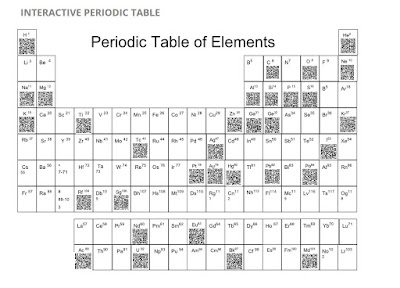
Sixth graders at Wilson Middle School were challenged to design and create digital posters of a chosen element from The Periodic Table of Elements using Google Draw.  Google Draw allows its’ users to collaboratively design their element posters. Students were advised of the rubric and each element poster was shared. 
 
6th grade, GAFE, Wilson Middle School, Science, Periodic Table of Elements, Google Drawings, Google Sites, Mrs. Lindsay Warren, creativity, QR Codes, Digital Design, Digital Learning,

 
After creating their own unique QR Code for each element, the students were able to embed them on the digital table. 

 site 
 Mrs. Warren not only wanted a very large model of the project in her classroom, but she also wanted to create a website for the students to use and share as to prepare for the upcoming assessments.  After reviewing options for showcasing their elements, students chose the website application Google Sites. With Sites, text and images come alive!. The teacher was able to create the original site and then let the students take it from there. Sites allows the creator to grant editing accesses to other users. Mrs. Warren added the students and supported them as they made decisions regarding design and organization.  The group editors consisted of Jenna, Gilbert, Carson, Sydney, Reese, Owen, and Gabriel.  Group editors provided feedback to others by editing content for errors in spelling and punctuation. Gilbert and Owen stated, “We improved all punctuation and were able to move things around to make things organized and readable.” 

Sydney and Reese both said, “This surely wasn't an individual project. We had a team that worked hard together and completed this project as fast and precisely as we could.” Gabriel and Jenna summed it up well, "We loved this project because we got to learn facts about the Periodic Table of Elements in a fun way. We didn’t just have to listen to the teacher talk, we got to create and learn at the same time." They both agreed that next year's class should do this project. "I think they’ll have fun," said Carson.

Mrs. Lindsey loves how Google tools make quick, effective collaboration and communication a snap.  “It frees more time to spend on teaching and learning which makes this an ideal environment for the 21st century classroom,” she stated. This completed site was posted onto Mrs. Warren’s Moodle page to allow students to access 24/7 for reflection and review. 

These activities are aligned with ISTE Student Standards:
1. Empowered Learner - Students leverage technology to take an active role in choosing, achieving and demonstrating competency in their learning goals, informed by the learning sciences. Students: a. Build networks and customize their learning environments in ways that support the learning process.
b. Use technology to seek feedback that informs and improves their practice and to demonstrate their learning in a variety of ways.


2. Digital Citizen
- Students recognize the rights, responsibilities and opportunities of living, learning and working in an interconnected digital world, and they act and model in ways that are safe, legal and ethical. Students:a. Engage in positive, safe, legal and ethical behavior when using technology, including social interactions online or when using networked devices.
b. Demonstrate an understanding of and respect for the rights and obligations of using and sharing intellectual property.


3. Knowledge Constructor
- Students critically curate a variety of resources using digital tools to construct knowledge, produce creative artifacts and make meaningful learning experiences for themselves and others.  Students:
a. Plan and employ effective research strategies to locate information and other resources for their intellectual or creative pursuits.

b. Curate information form digital resources using a variety of tools that methods to create collections of artifacts that demonstrate meaningful connections or conclusions.


4. Innovative Designer
- Students use a variety of technologies within a design process to identify and solve problems by creating new, useful or imaginative solutions. Students:
a. Select and use digital tools to plan and manage a design process that considers design constraints and calculated risks.


 6. Creative Communicator - Students communicate clearly and express themselves creatively for a variety of purposes using the platforms, tools, styles, formats and digital media appropriate to their goals. Students:
a. Choose the appropriate platforms and tools for meeting the desired objectives of their creation or communication.
 
b. Create original works or responsibly re purpose or remix digital resources into new creations.
c. Communicate complex ideas clearly and effectively by creating or using a variety of digital objects such as visualizations, models or simulations. 
d. Publish or present content that customizes the message and medium for their intended audiences.


7. Global Collaborator
- Students use digital tools to broaden their perspectives and enrich their learning by collaborating with others and working effectively in teams locally and globally. Students:          
a. Use digital tools to connect with learners from a variety of backgrounds and cultures, engaging with them in ways that broaden mutual understanding and learning.
b. Use collaborative technologies to work with others, including peers, experts or community members, to examine issues and problems from multiple viewpoints.
c.  Contribute constructively to project teams, assuming various roles and responsibilities to work effectively toward a common goal.