Showing posts with label Research. Show all posts
Showing posts with label Research. Show all posts
Tuesday, December 12, 2023

Tuesday, February 19, 2019
Collaboration that BLEW our Mind and FLOODED our Learning!
“This project was so cool! We got do our own research and meet 7th graders who learned about tornadoes and floods too.” -Alondra (4th Grade Hughes Elementary)
From research to organization to collaboration, and then feedback and revision, students in Mrs. Turner and Mrs. Covarelli’s class had a learning experience that they won’t forget!
It just so happened that 7th grade students at Tidwell Middle School were learning about catastrophic events the same time that these 4th grade students were doing research. Mrs. Wellborn and Mrs. Christian's were part of a scheduled ZOOM meeting that allowed them to provide feedback for 4th grade and share a little about what they learned about tornadoes, floods, and the effects these disasters had on the environment. “It was nice to hear feedback so that we could fix parts of our website," Said Alondra. She added, "it was also nice because when we were texting (AKA: typing on collaborative Google Slides), my partner sent us a link to their 7th grade project. It was cool to learn more facts from them.” Naomi added, “I liked that we got to learn with the 7th graders that we got to see some of what we are going to learn in 7th grade. We even got to meet our future 7th grade teachers!”
Global Collaborator
 |
| Virtual Connection via Zoom |
From research to organization to collaboration, and then feedback and revision, students in Mrs. Turner and Mrs. Covarelli’s class had a learning experience that they won’t forget!
As a part of a Lucy Calkins unit, students were put into groups based on interested level to research a natural disaster or weather event. They were responsible for taking the overarching topic and creating subtopics within that. They did their own research, took notes, and cited sources to write a final essay with their research. After writing the essay, groups then created videos using FlipGrid to share what they learned about their event.
RESEARCH AND WRITING:
According to Alondra, the most challenging parts of this project was the research. “When you type too much in your search, sometimes you don’t get what you need. We had a hard time finding just the right information.” Mrs. Covarelli agreed that research was the most difficult part for her students. She points out, “Students struggled with how to use keywords in search engines to find the results they were hoping for. We did mini lessons on how to use keywords when researching. Some students also had a hard time finding research on their subtopic, so they changed subtopics based on the research they were finding online.” Alondra added, “Our teachers helped us by giving us safe search websites. It was nice that Mrs. Covarelli was protecting us from any bad websites.”
ORGANIZING AND PUBLISHING:
Two specific groups took their information and organized it within a Google Site to submit for Expo 2019. Naomi's group researched floods. She states, “I liked creating a Google Site with my group because we could all work together. We could see each other’s work and get feedback from each other. If someone was absent we could still see their work.” Mrs. Turner helped students learn the importance of organizing a website and making information engaging and clear for others. Students added their Flipgrid video to the website along with photos, and even maps to bring their research to life for their audience.
COLLABORATING AND RECEIVING FEEDBACK:
 |
| 7th Grade and 4th Grade Partner Up on Collaborative Slides |
 |
| Mrs. Wellborn and Mrs. Christian Meeting 4th Grade Students at Hughes Elementary |
SHARING: Not only did these students share their site with 7th graders, but they have also been selected to present at Expo 2019! Come learn more about their experience on February 28th! "I'm so excited about Expo. I went in 2nd grade, but I’m glad to get to share my project again this year," said Aislynn. “I’m very excited about Expo. It’s my first time doing it,” added Naomi. For Adelais, this will be her second time at Expo. “ I went in 2nd grade, but I’m glad to get to share my project this year and even see other people’s projects.” Presentation times can be found at: https://expo.nisdtx.org/
Click the images below to view student websites:
ISTE STANDARDS:
 |
| Floods by Aislynn, Landon, Yosari, Lia, Rachel, and Naomi |
 |
| Tornadoes by Adelais, Alondra, and Bella |

ISTE STANDARDS:
Knowledge Constructor:
- 3a - Students plan and employ effective research strategies to locate information and other resources for their intellectual or creative pursuits.
- 3b - Students evaluate the accuracy, perspective, credibility and relevance of information, media, data or other resources.
- 3c - Students curate information from digital resources using a variety of tools and methods to create collections of artifacts that demonstrate meaningful connections or conclusions.
Creative Communicator
- 6a - Students choose the appropriate platforms and tools for meeting the desired objectives of their creation or communication.
- 6b - Students create original works or responsibly repurpose or remix digital resources into new creations.
- 6c -Students communicate complex ideas clearly and effectively by creating or using a variety of digital objects such as visualizations, models or simulations.
- 6d - Students publish or present content that customizes the message and medium for their intended audiences.
Global Collaborator
- 7a - Students use digital tools to connect with learners from a variety of backgrounds and cultures, engaging with them in ways that broaden mutual understanding and learning.
- 7b - Students use collaborative technologies to work with others, including peers, experts or community members, to examine issues and problems from multiple viewpoints.
- 7c -Students contribute constructively to project teams, assuming various roles and responsibilities to work effectively toward a common goal.
Wednesday, November 1, 2017
Advancing Academics: More than Test Prep
As educators focus on growing their Advanced Academics programs and improving AP test scores, too often their conversations begin and end somewhere around “test prep”. While there is value in traditional test prep strategies like multiple choice practice and repetitive text analysis, students also desperately need to be able to think critically and apply their knowledge in meaningful ways.

Northwest High School’s AP World History teachers, Jeanette Jones and Nicole Olson challenged their students to collaboratively depict the effects of historic trade routes based on the five major themes of their AP course. Student Sam clarified, “We were given a map of all of the trade routes …and had to accurately describe the interactions between those empires on an environmental, economic, social, political, and cultural level.” Students worked together to research and create an infographic that compares trade routes and visualizes key points of their research. (You can access the full instructions here.)
Students were given choice in how to create their graphics; however, Jones & Olson specified that students couldn’t use PowerPoint or Slides to create their presentations because while useful, these platforms are too visually limiting for the needs of this assignment. Instead, they recommended Piktochart, a platform designed for creating professional presentations and graphics. (Check out these student examples: Sample: Smore & Sample: Piktochart.)
Student Bailey reflected on how this task prepared her for the AP exam, saying, “Trade routes are a major part of how things got diffused in the world… how language got diffused and cultural trade… those are important things to know for the AP exam because they are such a huge part of history.” She added, “And when I make a presentation for something, I typically try to make myself an expert in it…”
Creating infographics as a way to present research and demonstrate understanding of content engages students in a hands-on, student-centered learning process. Sam points out that, “When [you] read a textbook, you’re just looking for answers to the reading guide or for vocabulary. Having to do a project, to write it down and describe it, you really think about what you’re doing and how you’re learning it”. When students engage in collaborative tasks that require in-depth analysis and critical thinking, they gain sincere ownership of their learning that results in a lasting understanding of content in ways traditional test prep alone cannot provide.
Monday, April 17, 2017
From Note Taking to Site Creating
 |
| Students work on their Science Sites |
Two students, Yune and Kayla, learned a lot throughout this process and went above and beyond to make their site unique and effective. Yune points out, "I’ve learned a lot more about energy during this unit, because I have had to do my own research. It has opened my mind up to things that I haven’t thought about before." Kayla adds, “This was really fun because I got to learn how to design a website while I was reviewing the science I had learned." She adds, "I love keeping things organized, so this project helped me do that."
One aspect that both of these students learned was how to organize information in an effective way. Kayla states, "I had never heard of sub pages before. Sub pages are really helpful when you have a lot of information to put together." Students also learned about the importance of visuals and the impact that they can have. Mr. Anderson sent a Google Slides template to students to encourage them to identify types of energy and include a GIF or image that would show that specific energy type. "The GIFs are important for energy types because you can actually see the motion," claims Kayla.
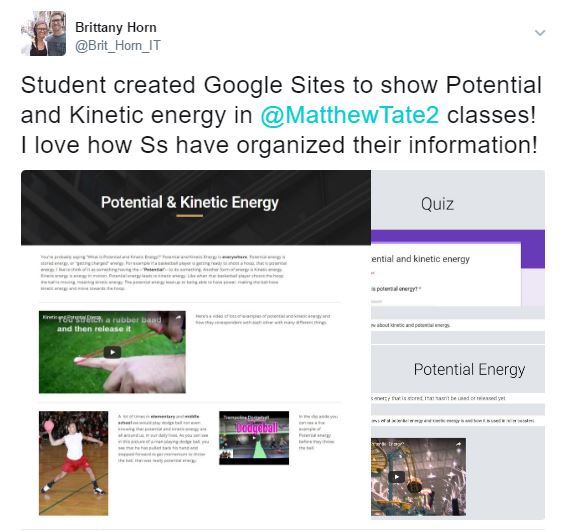 When asked what was unique about their site, Yune responded, "I included a Google Form in my website for visitors to quiz themselves. At first I just listed questions, but during this project, Mr. Tate showed me how to create a Google Form." Kayla's site is unique in that she created it to look like a school yearbook. She even disguised her definitions page to resemble student quotes.
Designing a website requires research, organized thinking, visual learning, and allows students to personalize their work. "The plan is for students to take these sites with them as a living document that they can easily access, even after this year," stated Mr. Tate. He added, "I would have liked for students to leave each other feedback and expand their audience." Mr. Anderson showed the students how to add a feedback form to their site, so that they can start helping each other during the process later in the year. The Google Sites that have been created are only the beginning for these students!
Check out a few more student examples here:
- https://sites.google.com/nisdtx.org/kooper-jose-science-site/home
- https://sites.google.com/nisdtx.org/taylorhymas/home
- https://sites.google.com/nisdtx.org/jleon/home
Student ISTE Standards:
- 1b: Students build networks and customize their learning environments in ways that support the learning process.
- 3c: Students communicate complex ideas clearly and effectively by creating or using a variety of digital objects such as visualizations, models or simulations.
- 6b: Students create original works or responsibly repurpose or remix digital resources into new creations.
- 6c: Students communicate complex ideas clearly and effectively by creating or using a variety of digital objects such as visualizations, models or simulations.
Monday, May 2, 2016
Technology is Making a Big Impact
 |
| Google Sheet Learning Journal with Peer Feedback |
The Tech Apps class has had many opportunities to utilize their Google Drive this year. This project, however, revealed that Google Sheets could be more than a place for numbers. Mrs. Wilsie found a resource to share with students that allowed them to organize their research and thoughts in different columns and tabs. After a few days of research, students shared their sheet with a small group to gather feedback on their progress. They then used the feedback to go back and fill in gaps.
Aryi wants to be a dermatologist, so she chose to research how technology has influenced the medical world. She's especially enjoying using Google Sheets for the learning journal. "The learning journal was very helpful. When I use technology for projects, it’s usually not very organized, so I go back to using paper. The learning journal showed me how to organize my information." She added, "I got to write out what I had learned in the different columns which was good because it kept me from just pasting a bunch of research in one place." Another student, Brody, points out, "I like using this because it’s an easy way to track your data. The sheet keeps up with the dates for us, so that we can go back and find them. I also like that I can have group members comment on my research."
 |
| Students using a variety of tools from the Tools That Make IT Click Blog to create their final presentation |
Another neat aspect of this project, is the amount of choice involved. Now that the research is complete, students are grouped based on their research topic. They will be putting together a presentation for the class on their research. Students are using the Tools That Make IT Click Database to get ideas. Brody comments, "We went through the tools and saw Emaze. I have used it once before and we chose it because we think that we can embed our different projects within the slides."
Tatum is doing her research on Quantum Physics and is presenting her information in a Google Site. She wants to take something big and outside of the box and make it easier for others to understand. Another student LiLi is creating a PowToon video for her presentation. "I’ve never used it before, but it looks like a cartoon and I think my class would enjoy watching this."
Students will be presenting their research presentations to the class this week. According to their research, technology has influenced many different areas of life, but it has also made a BIG impact on these Tech Apps students who get to try new tools and learn new skills daily!
Monday, March 21, 2016
An Experience Worth Every Penny
 |
| A tool for the presentation, a tool for feedback, and a tool for presenting information. |
 |
| Fine Tuning Presentation Skills with Doceri |
 Perhaps the most powerful aspect of this project was that students got immediate feedback from their peers. Punn comments, "Verso was nice because you got anonymity from your peers, so you could be honest and give true constructive criticism. At the same time, you got instant digital feedback." As seen in the image to the right, Verso allows the students to be anonymous when responding to each other, while the teacher can see student names.
Punn also expanded more on the research itself. He points out, "We used several sources while finding our research. The CIA world fact book was helpful for determining our world’s economic status, and a simple Google search gave us most of the information that we needed otherwise." Researching currency exchange was only a part of what students learned from this experience. It was a mix of organizing and communicating research, presenting ideas to an audience, and both receiving and giving feedback that made this experience worth the time invested!
Emily's Thinglink:

Punn's Thinglink:

Monday, January 25, 2016
How to Succeed in Virtual Business Without Really Trying
This year in Northwest ISD marked the opening of V.R. Eaton High School, and with it the Academy of Business Management and Entrepreneurship (BME). This means this is the last year for the flagship Virtual Enterprises International (VEI) class to be held at Byron Nelson High School. Since this class deals with the creation and management of a "real" business in a virtual world, it will be moving to the BME Academy after this year. VEI is a program where students learn about business by creating their own business in their classrooms, as shown in their video below:
About Virtual Enterprises International from VE International on Vimeo.
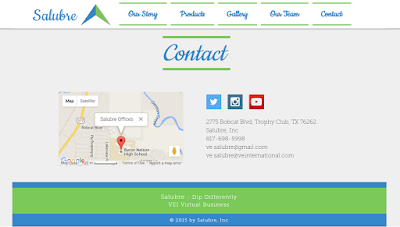 At Byron Nelson High School, currently the only school in Texas with a VEI course, Mr. Browarski's class has taken to this task like a fish to water. They have taken a vision of a business and made it a working machine. From payroll to HR, social media accounts to corporate webpages, marketing to online virtual marketplaces, their company Salubre has grown in leaps and bounds. Check out their story and success at www.ve-salubre.com.
 What this group of students has done is more than just create a website. They have created a business plan based on market research and models. They have a team divided into departments to handle all the responsibilities a real company would have to face. Students Ethan Langley and David Ryan, the Salubre Financial Team, discuss some of the intricacies of their company. "Essentially there are all the facets of a real life company. We keep track of the finances related to running our business, from sales and shipments to operating costs such as food, insurance, and utilities." The work each group in the company has assigned to them is not random, as David explained. "Each department has a specific set of tasks to perform during the course of the school year, including using our personal pay from the company to invest in or buy merchandise from other VEI companies (schools) around the country to keep their companies in business."
The creative and marketing team members describe how they went about creating all of this. The amount of software applications and skills that the team members have had to learn, often on their own initiative, is staggering. "We had to create logos, banners, catalog designs, web designs, all kinds of stuff," said Nathan Sokul from the creative team. "Primarily we use Adobe Illustrator, Indesign, Lightroom, and Photoshop. If we didn't know how to use something we had to figure it out for ourselves. I learned most of these during class by looking up video tutorials on YouTube or Lynda." Hayden Rivers, part of the marketing team, said they used Wix to create the website and then linked it to Google Analytics to continuously assess their company's exposure. "We have to do industry analysis by checking out prominent companies and looking at our VEI competitors." They also use Google Docs and Google Drive to organize and collaborate within the company. "Honestly, without this type of instant collaboration, this couldn't be done" says Hayden. "With the plethora of videos and guides available to teach yourself, and such easy access to free and cheap software, it makes all this possible."

Mr. Browarski's class is special. It's special because it isn't really a class at all: it's a business. A business developed and run by students. A business that is connected to and collaborates with other businesses both locally and globally. A business that has taught them life-long lessons by helping them to develop skills they can use as they enter the real business world. A business that has taught them how to succeed.
About Virtual Enterprises International from VE International on Vimeo.
 At Byron Nelson High School, currently the only school in Texas with a VEI course, Mr. Browarski's class has taken to this task like a fish to water. They have taken a vision of a business and made it a working machine. From payroll to HR, social media accounts to corporate webpages, marketing to online virtual marketplaces, their company Salubre has grown in leaps and bounds. Check out their story and success at www.ve-salubre.com.
 What this group of students has done is more than just create a website. They have created a business plan based on market research and models. They have a team divided into departments to handle all the responsibilities a real company would have to face. Students Ethan Langley and David Ryan, the Salubre Financial Team, discuss some of the intricacies of their company. "Essentially there are all the facets of a real life company. We keep track of the finances related to running our business, from sales and shipments to operating costs such as food, insurance, and utilities." The work each group in the company has assigned to them is not random, as David explained. "Each department has a specific set of tasks to perform during the course of the school year, including using our personal pay from the company to invest in or buy merchandise from other VEI companies (schools) around the country to keep their companies in business."
The creative and marketing team members describe how they went about creating all of this. The amount of software applications and skills that the team members have had to learn, often on their own initiative, is staggering. "We had to create logos, banners, catalog designs, web designs, all kinds of stuff," said Nathan Sokul from the creative team. "Primarily we use Adobe Illustrator, Indesign, Lightroom, and Photoshop. If we didn't know how to use something we had to figure it out for ourselves. I learned most of these during class by looking up video tutorials on YouTube or Lynda." Hayden Rivers, part of the marketing team, said they used Wix to create the website and then linked it to Google Analytics to continuously assess their company's exposure. "We have to do industry analysis by checking out prominent companies and looking at our VEI competitors." They also use Google Docs and Google Drive to organize and collaborate within the company. "Honestly, without this type of instant collaboration, this couldn't be done" says Hayden. "With the plethora of videos and guides available to teach yourself, and such easy access to free and cheap software, it makes all this possible."

Mr. Browarski's class is special. It's special because it isn't really a class at all: it's a business. A business developed and run by students. A business that is connected to and collaborates with other businesses both locally and globally. A business that has taught them life-long lessons by helping them to develop skills they can use as they enter the real business world. A business that has taught them how to succeed.
Monday, September 14, 2015
Lone Star Road Trip
What's better than a family road trip? I know... a road trip planned by the kids!!
 Given their newfound knowledge of Texas History, fourth grade students in Mrs. Kerry's class, at Peterson Elementary, dug deep into their Texas roots as they worked in groups to plan a road trip around the Lone Star State. With a set budget and the challenge of finding something to do within each of the four regions of Texas, students got straight to work. Students researched hotels, activities to do within their selected cities and places to eat. Groups also had to keep mileage in mind as they figured out how much gas they would need to take their trip.
Talk about real world application! Students were given a $2,500 budget that would fund
their gas, food, lodging, activities and more.
Careful planning was necessary as the group made decisions on how to
best spend their money. Emma said, "Some skills I think I gained for the
future are that I'll be able to calculate the cost of taking a road
trip. By calculating the cost I will be able to figure out what I'm
going to eat and do and where I am able to stay".
As students spent time reflecting on their work, Lindsay commented, "My favorite part of the project was the itinerary because you can plan all the times and exactly how long you want to stay at something." Choosing the destinations they would visit in each region took a lot of research and thought. They were tasked with finding information about that region's industries, climate, plant/animal life, and historical facts.
 Students wrapped up their project with a digital presentation and persuasive letter for their parents. Their letters included three reasons why their parents should agree to take them on this road trip, while their digital presentations highlighted details from each region of Texas they would be visiting.To pull the entire project together, students learned the art of "App Smashing", while utilizing Pic Collage, 30 Hands, and Weebly. By using Weebly to culminate their project, students were able to reach a larger, more global audience as they shared their learning with family and friends.
To view the road trip two groups of fourth graders organized, click the images within this post. Their Weebly sites are private, but can be accessed with a password (mrskerry).
Given their newfound knowledge of Texas History, fourth grade students in Mrs. Kerry's class, at Peterson Elementary, dug deep into their Texas roots as they worked in groups to plan a road trip around the Lone Star State. With a set budget and the challenge of finding something to do within each of the four regions of Texas, students got straight to work. Students researched hotels, activities to do within their selected cities and places to eat. Groups also had to keep mileage in mind as they figured out how much gas they would need to take their trip. Talk about real world application! Students were given a $2,500 budget that would fund
As students spent time reflecting on their work, Lindsay commented, "My favorite part of the project was the itinerary because you can plan all the times and exactly how long you want to stay at something." Choosing the destinations they would visit in each region took a lot of research and thought. They were tasked with finding information about that region's industries, climate, plant/animal life, and historical facts.
Students wrapped up their project with a digital presentation and persuasive letter for their parents. Their letters included three reasons why their parents should agree to take them on this road trip, while their digital presentations highlighted details from each region of Texas they would be visiting.To pull the entire project together, students learned the art of "App Smashing", while utilizing Pic Collage, 30 Hands, and Weebly. By using Weebly to culminate their project, students were able to reach a larger, more global audience as they shared their learning with family and friends.To view the road trip two groups of fourth graders organized, click the images within this post. Their Weebly sites are private, but can be accessed with a password (mrskerry).
Sunday, April 12, 2015
Texas Oil: A Digital Exhibit
 For this project, 7th grade Medlin students were asked to create a digital exhibit that records the history of the first Texas oil boom at Spindletop in 1901 and describe the social and economic effects of the discovery. Students researched the history of Spindletop, collected data, composed relevant charts and/or graphs, and present the information digitally. Students had the choice of what to use and how to present their digital exhibit.
This student group created an emaze to communicate their learning on Texas oil. "I benefited from this project as a student and learned how the oil discovery at Spindletop accelerated the production and use of oil. The old discovery at Spindletop made oil the leading energy product for automobiles. This large oil discover led to oil production taking over as one of the World's largest industries is in the US and even the World."
Vanessa and Isabella created a video using Microsoft Movie Maker for their digital exhibit. "This project was so much fun! This project was a good experience for us to learn more about the oil industry. The technology we used was appropriate for the task given. I thought the fact that boomtowns arose in a matter of days was very interesting. I loved this project!"
For more projects, please visit the links below:
Smore: The Rise of Black Gold
Thanks to Mr. Perrin and Ms. Scholler for their collaboration on this post.
Thanks to Mr. Perrin and Ms. Scholler for their collaboration on this post.
Monday, November 24, 2014
Creating Art in History - A Nontraditional Use of Google SketchUp
What’s going on behind the walls of history? The Pre - AP U.S. History class of juniors just finished their new creative art project. John Klingseisen, STEM Facilitator, created the project around a field trip to the Fort Worth Amon Carter Art Museum where students took a step inside the past by learning the ideas behind American art during the Gilded Age. The project itself consisted of a physical art piece, an informative essay including topics such as industrialization, urbanization and Progressivism, even a digital representation of the art piece.
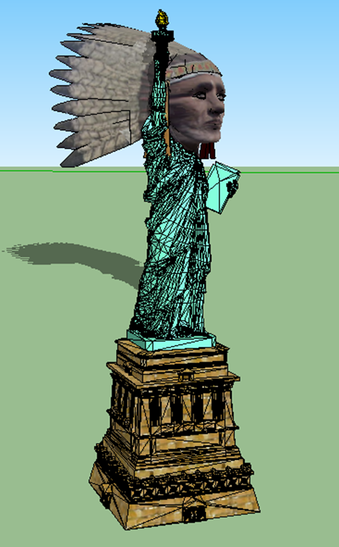 One art piece per group was required. The essay portion was necessary for grading. This assignment was a reflection of what a student learned from personal research as well as how to follow a rubric’s criteria. The required amount of APA cited sources left in the students in charge of what they learned. On the rubric it was mandatory that every student in their essay use outside sources such as books or databases and not the more common sites like Wikipedia or Bing. The digital representation was accomplished through Google Sketchup where different textures and feature were applicable.
Nathan Patske Pre - AP U.S. History student said “Our project was the best,” piece including an electrical switch for lights. Although enjoying the project the student felt there was something missing. Nathan added “There should be checkpoints” for the progression of the art pieces to keep one single person from working on the whole art aspect.
A question for the History Facilitator was, “Next year will the project will be implemented?” The answer, yes. Perfect or not, the project broke out of the regular Project Based Learning format unlike regular history projects with informational question and monotonous reading instituting hands on art the teams were able to share and finally present to a panel of colleagues.
STEM Academy Newsletter
By: Martin Bowser, STEM Academy Student
One art piece per group was required. The essay portion was necessary for grading. This assignment was a reflection of what a student learned from personal research as well as how to follow a rubric’s criteria. The required amount of APA cited sources left in the students in charge of what they learned. On the rubric it was mandatory that every student in their essay use outside sources such as books or databases and not the more common sites like Wikipedia or Bing. The digital representation was accomplished through Google Sketchup where different textures and feature were applicable.Nathan Patske Pre - AP U.S. History student said “Our project was the best,” piece including an electrical switch for lights. Although enjoying the project the student felt there was something missing. Nathan added “There should be checkpoints” for the progression of the art pieces to keep one single person from working on the whole art aspect.
A question for the History Facilitator was, “Next year will the project will be implemented?” The answer, yes. Perfect or not, the project broke out of the regular Project Based Learning format unlike regular history projects with informational question and monotonous reading instituting hands on art the teams were able to share and finally present to a panel of colleagues.
STEM Academy Newsletter
By: Martin Bowser, STEM Academy Student
Monday, November 17, 2014
Reality and Redefining Persuasive Writing
From a mere four reality TV shows in 2000 to a staggering 340 in 2010, this phenomenon has captured audiences and changed the face of television. So, how could a topic you are passionate about be transformed into a reality show? This is the question that Ms. Appel, from Medlin Middle Sschool, posed to her 8th grade language arts students. Students were tasked with collaborating to design a persuasive multimedia pitch for a reality tv show.
Students worked in teams to develop a reality show name, a concept, a catch phrase, and conducted research to identify the network that would be the best for for their show. After developing the foundation for their show, the groups created a storyboard and had the opportunity to chose the media or presentation tool they would utilize to present their persuasive pitch. The last piece of the puzzle was presenting their multi-media presentation to an audience and receiving feedback.
Josey, Brydon, and Shayleigh developed a showed called Fiction Wars. "Our mission is to get multimedia representation for readers, and their books, everywhere. Our show puts readers into mind bending situations based on their favorite book, testing their knowledge and resilience under pressure. We believe that CBS is the best fit for our show because not only is it a major network, it has a strong reputation in the gameshow world."
"I felt like this was a great idea for a project. It allowed me to feel free to choose a topic I was passionate about. I was fun to get to come up with an idea and work through the process. Getting to choose our own tool allowed us to find what works best and make it our own. Using technology enable us to make our project more professional than we could have on paper. We were able to combine audio, visual and imagery to create a fun presentation for our audience." Shayleigh added that they were confident their persuasive technique was effective based on the clapping their group received at the end of their presentation. She found that this was a fun way to learn about persuasion while incorporating it with an idea they were passionate about.
Click here to view the rubric for this project.
Monday, October 6, 2014
A Global Perspective with Blendspace
 Having a global perspective is essential for today's learners. Students in Ms. Nolan's class had the opportunity to explore professional etiquette in different situations and to identify strategies for dealing with differences in ethnicity. Student's used a tool called Blendspace to create a way to communicate their learning and to allow others to learn from their research.
Blake explored etiquette as it relates to Indonesian culture. He found that a man should never extend his hand to a woman and he should always wait for her cue. He also discovered that finger pointing is considered inappropriate.
Audrey focused her research on etiquette tips for Saudi Arabia. "The left hand is considered unclean or unpure and reserved mostly for hygiene. Also, avoid gestures with the right hand. Do not point at another person directly and do not eat with the left hand. The "thumbs up" gesture is offensive and rude. Furthermore, try not to cross your legs when sitting and never show the bottom of your feet. It is common and proper to remove your shoes before entering a building or a person's home. Follow the lead of your host."
Thursday, April 3, 2014
Biography Analysis: A Lesson on Character
 If a teacher is like a tour guide, their students become travelers on a shared journey. From this perspective, students are afforded freedom of choice, a sense of independence, and agency over the experience. In Mrs. Laura Taylor-Dunn's 5th grade class at Peterson Elementary, students traveled back in time and examined biography texts about their chosen historical figure. They then created a published document and newscast showcasing what they learned.
Students worked together in collaborative groups to analyze and identify the traits and characteristics of their historical person and recorded their findings in a circle map. These traits were then used to create a recording sheet for their research projects. Students worked with their Library Media Specialist, Mrs. Sanders, to research and compile important information about their famous person. After analyzing their notes, students selected three character traits they felt their famous person best displayed and justified their selections. The resulting artifact was a Microsoft Publisher newsletter. Students then used an iPad application called TouchCast to create a news report video about their famous person.
In Ashlyn's examination of Eleanor Roosevelt, she highlights that "people still think she was respectful, caring, and nice because she cared about how other people felt and she focused on human rights and women's issues. I guess you can say she followed the Golden Rule."
According to Ms. Taylor-Dunn, "this project enhanced student learning because it was fun! Not only did the students learn how to use Microsoft Publisher, they also had the opportunity to explore an app called TouchCast. Using this technology allowed the students to express themselves creatively and to communicate their ideas authentically."
Subscribe to:
Posts (Atom)