Showing posts with label Flipgrid. Show all posts

Saturday, September 25, 2021

How Summer PD Impacts Student Learning!


“Implementing Hyperdocs was a complete push out my comfort zone. Relinquishing the control early in the school year was not something I was used to” comments Mrs. Spring, 4th grade at Nance Elementary. Kim Spring has not only been intentional about the professional development she attends, but also intentional about implementing her learning in meaningful ways with students. Two years ago, Kim helped co-lead “Delivering Engaging Lessons with Pear Deck.” This was a tool Kim learned and then implemented consistently with her students. Pear Deck wasn’t just a new tool for Kim. Pear Deck meant continual formative assessment, intentional student discourse, and even a way for students to create assessments for their classmates. By attending and leading Pear Deck sessions, Kim was able to maximize the use of Pear Deck to meet campus and district learning goals. 

Last year, Kim decided to attend “Save Time and Give Choice with Hyperdocs” led by Instructional Technologists Shelly Hall and Kylie Lloyd. Immediately after the session, I received an email from Kim with her takeaways and goals for implementing a hyperdoc with her class. Designing a hyperdoc takes intentional planning. Mrs. Spring used backward design and considered her learning targets and desired outcomes as she created each aspect of her hyperdoc. Since this would be a self-paced lesson, she had to plan ahead for students. 

During the 3rd week of school, Kim’s students experienced their first hyperdoc! This unit on Place Value was not only engaging and interactive, but also allowed for gradual release of the content and self paced learning. Gabriella, Tommie, and Abby were three students that specifically enjoyed this unit. Gabby mentioned, “I liked learning at my own speed and pace. I was able to take things one step at a time, but always had something I was working on.”  


The unit started with students ENGAGING in the topic of place value through direct instruction and focused videos for students to watch. After students had a grasp on place value they were asked to EXPLAIN their learning in Flipgrid. The Flipgrid check in allowed Mrs. Spring to see who understood the content and who needed extra support. Mrs. Spring pointed out, “Flipgrid comes in handy as I'm able to hear the kids verbally explain their reasoning and see their work. I am able to leave feedback to them as well.” 

As students progressed through the hyperdoc, they were asked to APPLY their learning. Mrs. Spring had students complete a self-paced Pear Deck to assess their knowledge up to this point. She pointed out,  “I LOVE Pear Deck. It allows for self-paced lessons and I’m able to leave feedback at any given time. It helps me keep track of who has finished, so I know where each student is. It’s a great teacher sidekick!” 

Instructor and Student Paced Pear Decks Throughout The Unit

Next, students SHARE and REFLECT with their peers. They look at problems they’ve completed in their Stepping Stones book, along with the work they’ve explained in Pear Deck and Flipgrid to answer the following questions with others: 

1) What was your favorite part of this unit?

2) Was there a part of this unit that confused you?

3) Show a partner how you explained place value to the millions on slide 4.

Lastly, students are given an opportunity to EXTEND their learning. Not all students will have time for this section of the learning, but it’s a great way to challenge students who have successfully grasped the content. In fact, this is a great way to differentiate learning for students. Students were given the opportunity to create their own Pear Deck to share with the class. This task required students to apply their learning by creating their own questions. Both Tommie and Abby pointed out “The most challenging part of this unit was creating the Pear Deck. It was tough making the questions.” 

All in all, Mrs. Spring’s first hyperdoc was a success! “I love the independence of it all,” states Kim. “It was really neat to watch the kids take such quick ownership of their hyperdoc. I have a large group of students that are pretty above level in math. This helped with my fast finishers. They instantly went into their hyperdocs and got going!” 

This unit is a prime example of the NISD Learning Framework and the intentionality that goes into a well designed lesson in NISD: 

Click HERE to Enlarge Image


Tuesday, April 20, 2021

Spring Bingo Challenge: Highlighting the Heroes


The amount of technology available to teachers can feel overwhelming. It seems like a new tool is released each week, making it hard for anyone -- let alone the busy teacher -- to keep up. But when it boils down, we know that technology itself isn’t necessarily innovative or meaningful on its own. Rather, we need teachers who intentionally implement that technology in their lessons and classrooms for the most impactful learning to happen. It's also true that teachers need time with tech tools to explore and implement, to try and try again.

In an effort to help teachers sift through the barrage of technology tools and templates available to them, NISD's Instructional Technology team hosts an annual Spring Bingo Challenge (happening in 2021 from April 1-30). Throughout this time teachers, K-12 and throughout the district are challenged with a fun way to explore instructional technology tools (new and old) at their own pace and when it makes sense for them.

A major benefit to this challenge happening during the Spring semester is that school is still in session. Meaning, instead of bookmarking a bunch of exciting ideas during a Summer PD that we someday hope to use (we’ve all been this person), educators are able to implement their ideas with students in the moment, as they learn, and when they have the support of their team and instructional technologist should they need it. After all, there is research enough to support the fact that effective job-embedded professional development can have a positive impact on teacher practice. However, between breaks, benchmarks, standardized tests, and end-of-year celebrations it shouldn't come as a surprise that the Spring semester is also a wildly busy time of year for teachers.


And yet...


At the time of writing this, we are already halfway through this year's challenge and well into the Spring semester. Teachers are asked, as a part of the challenge, to share their learning on Twitter using the hashtag #NISDITBingo.


Teachers have too much on their plates.

They are teaching in a pandemic.

They are tripping over their to-do lists.


And yet, that hashtag is filled with teacher heroes.


#NISDITBingo is filled with dedicated educators who are committed to prioritizing their professional growth for the sake of their students. It's filled with those who are courageous enough to try something new, and who are determined enough to try it now -- today -- when it will impact these learners. That hashtag is filled with teachers who are learning by doing and who are sharing their successes.


The thing is -- change is hard. Pushing yourself to learn something new, especially while those around you talk about things coming to an end, is hard. So, yes. These teachers are heroes who deserve to be celebrated.


Highlighting the Heroes

Below are only a few "hero highlights" from the Spring Bingo Challenge. See all of the shared successes at #NISDITBingo.


Engaging Hooks with "Mystery Reveals" 

As educators, we know the importance of grasping our learners early on in a lesson or unit. Creating a little mystery around a topic is a great way to get hook students and get them excited about their learning. When teaching her students how to compare fractions, Mrs. Kemper used a “Mystery Reveal” activity in Seesaw where students used a magnifying glass to reveal the fractions as they learn and work to solve the problems.


If you don’t use Seesaw, don’t sweat it! Mrs. Herrera used a similar Jamboard template to engage her students in problem-solving and to review the math concepts they were working on.


Problem-Solving and Communication: Flipgrid

Mrs. Robbins creatively combined a Google document and QR codes with Flipgrid, a platform for video responses complete with a whiteboard. She cleverly created a problem-solving “flip escape”. For this task, students had to solve each math problem, scan the cooresponding QR code, and then entering a code word so they could share how they solved each problem in Flipgrid before they could unlock the next one.


Not only did she design an engaging, gamified learning experience for her students, but by integrating Flipgrid at each step, students were empowered with a voice and recognized for their success in learning, where they could both showcase and share their learning to an authentic audience of their classmates. Even better, because of her intentional planning students could collaboratively learn from one another along the way. 


In Mrs. Waddell's class, students were given the chance to lead a discussion through Doceri, an app for mobile educators. Not only did Mrs. Waddell's intentional use of this tool foster classroom communication and individual reflection, but it gave students a chance to practice leadership while learning.


Assessment: Jamboard

Mrs. Mogg wisely tweaked a pre-made KWL template from Canva to use as the background in an interactive Google Jamboard. By moving the KWL graphic from a static Canva to the interactive Jamboard, she elevated the task. Students were engaged on a platform that let them collaboratively share their thinking. 


Feedback: Bitmoji, Canva, Seesaw, & Autocrat

Feedback is a critical part of learning and should be timely, relevant, and specific. In a creative twist, Mrs. Weiss designed her own “digital stickers” in Canva using her Bitmoji. She then used her digital stickers to provide her learners with visual feedback in Seesaw. Similarly, Mrs. Washam took that idea a step further, using the audio tool to provide her students with verbal feedback that accompanied the sticker.  


Critical feedback is important to learning, but positive feedback can go a long way in building relationships with students and parents. Using a Google Sheets Add-on called Autocrat, Mrs. Moggs was able to quickly and efficiently send home personalized, positive notes for each of her students. This is such a powerful way to easily celebrate students and communicate with parents while saving on time.

Review: Flippity!

Mrs. Janese created an interactive game to help her students review their sight words using one of the templates provided on Flippity, which offers a variety of templates to easily turn a Google Spreadsheet into engaging activities. Then, she was able to easily and seamlessly link to the game through a Seesaw Activity so that her little learners could easily navigate to and participate in their learning task. 


Interested in exploring more? Want to put these ideas to use in your own classroom? 

Northwest ISD’s BINGO Challenge is running from April 1-30, 2021. Anyone can play and participants can start learning at any time during the challenge. Get your own BINGO board here! 

Monday, September 23, 2019

When Characters Come Alive

Kirstie Cooper’s ELA class at Adams Middle School is one that students are consistently engaged, challenged, and having fun. She takes everyday lessons and turns them into learning experiences for her students. 
"All Summer in a Day" is a Science Fiction short story by Ray Bradbury. Cooper gave her students a digital copy though Google Classroom, which streamlines the process of sharing files between teachers and students. As they read the story they used Kami to annotate the text. Students focused on the characterization of Margot as they read.When finished, an analysis of the text which included looking at elements such as point of view, figurative language, and theme was done. Once students completed that task, they began compiling all of their knowledge of the text to incorporate into the final task.


To begin, Cooper used Flippity to do a random group generator. The kids weren’t thrilled that they didn’t get to choose groups, but Flippity eliminated that potential management struggle. Next, students created a Google Doc, which they collaborated with each other on, shared with the teacher, and begin creating a script. Students were tasked with creating a “talk show” style script where there would be hosts who interviewed the two main characters of “All Summer in a Day”, Margot and William. Students had to create 3 questions per guest and formulate their response based on inferences from the text and the characterization of Margot and William. Finally, once students finished their script, they used Flipgrid to record themselves hosting their talk show. This gave quiet students a voice, it allowed us to see the profound thoughts you didn't know were there, and took their learning to a deeper level than you thought possible for this learning opportunity.
Student Talk Show Example


Student Talk Show Example

Monday, May 6, 2019

Philanthropy Partners: A Collaboration Between Elementary Schools

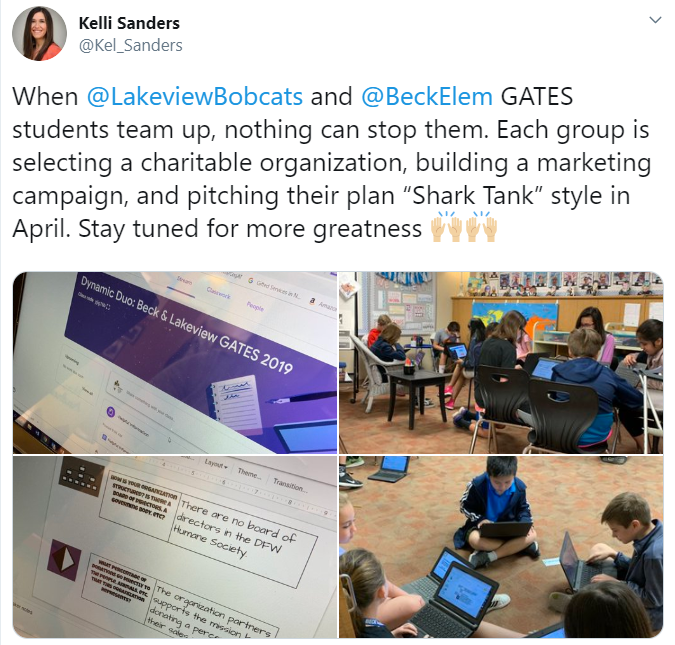
The spring semester brings about a lot of change. One of the biggest changes is the anticipation for current fifth graders, as they begin to think about and prepare for middle school. The transition into middle school can be challenging. To help ease that transition, the GATES teachers at Lakeview Elementary (Mrs. Andrews & Mrs. Blake) and Beck Elementary (Mrs. Moses & Mrs. Pickett) teamed up for a dual campus philanthropy project. 
By definition, a philanthropy project promotes the welfare of others, expressed especially by the donation of money and goods. Students were tasked with choosing a nonprofit organization within the community that aligned with their own unique passions and interests. For Ella, having a voice and choice was very important. “I like that we got to pick our own interests and that we didn’t have to do one thing and one thing only.” A variety of organizations were researched, with the primary focus being children, women, senior citizens, the homeless, veterans, animals (domestic and wild), literacy, environmental issues, and sports. Once students had a general idea on the type of organization they wanted to pursue, they completed a Google Form which helped teachers group them with peers. 


The groups were made up of students from both campuses. This meant some of their group members would not be available for face to face collaboration on a daily basis because they were at another school. Nakkitha was especially excited about the cross-campus collaboration. “I loved how we got to collaborate with people outside of our school because we got to meet new people and make new friends”. As group members dove into more specific research on their common interests, they utilized Flipgrid and Google Slides to communicate. These platforms allowed group members to continue the “conversation” even after their scheduled GATES time was over. Check out this Mixtape to hear a sampling of the group interactions. A walking field trip from Lakeview to Beck was also planned into their work time to allow groups face to face interaction.

Click the image above to view Shark Tank presentation
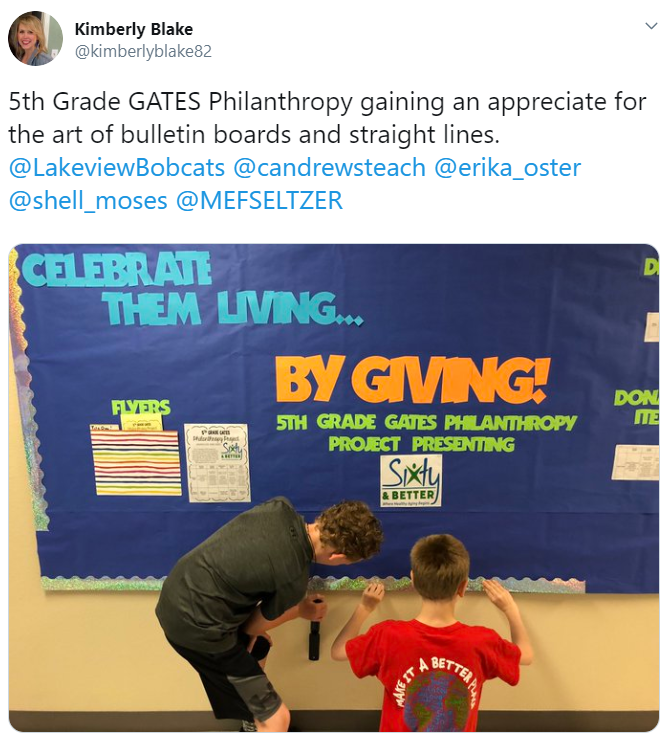
Groups were tasked with creating a digital presentation and pitch to be presented Shark Tank style. Their presentation would introduce the organization, explain why that organization was selected, and share how the community could get involved. They would also have an opportunity to present their marketing plan, which would include plans for advertising their project at both campuses. Groups created mockup flyers, commercials, scripts for announcements, dress up day calendars, bulletin board plans, and social media posts for the panel of “sharks” to consider. 

Click image to view the student created commercial
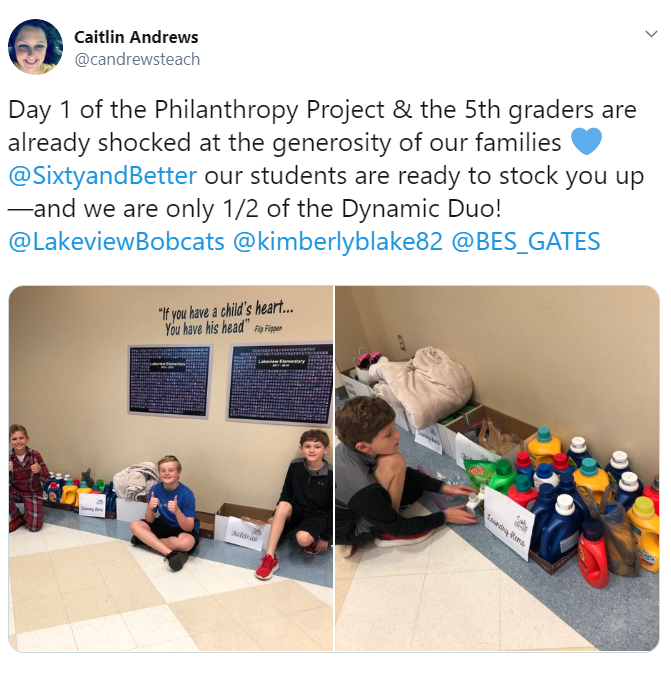
Both campuses came together for pitch day. Groups were able to share their presentation with the panel and their peers. The shark vote, coupled with the student vote, determined which project would be selected and rolled out at both campuses. The group representing the organization Sixty and Better was selected. At that point, the marketing plan from the student presentation began coming to life at Beck and Lakeview through campus-wide dress up days and a donation drive. Students in the GATES classes were each assigned a role in ensuring the logistics for the project were handled appropriately on their campus. Shashwat was one of the project managers. “I was in charge of keeping everything organized and well managed. This has taught me how to be a good leader and that as a good leader, patience is important”. It did not take long for all students involved to get plugged in. They were eager to be a part of something bigger than themselves. Check out what some of these students at Lakeview had to say. They made their podcast debut with an episode dedicated to the work being done for Sixty and Better.


Service learning projects are powerful learning experiences for all students. As Social Emotional Learning becomes a bigger focus throughout the district, these types of projects help students become responsible decision makers. They build social awareness, self-awareness, and relationship skills. They foster one’s personal well-being and the importance of self-management. They impact the whole child. For more information on other service learning projects happening at Beck Elementary, take a listen to the latest episode of the Bulldog Bulletin.

Final numbers from the campus donations will be posted to the blog upon the project’s completion. Please check back soon!

Monday, December 3, 2018

Permission to Be Creative!

Mrs. Johnson (a 5th grade teacher at Granger Elementary) created a collaborative Google Site with the purpose of expanding learning in the ELA and social studies classroom. On the homepage of the site, students find permission to be creative! The site reads, “This will be a place for you to take your learning to the next level by using your creative mind to build on what you’ve already been learning about in class. Think outside the box, explore new ideas, and discover topics that you’d like to know more about.” The license to be creative has led to student ownership that can hardly be put into words.

How did this site come about? Mrs. Johnson states, “Some students finish their classwork quickly and need to have a project to work on, or they need to be challenged to take their learning to the next level. I also have students who simply thrive when having projects to work on. I had many students who fell into these categories this year, and I really wanted provide them with more than just the everyday ELA and social studies classwork. With a blue crayon and a piece of notebook paper, I began jotting down their suggestions. We came up with a few ideas, such as making Google Slides, designing games, and creating Kahoot quizzes. Then, I asked these students about some of their topics of interest. That afternoon, I took their suggestions and organized them into a Google Site. By adding their ideas to the site in an organized way, many more ideas started flowing. I added more ideas of my own, and then I gave about seven students access to this site so that they could add more ideas. Together, we formed the basic structure of this enrichment site.”


Here is how the site works. 1. Students use the “Topics” and “Activity Option” pages to gain inspiration and decide on a creation project that they are interested in. 2. Students click on the timeline spreadsheet and sign up to create a project. 3. Students create the project of their choice using the tool of their choice. 4. Students insert their project into the “Finished Projects” page.  5. Students record a FlipGrid video explaining the what, why, and how of their project. They also explain how their project will impact other students and reflect on what they would have done differently if they were to do the project again.


Students lit up as they shared about their projects. Samanvita, Amari, Kaden, Shabbeer, and John could have chatted for hours about projects they had created and project ideas that were marinating in the back of their mind. "It's not like other classes because we’re getting to chose what we create" said Kaden. "It's really cool," says Amari with a smile, "It's like we are student teachers!" 

Samanvita shares a little about her creation, “I made a Powtoon about point of view, a WeVideo about story elements, and there is is lego website that I’m hoping to make a Stop Motion video from. Right now, I’m using Tinkercad to create a gun from the Revolutionary War. I also made a George vs. George quiz. I think I made it a little too tricky because most people only got 30%.” Samanvita asked me to take the quiz and I’m sad to say that I failed as well. All that said, she had feedback woven within the quiz and was able to help me learn from my mistakes.

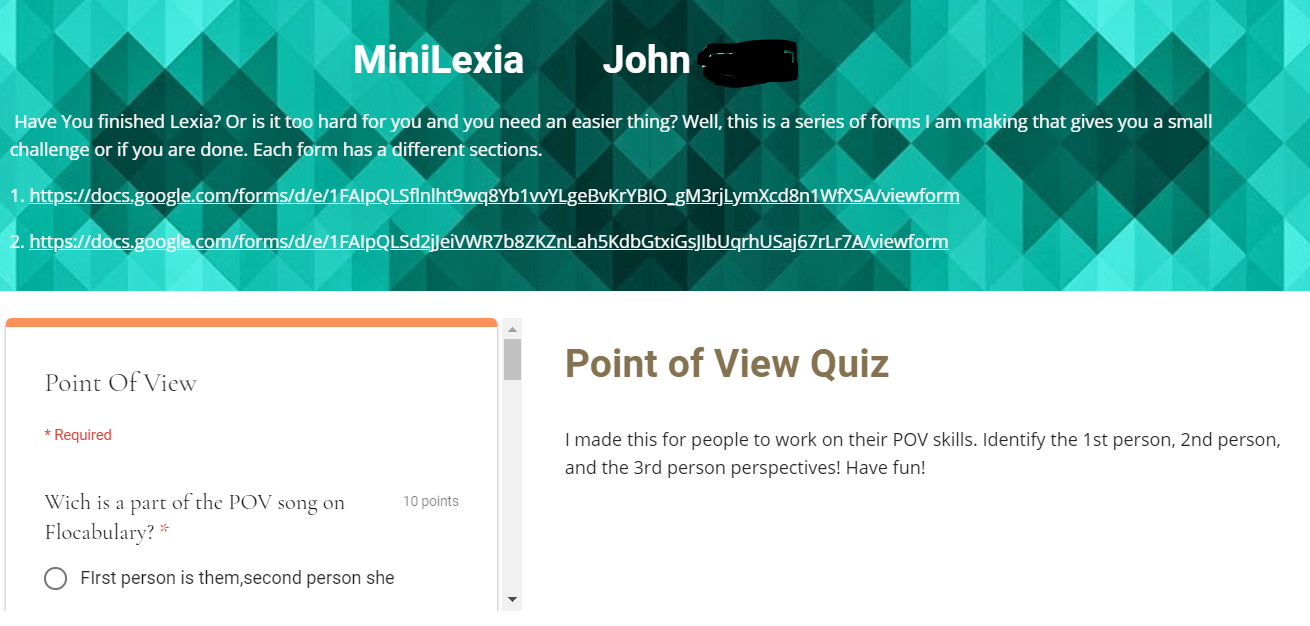
Other created projects include, a 3D print of the Boston Tea Party ship, a mini Lexia series to help others who may want extra practice, various Kahoot and Google Form quizzes over covered topics, and even stop motion videos. According to these students, the most challenging aspect of the project is time management and choosing the right tool for the resource that they are making. They are learning that some tools are limited and they need to be purposeful when choosing. Many of these students get excited about their projects and end up working both at school and at home.


John's Mini Lexia Quiz and a Point of View Google Form
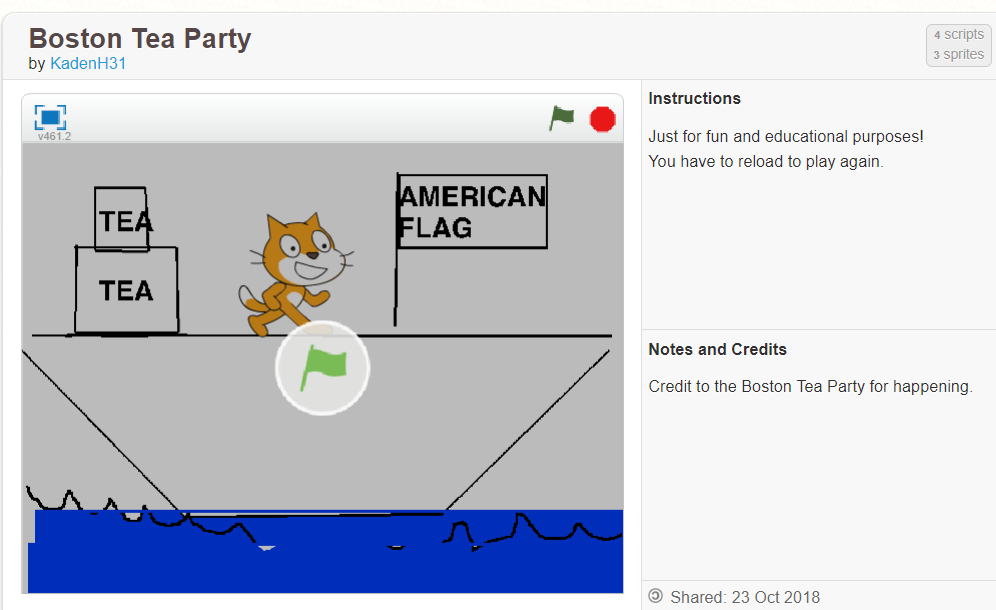
Kaden's Boston Tea Party Scratch Game

 In closing, Mrs. Johnson points out, “I was most surprised with how smooth the transition has been and how little guidance is needed. My students are extremely self-driven and self-motivated with this website. I am impressed with the variety of products that they have created as a result of this website. I am also thrilled about how excited they are to create so many different projects.” She adds, “One of our campus initiatives is to raise the level of Masters scores by 10%. I definitely believe that by doing these types of self-initiated projects, our students will show growth in their reading and thinking abilities.”

Be on the lookout for some of these student created products at EXPO 2019!

Wednesday, October 10, 2018

Supporting the #Wildcatway Reading Initiative


The Wildcat Way is more than just a motto at Wilson Middle School.  Over the summer, teachers put down their beach reads and picked up Disrupting Thinking: Why How We Read Matters by G. Kylene Beers and Robert E Probst in an effort to better understand ways to foster a culture of  reading across campus and provided opportunities for collaboration through ways to disrupt our thinking about reading.  

It was from this book study, teachers Helen Read, 7th grade ELA, and Matt Norris, 7th grade Math, crafted “The Wilson Review.”   The Wilson Review is a process of creating and posting digital video reviews for students and staff. The goal of the showcase board is to get students interested in books as well as to share the books they love so that they can get inspired to read. Students can access the reviews via teacher Moodle pages and Google Classroom courses. The Reviews are also on display outside Ms. Read’s and Mr. Norris’ classrooms on a large bulletin board where students and teachers can use their mobile device to scan the QR codes.  

Middle School, Wilson Middle School, Flipgrid, Book Recommendations, Book Review, Chromebooks, 6-8, Ms. Helen Read, Mr. Matt Norris, Summer Reading, Reading, Cross-Curricular, Voice and Choice, Voice Recording,


While the activity of having students submit book reviews might seem somewhat mundane,
these two teachers took it up a notch by allowing students to use FlipGrid as a tool for recording
their review.  In the world of Instagram and SnapChat selfies, what a better way to relate to
students than asking them to record their book review. 


Flipgrid is place where you can verbalize your learning.  Flipgrid was purchased by Microsoft and provides a moderated and easy to use platform to create up to 5 minute videos and showcase the videos for only NISD users to view.  Flipgrid along with the cameras on student’s Chromebooks were a great pair for this project. “With the integration of Flipgrid students get excited about sharing their books using the Book, Head, and Heart Model.  As they are creating they can investigate what others have said about books they might be interested to read.  Find a review you enjoy, students can leave a thumbs up to the creator and check out the book in the library.” This type of interaction motivates students to continue reading so they can make additional post.  WOW,  so far The Review board has 26 hours of engagement time and growing. 


Student Raul shared, “Flipgrid allows you to express what you think about a book, you can
say what you want.”  Students enjoy the freedom and creativity this outlet offers.  The ability to
record something for others to watch later is also an aspect of the tool students appreciate.
Gracie Clair reflects, “My flip grid experience has really put it in a way for me that I can speak
up and prove my thinking, with people watching it after I film it, not while I film it.”

Staff have already seen an increase in student engagement during daily reading and this is
only the beginning!  Ms. Read and Mr. Norris hope to continue utilizing Flipgrid throughout
the year for book reviews.  Even teachers have benefited from the program!  As Ms. Read
reflected on her experience she shared, “Making my own Flipgrid video was an interesting
experience because it put me in the shoes of my students. I was a bit nervous recording myself.
It also solidified what I wanted my students to be able to share about their reading. I’ve learned
about some books I have definitely added to my own TO BE READ list.”  Mr. Norris has also
enjoyed the experience and was pleased to see, “With showcasing of teacher examples and as
more students recorded their reviews, students overcome their hesitations.”


In today’s schools, technology can be seen as an enemy of reading, however these two innovative teachers have uncovered a strong ally in growing passionate readers.  The Wildcat Way Reading Initiative is off to a strong start. 

Wednesday, April 4, 2018

Why You Shouldn't Be Afraid to Replace a "Tried-and-True Method"


Tired of the same old pen-and-paper, drill-and-kill nature of test corrections, Algebra 2 teacher Mrs. Kubacki at Northwest High School wanted to shake things up and to make math a little more engaging for her high schoolers. Of course, her existing method was working just fine; students were completing the corrections and often showing growth. Still, she wanted to take a risk.


Quiz corrections are a staple task in her classroom because they give her students the opportunity to earn back missed points on tests. Many of her students rely on them as a way to boost their grade, and she relied on them as an important step in assessing her students progress in advance of a test. She wanted to ensure that when she replaced a tried-and-true method she would still end up with meaningful evidence of learning, so she turned to an tool that is rising in popularity: a video discussion platform.


Tools like FlipGrid and Recap are becoming more renown, but with any new tool, it’s how you use it that truly matters. Though a great tool for virtual classroom discussion or Vlogging, Kubacki instead challenged her students to create with it. She wanted to see student-created tutorials, to be shared with the class.

Using Recap, also known as Let’s Recap and Recap That, her students created video tutorials for one another solving the questions they had originally missed on their quiz. Prior to filming, she gave them clear-cut, high expectations: they had to show their work, use and even define academic vocabulary words for their audience, and show their work step-by-step so their peers could better learn from their video. As a class and before they first participated, they created a list of video norms and best practices for their tutorials. (This list included rules like: No filming and walking. Eliminate as much background noise as possible. Rehearse your video before filming...)


It's probably worth mentioning that many students did have reservations at first; a selfie generation who constantly Facetime, SnapChat, and learn from YouTube are afraid to be on camera. Just like many adults, they were nervous to document their learning and share it with an audience. Anticipating this, Kubacki did not force her students to be on camera, but instead gave them a choice. She also artfully paired students up for the task, sure to consider their personalities. And since she knows it’s helpful when a leader takes the first risk, she was sure to create her own video first, modeling the class-created expectations.


On the day students finally created and published their video tutorials in class, their teacher was both mobile and available to help anyone in need -- this is one of the many benefits in giving students tasks of creation; the teacher can move out of the driver’s seat and into the passenger’s seat. In the event a student did get stuck, they were expected to create a "point of confusion video" --to post their problem step-by-step, up to the point of confusion, and to finally ask their peers for help. Because she expected students to comment on each other’s videos (they established norms for this too), students were able to get help on their corrections and were able to get immediate feedback from both their peers and their teacher.


Of course, Mrs. Kubacki could have stayed with her tried-and-true method of pen and paper, but what would her students have missed out on? Would they have felt as challenged? What academic or even personal growth might they have missed out on? By instead asking them to create video tutorials through Recap, she gave students a platform where they could immediately share their personal growth with a community of learners who could also benefit from their hard work. Taking this risk gave a larger purpose to students' time and to an otherwise mundane task such as quiz corrections. Even more, these students were empowered to own and share their learning by creating something that would help others.

*This blog has been corrected to clarify that the assignment, quiz corrections, was designed as a formative assessment tool leading up to a final summative grade.