Showing posts with label Cross-Curricular. Show all posts

Tuesday, May 11, 2021

Robots to the Rescue! - A Virtual Tournament


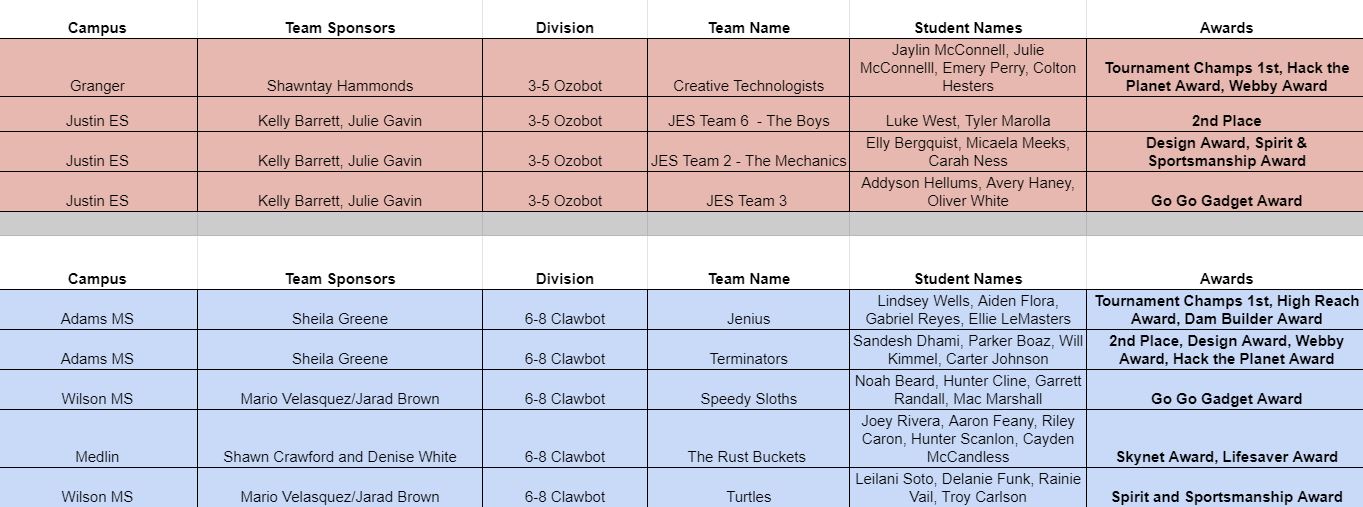
COVID-19 forced many events to either be cancelled or postponed over this past year. The Northwest ISD Instructional Technology team did not want students to miss out on showcasing their learning as in the previous 9 years. This year, we got creative and hosted a virtual edition of EXPO 2021 with the fitting theme “Coming Together as One.” In conjunction with the traditional EXPO event, the past 3 years, we have hosted a face to face district wide robotics tournament sponsored by the Northwest Education Foundation. COVID also forced our tournament to be reinvented to a VIRTUAL robotics edition. 

With the goal of inspiring younger students to pursue engineering in high school, the competition challenges were developed in a pre-COVID world for the VEX and Mindstorm EV3 robots. The challenges were based on real life scenarios and were designed to be judged as a face-to-face tournament by the REACH Robotics teams at Eaton High School with their sponsor, Mr. William Gilbert. Ms. Rene Egle, an Instructional Technologist in Northwest ISD, who leads an annual TechnoCamp and the Robotics Competition at our district EXPO, took two months to tweak the format to a virtual robotics edition. This challenge was differentiated for the younger grades using the Ozobots and Dash robots.

Natalie Spann, Library Media Specialist, at Lance Thompson Elementary stated, "The whole process sets students up for success and discovery. It was truly inspiring to see student curiosity and wonder contribute to such amazingly authentic products and learning outcomes. We can’t wait for next year!"

Robotics, STEAM, K-8, NISD, Engineering, Elementry, Secondary, Cross-Curricular, Virtual, Rene' Egle, William Gilbert

"I really liked this years remote format to the robotics competition. The real world problem gave students connections to how robotics and STEM projects can prepare them for future careers. We had 3rd through 5th graders involved with three different robots. The format this year allowed me to observe teams and see our learners grow in their technical thinking. I also feel this process gave teams more time and depth to their teamwork skill development.  I do think the project had many layers outside of just building a robot. Students had to take notes and reflect on their thinking. Teams had to do lots of problem solving using coding to meet the set parameters of the challenge," said Sara Jones, Library Media Specialist at Justin Elementary. 


Katie Delgado, 3rd grade sponsor from Sendera Ranch Elementary stated, "It was so fun watching the team work together to problem solve and beat challenges.  I loved watching them cheer each other on."

The NISD IT team has gotten such good feedback from both the sponsors and students! They are loving the challenges and we will be repeating this format again next year.


The Houston Deluge tournament synopsis: Hurricane Gilbo has flooded Houston, downing power lines, stranding citizens, and littering the city with debris.  Robots are sent into this dangerous environment to clean up the mess, control the flood waters, and save the humans.   

This type of STEAM competition has inspired 75 teams both elementary and middle school students to learn coding, engineering, and collaborative problem-solving in a real-world disaster scenario. Other elements of the project include an engineering design website, self-scoring rubrics, peer evaluations, and judges interviews that transform this project into a cross-curricular STEAM challenge where students and learn future-ready skills, work with technology, and become more effective communicators in a rigorous and relevant student-driven project environment. 

Andy from the Sendera Ranch team stated, "While working on this project, I learned I am good at persevering because when I couldn't get this one pencil I kept trying and trying then, I finally got the pencil.  Another reason is that when the robot got stuck I finally got it free!"


Fourth grade students Karsyn and Kenly from Lance Thompson said, "What at fun experience, getting to know new people and figuring out how the technology works while making it your own." "This was a fun, and creative experience, deigning cityscapes, but also a challenging one, learning to build a robot; we learned that teamwork is the best way to succeed." 

"Robotics and the tasks of this tournament are profoundly challenging every step of the way, yet students love the rigor and enthusiastically seek out the knowledge they need to achieve mastery.  This is a STEAM education activity with higher level learning that combines with creativity!" said Mrs. Shelia Greene, PLTW educator, from Adams Middle School.   


“Robotics just may be the most perfect instructional approach currently available. It offers classroom activities that teach high-value STEM content as well as opportunities to powerfully address ELA Common Core Standards. In fact, there are connections to robotics across the full spectrum of the curriculum. Robotics is also a highly effective way to foster essential work skills like collaboration, problem solving and project management."  Mark Gura writes in a blog post from Edutopia


Campus entries for the virtual tournament were due May 7, 2021.  The REACH Robotics team from Eaton High School are in the process of judging all the videos and engineering design websites.  View NISD Post Here 


We would like to thank our awards sponsors again this year.  The Northwest ISD Education Foundation.  


Wednesday, October 10, 2018

Supporting the #Wildcatway Reading Initiative


The Wildcat Way is more than just a motto at Wilson Middle School.  Over the summer, teachers put down their beach reads and picked up Disrupting Thinking: Why How We Read Matters by G. Kylene Beers and Robert E Probst in an effort to better understand ways to foster a culture of  reading across campus and provided opportunities for collaboration through ways to disrupt our thinking about reading.  

It was from this book study, teachers Helen Read, 7th grade ELA, and Matt Norris, 7th grade Math, crafted “The Wilson Review.”   The Wilson Review is a process of creating and posting digital video reviews for students and staff. The goal of the showcase board is to get students interested in books as well as to share the books they love so that they can get inspired to read. Students can access the reviews via teacher Moodle pages and Google Classroom courses. The Reviews are also on display outside Ms. Read’s and Mr. Norris’ classrooms on a large bulletin board where students and teachers can use their mobile device to scan the QR codes.  

Middle School, Wilson Middle School, Flipgrid, Book Recommendations, Book Review, Chromebooks, 6-8, Ms. Helen Read, Mr. Matt Norris, Summer Reading, Reading, Cross-Curricular, Voice and Choice, Voice Recording,


While the activity of having students submit book reviews might seem somewhat mundane,
these two teachers took it up a notch by allowing students to use FlipGrid as a tool for recording
their review.  In the world of Instagram and SnapChat selfies, what a better way to relate to
students than asking them to record their book review. 


Flipgrid is place where you can verbalize your learning.  Flipgrid was purchased by Microsoft and provides a moderated and easy to use platform to create up to 5 minute videos and showcase the videos for only NISD users to view.  Flipgrid along with the cameras on student’s Chromebooks were a great pair for this project. “With the integration of Flipgrid students get excited about sharing their books using the Book, Head, and Heart Model.  As they are creating they can investigate what others have said about books they might be interested to read.  Find a review you enjoy, students can leave a thumbs up to the creator and check out the book in the library.” This type of interaction motivates students to continue reading so they can make additional post.  WOW,  so far The Review board has 26 hours of engagement time and growing. 


Student Raul shared, “Flipgrid allows you to express what you think about a book, you can
say what you want.”  Students enjoy the freedom and creativity this outlet offers.  The ability to
record something for others to watch later is also an aspect of the tool students appreciate.
Gracie Clair reflects, “My flip grid experience has really put it in a way for me that I can speak
up and prove my thinking, with people watching it after I film it, not while I film it.”

Staff have already seen an increase in student engagement during daily reading and this is
only the beginning!  Ms. Read and Mr. Norris hope to continue utilizing Flipgrid throughout
the year for book reviews.  Even teachers have benefited from the program!  As Ms. Read
reflected on her experience she shared, “Making my own Flipgrid video was an interesting
experience because it put me in the shoes of my students. I was a bit nervous recording myself.
It also solidified what I wanted my students to be able to share about their reading. I’ve learned
about some books I have definitely added to my own TO BE READ list.”  Mr. Norris has also
enjoyed the experience and was pleased to see, “With showcasing of teacher examples and as
more students recorded their reviews, students overcome their hesitations.”


In today’s schools, technology can be seen as an enemy of reading, however these two innovative teachers have uncovered a strong ally in growing passionate readers.  The Wildcat Way Reading Initiative is off to a strong start. 

Monday, March 27, 2017

SPARKing Connections with Neurological Diseases

During a study of the Nervous System, students in Karen Lawson's Anatomy and Physiology class used Adobe Spark Page to compose a narrative that highlights a person who suffers from a neurological disease or condition from a provided list. It was suggested that the student's detail their project about someone they know or can interview in real life in order to connect their learning to a real world example; if no contact existed, students also had the option to research someone in the public eye who suffered from the disease or condition.

Check out these examples:


Adobe Spark enabled students to tell a story detailing many facets of the disease or condition such as the definition, history, treatment, rehabilitation, and prognosis. By composing a narrative instead of a scientific explanation, students were able to reach higher levels of Bloom's Taxonomy by researching or interviewing an individual, then applying their learning through the creation a new product within Adobe Spark. Furthermore, students were given a wide variety of choice with just enough parameters designated by their teacher; with the required criteria provided, students created various detailed narratives that let them detail new learning within a framework of creative freedom.


To share their narratives and learn about other neurological diseases or conditions, Mrs. Lawson had the students turn in their work via a QR code so that it could be creatively displayed on a Standards Based Bulletin Board as shown in the image above.  

ISTE Standards:
3A: Students plan and employ effective research strategies to locate information and other resources for their intellectual or creative pursuits.
6C: Students communicate complex ideas clearly and effectively by creating or using a variety of digital objects such as visualizations, models or simulations.

Monday, May 16, 2016

Mythical Mayhem: Learning Mythology via Student-Created Game

Athena, Hades, & Zeus... oh my! What's better than a fun online game? One that is fun, educational, and created by students. 

Eaton High School Computer Science and English students have been working together on a cross-curricular project to create an educational game to learn Greek Mythology. English students supplied details of several gods and goddesses they learned in class, including storylines, attributes, strengths, weakness, etc. to Computer Science students, who are using their Java programming skills to create an educational game. The goal of the game is for players to learn about Greek Mythology characters, advancing up multiple levels based on the players' demonstrated knowledge of each character.


Students are facilitating this project in Google Drive and used Google Folders to organize the content, planning documents, resources, graphics, and student-created video progress updates. As the "customers", English students and their teacher were able to collaborate in Google Docs to model a real-world game design contract to ensure all parties were in agreement on the details of the final product before any coding began. Now that the Computer Science students are in development phase, with a project manager, coding team leader, and graphics team leader, all ensuring the details of the project are progressing smoothly. One of the most powerful components of this project is the series of progress videos that students create. A portion of one of these videos is below:


This project is still ongoing, so the game is not yet complete. This short screencast shows the look and feel of the game thus far:


Not only is this project fun and educational, students are also demonstrating several technology skills they are expected to possess in order to be future ready learners, including:
  • Creativity & innovation: Students demonstrate creative thinking, construct knowledge, and develop innovative products and processes using technology.
  • Critical thinking, problem solving, & decision making: Students use critical thinking skills to plan and conduct research, manage projects, solve problems, and make informed decisions using appropriate digital tools and resources. 
  • Communication & collaboration: Students use digital media and environments to communicate and work collaboratively, including at a distance, to support individual learning and contribute to the learning of others.

To learn more about Eaton's Computer Science program, follow them on Twitter: @EatonCompSci

#WillCodeForDonuts

Monday, February 1, 2016

World of Research

Second grade students at Beck elementary recently explored the world! This cross curricular unit allowed students to learn about other cultures, as well as expository writing and communicating their ideas. Mrs. Moses and Mrs. Jeffcoat opened student's eyes to global communication by contacting families around the world and having them post videos about their Christmas traditions on a padlet wall. The project consisted of four parts: Learning about other cultures, writing an expository essay over research, creating a poster of facts to present to the class, and making a video using Shadow puppets to highlighted a chosen country. 
When asked what they learned about other cultures, Morgan commented, "I learned that in Italy they
eat eel for Christmas and they call cake figgy pudding, it looks really good!" Colbie and Reed added, "I wish that we opened Christmas crackers like they do in England."  

One of Mrs. Moses' students (Ben) lived in Italy for three years. Ben and his family made a video about Italian Christmas traditions and put it in the padlet wall to share with the class. They used Shadow Puppets for this video. Ben comments, "I choose Shadow Puppets because my sister used Shadow Puppets for a 5th grade report and I liked it."

While this project was fun, it was also challenging at times. "The hardest part was presenting the information and working with our table," said Sam. "We had to try to spell everything correct and everyone wanted to draw at one time without talking about their idea first," expressed Reed. They added, "We did rock paper scissors to decide who got to write first." Colbie and Morgan pointed out, "It was kind of hard working in a team. We were both managers for our team, so we had to give everyone something important to do." The essay was also challenging. Reed commented, "The first draft was challenging because we had to have a hook and write about all of the things that we learned."

All of the students enjoyed using Shadow Puppets to make their video. "I like picking out the photos for the shadow puppet video and working with the special effects," said Sam. "We used smiley faces, snowflakes, stars, and other emojis to make the video more fun for others."

Morgan and Colbie summed it up well, "We loved this project because we got to learn facts about what other cultures do." They both agreed that next year's class should do this project. "I think they’ll have fun," said Morgan. "They will have to learn to be friends with others. I think every class should do it."

Come check these projects out at Techno Expo 2016. You can also view these student's videos in the padlet, or by clicking on the links below:

Created with Padlet

Morgan's Video Exploring Italy
Colbie's Video Exploring England
Sam's Video - Exploring Mexico
Reed's Video - Exploring 


Monday, September 14, 2015

Lone Star Road Trip

What's better than a family road trip? I know... a road trip planned by the kids!!

http://mytexasroadtrip.weebly.com/Given their newfound knowledge of Texas History, fourth grade students in Mrs. Kerry's class, at Peterson Elementary, dug deep into their Texas roots as they worked in groups to plan a road trip around the Lone Star State. With a set budget and the challenge of finding something to do within each of the four regions of Texas, students got straight to work. Students researched hotels, activities to do within their selected cities and places to eat. Groups also had to keep mileage in mind as they figured out how much gas they would need to take their trip.

Talk about real world application! Students were given a $2,500 budget that would fund
their gas, food, lodging, activities and more. Careful planning was necessary as the group made decisions on how to best spend their money. Emma said, "Some skills I think I gained for the future are that I'll be able to calculate the cost of taking a road trip. By calculating the cost I will be able to figure out what I'm going to eat and do and where I am able to stay".   

As students spent time reflecting on their work, Lindsay commented, "My favorite part of the project was the itinerary because you can plan all the times and exactly how long you want to stay at something." Choosing the destinations they would visit in each region took a lot of research and thought. They were tasked with finding information about that region's industries, climate, plant/animal life, and historical facts.  

http://fantasticfuntrip.weebly.com/Students wrapped up their project with a digital presentation and persuasive letter for their parents. Their letters included three reasons why their parents should agree to take them on this road trip, while their digital presentations highlighted details from each region of Texas they would be visiting.To pull the entire project together, students learned the art of "App Smashing", while utilizing Pic Collage, 30 Hands, and Weebly. By using Weebly to culminate their project, students were able to reach a larger, more global audience as they shared their learning with family and friends.

To view the road trip two groups of fourth graders organized, click the images within this post. Their Weebly sites are private, but can be accessed with a password (mrskerry).