Showing posts with label Katy Barrey. Show all posts

Friday, May 27, 2022

'Teams' Work Makes the Dreams Work

    Pockets of NISD staff have been using Microsoft Teams to streamline group conversations; did you know that groups of high school students were allowed the opportunity to test the platform for their unique programs which foster team communication and collaboration? Check out the below Teams experience through the student lens as authored by Sophie Price, student at Steele Early College High School, supported by the program educator, Amber Robinson.

---

    Microsoft Teams has been very beneficial to many people at Steele Early College High School, but especially the members of the Steele Student Press - a self-branded name for publications made by Photography, Journalism, and Yearbook students at Steele. Abigail Beck, a photography editor for the Steele Student Press, explains that, “Microsoft Teams has been essential to Journalism’s ability to work as a cohesive team over the past few months.  It allows three different branches of our student press to coordinate planning and execution seamlessly together.” When asked to explain the specifics of her use of Teams, Beck said, “It allows me to put in requests for work I need to delegate, and get essential information and files from other people to allow me to do my job.” 


  Before we had Teams, Beck added, “our team would be reliant on email, which is so much more of a hassle when you are looking for time-sensitive communication.” Teams has many pros, and very few cons. Aubrey Dickinson, our Yearbook Editor in Chief, said, “Being able to contact other editors from the yearbook staff has made the process of producing our yearbook seamless. Having different channels of communication within Teams has kept our Student Press organized and allowed us to work efficiently. We have communicated and approved our social media posts through Teams, as well as planning push weeks to advertise for the sales of our yearbooks.” Like all modern wonders of technology, Teams does occasionally have its glitches, but other than that one would be hard pressed to find any glaring cons. 

Some of our favorite features on Teams include the ability to create different channels to organize conversations, private channels for groups like our editorial board, and the chat feature for collaborating one-on-one. The ability to call someone’s attention to a conversation by using the @mention feature (using the @ symbol, followed by their name) has also been invaluable. For those on the fence about getting Teams, Makenna Morgan, another photography editor for the Steele Student Press, offers these words of encouragement: “It will make your communication more streamlined, you will get more done, and it is a fantastic program for any workplace or organization to use.” If you’re going to use Teams, make sure to check it often, send chats to get used to the program, and use all available features! 


Teams has impacted the Steele Student Press in such a major, positive way.  As Aubrey Dickinson said, “I am incredibly grateful that we were presented the opportunity to use Teams this year and expand the horizons of our Steele Student Press beyond anything I could have ever imagined.”  

---

For staff interested in using Microsoft Teams, access it from the Portal to get started. Reach out to your Instructional Technologist for additional support!

Tuesday, October 12, 2021

Gaming as a SPORT: Expanding Opportunities for Students to Belong and Compete through eSports

Fall means the start of a new sports season! Tryouts are held and a roster is set based on player interests, abilities, and team needs. Practice schedules are created. Preseason matches occur then come regular season games and tournaments; the team works towards Playoffs and has the ultimate goal of making it to Finals. Fans attend to root for the home team and players hope for college recruiters to see their skills and potentially offer scholarships. The competition is tough, but skillful strategizing and teamwork can lead to a big win and open doors for future opportunities.

Nope, this isn't describing the upcoming football season -- this is a look at the new Fall eSports Season! As much as video games seem like a just-for-fun activity, this past time is becoming recognized as a varsity level sport in addition to Generation eSports being selected as the exclusive sponsor for the University Interscholastic League (UIL).

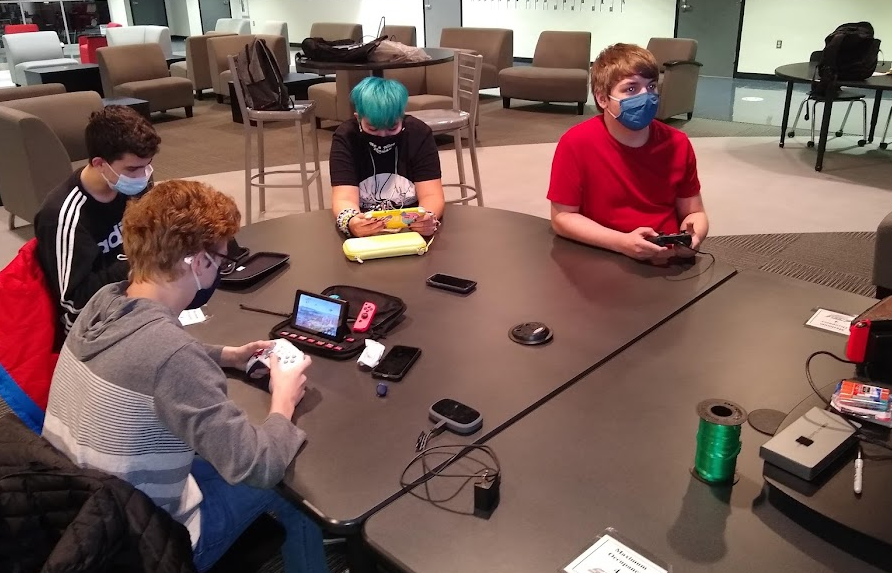
Two Eaton student going head-to-head in the Smash Ultimate Grand Finals.
Depending on the streaming requirements of the game being played, students will either use the designated Alienware PCs or their own gaming devices, such as Nintendo Switches. 
   -----

-----

"The purpose of eSports is to provide opportunities for ALL students to have a platform to acquire critical communication, collaboration, and problem-solving skills needed to thrive in work and in life as outlined by the NISD Profile of a Graduate" - NISD eSports Code of Conduct

Students at Eaton High School, Northwest High School, and Steele Early College High School participate in eSports Clubs as part of both casual and competitive teams. Student leaders on the various campuses coordinate with their game-based team on practice schedules and upcoming goals for league games.

Students at each of NISD 's high school eSports programs have top-of-the-line gaming PCs from Alienware including the PC and device peripherals such as Alienware mice, keyboards, and headsets.

Popular games on NISD campuses play games include Super Smash Brothers Ultimate, Overwatch, Valorant, Rocket League, and League of Legends offered through either the High School eSports League or the PlayVS league; because students have the opportunity to complete in two different leagues, this increases their opportunities for tournament play and competitions to enter. Students communicate game preferences and teams are formed based on student numbers and interests. For example, Super Smash Bros compete in teams of 3 whereas Valorant complete in teams of 5 and Overwatch in teams of 6.


Did you know? Eaton High School had teams compete in PLAYOFFS of different games in each of the past two years!

-----
Why is eSports an important program? 
What skills are kids getting as a result of their involvement?

-----

All of the NISD eSports clubs are welcoming new students. Show up and we will find a place for you to belong!


Get more through this NISD blog eSports: More Than Just Fun and Games and by exploring the NISD eSports Code of Conduct.

Monday, May 3, 2021

Elevating Student Learning with Technology Integration Academy

Goodbye one-size-fits-all lesson! See ya to an old mindset of technology use automatically equaling a higher level learning experience! 

HELLO personalized, needs-based & interests-based, choice-filled, differentiatedself-paced instruction! Technology Integration Academy meets teachers, administrators, and librarians where they are with technology integration and provides tangible resources and intentional modeling to elevate experiences for their unique learners. 

"But I'm already using technology in my classroom. Can I be exempt?" One of the best parts of TIA is that it is structured to grow EVERY learner from their current experience as choice is embedded in every module to provide a meaningful and tailored PD. Rather than providing a skills-based checklist where everyone meets the same end-goal, in this growth-mindset course, there is no technology proficiency ceiling, so the sky is the limit with possibilities that meet individual comfort levels. 

A primary goal of TIA is to highlight that technology usage itself does not elevate the learning experience; rather, it focuses on what students are being asked to do with the technology. Listing ideas on a Google Doc might have it's place in the lesson cycle, but are there also opportunities to publish to a larger audience, digitally collaborate outside the walls of the classroom, choose a personalized path or product, or create using higher level thinking? Focusing on the cognitive demand of the task helps to shift the focus from "Does this lesson have an element of technology" to "How can I pick the right technology platform to meet the intended learning goal?" 


The course content is structured around digital learning platforms we support in Northwest ISD, such as Learning Management Systems by grade level and the suite of apps in Google Workspace, accompanied by high impact instructional practices, like collaboration, creation, critical thinking, choice, reflection, and goal setting which are modeled in the course design and supported by participation requirements.


Take a look at some examples to explore the original prompt for various modules paired with unique creations and perspectives that develop as a result of choice, ownership, and collaboration.
 

To solidify new learning and identify actions steps moving forward, participants have a variety reflection opportunities in final module. Here are a few takeaways from the Spring 2021 TIA Cohort:
  • I have really liked exploring the different opportunities for choice and differentiation throughout this course. It has been nice to be able to pick according to my learning level and not have to be able to review things I have already learned. Another aspect I have enjoyed from this course is being able to be reflective and set goals on how I want to grow in the future. I want to try to incorporate more technology especially with goal setting and student choice. - Elementary Interventionist
  • Opportunities for Choice and Differentiation - I've come to realize that technology can play a significant role in the efficiency of differentiation. Meaningful Technology Integration - Technology is more than just assigning a google doc for the students to complete and submit. It can be collaborative and used to help students connect and enhance their learning. -7th Grade Science Teacher
  • I thought it was important to review SAMR and take a reflective look at the technology integration that I currently use in the classroom. I noticed that most technology I use is on the lower end of SAMR, so I've set a goal of looking at the technology use that allows for even more learning involvement for the students. My goals for moving forward also include being more productive with technology use in the classroom (like using the iPad to be more mobile and keep track of student progress), and for parent communication. -5th Grade ELA/SS Teacher
  • I will say that there are SO many options when it comes to technology use in the classroom. I was amazed at how many choices we have as teachers that are made available to us. My biggest plan is to use the technology to engage my students with presentations. I also want to really start using the IPAD for Doceri so I can walk around my room more. - High School CTE Teacher


Ready to take your technology integration to the next level? 

Enroll in the Summer 2021 TIA cohort today! The course content is available June 1st - August 8th, 2021.

For more information, visit these Technology Proficiency FAQs.


At Northwest ISD, we believe technology enables us to extend our reach and become more effective, relevant, and connected educators. We strive to use technology as a tool that engages our students at high cognitive levels, and this course is designed to reflect that philosophy in every way. This is important because NISD educators are expected to design, implement, and assess learning experiences to engage students and prepare them to be competitive and successful in a global marketplace.

Monday, November 18, 2019

Answering "Am I Doing This Right?" with Tech-Facilitated Feedback

"Am I doing this right?"
"I'm stuck!"
"I don't know how else to make it better."
"I think I have the hang of it?"

These phrases are ones that are muttered on a daily basis in every content and at every grade. Students are learning new material and are trying their best to show mastery, but are often unsure if they are on the right track or are meeting expectations. Unfortunately, these questions typically don't get answered until the end of a unit through some sort of summative assignment in which the student gets a grade, sees their marked errors, and then immediately moves on to the next topic of study instead of using the feedback for growth towards improvement.

You can't blame the teacher though, right? With 30+ students per class and having several class periods in a day, the shear combined class load of 150+ students to grade is overwhelming, not to mention and it's near impossible to hold a meaningful conference with every student within a 45 minute class period. To add, many teachers are already spending several hours after school preparing for the next school day. Is all hope lost? Do we accept that's just how it is? Is there a better way? YES! 

Check out these highly effective ways to maximize use of technology in delivering immediate, personalized feedback to every student. 

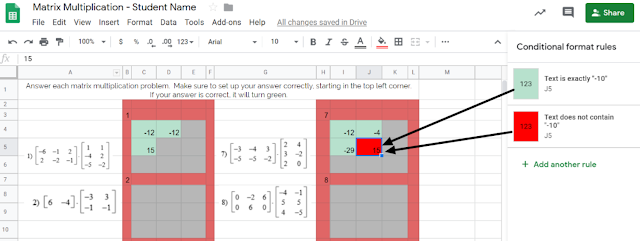
Tip #1: Incorporate tools that automate the process of providing immediate feedback. Check out this example from Carla Dalton's AQR (Advanced Quantitative Reasoning) class in which she maximized the 'conditional formatting' function within Google Sheets to efficiently check progress towards mastery. This auto-coloring box allows the student to know immediately if their calculation was right or wrong. Immediate feedback of this nature enables students to self-monitor the need for referring back to notes or self-regulation of knowing when to ask for help. This also is intended to correct misunderstandings as they occur, rather than addressing misunderstandings the next day after a worksheet's worth of doing it wrong and solidifying incorrect thinking.


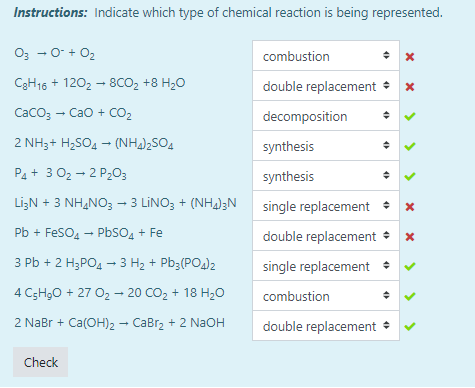
Another example of this automated immediate feedback is done through the use of Moodle quizzes when set to behave in Adaptive Mode, such as this example from Tiffany Mackerley's Chemistry class. This mode turns a traditional quiz into a series of formative questions that has a "check" button which allows students to immediately see which answers are right or wrong. Based on the immediate feedback, students can adjust their response accordingly; the teacher can additionally have it be set up to lose a certain percentage of points with each incorrect answer to minimize random, blind guesses.


Tip #2: Empower your students have their voices be heard as a welcomed source of feedback. In April Heffley's Art IV class, students gave anonymous, critical feedback to their peers' artwork in order to make improvements on what was considered "final" artwork for the time-being. The anonymity allows students to be honest about their thoughts while the teacher is able to monitor students responses through the Teacher Dashboard. Though it does save the teacher time from not being the sole giver of feedback, but it it also valuable to the student receiving the feedback as this process allows varied opinions and perspectives that might not have been considered. Not to mention, it also targets higher order thinking skills by those giving the feedback considering evaluation is the second highest cognitive level in Bloom's Taxomony. Beyond collecting the feedback, Mrs. Heffley then uses the peer's feedback to hold individual conferences with each student artist as they review the feedback together; during this time, the teacher assumes a partner position, rather than evaluator position, in supporting the students' growth.


Tip #3: Seek new opinions from audiences outside the walls of your classroom.
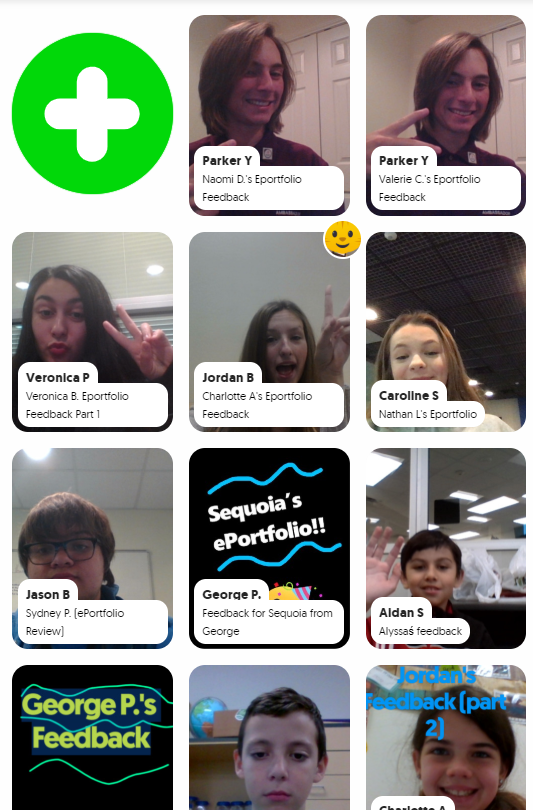
Opening the virtual-doors to your classroom does not have to mean you are connecting with people literally across the globe or are blindly matching with unknown audiences. Patti Hayes' 10th-12th graders at Steele Accelerated High School partnered up with Sandra Champion's GT 5th graders at Hughes Elementary School to review each other's ePortfolios and provide feedback to one another. Google Slides were used to pair up the students, collect written feedback, and link to a FlipGrid that facilitated introductions and oral feedback. This partnership benefited both audiences as the younger students were able to hear from more experienced students in this area, while the older students had their content viewed from true 'outsiders' which helped pinpoints things to be explained or clarified. For more information on this partnership, stay tuned for a blog post detailing this experience set to publish here on 12/9/19!
While all of these tips require time to be invested on the front end to prepare and set up, changing when and how feedback is given maximizes a student's understanding of the material by shifting mindset to viewing feedback as a tool for growth as opposed to a numerical final evaluation. Also note that giving quality feedback is a skill that is developed over time and you can't assume any student, regardless of age, should automatically 'know' how to give good feedback. When asking students to give each other qualitative feedback, sentence stems help focus thinking. Lastly, because feedback is a skill, the more times you ask students to give feedback, the more developed they will become in this area.

This post highlights examples of the following ISTE standards:
  • Students use technology to seek feedback that informs and improves their practice and to demonstrate learning in a variety of ways. (ISTE Student Standard 1c)
  • Use technology to design and implement a variety of formative and summative assessments that accommodate learner needs, provide timely feedback to students, and inform instruction (ISTE Teacher Standard 7b)

Wednesday, April 17, 2019

These Documentaries Are KILLER!

We are led by example. 

Think about it: Have you ever... Put together a puzzle without first looking at the cover to see what it's supposed to look like once complete? Made a craft or home improvement project without first looking up inspiration or instructions on Google or Pinterest? Saw a movie without watching the trailer or reading the synopsis? The answer is mostly likely no, as we are driven by seeing something that we can connect with.

Because of this need for inspiration to draw from and even deviate from, it is often challenging to ask our students to create - the highest level of Bloom's - without giving them any sort of frame of reference. Couple that with asking students to use a new tech tool, conduct a research project on an unknown individual, and apply taught curricular concepts to a new creation may feel daunting for even our traditionally higher performing students. 

Recognizing all of these factors, Becky Ainsworth - Forensics Science teacher at Byron Nelson High School, created multiple resources to set her students up for success. Students in this upper level class were tasked with creating a mini-documentary that detailed the forensic psychology of an infamous serial killer, and were to present the information in a video format using Adobe Spark to make it view like a true documentary. 

Click to view Mrs. Ainsworth's Spark Project Instructions.
In previous years, students presented this content in a traditional format by standing in front of the class and retelling their information. This type of presentation lacked student engagement, was time consuming, and the success of a exemplar product was confined to that class periods' limited audience. To elevate this experience, Becky then replaced the traditional presentation format with the documentary style project requirement. With any first year project, there aren't a bank of examples to pull from, so it was a genius idea that Mrs. Ainsworth created and delivered the project instructions using the exact tool, Adobe Spark Video, she was asking students to use. Additional relevant information, including required content and the grading rubric, were showcased on a traditional document project outline.

Next, students were empowered with full creative freedom to add content from any reliable source (with a minimum of at least 3) as they conducted their own research. The documentary is a visual, video presentation, so the main premise requires a series of photos and videos that have a voice-over to tell the story using very little, if any, text on screen. Students used sites such as Pixabay to find free stock photo and video clips, as well as truly realistic clips that depicted the actual serial killer in photo or video. Check out these top two mini-documentary creations:

Ian Brady: As told by Lauren
Jeffrey Dahmer: As told by Kai and Tony

Once video creation was complete within Adobe Spark, students downloaded their videos and then uploaded them onto a collaborative YouTube Playlist that would house projects for all Forensic Science students at BNHS. By uploading to this platform, students were able to share their creation beyond the walls of their class period and could in turn view documentaries created by students studying the same content in a completely different class period. Publishing to YouTube allowed students to have a broader audience, made the presentation format more engaging as students got to watch multiple mini-documentaries, and created a wealth of examples to draw from for the following school year. Since Mrs. Ainsworth's classes in all had 57 videos on their Playlist, Mrs. Ainsworth plans to pick the top exemplars, as well as non-examples, from this collaborative playlist to make a new, shortened, and focused playlist to support next year's students as they, too, begin this exciting creative project.

This project meets ISTE Student Standard of being a Knowledge Constructor (3) in which students
  • 3a: Students plan and employ effective research strategies to locate information and other resources for their intellectual or creative pursuits.
  • 3b: Students evaluate the accuracy, perspective, credibility and relevance of information, media, data or other resources.
  • 3c: Students curate information from digital resources using a variety of tools and methods to create collections of artifacts that demonstrate meaningful connections or conclusions.


Monday, February 4, 2019

"Hear" Me Out: Deaf Culture Experience/Experiment

Challenge: You are about to experience simulated deafness for a full 24 hour period to truly experience authentic ASL language usage as a hard of hearing individual. 

What a shock that must have been to the students in Mrs. Enfinger's American Sign Language I and II classes as Byron Nelson High School. While this teacher is able to somewhat mimic this experience in class by having full silent class days by which students must solely sign the language without speaking aloud or listening to said communication, this experiment provided a truly different take on removing sound from the equation. As a result of the experiment, deaf culture awareness was at an all time high at BNHS as students, parents, teachers, and administrators were talking about their opinions, accommodations, concerns, and perceptions which brought to light the need for true empathy and understanding for ALL types of students.

To begin, the following various stakeholders were informed about the experience.
  • Students who would be participating learned of their assignment expectations and details
  • Parents of those students in part that the experiment was expected to continue in full effort at home throughout the 24 hour time span
  • Teachers and all other school staff since they would have these ASL students in their classes as well as other staff members who would be witnessing the experiment in other roles
The most frequently asked question was "How am I supposed to teach?" or "How is my student supposed to learn?" The best part about these questions is that the eye-opening learning experiment would not solely be experienced by the direct participant, but so much learning and understanding would also occur with other responsible parties.

To prepare for the "big day," students were tasked with researching ADA (American Deaf Association) requirements or accommodations available for all of the students' traditional daily activities including in the classroom such as enabling closed captioning on videos, live closed captioning on Google Slides, in addition to what needs may result for electives such as music or sports, and even church or other after school activities. They also gained an awareness of additional accommodations to accomplish other things they would want to do such as technology available including phone apps, interpreter and closed captioning services. Furthermore, research continued as students learned about Mandy Harvey and Nyle Dimarco to study deaf later in life vs. deaf from birth. Going into the experiment, students not only had a base understanding of the language they've so far learned through a traditional classroom setting, but they've also had a heightened interest in cultural aspects and legal accommodations as this research was authentic and immediately applied.

Students didn’t know the exact day they would go deaf in order to simulate adult deafness as it is usually gradual and don’t know it is happening. Instead, they showed up to class on a random day and were then told it would be their day to go deaf. The kids wore inner earplugs and outer ear muffs and on a scale of 1 to 10 (1 being profoundly deaf) were a 3-4 to simulate an adult who was hard of hearing. Students had their choice of how they preferred to journal their experience from keeping an ongoing written blog via Google Doc, a vlog (video blog) for extra credit to later by shareable via YouTube, voice notes on a phone, other other digital presentation format.  

Alisa's full YouTube video blog (vlog)

Alisa's thoroughly detailed, insightful blog

Megan & Copelynn's Adobe Spark Page Experience Summary
These examples above show the passion and above-and-beyond-effort these students exhibited through being given an relevant, authentic experience coupled with the ability to share their story with a live, authentic audience. 

Mrs. Enfinger concluded that “The amazing thing about ASL is that I get to watch these kids fall in love with the culture and the people in a different way. They have a deep compassion and admiration for them, but it is difficult to teach them an understanding, empathy if you will. Not sympathy at all because what they learn over everything else is how empowered they felt- truly no fear! This experience was meant to educate them and those around them that the deaf can do anything the hearing can do except hear.”

This experience meets International Society for Technology in Education (ISTE)’s standard of a Knowledge Constructor in which “students plan and employ effective research strategies to locate information and other resources for their intellectual or creative pursuits” (3A) and “students build knowledge by actively exploring real-world issues and problems, developing ideas and theories and pursuing answers and solutions” (3D). 

Monday, November 12, 2018

Juxtaposing Student Voice & Choice w/ AP Exam Test Prep

When your Senior level AP course doesn’t have TEKS and is primarily focused on preparing for the AP exam, there is not much room for student creation and choice, right? WRONG! AP English IV (AP Literature and Composition) teachers Denise Tennison and Brittany Harper at Byron Nelson High School look for innovative ways to prepare the student, while engaging them in the learning that goes beyond traditional test prep. What better way for students to learn question analysis than to create AP-level questions themselves. Futhermore, they stepped into the teacher role and used formative assessment websites, like Quizizz, Socrative, and Mentimeter, to create student-made quizzes with a future audience of their own peers. Talk about real world application, authentic audience, collaboration, and student choice - all wrapped up into one!


This task’s purpose was multifaceted as it aimed to 1. Analyze Othello, and 2. Apply knowledge and syntax of the 12 English Literature and Composition Question Types. Specifically, it challenged students to CONSTRUCT AP questions in order to be more prepared to DECONSTRUCT them on the exam as it will be easier to answer high-level questions if students have an understanding of how they are originally developed.  


Project Instructions:


In the past, this project stopped at Step #4 above in which the student solely created the questions on a collaborative Google Doc. Although these did provide a sample set of study questions, they weren’t interactive, thus many peers read over them without truly applying their thinking to answer and engage with the content. Furthermore, there wasn’t an authentic audience since it was simply a paper turned in to be graded by the teacher. To provide a more engaging experience and incorporate student choice, Tennison and Harper brainstormed applicable product choice websites using the Tools that Make IT Click resource to identify a set of options that would work well for this assignment.


Benefits of designing student choice lessons with multiple tool options:
  • Students have power over the tool they chose.
  • They are more engaged in the process because they were able to break out of the “one-size-fits-all” approach in which every students' experience is identical.
  • Students can apply prior experience with tools they have used in other classes to understand which tool most appropriately applies to their content.
  • Neither the teacher or students need to be “tool-expert.” There are so many resources that are Google-able to understand how a tool works; plus, students typically are able to figure site features out quicker than many adults.
  • If a tool doesn’t fit one groups’ needs or isn’t as easy to understand, just pick another platform!


Example #1:
Students: Cavnar, Dumble, Felten, Pham, Cobb, Hinshaw
Formative Assessment Tool: Socrative
Play along HERE! Room Name: CAVNAR


Example #2:
Students: Edwards, Ye, Holt, Plocek, Mauer, Young
Formative Assessment Tool: Quizizz


Students’ feedback on this project was very positive. Because of the collaborative group nature, these teachers overheard really good conversations taking place as students discussed Othello, compared the 12 question types to best assign various formats to their content, and wrote a challenging question and designed relevant distractors. When it came time to enter these into the formative assessment site, students were able to collaborate in discussing their prior experience with various sites as they weighed the benefits and downfalls of each in order to connect the best type of tool to their content needs. Additionally, they were able to design the type of experience they would most like to participate in such as choosing sites that use gamification, whole class/group vs. individual quizzes, and embedded opportunities for detailed student feedback. The final products will support students two-fold: allowing the student to be the “teacher” in designing the content, as well as letting the student be another peer's student by taking each other’s assessment’s now and in the Spring to prepare for the exam. Adios traditional, boring test prep!

Tuesday, September 11, 2018

A Recipe for Success: "Stringing" A Rhythmic Pattern


Learn.
Act.
Reflect.
Goal Set.

Repeat.


Is nailing down this process a Science or an Art? I'd argue it’s an Art - Fine Arts to be exact. Students in Gary Keller and Sessalie Shapley’s Orchestra class at Byron Nelson High School have perfected this process on a continual, weekly basis to improve students' overall abilities. One might think that Technology doesn’t doesn't have a logical place in an instrumental-based class, but that's far from the truth as this Orchestra class is fully dependent on the technology used in preparation for and reflection of daily performance.


Each class is infused with technology from start to end. For example, students are tasked with the responsibility of tuning their own instrument at the start of class each day; they use readily available, free, phone-based tuning apps such as DaTuner and InsTurner to put the accountability on themselves rather than the teacher to ensure the instrument is in the right key. This process is critical to harmonizing as an Orchestra and developing a natural ear for the correct sounding notes.


To continue in the lesson design, classes often provide traditional opportunities such as learning new music and practicing as a full Orchestra. However, the power of technology is truly evident in the individual practice times. During these times, students participate in the general format as follows:


Recipe for Success:
  1. Students create a video of themselves playing a specific song or section of a song determined by the instructor. During this time, students use a combination of their phone and their computer to have both the online metronome and video camera co-functioning. This video serves as a pre-assessment to create a base-line of performance and needs assessment for the week.
  2. Self-critique that video to identify one specific goal to work towards throughout the week. This then becomes the targeted focus for all practice times throughout the week. Topics of suggested focus include intonation, bow placement, vibrato, dexterity confidence, or other of choice.
  3. The student then creates an end of week video over the same content and again uses that as direct evidence to self-assess progress towards goals.
  4. Upload and reflect upon these artifacts in Google Classroom. The Orchestra instructors then review each student's performance to provide individualized attention and feedback focused specifically on the students' performance and self-set goal.
  5. Based on their self-assessment and teacher feedback, the student then goal-sets via a Google Doc for the following week to continually focus on targeted instruction and self-improvement.

Each of these weekly goal sheets provide evidence for the student to reflect up on their progress towards goals and make new objectives based on previous performance. Since the evidence gets uploaded to Google Classroom, students have a personal Google Folder within their own Google Drive which serves as a private portfolio that stores their yearly progress. Students then have the ability to select which pivotal pieces they would like to showcase within their published ePortfolio.

Assistant Orchestra Director, Sessalie Shapley, comments on the power of infusing technology into their classroom, "Google Classroom video recordings allow me to give feedback to every student based on what I see and hear in their recordings. It is a far more efficient use of time letting the recording and grading happen outside of class instead of one at a time, in class, while all of the other students are waiting;" furthermore, "The video recording assignment allows and even encourages students to record themselves multiple times in order to get their “best” recording" which is the ultimate goal: student-driven success fueled by continual practice in perfecting their art. Best of all, the power of technology has helped Mr. Keller and Ms. Shapley build connections beyond what would be traditionally capable with a large Orchestra on a time-restricted class period as Sessalie continues, "The goal sheets and comments have given me several opportunities to discover something about the student’s expectations and other musical talents, gifts and thoughts, which then allowed for deeper discussion about their playing and their musicianship."

As a natural final step, students reflect on their year in an open-ended format. The power of reflection, goal-setting, and improvement shine through in the following student final responses:

Student 1:
“I thought that the goals were a great way to stay conscious of our playing abilities - to constantly be reminded of our strengths and weaknesses so that we can improve on them over time. I also believe that the exercises we were given are great practice strategies for improving many aspects of musicianship like dexterity and intonation.  I think I have certainly seen evidence of our goals in action as the progressed. Some of the goals on the goal sheets did not always pertain to me, but still having to look at them on a regular basis caused me to think more upon how I can always channel my actions in class and practice towards furthering the goals and the overall quality of our orchestra.”


Student 2:
“This year I have heard and felt so much progress in my playing. This was the first year I took private lessons, and I think that was extremely beneficial by itself. But beyond that I have felt so much more confidence in my playing. This was the first year I made it through a solo contest without crying, and the first year I came out of an audition room feeling proud of myself. And confidence alone has made a world of difference in my playing. I have also noticed a lot of progress related to our goals and goal videos. I didn’t realize it in the beginning, but when we came back near the end of the year and redid the dexterity video, it was actually really cool to find how much easier it was for me to do and how much clearer I sounded than in the beginning of the year. It was also useful to see the goals and realize that it’s okay to experiment with the bow and with the left hand, and just that everyone is doing what they can to make beautiful music in the outcome. I have seen so much progress this year in my playing and how I feel about it and I hope to see even more in years to come.”

The presence of technology has empowered these students to find value in the daily struggle of learning, trying, and occasionally failing all while appreciating their own growth that would otherwise not be as apparent strictly as perceptions and memories.

This intentional goal-setting and reflection process meets the following Student ISTE Standards:
Empowered Learner: Students leverage technology to take an active role in choosing, achieving and demonstrating competency in their learning goals, informed by the learning sciences.
  • 1a: Students articulate and set personal learning goals, develop strategies leveraging technology to achieve them and reflect on the learning process itself to improve learning outcomes.
  • 1c: Students use technology to seek feedback that informs and improves their practice and to demonstrate their learning in a variety of ways.
This also exemplified the following TEA Music Level 1 TEKS in which the student is expected to develop processes for self-evaluation and select tools for personal artistic improvement (6c).

Monday, April 9, 2018

Student Choice & Content Creation - Not So "Foreign" After All!

Learning a foreign language can be, well, foreign sometimes! On top of mastering new vocabulary and verb conjugations, students in Pre-AP Spanish II are also learning the difference between two past tenses, preterite and imperfect, and then identifying the corresponding verb conjugation for that correct past tense - whew! In Spanish, you must differentiate between the two types of past tense shown the below table.


Preterite Tense
Imperfect Tense
Definition
A completed action in the past
Ongoing, repeated, or past actions without implied specific beginning or end
Example
“He put his hand through the car window.”
“The birds sang.”


It’s been said that mastering preterite and imperfect can be done through repetition in that the more you do it, the better you will get at it. While this skill can be sharpened through worksheets or practice sentences, this concept is a difficult one that gets solidified in memory when it is applied. Language is developed through speaking, listening, reading, and writing, so what avenue is best to facilitate this language acquisition?


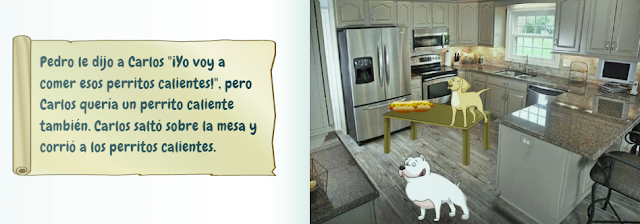
Asking a high school student to speak in front of their peers is scary enough, add on top of that the factors of the language not being their primary one, compiled with a new and super challenging concept as well as one that requires much thought before the actual sentence is constructed. Listening and reading are both effective in learning the content, but both of these depend on teacher-facilitated content consumption rather than student-driven content creation.  So, two Byron Nelson Pre-AP Spanish teachers, Matt Condon and Isabel Greuling, created the perfect project to get the best mix of language development through product creation with appropriate scaffolds to facilitate student success. Students were tasked with writing their own Spanish Children’s Story Book!


To communicate clear expectations, students received this Rubric, Requirements, and Rough Draft document which contains intentional planning tools such as separate boxes to pre-write two sentences per page, a space to plan vocabulary that will be used and its translation in both English and Spanish, and instructions to highlight verbs and grammar. To facilitate effective story development, students also completed this StoryStarter questionnaire to help students develop the concept prior to developing the language used to describe it. To gain quality peer feedback, students reviewed each other’s rough drafts using this Peer Edit Guiding Questions. Lastly, students constructed their final draft using the online story creator site: Story Jumper; those who are more artistically advanced or who prefer to work offline also had the option to creating a physical book that meets these same requirements.

Below are a few exemplars. Click each image to view the full version within Story Jumper.

Teacher Feedback: Jackson did a fantastic job of using the preterite and imperfect correctly throughout his book. This book contained very few errors and had a wide range of varied vocabulary covered in Spanish 1 & 2.  Jackson terrifically demonstrated his knowledge and mastery of grammar and vocabulary concepts from the last few chapters.  

Teacher Feedback: Dylan exceeded the project’s expectations on this activity by creating a funny, original story with a surprise ending and using correct preterite & imperfect usage to narrate the book.

Teacher Feedback: Adriana's story is very original, and she uses multiple concepts we have learned this year very well. 

Additional student exemplars: Samuel el Sapito and La Mofeta Triste


Students were able to extend the project a step further in creating an audio file of them reading aloud their storybook; thus, refining the skill of speaking the language. In doing so, students can practice pronunciation using a familiar text that they personally constructed which again sets the student up for success. This optional additional audio file can be embedded on the first page of each Story Jumper book.


“I don’t teach a foreign language, so how can this concept be applied to my classroom?”

This project has multiple elements of "good teaching" that can be applied to all ages and content areas.

Highest level of Bloom’s = Creation
  • Are you providing time for your students to apply their learning to their own student-driven product?
Student Choice
  • Students were able to choose their own setting, characters, and script providing multiple opportunities for student buy-in and student-selected opportunities to demonstrate success.
Scaffolding
  • Appropriate planning documents and class time were provided to allow students to pre-write and get peer-feedback for revising and editing.
Cross-curricular
  • Since Spanish is a language, incorporating ELA elements lend itself easily to this task. Rather than simply saying “Write using appropriate grammar,” this project reminded students of multiple literary elements such as setting, character development, and climax which are concepts currently being studied in English I-IV.


This activity meets ISTE's Student Standard of being a 'Creative Communicator' in which "Students communicate complex ideas clearly and effectively by creating or using a variety of digital objects such as visualizations, models or simulations.." (6c)