
"Am I doing this right?"
"I'm stuck!"
"I don't know how else to make it better."
"I think I have the hang of it?"
These phrases are ones that are muttered on a daily basis in every content and at every grade. Students are learning new material and are trying their best to show mastery, but are often unsure if they are on the right track or are meeting expectations. Unfortunately, these questions typically don't get answered until the end of a unit through some sort of summative assignment in which the student gets a grade, sees their marked errors, and then immediately moves on to the next topic of study instead of using the feedback for growth towards improvement.
You can't blame the teacher though, right? With 30+ students per class and having several class periods in a day, the shear combined class load of 150+ students to grade is overwhelming, not to mention and it's near impossible to hold a meaningful conference with every student within a 45 minute class period. To add, many teachers are already spending several hours after school preparing for the next school day. Is all hope lost? Do we accept that's just how it is? Is there a better way? YES!
Check out these highly effective ways to maximize use of technology in delivering immediate, personalized feedback to every student.
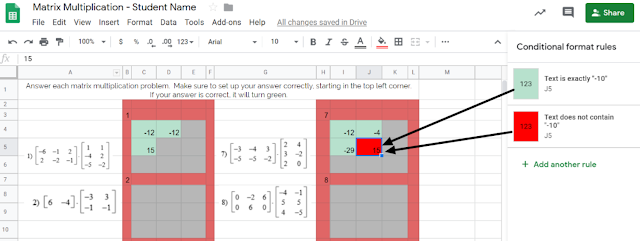
Tip #1: Incorporate tools that automate the process of providing immediate feedback. Check out this example from Carla Dalton's AQR (Advanced Quantitative Reasoning) class in which she maximized the 'conditional formatting' function within Google Sheets to efficiently check progress towards mastery. This auto-coloring box allows the student to know immediately if their calculation was right or wrong. Immediate feedback of this nature enables students to self-monitor the need for referring back to notes or self-regulation of knowing when to ask for help. This also is intended to correct misunderstandings as they occur, rather than addressing misunderstandings the next day after a worksheet's worth of doing it wrong and solidifying incorrect thinking.
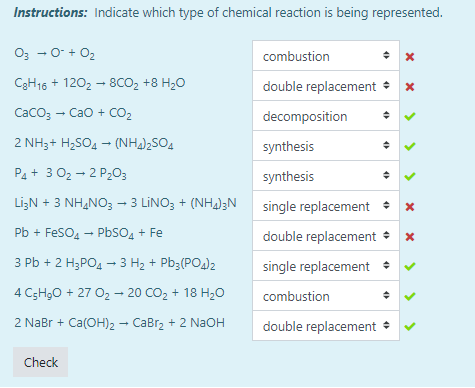 Another example of this automated immediate feedback is done through the use of Moodle quizzes when set to behave in Adaptive Mode, such as this example from Tiffany Mackerley's Chemistry class. This mode turns a traditional quiz into a series of formative questions that has a "check" button which allows students to immediately see which answers are right or wrong. Based on the immediate feedback, students can adjust their response accordingly; the teacher can additionally have it be set up to lose a certain percentage of points with each incorrect answer to minimize random, blind guesses.
Tip #2: Empower your students have their voices be heard as a welcomed source of feedback. In April Heffley's Art IV class, students gave anonymous, critical feedback to their peers' artwork in order to make improvements on what was considered "final" artwork for the time-being. The anonymity allows students to be honest about their thoughts while the teacher is able to monitor students responses through the Teacher Dashboard. Though it does save the teacher time from not being the sole giver of feedback, but it it also valuable to the student receiving the feedback as this process allows varied opinions and perspectives that might not have been considered. Not to mention, it also targets higher order thinking skills by those giving the feedback considering evaluation is the second highest cognitive level in Bloom's Taxomony. Beyond collecting the feedback, Mrs. Heffley then uses the peer's feedback to hold individual conferences with each student artist as they review the feedback together; during this time, the teacher assumes a partner position, rather than evaluator position, in supporting the students' growth.

Tip #3: Seek new opinions from audiences outside the walls of your classroom.
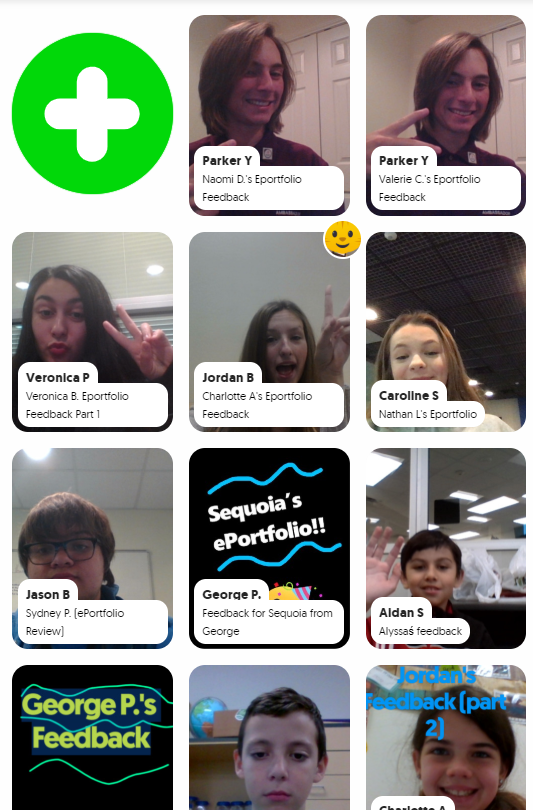 Opening the virtual-doors to your classroom does not have to mean you are connecting with people literally across the globe or are blindly matching with unknown audiences. Patti Hayes' 10th-12th graders at Steele Accelerated High School partnered up with Sandra Champion's GT 5th graders at Hughes Elementary School to review each other's ePortfolios and provide feedback to one another. Google Slides were used to pair up the students, collect written feedback, and link to a FlipGrid that facilitated introductions and oral feedback. This partnership benefited both audiences as the younger students were able to hear from more experienced students in this area, while the older students had their content viewed from true 'outsiders' which helped pinpoints things to be explained or clarified. For more information on this partnership, stay tuned for a blog post detailing this experience set to publish here on 12/9/19!
While all of these tips require time to be invested on the front end to prepare and set up, changing when and how feedback is given maximizes a student's understanding of the material by shifting mindset to viewing feedback as a tool for growth as opposed to a numerical final evaluation. Also note that giving quality feedback is a skill that is developed over time and you can't assume any student, regardless of age, should automatically 'know' how to give good feedback. When asking students to give each other qualitative feedback, sentence stems help focus thinking. Lastly, because feedback is a skill, the more times you ask students to give feedback, the more developed they will become in this area.
This post highlights examples of the following ISTE standards:
- Students use technology to seek feedback that informs and improves their practice and to demonstrate learning in a variety of ways. (ISTE Student Standard 1c)
- Use technology to design and implement a variety of formative and summative assessments that accommodate learner needs, provide timely feedback to students, and inform instruction (ISTE Teacher Standard 7b)


