Showing posts with label Kylie Lloyd. Show all posts

Tuesday, December 14, 2021

Student Perspectives: A Comprehensive Reflection on Project-Based Learning


“This was probably my favorite project that I've ever done in an English class because it is based on a topic that I am a big fan of -- video games. I've never done something that I've been extremely interested in during English class.” - Hunter

“This project involved video games, art, symbolism, gothic literature, and design -- all things that I love.” - Traci

“I am proud of the different ways I was able to better the project because of the effort I gave. This was an amazing idea to get us to engage and learn about gothic themes and symbolisms.” - Caitlyn 

Statements like these are sure to put a smile on any teacher’s face because, naturally, teachers want their students to enjoy learning. They want students to be engaged and excited about their work. But not all learning experiences result in the kind of enthusiasm these students expressed in their project reflections.

So, what was different about this assignment?


The Project

Students in the STEM Academy at Northwest High School completed a “Gothic Video Games PBL”. They were assigned a small team (3-4 people) and tasked with creating a video game design that honored Edgar Allen Poe’s contributions to Gothic Literature. By the end of their project, they had to answer the driving question, “How does style drive creativity?” Their learning tasks included:
  • work as a team to develop an E10+, ‘gothic game’ idea loosely based on an existing Gothic short story 
  • create a visual representation of their game to support the pitch
  • 'pitch' their idea to a local game developer through a formal presentation
The end-products themselves aren’t that unique, so what made this project so engaging? In PBL students follow a learning path wherein creation acts as the impetus for learning.

Project-based learning reframes traditional teaching, offering real-world, hands-on experience. In PBL students are challenged to create an authentic end-product, but haven’t necessarily learned what they need to know to create that end-product. In this way, student inquiry drives learning in a PBL.

Students know they have to create or do something (and even have a product rubric), but they don’t always know how to accomplish their task or have the knowledge they need to get it done. Students gain those throughout the PBL and apply what they learn as they create. This is different from classrooms where demonstrating mastery primarily happens at the end of a unit.

Paired with consistent feedback, PBL leaves room for students to fail in the moment but still grow and succeed in the end. The need to create becomes a catalyst to learning, and within the parameters of the PBL, a student can personalize their learning experience based on their interests and passions. How and what students learn in a PBL is organically driven by their authentic "need to know" for the purpose of creating.

(A note for teachers: In PBL, student inquiry is strategically planned and guided. The success of projects like these hinge on detailed backward design and the facilitator’s intentional guidance and scaffolding of student thinking throughout the project.)


The Reflection

Through Project-Based Learning, students get more than just academic content. In PBL students practice critical skills like communication, personal responsibility, time management, teamwork, and creativity. Student reflections even showed that through PBL students apply what they learn across content areas and make cross-curricular and industry connections.
"[Through this project] I grew my knowledge of game design and gothic elements, which allowed me to become more creative with those things. In a STEM field, most of the problems you have to solve aren't going to have definitive answers, so you need to be creative and innovative to solve them." - Robert
“A creative skill that I grew during this project has to be brainstorming. I don't brainstorm often… but this project and the brainstorming [needed] allowed me to think of a lot of unique ideas we could add to our game.” - Rylan
“Creativity is extremely important in the STEM field as it requires everyone to be unique when it comes to approaching a problem. If we all share the same idea, the final product will be dull.” - Anthony
"Our group's problem-solving was phenomenal. We found many issues with our original idea, but then made an amazing comeback and [designed] a whole new game and presentation. My group was lacking in the communication department... Thankfully, we pulled ourselves back together to make what I would say is a pretty good project." - Ethan
Of course, no collaborative effort is without its challenges. Students shared that, by working together, they learned to advocate for themselves and each other. They learned to lead, to compromise, to play on each other’s strengths, and to communicate with one another in a professional manner. Ultimately, they learned with and from each other.
“We came across many problems while working on our project. There were many things that we either disagreed with or didn't fully understand. We had to collaborate and try to work things out.” - Ryan
“I've grown as a problem-solver by understanding my weaknesses and getting help from people who are better at a particular thing than I am.” - Amelia
“This project taught me a lot of presentation skills that I will need in the future... After watching many [other teams present], I was able to learn the best ways to talk, communicate, and demonstrate ideas when presenting. That is why I enjoyed this project so much. I was able to learn some really great ways on how I should go about presenting.” - Vincent

“We were able to blend our ideas as a team to make something really cool.” - Anthony 


The Products

After two and a half weeks of hard work, students were proud of themselves and of what they had created. They were eager to celebrate and share their hard work, growth, and successes. They presented their ideas to a panel of judges, which included a gaming expert who was acting as their game developer. Celebrate these hardworking students by exploring are some of their final products:

“The Crypt”

This team of STEM students designed a full website, complete with original artwork, to showcase their video game idea based off of the story “The Fall of the House of Usher”. Highlighting the idea that our surroundings have an impact on our mental health, they challenged players to escape from the Crypt before they "go insane". Replete with gothic imagery and symbolism, in this game, players are “in a fight against insanity, which is caused by the dark”. The player “must cling to torches and light sources to save what sanity remains”.


"Puppet's Mirror"

This group designed a game where you escape by solving puzzles. They cleverly embedded mini-games that innocently represented the darker aspects of their short story, "The Black Cat" in order to adhere to their E10+ kid-friendly rating for their game. For instance, when in the story the cat loses an eye to the owner's violence, in the game, players are instead transported to "a rigged rotating cup" game with images of a one-eyed cat. They even used online tools to create an AI vision board for their game. They also created 3D mockups of their main character, noting minor adjustments in her appearance to symbolize her personality changing and other gothic aspects of their game. 


"Just Around The Corner"

In this "labyrinth escape game", players must get out "before the consequences of their actions catch up with them". In this excellent presentation, students shared original artwork, that included iconic gothic symbolism from Edgar Allen Poe's "The Black Cat". Their work helped the project judges visualize each level. They also included a detailed description of how sensory elements of gameplay and user experience would communication the theme, build suspense, and contribute to the overall gothic of the game. Lastly, their pitch used persuasive diction to entice future players. 


Thinking about trying a PBL with your students? Check out these helpful resources from PBLWorks. 


Tuesday, February 11, 2020

Monuments & Mysteries: An Innovative Jigsaw In Language Education


At Northwest High School, AP Spanish teacher Ginger Cline is doing more than teaching a language. She works hard to truly connect her students to the cultures of the people who speak the target language -- that takes intentionality and innovation. Fortunately for her students, she is committed to both.

In addition to language, culture can be found in the stories told and monuments recognized. Whether a globally-celebrated landmark or simply a local treasure, monuments hold meaning, and by learning about them we can learn more about the culture and ideas that they represent. That said, it would be impossible to teach every student about every meaningful monument across Spanish-speaking cultures. That’s why for this assignment Mrs. Cline put a few engaging twists on a tried and true method -- the jigsaw method.

The traditional jigsaw method works like a puzzle. First, students take on the role of investigator and teacher; they work in small groups to understand and become experts on a part of the overall collection of information before then teaching their small part to their peers. Even though students are initially only responsible for learning and teaching one part, through the presentations at the end, all students have the exposure to and opportunity to learn all of the material. Because students have become experts on part of the information with the purpose of teaching others, this process gives students ownership in their learning.

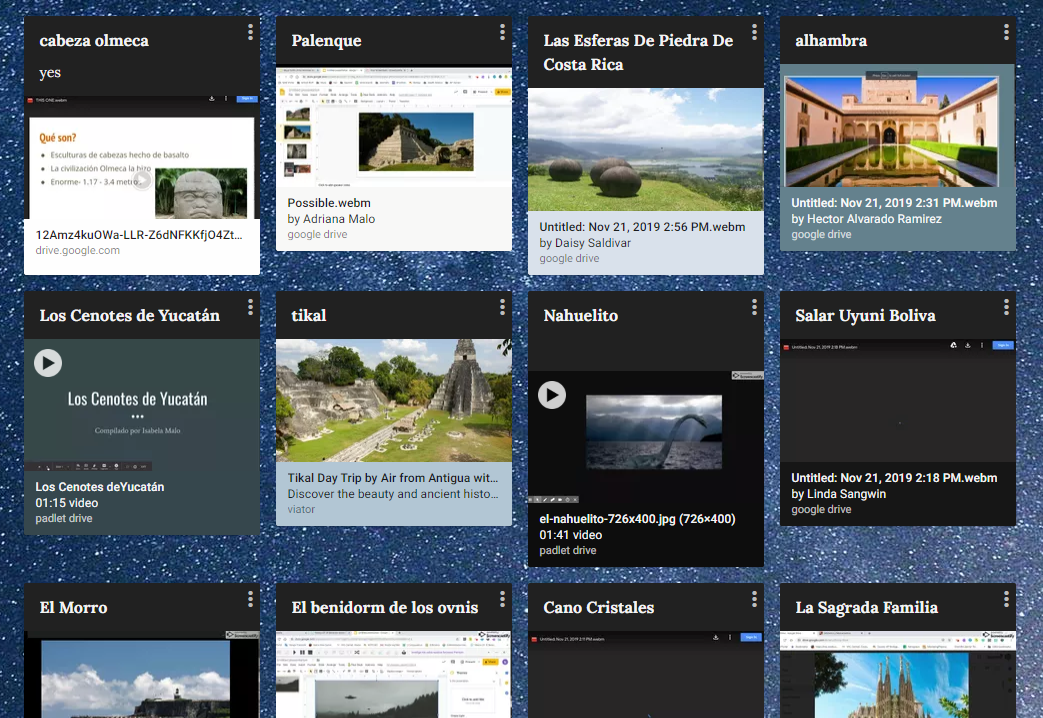
screen grab of Padlet
But more than exposure, Mrs. Cline also wanted her students to create and to have a cross-class collection of student-created resources that they could look back on for this information. That required some creativity on her part. Here is what they did:

Students selected a monument they were interested in and were tasked with creating a screencast about that monument in their target language (Spanish) that both introduced the monument and explained the story behind it. Then, students shared their screencasts on a collaborative Padlet. By having students create screencasts in their target language, Mrs. Cline was able to assess each student’s language learning through an authentic product.

Preview of a Bingo Board created by Mrs. ClineThe next step was to bring the learning together. Through Padlet all students could access and watch each video, but Mrs. Cline motivated them to do so by creating BINGO boards based on the videos students created. Playing BINGO together not only ensured that students would watch the videos, but that students’ had an authentic audience in their peers. Students could also see the relevancy in their purpose for creating -- knowing someone will see your work and find value in it makes learning more meaningful.

Mrs. Cline’s Mysteries and Monument Bingo is a reminder that you don’t have to reinvent the wheel to be innovative, but you do have to push the boundaries of tradition. She started with an established, sound teaching strategy -- she kept the most valuable parts and then skillfully integrated technology to create a deeper and more meaningful learning experience for her students.

Monday, November 11, 2019

Bringing Seesaw to Secondary: Why Seesaw isn't just for Elementary classrooms

Bringing Seesaw to Secondary: Why Seesaw isn't just for Elementary classrooms

As a platform, Seesaw lets students blend pictures, video, voice-over, annotation tools, and external resources. It can be a powerful platform for both creation and reflection. Typically, Seesaw is used by elementary educators because it caters to kids -- it’s icon heavy, makes providing voice and video instructions easy, and because it is web-based, is easily accessed on Chromebooks. Secondary teachers, don’t stop reading yet… 


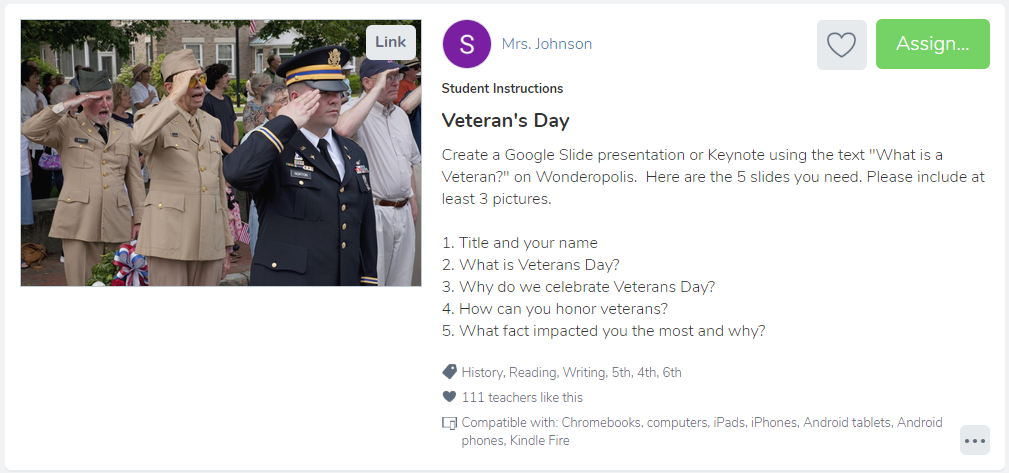
Middle School teacher Kristy Fair at Gene Pike Middle School is engaging her 6th-grade students through Seesaw. For Veterans Day and as a part of their nonfiction unit, she had her students read an article from Wonderopolis and then create a presentation about what they learned. Beginning with a lesson from Seesaw’s Activity library, which is filled with pre-created activities for K-12 for all contents, Mrs. Fair modified the assignment and instructions to better meet her students' needs. She added voice instructions and asked her students to make personal connections to Veterans day before sharing their research with the class.


What I love about this lesson is that she asks her students to reflect, make connections, and create a resource to share with their classmates all based on what they read. A lesson like this is flexible -- it can easily be made more or less challenging depending on the article linked in and on the level of critical thinking students are being asked to show in their evidence of learning. She modified the task to meet her students' needs. Regardless, Seesaw and Google Slides are simply the tools through which Mrs. Fair assigned and assessed student's comprehension and learning. 


I observed her classes using Seesaw and witnessed first-hand how excited and engaged her middle schoolers were while using Seesaw. They loved sharing their work so that their classmates could see it, and were quick to leave each other positive feedback on what they shared. They were eager to participate -- one student went so far as to respond to the Veterans Day assignment from home the morning before class, sharing a video reflection about how his great-great-grandfather was a veteran.


As a former-high-school-teacher-turned-Instructional-Coach, I had admittedly written this tool off as an elementary-only resource, but working with secondary teachers and students in Seesaw quickly showed me how useful this platform can be for meeting the needs of students of all ages and ability. At its core, Seesaw is a platform for sharing and curating work, for synthesizing thinking and evidence of learning in one easy-to-use and easy-to-share place. As an added bonus it seamlessly integrates with Google Classroom, which many secondary teachers are already using. Seesaw creates choice and flexibility in how students share their learning. Whether asking students to snap a picture of their journal, annotate and reflect on what they wrote or asking students to upload their lab data and reflect on the implications of their scientific findings using videos, Seesaw can amplify the reflections and learning that happens in secondary classrooms. 


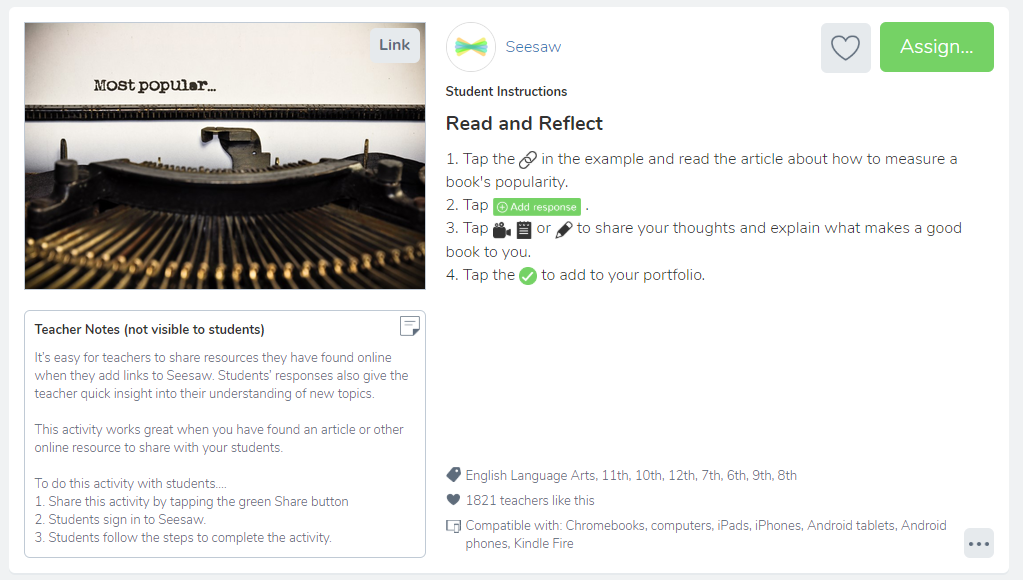
Below are a few pre-created secondary Seesaw lessons for various contents that can all be found in the Activity Library. How will you use Seesaw in your secondary classroom?


Monday, April 8, 2019

How to Turn 6th Graders Into World Travelers


At Gene Pike Middle School, 6th grade World Cultures teachers Connie Garza and Dawn Goldstein want to do more than teach their students about other places -- they want to show their students the world. Consider for a moment that 2018 research discovered 1 in 10 Americans has never left their home state, for financial or other reasons. With this in mind, it's safe to assume not all of our students will have the opportunity to visit many of the far-off places they're learning about in school.

Still, we know that learning to understand other cultures and gaining perspective on how other people live is an important part of succeeding in our global society and in learning to be a well-rounded individual. Thanks to Google’s Virtual Reality (VR) Tour Builder, even if Garza and Goldstein can't fly their students abroad, they can still take them to places all over the world.

For context, Google’s Virtual Reality platform relies on Google Earth’s existing 360-degree footage, making it possible to virtually explore any place in the world through your computer screen or a pair of VR Goggles. What’s even better? Their VR Tour Creator allows people (in this case 6th graders) to design a virtual tour with stops anywhere around the globe and lets them embed their own photos or written details into the tour.

After explaining their task to students, Goldstein and Garza used student-led stations to guide their learning about Europe. During their stations, students used hyper docs and other printed and digital resources to learn about European countries overall, documenting what they learned in their “travel journals” and earning stamps in their “passports” for visiting each country. Throughout this step, students gained important insight into the countries and cultures that would ultimately help them build their tour during work-time.

A key success in this project is that by launching the project before introducing and researching the countries, Garza and Goldstein prolonged their students’ inquiry and created a crucial “need to know”. Instead of learning for the sake of learning (albeit a worthy endeavor), these students were learning with the motivation to design their dream tour through a European country, that would also highlight important geographical and cultural details of each place they visit. This created a personalized passion for their learning that inherently increased student engagement throughout the learning process of every country.

A major challenge in a project like this -- where students are focusing on only one from a list of topics they need to be experts on -- is making sure students master their overall learning about European culture and geography, while still highlighting the country they are most interested in learning more about. To address this, Garza and Goldstein made sure students visited each country through the exploratory stations, but they also gave students a peer audience. Because students would be sharing their projects with each other, they were motivated to do their best work; meanwhile, students were exposed to numerous European countries through their peers' student-created virtual tours.

One thing to remember is that you don’t need VR goggles to make Google’s Tour Builder interactive and exciting. Anyone can explore the tours online, and students can use the “hotspot” feature. For this project, they were asked to add detailed pictures, important travel notes, and fun facts about the culture and geography to make their tours more interactive. For example, one student used a hotspot near Italy’s Leaning Tower of Pisa to clarify that a modest dress code is an important consideration when visiting Italian landmarks. Ultimately, creating tours through Tour Builder is easy, but this "hotspot" feature lets students add reflective depth and learning to their creation. It is a feature that educators can rely on to make the task of creating more rigorous. You can see a student-created tour of Italy here: Example.

Through this project, Garza and Goldstein undoubtedly created a few travel-bugs, but even more, they gave students the opportunity to imagine themselves going on great adventures. They gave this group of sixth graders the chance to be (virtual) world-travelers.

Monday, January 28, 2019

The Real World is In Your Classroom


Visualize a small group of kids huddled in a middle school flex space, Expo marker in hand and video camera staged in front of them, confidently drawing shapes and lines on the whiteboard as they explain the steps to solve an equation. Picture students, who otherwise avoid math, passionately debating the best place to ask a question: is it before or after an example? Can you hear them, animated, discussing the best way to teach someone about complementary and supplementary angles?

This was the scene in Jennifer White’s math class at Pike Middle School when she challenged her students to create Edpuzzles that teach other students new math concepts. Determined to engage her students in rigorous and authentic learning, she asked them to design video lessons that would be used as warm-ups and tutorials in other classes.


If you don’t know, EdPuzzle is a video platform that lets teachers turn any video into a lesson by embedding questions, comments, and/or audio. Teachers then assign their video lessons to students and collect formative data, like who watched the video and what they understood. Because the videos are self-paced, students can re-watch them as many times as they need, and even share them with others.

For this project, in teams of 2-3, students chose a topic from their next unit of study. Before creating their video lessons in EdPuzzle, they explored resources, researched their topics, and planned what comments and questions would best help their audience learn the concepts.

White gave students a choice to either find an existing video or create their own to use in the EdPuzzle. Some were excited to make their own videos using their Chromebooks. Giving choice helped her differentiate for students who needed more time during the ‘discovery phase’ and for those who needed an extra challenge.

Before publishing and sharing their work with their audience, students gave each other feedback (using Google Forms) about how they could improve their lessons. Mrs. White gave students time to apply the feedback they collected. This step also worked to expose students to all of the terms they needed to know, and to reinforce the concepts they would eventually see in class.

In the end, this whole project took 3-4 days, provided a whole department with student-created peer tutorial resources, and gave students the chance to learn with a purpose. You can see examples of student work here: Example 1 & Example 2

It is hard to imagine what authentic learning looks like in practice because there isn’t a ‘single right way’ to approach it. John Lamar, with bie.org, put it simply, “In fully authentic work, students are doing work that is real to them... [it has] a direct impact on or use in the real world. (The “real world,” by the way, could still be school, which is a very real place for students.)”

It’s easy to get caught up in preparing kids for the future, but don’t forget: to our students, the real world is here and now. The real world is in your classroom as much as it is outside of it.

One of Mrs. White's biggest takeaways from this project was that students owned their learning throughout the entire process. That happened because she gave students a purpose and audience for their learning. Students were proud to contribute to their immediate environment and motivated knowing that other people would see and benefit from their work.

Ultimately, when educators design authentic learning opportunities they empower students in the present. Instead of hoping students will become leaders, creators, and good citizens one day, teachers can give students the chance to be those people today, to contribute to their real world in the here and now.

Monday, November 19, 2018

Say “Oui!” to Performance-based Assessments


If you’re anything like I was as a classroom teacher, you’ve spent many nights drowning in papers to grade. You understand the time spent in coffee shops, trying desperately to get caught up. And yet, if you’re anything like me, there have been times that, after all those hours and lattes, you weren’t satisfied that your students’ grades actually reflected their knowledge and ability. Where was I going wrong?

I assigned and graded vocabulary worksheets each week, but students were still scoring low on their diction in writing. I graded reading quizzes that assessed plot and character knowledge, but in the end some students couldn’t talk about the major themes of a novel. Between what felt like wasted class time and weekends spent grading, it never failed that when it turned out an assignment didn't actually tell me whether or not my students truly “got it”, I was left frustrated.

I understood that traditional assignments and tests work to show if students “know” something, but quickly learned that they fall short as an indicator of whether or not students can actually use that knowledge. Of course there is a time and place for each, but it is important for teachers to challenge their students with performance-based assessments if they want to know that students can apply their knowledge in meaningful ways. Northwest High School’s French teacher, Madame Blanc (Mrs. White), made this shift in her classroom this year, away from traditional tests and towards a performance-based method of assessment -- and it seems to be paying off.

Each six weeks, Madame Blanc gives her students both creative tasks and opportunities to apply and demonstrate their learning through student-created products that are ultimately shared through their ePortfolio, a personal and digital collection of their growth and learning. As a basic example, she asked her students to create an article for a French magazine that explains an American holiday and custom as a way to assess their application of many language skills they are working on.

French student Elise Reuman recounted one assignment where she and her classmates were asked to create a video that described their partner’s family as a way to demonstrate their ability to use adjectives in French. Using Adobe Spark video, she described her classmate's family. Elise reflected, “...using the vocabulary in a way that applied it to a likely scenario really helped to ingrain the information. Projects like this usually only require the [written] portion of the vocabulary… [but] Mrs.White, went a step further and required a vocal response as well. This really solidified some of the pronunciation and helped me become more comfortable with actually speaking the French language.”

As Elise shared, performance-based tasks engage students in more authentic opportunities to practice real-world skills. It’s important to note that, in a performance-based classroom “teachers do not have to “give up” units of study or favorite activities” (ASCD). According to ASCD, it’s because these “authentic tasks are rooted in curriculum” that “teachers can develop [assignments] based on what already works for them.” It’s ultimately through small changes in how teachers ask students to learn that “assignments become more authentic and more meaningful to students.”

For example, in another assignment in Madame Blanc's class, students were challenged to learn about multiple perspectives, including the likes and dislikes of French teenagers. They had to go further to compare/contrast these perspectives with those of American Teens. Students interviewed their peers (some opting to collect data through Google Forms), graphed and visualized the data they collected (through Google Sheets), and then wrote of summary of their findings in both French and English, finally sharing their work through their ePortfolio (a website created on Google Sites). Assignments like this require students to be strong in their content knowledge, but more than that, they develop skills outside of French language studies -- skills like the 6 Cs: creativity, communication, collaboration, critical thinking, character education, and citizenship.

Watching performance-based assessments work for Madame Blanc has reiterated what hindsight and experience taught me: It was when I focused on creating rigorous and authentic learning tasks for my students, rather than assigning simple checks-for-understanding for grades, that I best served them. It is through rigorous, performance-based learning tasks that we can empower our students to think critically and create, and that we can most accurately and authentically assess their learning.

Tuesday, September 25, 2018

Skilled Students: With the Certifications to Prove It

Every choice Patti Hayes makes about her Business Information Management course is funneled through Career and Technical Education (CTE)’s vision for future-ready students: “Skilled, Credentialed, and Ready”. Though, this isn’t unique to her classroom. In high school CTE classrooms throughout Northwest ISD, students are given every opportunity to graduate both skilled and certified with professional, industry certifications.

From students in Health Science earning CPR certifications, to those in Architecture classes certifying in programs like AutoCad, NISD students are graduating, at no cost to them, with industry certifications. “People need to understand that when we talk about industry certifications,” STEM Coordinator Casey Helmick explains, “it’s not like when I was in high school, a computer test that doesn’t mean anything. We are talking about certifications adults are currently paying for in order to get or keep their jobs. That is one way we set our kids up for future success.”

Through CTE, students have access to 27 pathways, each offering unique certifications that relate directly to degrees or fields of interest. For example, engineering students in the STEM Academy earn OSHA certifications their freshman year, and many have earned Autocad and Revit certifications by the time they graduate, while students in Business Information Management have the chance to become Microsoft Masters -- a title many are determined to earn before graduation.

Here is how it works: NISD high school students enrolled in any CTE class have access to Jasper and G-Metrix online, both certification curriculum platforms. Jasper teaches students Microsoft skills, challenging them with 8 skills-based lessons before their final creation project. GMetrix teaches programs like Autodesk and Adobe through 4 create-as-you-go lessons. Once students are trained, they test to certify through Certiport. In addition to these tools, students can supplement their learning with video tutorials from a site called Lynda.com, to which all Northwest ISD students have access.

Northwest High School (NHS) student Hulen Howard is currently certified in OSHA and working on both his Revit and Microsoft Word certifications. “It is the difference between having experience and having something to show that I have this experience,” He said. “If I apply for a job and claim I know Revit, my certification will show them what level of experience I have.”

Patricia Tran, NHS CTE teacher, reminisced, “I have students from the past who call me and say, ‘Hey Mrs. Tran, do you still have that certificate for PowerPoint or Word?’ because now they need it for work. One of Mrs. Tran's former students, Derek Maynard, who is currently attending the NCTC and working as on a maintenance team, can attest to this. He said, "My certifications [allow] me to show off my technical skills that I have learned... and how hard I have worked to get here. [They] have even opened up special opportunities for me at work. I was asked by my current employer to create a 3-dimensional drawing of a stage, based off of my Revit experiences."

Students seem to understand the benefit of pursuing these certifications. Helmick explains, “There are certifications connected to or linked to their pathway, but students aren’t limited to their pathway. They can earn certifications based on what they feel will give them the most potential and advantage on their [resume].” In fact, many Steele Accelerated High School students work towards certifications during their free time.

Steele senior Bergon Connor says he is going through certifications to better himself and build his resume. “I was focused on getting those certifications. Once I got one, I couldn’t stop.”

“A lot of us, when we started, didn’t think [certifications were] important or helpful,” Steele senior Sarah Alam clarified, “Even me. But once I did [start], I realized that having those certifications will be so helpful for [my] future.” For Sarah, who plans on pursuing a theater degree at the University of North Texas, certifications are a way to secure her financial future. She joked, “Believe it or not, theater doesn’t pay that much, so pursuing a job in Data Entry while I am in school will help me. I need a good, stable job as a backup plan.”

Students talk about how certifications can help them reach their goals. Someday Cosmetology student and junior Abigail Warmbrod hopes to open her own salon and massage parlor, and she knows that her certifications are preparing her to present to her employees or use Excel to manage the books. But for now she is learning through her Academy and working a high school job that, she says, her certifications helped her get, “I had a job interview where I was able to explain my certifications. Even though it had nothing to do with the job, it stood out, and I was able to make those connections for them. And it helped me get the job.”

Her teacher, Ms. Hayes, shared more of Abigail’s story, stressing, “Her first year she struggled. But she is determined and [she is] tapping into the resources available to her. To me that is the success story – someone who has struggled to certify, and then continuously battled, but stuck it out.” Hayes added, “It's about learning to be independent and pushing through their struggles. That is the success story…"

To date, Abigail has earned numerous Microsoft certifications, including Outlook, PowerPoint, Excel and Word Expert. Her next step is to become an expert in Excel, a test labeled by many as one of the more challenging certifications. “I am very determined to do it. I want that feeling of ‘I am done’. I don’t want to start something without finishing it.” Abigail’s classmate, Sarah, repeated this sentiment, “It’s difficult, but you’ve got to get through. I took Excel [multiple] times, but I pushed through it. And it’s taught me to be persistent and not stop trying. To gain skills and knowledge is really helpful no matter how difficult it is.” Abigail takes her test next Thursday.

Wednesday, April 4, 2018

Why You Shouldn't Be Afraid to Replace a "Tried-and-True Method"


Tired of the same old pen-and-paper, drill-and-kill nature of test corrections, Algebra 2 teacher Mrs. Kubacki at Northwest High School wanted to shake things up and to make math a little more engaging for her high schoolers. Of course, her existing method was working just fine; students were completing the corrections and often showing growth. Still, she wanted to take a risk.


Quiz corrections are a staple task in her classroom because they give her students the opportunity to earn back missed points on tests. Many of her students rely on them as a way to boost their grade, and she relied on them as an important step in assessing her students progress in advance of a test. She wanted to ensure that when she replaced a tried-and-true method she would still end up with meaningful evidence of learning, so she turned to an tool that is rising in popularity: a video discussion platform.


Tools like FlipGrid and Recap are becoming more renown, but with any new tool, it’s how you use it that truly matters. Though a great tool for virtual classroom discussion or Vlogging, Kubacki instead challenged her students to create with it. She wanted to see student-created tutorials, to be shared with the class.

Using Recap, also known as Let’s Recap and Recap That, her students created video tutorials for one another solving the questions they had originally missed on their quiz. Prior to filming, she gave them clear-cut, high expectations: they had to show their work, use and even define academic vocabulary words for their audience, and show their work step-by-step so their peers could better learn from their video. As a class and before they first participated, they created a list of video norms and best practices for their tutorials. (This list included rules like: No filming and walking. Eliminate as much background noise as possible. Rehearse your video before filming...)


It's probably worth mentioning that many students did have reservations at first; a selfie generation who constantly Facetime, SnapChat, and learn from YouTube are afraid to be on camera. Just like many adults, they were nervous to document their learning and share it with an audience. Anticipating this, Kubacki did not force her students to be on camera, but instead gave them a choice. She also artfully paired students up for the task, sure to consider their personalities. And since she knows it’s helpful when a leader takes the first risk, she was sure to create her own video first, modeling the class-created expectations.


On the day students finally created and published their video tutorials in class, their teacher was both mobile and available to help anyone in need -- this is one of the many benefits in giving students tasks of creation; the teacher can move out of the driver’s seat and into the passenger’s seat. In the event a student did get stuck, they were expected to create a "point of confusion video" --to post their problem step-by-step, up to the point of confusion, and to finally ask their peers for help. Because she expected students to comment on each other’s videos (they established norms for this too), students were able to get help on their corrections and were able to get immediate feedback from both their peers and their teacher.


Of course, Mrs. Kubacki could have stayed with her tried-and-true method of pen and paper, but what would her students have missed out on? Would they have felt as challenged? What academic or even personal growth might they have missed out on? By instead asking them to create video tutorials through Recap, she gave students a platform where they could immediately share their personal growth with a community of learners who could also benefit from their hard work. Taking this risk gave a larger purpose to students' time and to an otherwise mundane task such as quiz corrections. Even more, these students were empowered to own and share their learning by creating something that would help others.

*This blog has been corrected to clarify that the assignment, quiz corrections, was designed as a formative assessment tool leading up to a final summative grade.

Monday, March 12, 2018

Spark Learning: Inquiry-Based Learning in 5th Grade

If you could be any creature at all, what would you be? Which ink spreads the least in water? Can a flashlight be powered by the sun? Can water be purified through evaporation?

These were only a few of the questions that 5th grade scientists at Prairie View Elementary school answered through their own research and the scientific process. Their teachers, Mrs. Davidson and Mrs. Ward, challenged them with an Inquiry Project; Mrs. Davidson explained, “They created their own questions based off of personal interests, and followed through with gathering data, analyzing their data, and creating a presentation to show their results.”


Mrs. Davidson added, “We wanted them to learn to question something on their own”. They challenged students to think about how they approach a problem, and even how they would handle social situations, how people would handle money or respond to various circumstances. But most of all, they gave students choice. For their inquiry project, students could choose any topic that sparked inquiry: they could investigate something entirely new or ask a question that extended previous inquiries from their time in school. One of her students, Kaden shared, “I like that [the inquiry project is] a creative activity”, and that after this project, he “knows how to answer [his] questions”.


Following the steps of the scientific process through inquiry-based learning, students developed questions and hypotheses before performing research. Zephyr’s team was interested in conducting a social experiment. They wanted to know, given a few staple options, what food people would eat for the rest of their lives if that had to. He said, “We made a survey and asked the staff and 5th, 4th, and 3rd graders. We collected the data and looked at the pie chart… Surprisingly, most people prefer pizza.” Zephyr added, “It’s important to answer questions because we can learn”.


Both Mrs. Ward and Mrs. Davidson, co-teachers in math and science, highlighted how integral both math and science were to the processes students were tasked with completing. Mrs. Ward clarified, “You can’t do science without math, they’re married”. Student Davis made cross-curricular connections through this project, explaining that what he learned can be applied in other areas of his life. He made the connection talking about math and problems in general, “...first [I] look at the problem and then think about it. Then, get a solution. It’s the same as science.”


Ultimately, inquiry projects like this one offer students choice, but not at the expense of content knowledge or the skills students are developing through their own hard work. For example, one team learned the steps of the design process as a part of their inquiry. They wondered, “Can you clean water through evaporation?” To find the best way to measure their results, students had to design an evaporation system that would test their theory. They collaborated to created two different designs, tested each design to see which worked better, and tested their original hypothesis. Other group's experiments failed, but Mrs. Davidson stressed to them that failure is a part of learning and of the scientific process - failure is an opportunity, so they would present about what they learned through their failures.


A crucial aspect of this assignment was that students’ inquiry was driven by the end-goal of presenting their scientific findings to their peers and an audience. As students prepared to present, they had choice in how to showcase their findings. They created videos, posters, and traditional slideshows chalked full of tables and graphs; this autonomy and choice helped to foster their passion to share what they had learned. Students were even given the opportunity to present to an authentic audience at EXPO, the district’s student showcase. Student Davis excitedly shared that his team’s project was picked to present at EXPO, saying, “I did it last year and really liked it. I like getting up there and presenting.” His team made a video "...because it captured what the person was actually saying" Although he thought the video gave them more accurate data, h
e was quick to reflect on what he would change to improve his presentation before the event, explaining, "We are going to add subtitles".


Mrs. Davidson acknowledges that managing and guiding so many student-groups at a time can be challenging. A project like this requires teachers to step out of any traditional role, and into the role of facilitator. They have to be the supporter, to ask guiding questions, manage supplies, point students to resources for help, and all the while handling classroom management. To be successful, she explained that she gave her students a step-by-step checklist and detailed calendar of due dates and expectations at the start of the project. Mrs. Davidson -- a self-identified control freak -- points out that it's important to let go and let them do it. “Because it’s their own exploration, it’s high interest and high energy,” she stressed, “It’s worth the mess.”

Monday, September 11, 2017

From Consumers to Creators: Students Design Curriculum

Tired of the traditional two-week review of safety rules each year, Ms. Hendrix at Northwest High School decided to put students in the driver's seat of their learning. Her chemistry students were tasked with creating an online, self-paced "Science Safety Education" course that caters to high school students and includes videos, presentations, and assessments. Student Alexis noted they were basically designing curriculum.

One of my favorite aspects of this project is the student ownership of their work. Hector said that his time spent in this project felt productive because he knew it was going to be put to use. Students were creating, all while knowing that there would be a specific audience. This project enabled student choice while staying within the teacher's required parameters and TEKS. Giving up control of an assignment can be scary for teachers, but the ownership and genuine learning that takes place as a result is invaluable to students. Hector added, “It’s cool because [what we created is] actually going to help someone later.”

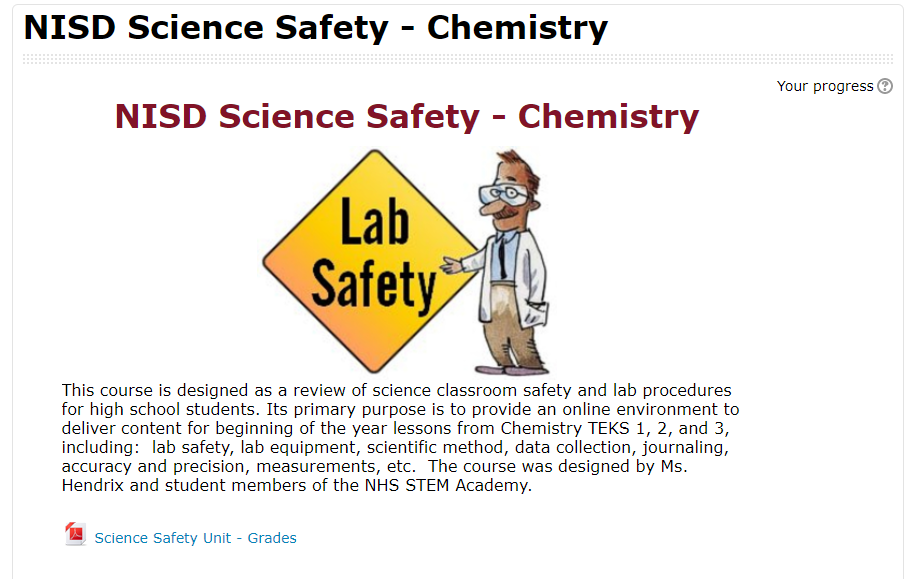
labsafetymoodle.PNGStudents were ultimately able to redefine their learning using video editing software (WeVideo, iMovie App, and Adobe Spark), Google Drive and Slides, and various Moodle features to collaboratively teach future classmates.

Essentially, each team of students was responsible for a different Lab safety and procedure topic. There were many topics to be covered like journaling, recording scientific data, creating charts and graphs, and the history of science. Each team had to create a note-taking presentation resource, a video, and various assessments for their unit. The teams collaborated to culminate everything in a final product for the next year’s science students to use at the beginning of the school year.

Ms. Hendrix was sure to leave the actual creation of the course to the students, but did help them format it into Moodle so others could benefit from their hard work. Payton said, “[This project] made me reflect on how I learned as a sophomore, and I was able to apply that for other students.” In creating the course, students had to think critically about how people learn, what type of learning sticks, and what resources and content would be best for their intended audience. Everett added, “...we had multiple people who learned different ways in our group, and so each person was able to contribute differently.”
student safety video.PNG
The teams pulled from existing resources and created brand new ones. Many students embedded student-made videos into their Google Slide presentations. Alexis’s team worked hard to make their video entertaining. “We wanted it to be funny because ours was … about doing a write-up,” Alexis noted. “It’s a boring topic for some, so we wanted it to be funny considering our audience [was] teenagers.” As always, some of the biggest learning moments came as students reflected on their work. Hector reminisced, “Out of all of the things that I did that year, I feel like this had the biggest impact.”