Showing posts with label Google Sites. Show all posts

Wednesday, November 6, 2019

Leading the Way...One Newscast at a Time!

There is nothing more powerful in the realm of education than the voice of our students. Allowing students to deeply root themselves into the culture of a school by sharing what they are passionate about, enables the school culture to thrive. Prairie View Elementary school does just that with their Leader Vision crew. What started as a club sponsored by a Northwest ISD Education Foundation (NEF) grant in 2018, has grown into a pivotal communication tool for the school.

Every single day, the Leader Vision team, championed by Mrs. Tiffany Dold and Mrs. Jennifer Casey, Prairie View Elementary’s Library Media Specialist and GATES teacher, respectively, sets the tone for great learning through the broadcasting of their completely student-driven newscast. Leader Vision brings the news daily to the kids at our school and keeps them informed of events and opportunities happening on our campus. Teachers come to the team with special announcements or segments to add in. Mrs. Dold believes this program benefits PVE by giving students and teachers ownership of school announcements, making this a relevant source of information for the campus. Mrs. Casey shares that they constantly talk about the habits as part of our Leader Vision group, as expectations to uphold in the classroom, as well as brainstorming ideas for the segment about LIM. Students create content to teach the 8 Habits of Leader in Me on the announcements such as providing examples how to live the Habits, hand motions, and reminders about each habit.


Because of this illustrious morning announcement crew, in one week PVE was able to increase campus DI enrollment by 500%. To ensure that everyone has their voice heard on campus, the team also includes a Language of the Week segment where the Dual Language Hawk Leaders teach the campus Spanish phrases. During Hispanic Heritage month, 2nd – 5th grade Dual Language students created more culture and historical awareness by researching and preparing a report on an important Hispanic person.

So how does this well-oiled machine function so that everyone has the opportunity to listen to the newscast during their Hawk Huddle? Students were divided into teams of broadcasters and given one day of the week to plan and broadcast. The students were given a template to use to plan the broadcasts. Then they collect the information needed (lunch menus, birthdays, campus news, and Habit of the week, etc.) and brainstorm ideas for specific segments. This 9 weeks we are really challenging the kids to draw on their own LIM experiences to add to the broadcast. There are two cameramen/producers that are responsible for setting up the mic, preparing the recording area, using the recording software, editing, and uploading the final broadcast. This process starts with these students preparing the iPad for filming and ensuring that they have created the background image. This year the Leader Vision is using DoInk, a greenscreen app, that allows their students to have full control over what the newscast looks like. The producers record their video, apply the desired background, and export the video to YouTube. The final step of the process is to upload the video directly into the Google Site that is shared across the entire campus. This process seems intense, does it not? The amazing fact is that this group functions so well that all of this happens within the span of about 15 minutes before the final bell rings to start the day of learning. That is efficiency at its finest.


When asked about future goals for the Leader Vision Program, Mrs. Casey and Mrs. Dold shared the following aspirations. Casey expressed that, “We would like to involve more kids in the news broadcast. In the spring, we will hold auditions again to rebuild and train a new crew for our departing 5th graders. Flipgrid helped us to determine a student’s on screen presence and a google form let us know about the applicants and their interest in Leader Vision.” Dold added, “We also have a long term goal of live announcements and a short term goal of pre-recording everyday.”

When we asked these young newscasters what they enjoy about the Leader Vision program the most, one student shared that, “He enjoyed being part of a team that was beneficial to the school and being able to film on the iPad.” Another student shared that her favorite part was “recording and being able to tell students about the lunch menu and birthdays.”

Though this writer may be signing off for now, one thing is for certain; the Leader Vision crew will continue to deliver the news and drive the Prairie View Hawks forward toward success.   


Check out some of their broadcasts below!


Thursday, March 28, 2019

Finding the Right Tool for the Job

In many instances, educators are encouraged to approach student learning and growth by focusing on individual student deficits or identified areas of need. While being aware of student needs is important, an effective educator must also be able to focus on what a student can do rather than solely concentrating on what they can’t. Educators spend a lot of time collecting, evaluating, and comparing assessment data in order to guide practice in a way that is designed to fill and eliminate learning gaps for students. However, promoting student growth and success requires an educator to see their students from multiple perspectives and to know where they are in the now.

A successful model of education considers both strengths and needs and does so by allowing students room to showcase those things on a daily basis. Temple Grandin, a professor at Colorado State University and a famous autism spokesperson expressed this effectively when she said, “In special education there’s too much emphasis placed on the deficit and not enough on the strength.” One of the best things about being involved with special education classes at Eaton High School is seeing how the teachers of these classes focus on the entire student. Knowing what students need as well as what they are capable of doing is key to helping them learn independence and skills that will serve them well into adulthood.

Lisa Daniel’s Applied English students are given opportunities to not only learn necessary ELA skills, such as expository writing and resume building, but she also works with them on how those skills apply to real life situations by arming them with the right tools and resources to compete for opportunities in the postsecondary world. For example, Lisa’s students were given the chance to begin developing their own ePortfolios to help record and reflect the skills they have been learning as well as to create a way to showcase themselves after they leave EHS. While building these sites, one student spoke of his deep interest in meteorology and weather and began incorporating his independent research and knowledge of the topic into his ePortfolio in order to show not only his desire to pursue that passion but also his independently developed skills in the areas of research, communication, and science.

Another student in one of Lisa’s classes encountered this same curriculum in an equally inspiring way by requesting access to an added tool in order to begin setting up his ePortfolio. This student, who deals with some physical limitations that most might consider a total obstacle to his ability to use digital tools and devices, was able to communicate a need for a stylus in order to access Chromebook features, allowing him to more effectively express how he wanted information displayed by setting up his page formatting, background, profile photo, and portfolio pages. While this was not an easy process for him, with a simple tool and some one on one teacher support, this student was given the independence to complete a task successfully. What some may not realize is that the student’s differences are not a hindrance to him in every situation. With the right tools, this student, who may not express a physical voice that is heard, can have a distinctive voice through his work and successfully do the same, if not more, than the students around him with no noticable differences in the end result. The author, George Couros, said it best when he said, “Technology is not just a tool. It can give learners a voice that they may not have had before.”

Christina Schweitzer’s SOAR (Social Occupational and Academic Readiness) students were awarded iPads and upright stands through the Northwest Education Foundation Grants. These particular devices, when utilized with the provided stands, allow students with physical differences to access tools that help to develop online navigations skills as well as reading, writing, and other communication in ways more conducive to their physical needs. For example, students were given the opportunity to work directly with interactive online anatomy curriculum to access content about the human anatomy in ways that were previously unavailable to them with textbooks or regular curriculum tools. In addition, these SOAR students are able to utilize digital resources that are focused on incorporating individual interests and skills. By bringing in digital tools like these, teachers can facilitate personalization of learning and students can engage and connect more with content while showcasing talents and mastering curriculum. Simply put, when we figure out what a student can do, we can find the right tools and resources to help that student grow in ways previously unimaginable.

Although technology tools are great to have in the classroom, it is never about the tool itself. Good learning is always about how those tools are used and about using the right tool for the right student and situation. When educators, such as these special education teachers, take the time to get to know what their students are capable of doing, they can customize curriculum to access those strengths and create situations where students display their talents while building confidence and a solid mastery of academic skills.

Thursday, March 21, 2019

The Spotted Article - Justin ES Newspaper


Tuesday afternoons, the library at Justin Elementary quickly fills with Chromebooks and excited
students. Anyone who has spent any amount of time in the world of education knows, the greatest
idea factories in the school are; the students. When 3rd grade student, Leyton, approached
Ms.Thorne about starting a school newspaper club, she immediately saw the potential for student
voice and choice through this activity. With a little research on the ins and outs of a successful school
paper, the club quickly began to take life. In an effort to provide student ownership of the paper,
Ms. Thorne allowed students to be involved from the start; selecting their own name for the
publication as well as self selecting topics of interest to be featured. Students chose to
include: Teacher of the Month, Book of the Month, History of the Month, Challenge of the Month,
just to name a few. Ms. Thorne shared, “They have free reign - for the most part - on what they’d
like to write about and are able to collaborate with their peers on ideas to include in their article.”


While the task of getting things rolling wasn’t too much to tackle, deciding on the best way for students
to write and publish the paper, proved to be more of a challenge.  Ms. Alyssa Thorne knew she wanted to
use technology to provide students a platform for effective collaboration and meaningful creativity,
however she wanted to be careful in her selection of tools.  “I value independence and desired
for this club to be student-led. Finding tools that the students could explore and easily figure out
without my constant guidance was important to me, and I’m pretty sure the students appreciate
it, too!” Ultimately, she selected Google Slides, Canva, MakeBeliefsComix, and Google Sites.  
Students utilize each tool for a different part of their process.  Google Slides is used for drafting,
ELA, Justin Elementary, Newspaper, Clubs, Canva, GAFE, Google Slides, Google Sites, MakeBeliefsComix, AppSmashing, 3-5, Community, Mrs. Alyssa Thorne, Rene' Egle

revising, peer editing, and collaboration.  Canva provides a template for the design of the newspaper
and advertisements that appear in the paper.  To add a little fun, MakeBeliefsComix is used to
create entertaining comic strips.


Google Sites allows students to easily organize and share each completed publication. Click the
image below to see the monthly newsletters.


With the help of technology, these young writers are now published authors!  Students are enjoying
the club and learning a lot along the way. Reagan shared, “I like Newspaper Club because I like to
have the freedom to write what I feel like writing.”  Another student expressed, “I love how everyone
can cooperate, and it’s always fun to make articles!” The words of these students are evidence
enough of the overall success of the project.  Ms. Alyssa Thorne is passionate about this endeavor and
would love to collaborate with any other educators who might be interested in starting a newspaper
club at their own campus.


Tuesday, February 19, 2019

Collaboration that BLEW our Mind and FLOODED our Learning!

“This project was so cool! We got do our own research and meet 7th graders who learned about tornadoes and floods too.” -Alondra (4th Grade Hughes Elementary)


Virtual Connection via Zoom

From research to organization to collaboration, and then feedback and revision, students in Mrs. Turner and Mrs. Covarelli’s class had a learning experience that they won’t forget!


As a part of a Lucy Calkins unit, students were put into groups based on interested level to research a natural disaster or weather event. They were responsible for taking the overarching topic and creating subtopics within that. They did their own research, took notes, and cited sources to write a final essay with their research. After writing the essay, groups then created videos using FlipGrid to share what they learned about their event.

RESEARCH AND WRITING:
According to Alondra, the most challenging parts of this project was the research. “When you type too much in your search, sometimes you don’t get what you need. We had a hard time finding just the right information.” Mrs. Covarelli agreed that research was the most difficult part for her students. She points out, “Students struggled with how to use keywords in search engines to find the results they were hoping for. We did mini lessons on how to use keywords when researching. Some students also had a hard time finding research on their subtopic, so they changed subtopics based on the research they were finding online.” Alondra added, “Our teachers helped us by giving us safe search websites. It was nice that Mrs. Covarelli was protecting us from any bad websites.”

ORGANIZING AND PUBLISHING:
Two specific groups took their information and organized it within a Google Site to submit for Expo 2019. Naomi's group researched floods. She states, “I liked creating a Google Site with my group because we could all work together. We could see each other’s work and get feedback from each other. If someone was absent we could still see their work.” Mrs. Turner helped students learn the importance of organizing a website and making information engaging and clear for others. Students added their Flipgrid video to the website along with photos, and even maps to bring their research to life for their audience.

COLLABORATING AND RECEIVING FEEDBACK:
7th Grade and 4th Grade Partner Up on Collaborative Slides
It just so happened that 7th grade students at Tidwell Middle School were learning about catastrophic events the same time that these 4th grade students were doing research. Mrs. Wellborn and Mrs. Christian's were part of a scheduled ZOOM meeting that allowed them to provide feedback for 4th grade and share a little about what they learned about tornadoes, floods, and the effects these disasters had on the environment. “It was nice to hear feedback so that we could fix parts of our website," Said Alondra. She added, "it was also nice because when we were texting (AKA: typing on collaborative Google Slides), my partner sent us a link to their 7th grade project. It was cool to learn more facts from them.” Naomi added, “I liked that we got to learn with the 7th graders that we got to see some of what we are going to learn in 7th grade. We even got to meet our future 7th grade teachers!”
Mrs. Wellborn and Mrs. Christian Meeting 4th Grade Students at Hughes Elementary

SHARING: Not only did these students share their site with 7th graders, but they have also been selected to present at Expo 2019! Come learn more about their experience on February 28th! "I'm so excited about Expo. I went in 2nd grade, but I’m glad to get to share my project again this year," said Aislynn. “I’m very excited about Expo. It’s my first time doing it,” added Naomi. For Adelais, this will be her second time at Expo. “ I went in 2nd grade, but I’m glad to get to share my project this year and even see other people’s projects.” Presentation times can be found at: https://expo.nisdtx.org/

Click the images below to view student websites:
Floods by Aislynn, Landon, Yosari, Lia, Rachel, and Naomi 
Tornadoes by Adelais, Alondra, and Bella 


ISTE STANDARDS:
Knowledge Constructor:
  • 3a - Students plan and employ effective research strategies to locate information and other resources for their intellectual or creative pursuits.
  • 3b - Students evaluate the accuracy, perspective, credibility and relevance of information, media, data or other resources.
  • 3c - Students curate information from digital resources using a variety of tools and methods to create collections of artifacts that demonstrate meaningful connections or conclusions.
Creative Communicator

  • 6a - Students choose the appropriate platforms and tools for meeting the desired objectives of their creation or communication.
  • 6b - Students create original works or responsibly repurpose or remix digital resources into new creations.
  • 6c -Students communicate complex ideas clearly and effectively by creating or using a variety of digital objects such as visualizations, models or simulations.
  • 6d - Students publish or present content that customizes the message and medium for their intended audiences.

Global Collaborator

  • 7a - Students use digital tools to connect with learners from a variety of backgrounds and cultures, engaging with them in ways that broaden mutual understanding and learning.
  • 7b - Students use collaborative technologies to work with others, including peers, experts or community members, to examine issues and problems from multiple viewpoints.
  • 7c -Students contribute constructively to project teams, assuming various roles and responsibilities to work effectively toward a common goal.


Tuesday, February 12, 2019

"If I could learn about anything in the world, I would learn about...."

Walking into Mrs. Dwyer’s first grade classroom to find they were working on their passion projects, made my heart smile! First graders planning, researching, and creating a product to show off their learning about their self-selected passion is a dream come true. Passion projects are a way of investing in each child by naturally differentiating because the whole process and product is about them.

Read more to find out what Mrs. Dwyer, a teacher at Schluter Elementary had to say about launching passion projects in 1st grade:

I was determined to bring passion projects to life despite the differences in age and independence. It was important to me to engage them in relevant work that inspired them. I never want to limit my students, especially their beliefs about themselves. Back in October, I finally got brave enough to voice my vision aloud to one of my mentors, Liz Smith, GATES teacher. She came alongside me, helped me launch the project and pitch it to my kids to get their buy-in. We got down on the floor together and conferred with kids, to understand their passion, listen to them, and help them struggle to find their voice.
Time was always a constraint. I put two 15-30 minute blocks of time on the calendar each week to work on passion projects, and I accepted that life happens. If it didn’t work one day, one week or even one month, we just picked up where we left off when we could. Mrs. Smith pushed in the classroom when she could, and a few times we would divide and conquer. I would teach small groups while she conferred. Overall, we maintained flexibility.

In the planning process, students chose how they would share their learning and what product they would create. When we finally got to that stage, it got even more fun. It was also a dance, going back and forth between guiding and allowing student-independence. For example, one student would decide on making a video. The next student automatically wanted a video to be like a peer. We had to spend time talking about purpose and audience to help kids understand that a video may not be the best fit for every project. I thought I would get tears, but I did not. I think they felt so empowered, they would nod and say, “Maybe on my next project.”


There were a few projects where we had to get parent involvement in order for it to be a success for the student. Talk about engagement! I actually received an email from a parent, thanking me for the project because she saw her daughter light up in the process. Media was following her around with cameras thinking she was a big time YouTuber. I ran into another family at the indoor soccer fields, and it was awesome because I “caught” my student working on his passion. He was so proud! Another student, who wanted to learn all about ballet, came back to school in January excited because her mom agreed to sign her up for ballet class.

It fills me with so much joy to see how far my kids have come in this process. The difficult parts for me of managing 20 individual projects, scaffolding, and differentiating for each child, and mostly understanding exactly what they wanted to be the outcome of their work, were more than worth it. It was a definite growing experience for me as an educator. We can’t wait to share the finished products at EXPO and Open House. We are hopeful to get another project in before the end of the year now that we, as a class, have more skills and practice!


As you can see, Mrs. Dwyer and her students both gained substantial knowledge during this experience. Schluter Elementary set a goal at the beginning of the year as a campus for each student to take ownership of their learning process in planning, monitoring, and reflecting on individual and/or collective work in order to meet their highest potential. This learning definitely showcases the students ownership of their learning process and what high potential they each have. Check out all of Mrs. Dwyer’s students learning here.

Monday, December 3, 2018

Permission to Be Creative!

Mrs. Johnson (a 5th grade teacher at Granger Elementary) created a collaborative Google Site with the purpose of expanding learning in the ELA and social studies classroom. On the homepage of the site, students find permission to be creative! The site reads, “This will be a place for you to take your learning to the next level by using your creative mind to build on what you’ve already been learning about in class. Think outside the box, explore new ideas, and discover topics that you’d like to know more about.” The license to be creative has led to student ownership that can hardly be put into words.

How did this site come about? Mrs. Johnson states, “Some students finish their classwork quickly and need to have a project to work on, or they need to be challenged to take their learning to the next level. I also have students who simply thrive when having projects to work on. I had many students who fell into these categories this year, and I really wanted provide them with more than just the everyday ELA and social studies classwork. With a blue crayon and a piece of notebook paper, I began jotting down their suggestions. We came up with a few ideas, such as making Google Slides, designing games, and creating Kahoot quizzes. Then, I asked these students about some of their topics of interest. That afternoon, I took their suggestions and organized them into a Google Site. By adding their ideas to the site in an organized way, many more ideas started flowing. I added more ideas of my own, and then I gave about seven students access to this site so that they could add more ideas. Together, we formed the basic structure of this enrichment site.”


Here is how the site works. 1. Students use the “Topics” and “Activity Option” pages to gain inspiration and decide on a creation project that they are interested in. 2. Students click on the timeline spreadsheet and sign up to create a project. 3. Students create the project of their choice using the tool of their choice. 4. Students insert their project into the “Finished Projects” page.  5. Students record a FlipGrid video explaining the what, why, and how of their project. They also explain how their project will impact other students and reflect on what they would have done differently if they were to do the project again.


Students lit up as they shared about their projects. Samanvita, Amari, Kaden, Shabbeer, and John could have chatted for hours about projects they had created and project ideas that were marinating in the back of their mind. "It's not like other classes because we’re getting to chose what we create" said Kaden. "It's really cool," says Amari with a smile, "It's like we are student teachers!" 

Samanvita shares a little about her creation, “I made a Powtoon about point of view, a WeVideo about story elements, and there is is lego website that I’m hoping to make a Stop Motion video from. Right now, I’m using Tinkercad to create a gun from the Revolutionary War. I also made a George vs. George quiz. I think I made it a little too tricky because most people only got 30%.” Samanvita asked me to take the quiz and I’m sad to say that I failed as well. All that said, she had feedback woven within the quiz and was able to help me learn from my mistakes.

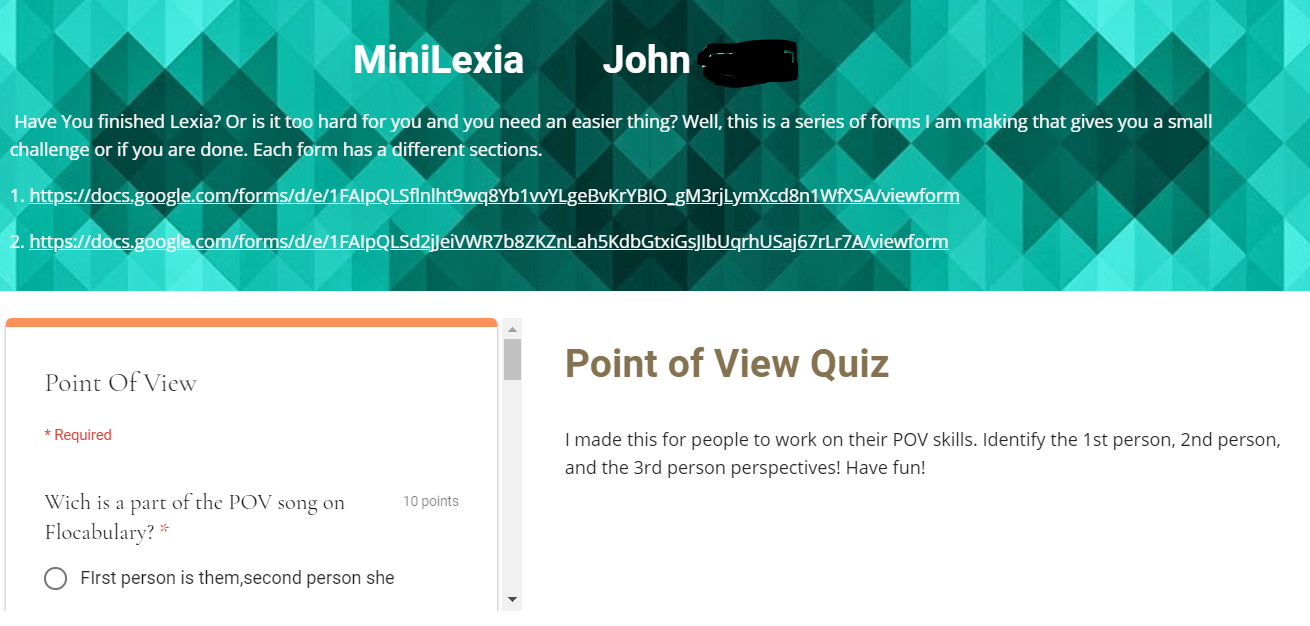
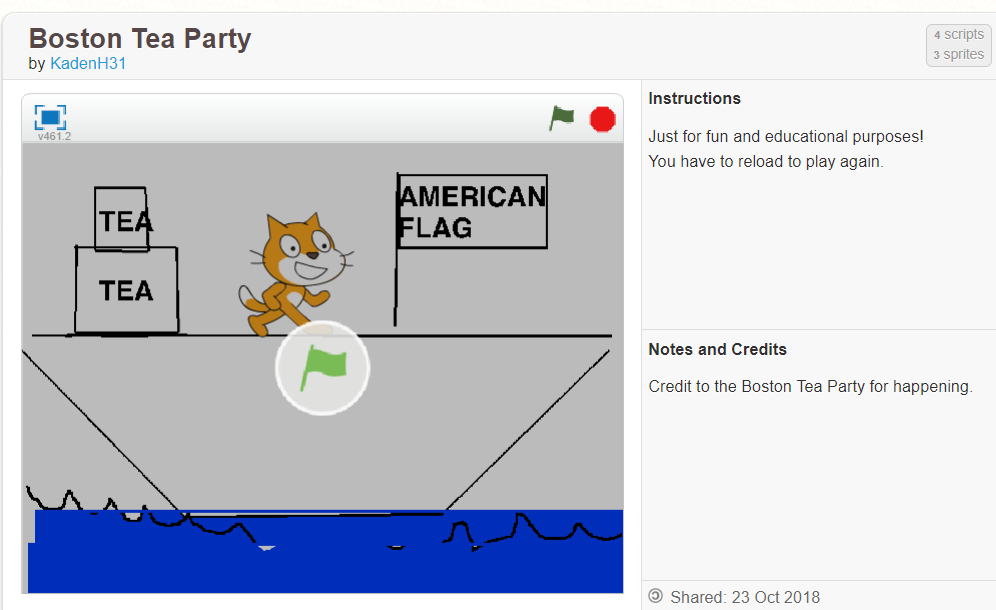
Other created projects include, a 3D print of the Boston Tea Party ship, a mini Lexia series to help others who may want extra practice, various Kahoot and Google Form quizzes over covered topics, and even stop motion videos. According to these students, the most challenging aspect of the project is time management and choosing the right tool for the resource that they are making. They are learning that some tools are limited and they need to be purposeful when choosing. Many of these students get excited about their projects and end up working both at school and at home.


John's Mini Lexia Quiz and a Point of View Google Form
Kaden's Boston Tea Party Scratch Game

 In closing, Mrs. Johnson points out, “I was most surprised with how smooth the transition has been and how little guidance is needed. My students are extremely self-driven and self-motivated with this website. I am impressed with the variety of products that they have created as a result of this website. I am also thrilled about how excited they are to create so many different projects.” She adds, “One of our campus initiatives is to raise the level of Masters scores by 10%. I definitely believe that by doing these types of self-initiated projects, our students will show growth in their reading and thinking abilities.”

Be on the lookout for some of these student created products at EXPO 2019!

Monday, November 19, 2018

Say “Oui!” to Performance-based Assessments


If you’re anything like I was as a classroom teacher, you’ve spent many nights drowning in papers to grade. You understand the time spent in coffee shops, trying desperately to get caught up. And yet, if you’re anything like me, there have been times that, after all those hours and lattes, you weren’t satisfied that your students’ grades actually reflected their knowledge and ability. Where was I going wrong?

I assigned and graded vocabulary worksheets each week, but students were still scoring low on their diction in writing. I graded reading quizzes that assessed plot and character knowledge, but in the end some students couldn’t talk about the major themes of a novel. Between what felt like wasted class time and weekends spent grading, it never failed that when it turned out an assignment didn't actually tell me whether or not my students truly “got it”, I was left frustrated.

I understood that traditional assignments and tests work to show if students “know” something, but quickly learned that they fall short as an indicator of whether or not students can actually use that knowledge. Of course there is a time and place for each, but it is important for teachers to challenge their students with performance-based assessments if they want to know that students can apply their knowledge in meaningful ways. Northwest High School’s French teacher, Madame Blanc (Mrs. White), made this shift in her classroom this year, away from traditional tests and towards a performance-based method of assessment -- and it seems to be paying off.

Each six weeks, Madame Blanc gives her students both creative tasks and opportunities to apply and demonstrate their learning through student-created products that are ultimately shared through their ePortfolio, a personal and digital collection of their growth and learning. As a basic example, she asked her students to create an article for a French magazine that explains an American holiday and custom as a way to assess their application of many language skills they are working on.

French student Elise Reuman recounted one assignment where she and her classmates were asked to create a video that described their partner’s family as a way to demonstrate their ability to use adjectives in French. Using Adobe Spark video, she described her classmate's family. Elise reflected, “...using the vocabulary in a way that applied it to a likely scenario really helped to ingrain the information. Projects like this usually only require the [written] portion of the vocabulary… [but] Mrs.White, went a step further and required a vocal response as well. This really solidified some of the pronunciation and helped me become more comfortable with actually speaking the French language.”

As Elise shared, performance-based tasks engage students in more authentic opportunities to practice real-world skills. It’s important to note that, in a performance-based classroom “teachers do not have to “give up” units of study or favorite activities” (ASCD). According to ASCD, it’s because these “authentic tasks are rooted in curriculum” that “teachers can develop [assignments] based on what already works for them.” It’s ultimately through small changes in how teachers ask students to learn that “assignments become more authentic and more meaningful to students.”

For example, in another assignment in Madame Blanc's class, students were challenged to learn about multiple perspectives, including the likes and dislikes of French teenagers. They had to go further to compare/contrast these perspectives with those of American Teens. Students interviewed their peers (some opting to collect data through Google Forms), graphed and visualized the data they collected (through Google Sheets), and then wrote of summary of their findings in both French and English, finally sharing their work through their ePortfolio (a website created on Google Sites). Assignments like this require students to be strong in their content knowledge, but more than that, they develop skills outside of French language studies -- skills like the 6 Cs: creativity, communication, collaboration, critical thinking, character education, and citizenship.

Watching performance-based assessments work for Madame Blanc has reiterated what hindsight and experience taught me: It was when I focused on creating rigorous and authentic learning tasks for my students, rather than assigning simple checks-for-understanding for grades, that I best served them. It is through rigorous, performance-based learning tasks that we can empower our students to think critically and create, and that we can most accurately and authentically assess their learning.

Tuesday, September 4, 2018

The Power of Learning by Experience!

This past spring, students in Mrs. Hayes Business Information Management class experienced the power of learning by experience! Students not only ran their own sports and entertainment business through simulation, but organized their research and experience in a cumulative Google Site.


Martha, currently a Sophomore in the Steele Collegiate Academy ran a successful business and learned a lot along the way. While the research and formative quizzes were an important part of Martha's learning, she truly enjoyed the Google Site as it was her means of reflection. "My Google Site allowed me to communicate everything about my business," commented Martha. "It helped my organize and highlight important information. It also helped me convey my learning in terms that those who didn't know about business could understand." Martha utilized Google Sites to it's full potential as she carefully chose images that would appeal to her audience and used captions to explain their importance.

Perhaps the most personal and powerful aspect of Martha's site, was her use of Screencastify to explain her learning and the development of her business. Screencastify was a new tool for Martha. She points out, "I hadn’t used Screencastify before. A junior came in and showed us what Screencastify was and how to use it. I wasn't sure at first, but it ended up being really easy and made my website more interactive and personal." Martha also pointed out that the purpose of her video and website was not simply to show how she passed the simulation, but to truly explain the business to others. Check out one of Martha's videos:


According to Martha, the most challenging part of this project was the business simulation "The quizzes and reading were pretty easy, but passing the simulation was probably the hardest part. It’s not a memorization portion, but it is skills based." the fact that students had to problem solve and make decisions during the simulation, led to a meaningful and reflective experience. 


Martha Sharing Her ePortfolio and
Project at Steele Showcase
Martha has since added this project to her personal ePortfolio and had the opportunity to share with community members and other students at Steele's 2018 Spring Showcase. She also has earned several certifications last year, one being the Entrepreneurship for Small Business Certification. "I got a 650 out of 700 the first time, but then I sat down with my friend Cassie and we went through what we knew and taught each other. I retook the test and past." Martha also went through Lynda.com courses to study for her certifications.


"When I first started the Business Information Management course, I didn’t think I’d enjoy it," said Martha. "Now, I’m planning to be in Coach Hayes course next year. I can see myself being in a career like this in the future, but regardless I learn so much"


Monday, May 14, 2018

Readers turned Vloggers

The practice of having students recommend books to their classmates is no new idea, however Kindergarten teacher, Jenny Stokes, recently decided to take this tried and true method and make it more engaging through the use of technology.

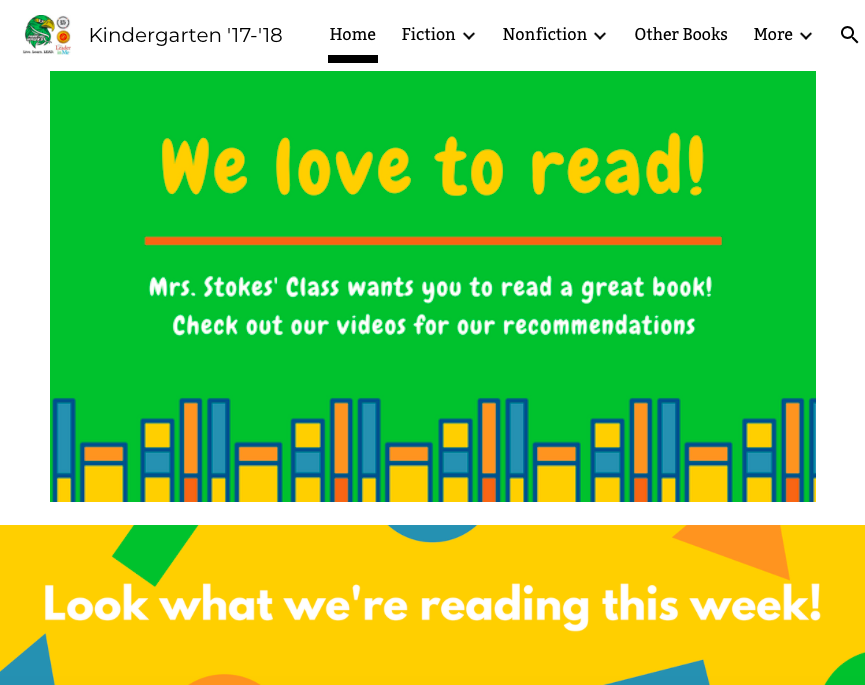
On any typical day, visitors can stop by Mrs. Stokes’ class during literacy block and find students actively engaged in a variety of tasks designed to increase fluency and ignite an excitement for reading. One of the most popular activities has quickly become the class book recommendations vlog. During this activity, students are either making book recommendations or browsing through their classmate’s videos in search of a recommendation matching their interests.


When a student is ready to make a recommendation, they use the iPad to record a video explaining why they would recommend the book. With support from their teacher, the video is uploaded to Google Drive and added to the class vlog created in Google Sites. Videos are organized by genre and kept up to date by Mrs. Stokes. Students are anxious to share about books they love! Zanelly said, “I like recommending books so my friends can read them and I like seeing what books my friends like to read so I can read them again.” 


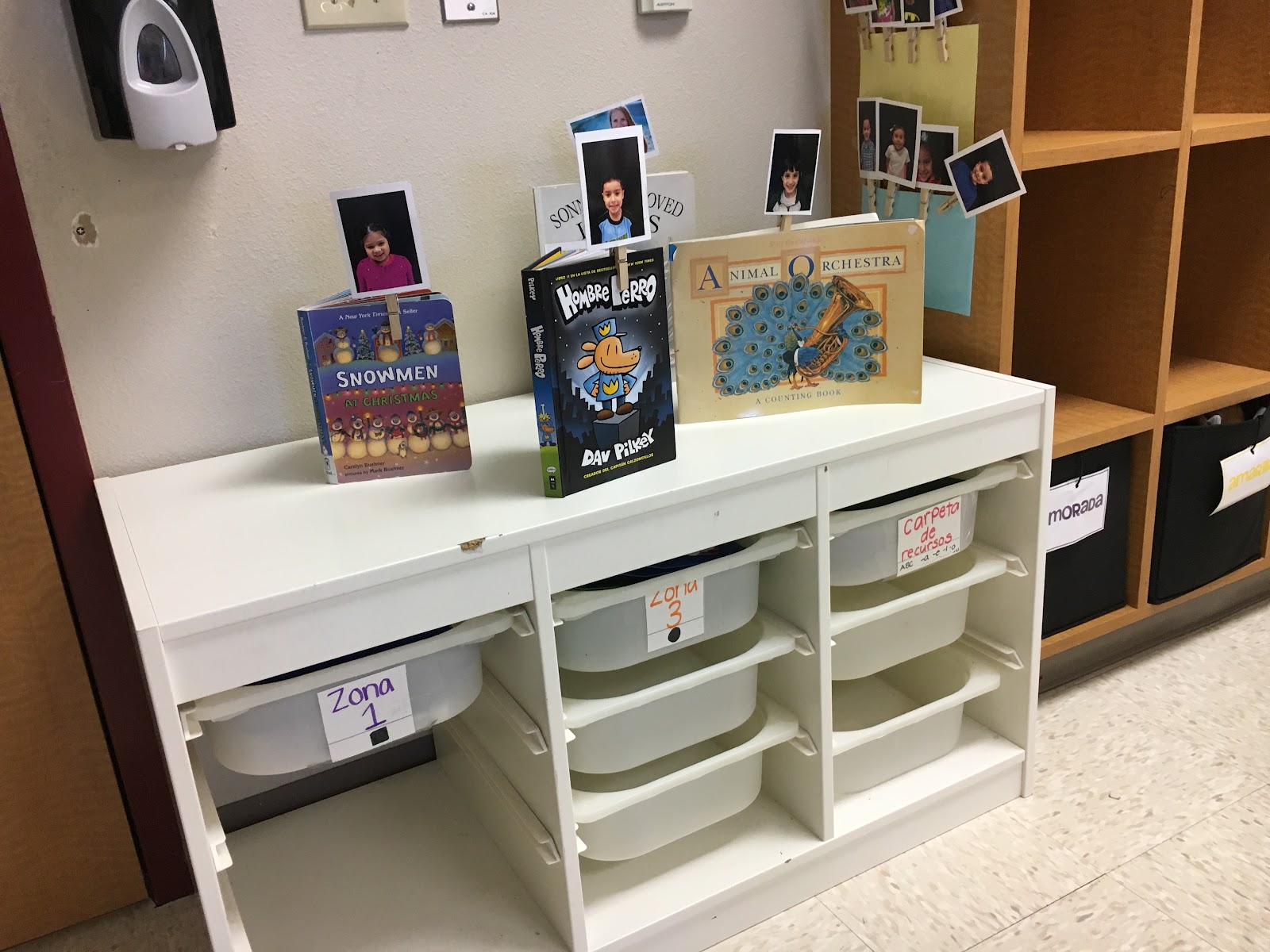
Students acting as consumers of the vlog, have been trained to independently login to a Chromebook using a QR code. Once active on their profile, students are able to access the class vlog easily through a link in Google Classroom. Students spend a few minutes watching their classmate’s videos before settling on a book. The latest featured books are displayed in a center so students can quickly locate them and begin reading. Their sweet grins and excited nature is evidence this practice is working wonders to build a love of literacy. Yahel shared, “I like it because you can see the other people’s books.” 

Mrs. Stokes believes the activity provides students the “opportunity to use something other than tablets and an app.” She feels the process of working with the vlog “ is making them more independent and teaching them to solve problems.” 


While the plan was for students to develop and grow, Mrs. Stokes found that she did too. In the original planning session with her Instructional Technologist, Jenny first hoped to develop and maintain a class blog. Once she saw how easy the platform was, she took it a step further and invited students to be not only consumers of the vlog, but also producers. It wasn’t long before students were taking videos on iPads and using QR codes to login to the Chromebooks independently. In the future, Mrs. Stokes envisions turning the vlog over to her students and allowing them to manage and organize their own videos. 


This lesson is a perfect example of the learning that can unfold when a teacher is willing to take risks and learn alongside their students. The motto at Prairie View Elementary this year is “Move Mountains” and boy are these tiny tots learning what it means to put caution to the wind and tackle even daunting tasks!

Tuesday, January 9, 2018

A Revelation about Resolutions

Watching a short TED talk on “Grit” by Angela Duckworth, a former consultant turned middle school math teacher, brought about thoughts of personal goal setting and perseverance, thoughts of new years resolutions, thoughts of never-ending attempts at self-improvement, thoughts lacking follow through, and thoughts of failure. It didn’t take long for those thoughts to bring on an overwhelming feeling of defeat with reminders of past inadequacies and ineptitude. As a new year begins, many will set personal and professional goals while trying to figure out how to keep from losing sight of those intentions and eventually abandoning them altogether. In that TED talk, Ms. Duckworth said one thing that began to turn lingering self-defeat into clarity and motivation: “…the ability to learn is not fixed...it can change with your effort…We have to be willing to fail, to be wrong, to start over again with lessons learned.” She very eloquently explained that the key to success and growth is not viewing failure as a permanent condition but as an opportunity for growth and forward progress.

Humans are conditioned to view failure in a very negative light and taught to take steps to avoid it at all cost. When failure is experienced, it is often seen as an endpoint in a journey instead of a brief detour or change in route. The question of how to change this mindset is one that is often neglected when working to facilitate skills for student success and, ultimately, life. However, when searching for solutions to this challenge, it becomes obvious that key elements for success must include clear and attainable goal setting and a frequent and effective self-reflection process.

Sticking with the traveling analogy, it stands to reason that experiential learning is a journey and beginning that journey without a clear destination in mind is futile and pointless. Even if the goal is to aimlessly explore and enjoy wherever life takes you, there is a destination, or goal, of some sort. While traveling, it is also good to keep in mind that when construction, a traffic problem, or an obstacle in a planned route arises, a detour can bring about many new and helpful experiences. The discovery of new places, the skill sets of flexibility and problem solving, and the knowledge of a better way of traveling for the future are all benefits to diverging from a planned path. Whatever it is that alters the planned route to a destination, the “failure” experienced in the pursuit of that original route is ultimately beneficial and one can only know this by reflecting on those experiences, understanding lessons learned, and setting a new course for success.

Eaton High School’s current resolution, or “problem of practice,” is to help students “demonstrate goal setting and reflection to foster critical thinking.” With this goal at the forefront of instruction, EHS provides prime examples of students utilizing digital resources for experiential learning, goal setting, and reflection. One of those examples can be seen in Jennifer Hamzy’s Psychology classes. Mrs. Hamzy uses Google Suite in two ways to provide EHS students with opportunities to reflect on content as well as course progress.
By copying a Google slide deck template, students receive detailed notes over chapter readings and lessons. In addition, these slide decks ask students to respond to reflection questions individually in their copy of the slide deck. They not only are able to increase understanding by making connections to complex psychology concepts but they can also go back to see their answers as they review information for course activities and assessments. Mrs. Hamzy’s students also receive a Google sheet that includes built-in fields and formulas for tracking assessment results and course progress.
This creates more student independence and allows students to see measured progress and areas of need or growth in one quick glance. By frequently documenting personal course data, students who find themselves in situations where they are facing an obstacle or failure, of sorts, can begin to see areas where they can alter their course and focus on a change in strategy for progress and growth, thus correcting previous failures and pushing forward.

While many students have the opportunity to learn practical lessons associated with experiential learning, some have thrived and begun to acquire the “grit” and perseverance necessary to push toward their goals. E-portfolios are an amazing tool for accomplishing this and for providing students with a platform for self-branding, goal setting, self-assessment, and reflection. One student who is an ideal example of utilizing digital resources for goal setting and reflection through experiential learning is Megan, a student in Kristal Holmes’ architecture course. Megan has set goals for herself related to professional architecture, design preparation, and future employment. She utilizes Google Sites to house her e-portfolio showcasing her collection of designs and floor plans as artifacts documenting her work and progress over the course of her studies.
Megan’s work with tiny house design is exemplary of how she documents her design experiences, reflects on them in her portfolio and makes new and improved designs that incorporate lessons she learns from previous architectural designs. Megan’s experiences in Mrs. Holmes’ course have also offered her the chance to develop skills and resources for her professional goals by participating in mock interviews and professional document preparation while constantly receiving feedback for improvement. All of these experiences with goal related tasks give Megan a chance to experience field specific work and tools that teach necessary skills and aid in driving her toward her destination.

Curtis Aguirre’s Spanish I students also utilize digital feedback and reflection tools as they practice using the Spanish language orally. These students use a web-based video tool called Recap where they are able to record themselves speaking Spanish and then receive video feedback concerning their recordings from their instructor and peers. Students can also record self-reflections regarding what they are working on and about their progress with course content. This feedback and reflective work are key to students seeing any challenges as areas needing focus rather than permanent set backs and failure.

Kathryn Watson’s French students are also frequently provided with opportunities to reflect on course assessments and grow through use of Poll Everywhere for informal personal and class reflection. Mrs. Watson uses this online survey tool for in-class reflections, discussions, and exit tickets assessing student feelings and understanding of course content. By allowing students to regularly utilize this tool for reflective tasks, they are being given the opportunity to think back on learning experiences and to contemplate how they dealt with previous assessments and challenges before attempting new ones.


With a true growth mindset at the forefront, anyone can find value in working through obstacles and reflecting on failure, which then facilitates independence, positive behavior changes, life-long learning, and permanent skill development. The learning process is incomplete without reflection. Rather than spending the new year resolving to learn knitting, overcome a personal fear, or lose weight, it would be beneficial to reflect on previously abandoned resolutions and begin to see failure as a temporary road block or detour pushing toward growth rather than a dead end. If we hope to see our students begin to drive themselves into the future, we must help them change views of failure and learn the “rules of the road” by discovering new perspectives and unearthing new routes along their journey to success.