Showing posts with label Zoom. Show all posts

Tuesday, February 19, 2019

Collaboration that BLEW our Mind and FLOODED our Learning!

“This project was so cool! We got do our own research and meet 7th graders who learned about tornadoes and floods too.” -Alondra (4th Grade Hughes Elementary)


Virtual Connection via Zoom

From research to organization to collaboration, and then feedback and revision, students in Mrs. Turner and Mrs. Covarelli’s class had a learning experience that they won’t forget!


As a part of a Lucy Calkins unit, students were put into groups based on interested level to research a natural disaster or weather event. They were responsible for taking the overarching topic and creating subtopics within that. They did their own research, took notes, and cited sources to write a final essay with their research. After writing the essay, groups then created videos using FlipGrid to share what they learned about their event.

RESEARCH AND WRITING:
According to Alondra, the most challenging parts of this project was the research. “When you type too much in your search, sometimes you don’t get what you need. We had a hard time finding just the right information.” Mrs. Covarelli agreed that research was the most difficult part for her students. She points out, “Students struggled with how to use keywords in search engines to find the results they were hoping for. We did mini lessons on how to use keywords when researching. Some students also had a hard time finding research on their subtopic, so they changed subtopics based on the research they were finding online.” Alondra added, “Our teachers helped us by giving us safe search websites. It was nice that Mrs. Covarelli was protecting us from any bad websites.”

ORGANIZING AND PUBLISHING:
Two specific groups took their information and organized it within a Google Site to submit for Expo 2019. Naomi's group researched floods. She states, “I liked creating a Google Site with my group because we could all work together. We could see each other’s work and get feedback from each other. If someone was absent we could still see their work.” Mrs. Turner helped students learn the importance of organizing a website and making information engaging and clear for others. Students added their Flipgrid video to the website along with photos, and even maps to bring their research to life for their audience.

COLLABORATING AND RECEIVING FEEDBACK:
7th Grade and 4th Grade Partner Up on Collaborative Slides
It just so happened that 7th grade students at Tidwell Middle School were learning about catastrophic events the same time that these 4th grade students were doing research. Mrs. Wellborn and Mrs. Christian's were part of a scheduled ZOOM meeting that allowed them to provide feedback for 4th grade and share a little about what they learned about tornadoes, floods, and the effects these disasters had on the environment. “It was nice to hear feedback so that we could fix parts of our website," Said Alondra. She added, "it was also nice because when we were texting (AKA: typing on collaborative Google Slides), my partner sent us a link to their 7th grade project. It was cool to learn more facts from them.” Naomi added, “I liked that we got to learn with the 7th graders that we got to see some of what we are going to learn in 7th grade. We even got to meet our future 7th grade teachers!”
Mrs. Wellborn and Mrs. Christian Meeting 4th Grade Students at Hughes Elementary

SHARING: Not only did these students share their site with 7th graders, but they have also been selected to present at Expo 2019! Come learn more about their experience on February 28th! "I'm so excited about Expo. I went in 2nd grade, but I’m glad to get to share my project again this year," said Aislynn. “I’m very excited about Expo. It’s my first time doing it,” added Naomi. For Adelais, this will be her second time at Expo. “ I went in 2nd grade, but I’m glad to get to share my project this year and even see other people’s projects.” Presentation times can be found at: https://expo.nisdtx.org/

Click the images below to view student websites:
Floods by Aislynn, Landon, Yosari, Lia, Rachel, and Naomi 
Tornadoes by Adelais, Alondra, and Bella 


ISTE STANDARDS:
Knowledge Constructor:
  • 3a - Students plan and employ effective research strategies to locate information and other resources for their intellectual or creative pursuits.
  • 3b - Students evaluate the accuracy, perspective, credibility and relevance of information, media, data or other resources.
  • 3c - Students curate information from digital resources using a variety of tools and methods to create collections of artifacts that demonstrate meaningful connections or conclusions.
Creative Communicator

  • 6a - Students choose the appropriate platforms and tools for meeting the desired objectives of their creation or communication.
  • 6b - Students create original works or responsibly repurpose or remix digital resources into new creations.
  • 6c -Students communicate complex ideas clearly and effectively by creating or using a variety of digital objects such as visualizations, models or simulations.
  • 6d - Students publish or present content that customizes the message and medium for their intended audiences.

Global Collaborator

  • 7a - Students use digital tools to connect with learners from a variety of backgrounds and cultures, engaging with them in ways that broaden mutual understanding and learning.
  • 7b - Students use collaborative technologies to work with others, including peers, experts or community members, to examine issues and problems from multiple viewpoints.
  • 7c -Students contribute constructively to project teams, assuming various roles and responsibilities to work effectively toward a common goal.


Monday, October 29, 2018

All Aboard: Where Hovering Dreams Become a Reality


“A dream doesn’t become reality through magic; it takes sweat, determination, and hard work.” 
-Colin Powell

          I think back to when I was a kid, thinking about how there would definitely be flying cars in the future.  Shows and movies like “The Jetsons” and “Back to the Future” made these dreams a quasi-reality for us.  Unlike three of Prairie View Elementary’s finest leaders, I was waiting for someone else to make this idea come to fruition, it never happened.

          It all started when Christopher and Ethan dreamed up the idea to transform the transportation world with a hover train that would exceed all current travel expectations.  Beginning the design process by sketching out what they imagined, their idea began to take shape.  After coming up with rough sketches of what their hover train would look like, they needed help to take their project to the next level.  Inviting Ian into the group seemed like the best addition, as he had experience designing futuristic models as well.  Additionally, Ms. Natalie Spann, Librarian at Prairie View Elementary, was asked to oversee this passion project, as the students eventually hoped to use the brand-new 3D-printer the school had won through having the most involvement at NISD’s Summer Techno Camps!

          Under the direction and guidance of Ms. Spann, the three 5th-grade engineers began to set-off on developing their idea in Tinker Cad, a design program that can then connect to a 3D-printer to print out their designs.  In discussing their design process, Christopher stated that “We know that it has to be aerodynamic, which is why the front of the train will be rounded, to allow the air to push around it on all sides.”  Through the process of designing the train itself, they have had to problem solve how they intend to make it hover.  Ethan suggested that “electromagnets within the train and surrounding the tunnel will allow the train to stay off the ground,” as he pulls up his Youtube video research.


          The beauty of learning in a district such as NISD, educators know where there is a will, there is a way.  It just so happened that the NISD STEM Academy at Northwest High School had recently posted about their culminating project after experiencing first hand what the engineering process looks like.  Ms. Elizabeth Mitias, the teacher of the Aerospace and STEM Principles classes, gladly accepted the challenge of having some of her seniors mentor our three emerging scientists.  Coordinating schedules, Ms. Spann and Ms. Mitias set out to schedule a Zoom Conference between the two groups of students.  The Prairie View students were excited at the opportunity to hear from “experts” in the field that they were working in.  They began preparing talking points and questions that they would ask the seniors.

          Finally, the day of the meeting arrived.  Ethan, Connor, and Marla, senior students from Ms. Mitias’’ class, were eagerly awaiting the arrival of the young engineers.  The meeting commenced with an introduction to the engineering process where the seniors discussed their experiences in creating their spacecraft.  Connor reiterated the idea that “It is necessary to get feedback from multiple perspectives when creating a project because a fresh pair of eyes can help you see things that you may have missed before.”


          Throughout the course of the meeting, Christopher, Ian, and Ethan held their own when challenged with scientific questions.  The level of discourse between these two groups of students was like none that this writer has ever experienced before.  Following a protocol where the Seniors gave reflective feedback and encouraging words of praise to the 5th-graders, who were silently listening and absorbing, the 5th-graders who once thought they were ready to print a prototype of their project and submit it for testing, knew that they had to comb through their plans and make adjustments to account for all of the new learning they had acquired.


          When asked about their experiences throughout this whole passion-project, the boys were ecstatic to share how they were feeling.   Ian stated, “I feel smart. I feel like a brainiac. I feel like I’ve done something nobody’s ever done before.”  Ethan expressed, “It feels like what we are doing is experimental. We are figuring out problems that we’ve never done before.”  Excited by the opportunity, Christopher shared, “I am just so eager to learn more about aerodynamics and electromagnets, and it feels like this is something that we can really make happen.”  Ms. Spann, who supported this project from its conception, expressed, “I love that this whole project was intrinsically motivated.  The students had the idea and set out to find a way to make it happen, all on their own.  They never had a question of if, just who would be willing to give them the space to make their dreams come true.”

          By empowering our students to find what they are passionate about, these Prairie View Leaders exemplify the necessity to fulfill the mantra, “Where there is a will, there is a way.”  This truly embodies Leader In Me Habit #4 as this is a WIN-WIN for all involved.

Tuesday, December 12, 2017

Discovering Jamestown – a Multi Grade Level Approach


Mrs. Swearingen, Mrs. Franco, and Mrs. Ahmad , all fifth grade teachers at Sendera Ranch
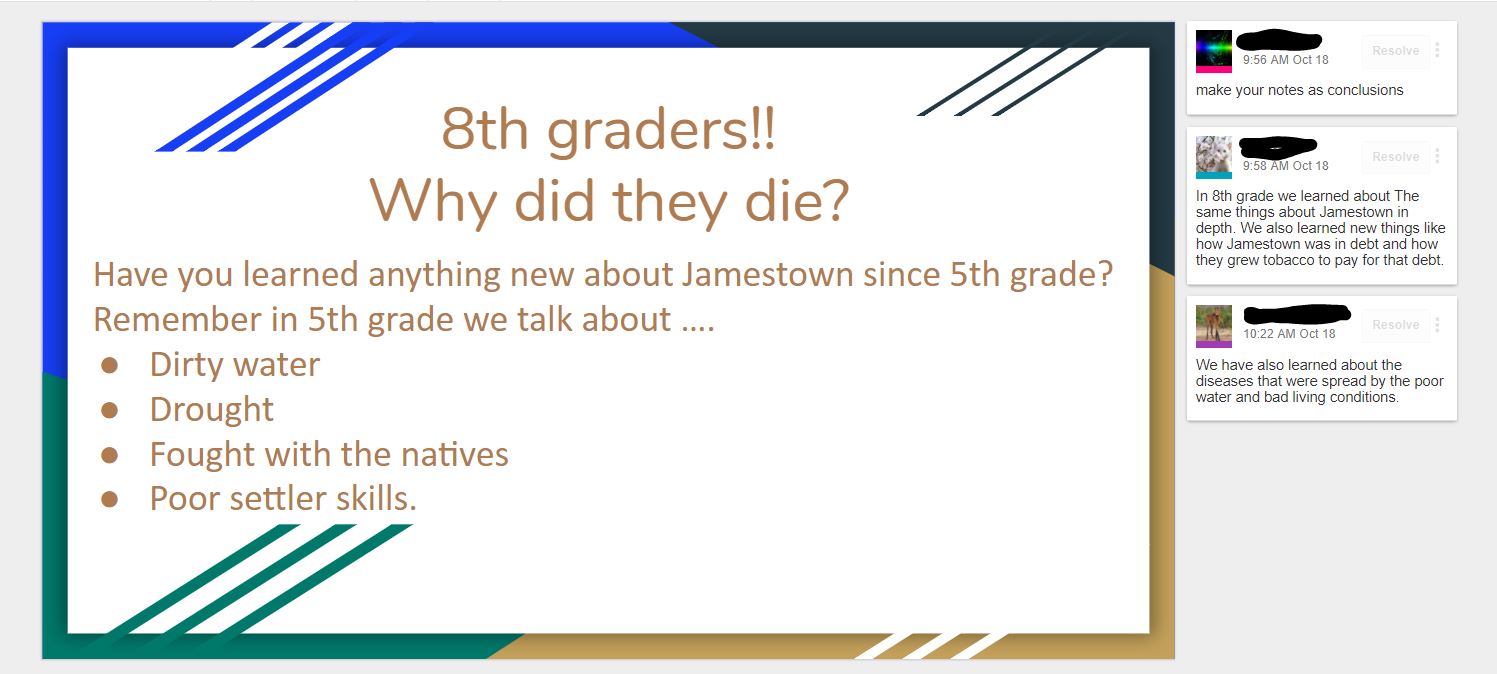
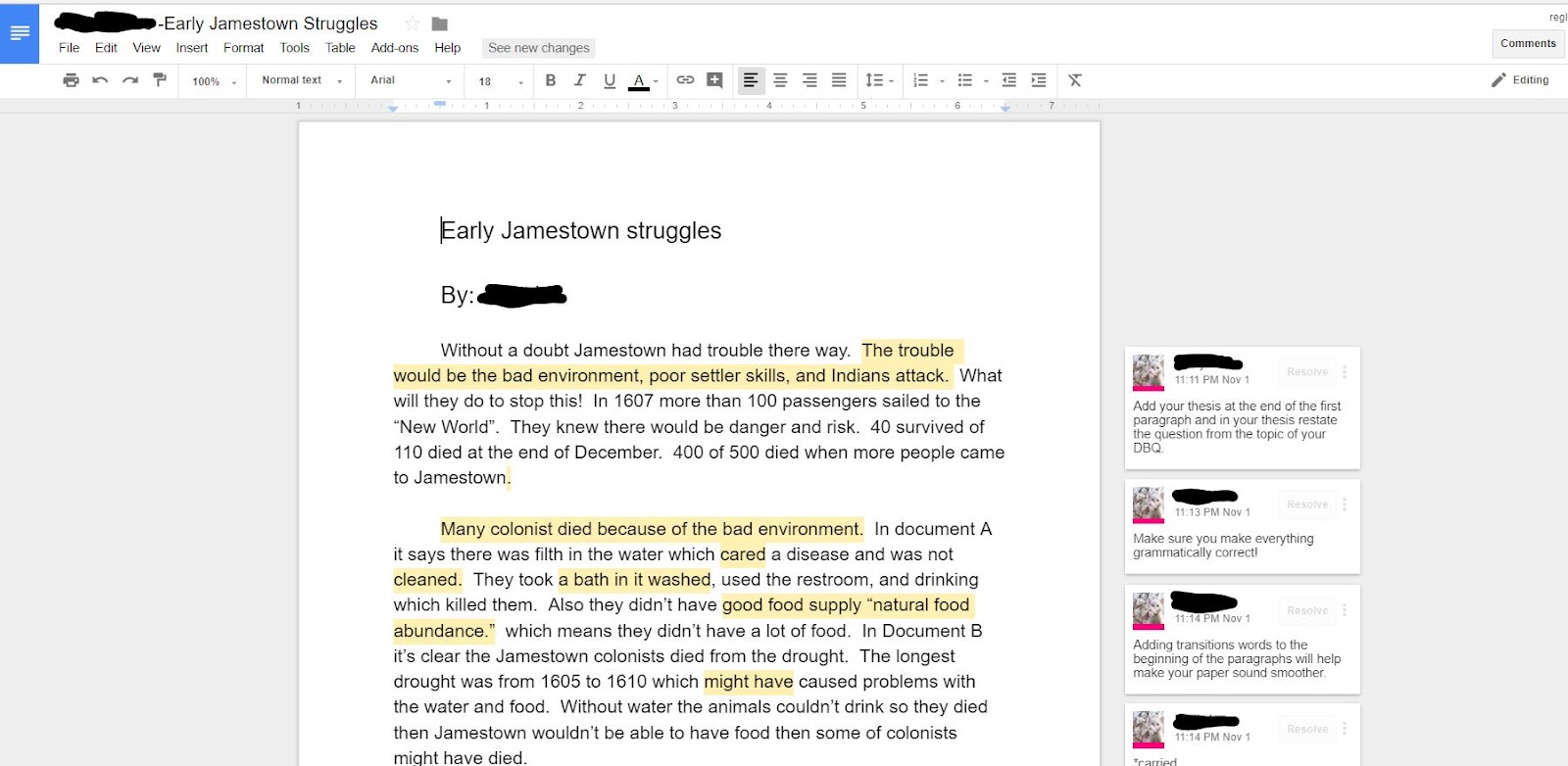
Elementary, know the power of feedback and praise.  They wanted their students to experience learning about Jamestown in a new and exciting way.  Mrs. Swearingen contacted an eighth grade teacher, Mrs. Kristen Mouser from Wilson Middle School.  The two teachers began to brainstorm to take the learning outside the four walls of the classroom.

First, the students in fifth grade classes were presented with the two learning targets for this project.
  • I will analyze a DBQ document, so I can answer the question, “Why did so many colonists die?”
  • I am successful when I can write a paragraph to explain my thinking.
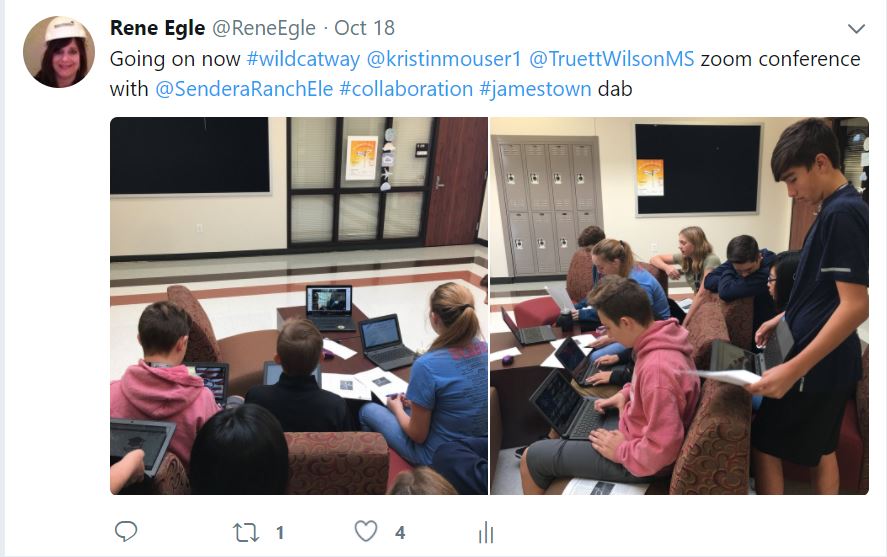
Immediately students went to work and created a collaborative slideshow to brainstorm questions they wanted to know about Jamestown. The next day, students found out Mrs. Swearingen and Mrs. Mouser had set up a time for the eighth graders and fifth graders to Zoom to have conversations. Zoom is a web-based tool that allows anyone to virtually connect and host a video web conference.  


5th Grade, 8th Grade, Google Docs, Sendera Elementary, Wilson Middle School, Zoom, Fifth Grade, Eighth Grade, Collaboration, Peer Feedback, Social Studies, Jamestown, DBQ, ELA


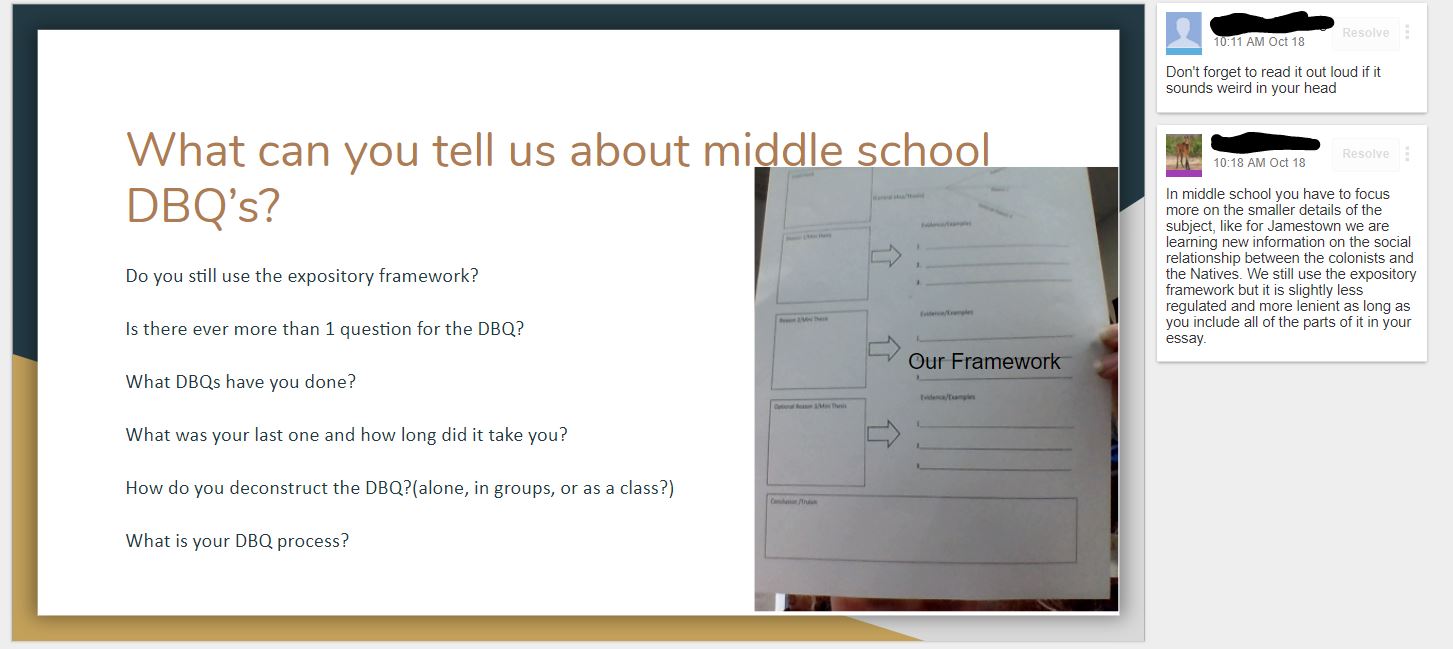
A few days later students began to write their paragraphs using Google Docs.   Using Google Docs allowed communications and collaboration for students to receive comments

and feedback from their peers.


“I liked reading what the 8th graders said.  They had some good ideas of how to make my DBQ
better.” said Brooke


“It was fun to see the 8th graders and hear what 8th grade was like and what an 8th grade DBQ was like.  They do it a lot faster than we do.” stated Logan

Research supports the value of peer collaboration and discussion across all content areas and concepts. By providing students the opportunity for peer feedback on their writing, students were able to offer one another constructive critique in order to improve their own communication skills. Extending, receiving, and evaluating feedback is a critical skill for all 21st Century Learners.  
1. Empowered Learner - Students leverage technology to take an active role in choosing, achieving and demonstrating competency in their learning goals, informed by the learning
sciences.
 - 1b. build networks and customize their learning environments in ways that support the learning process.
 - 1c. use technology to seek feedback that informs and improves their practice and to demonstrate their learning in a variety of ways

2. Digital Citizenship - Students recognize the rights, responsibilities and opportunities of living, learning and working in an interconnected digital world, and they act and model in ways that are safe, legal and ethical.
 - 2b. Students engage in positive, safe, legal and ethical behavior when using technology, including social interactions online or when using networked devices.

3. Knowledge Constructor - Students critically curate a variety of resources using digital tools to construct knowledge, produce creative artifacts and make meaningful learning experiences for themselves and others.
 - 3a. Students plan and employ effective research strategies to locate information and other resources for their intellectual or creative pursuits.
 - 3b. Students evaluate the accuracy, perspective, credibility and relevance of information, media, data or other resources.
 - 3c. Students curate information from digital resources using a variety of tools and methods to create collections of artifacts that demonstrate meaningful connections or conclusions.
 - 3d. Students build knowledge by actively exploring real-world issues and problems, developing ideas and theories and pursuing answers and solutions.

Monday, September 18, 2017

ZOOMing in on the 4C's!

ZOOM: Student View
5th grade students in Mrs. Chamberlain’s 6th Grade Pre-AP Math class collaborate and learn together every day! The unique aspect of this class is that none of these students are physically in the same classroom as Mrs. Chamberlain. Northwest ISD’s 1:1 environment, along with a variety of digital tools allow students from across the district to interact, give and receive feedback, collaborate, create, and even work in groups. Every morning, students remote into Mrs. Chamberlain’s class via ZOOM. Students all have a Microsoft OneNote journal in which they share a collaborative whiteboard and have individual pages to solve their work. The students are enjoying the class, the challenge, and the ability to learn from anywhere. In Zachary's words,"What I love about the remote class is that I can see other students from different schools without having to get out of my seat." Kash adds, "I like that we can share thoughts across the district" and Holden comments, "I feel challenged in math this year and the problems are fun because they seem like puzzles."


OneNote: Collaborative Whiteboard

ZOOM allows students to communicate with each other in a variety of ways. "I like how you can mute and un-mute yourself, and how you can raise your hand, because it makes you feel like you're in an actual classroom with the teacher. I would say the most difficult part so far has been my Unit 2 homework," said Matthew. 


Group 3: Google Draw Work and Collaboration
Google Slides: Turning in Posters


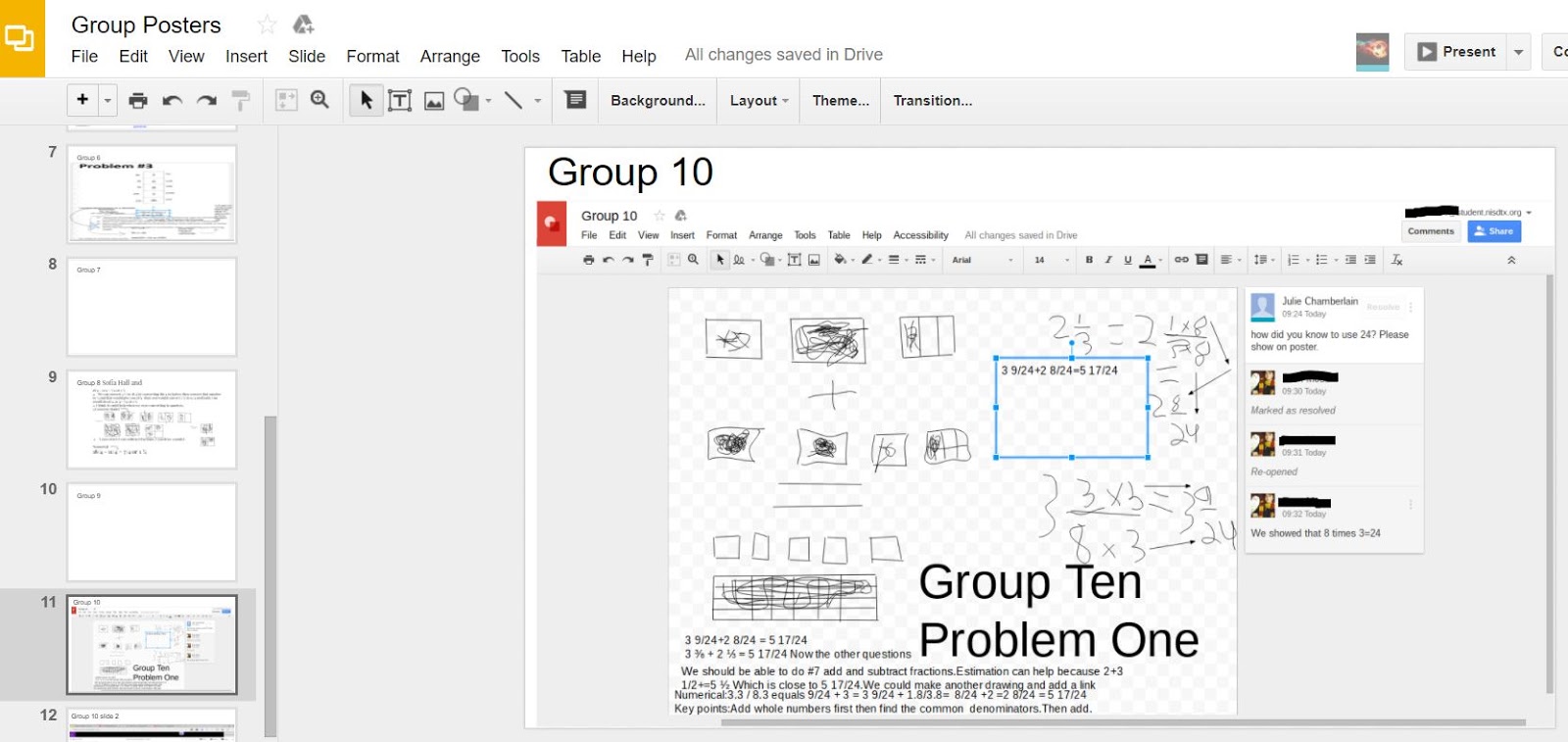
Recently, students were put into groups of two to create a visual math poster on fractions. Students used Google Draw to collaborate and show their thinking visually. Once visuals were created, students uploaded their drawings to a collaborative class Google Slide so that they could give and receive feedback as well as learn from other groups. According to Blane, "the group poster was exciting because I got to work with someone I have never worked with before."

Students in this class are learning to communicate and explain their thinking across a variety of platforms. They are learning how to interact via audio conference, text chat, visual graphics, etc. This class truly represents 21st century learning and encourages students to take ownership of their learning. They are encouraged to take risks as they work with students from other campuses. This class is just getting started and these students have a lot to accomplish before the end of the year!

Student ISTE Standards:
  • COMMUNICATION (1C): Students use technology to seek feedback that informs and improves their practice and to demonstrate their learning in a variety of ways.
  • CREATIVITY (4A): Students know and use a deliberate design process for generating ideas, testing theories, creating innovative artifacts or solving authentic problems.
  • CRITICAL THINKING (5C): Students break problems into component parts, extract key information, and develop descriptive models to understand complex systems or facilitate problem-solving.
  • COLLABORATION (7C): Students contribute constructively to project teams, assuming various roles and responsibilities to work effectively toward a common goal.

Monday, November 14, 2016

From Pages of Policy to Personal Practice


Students in Mrs. Wilsie's Tech Apps class at Tidwell Middle School were recently challenged with the task of not only understanding the nine page AUP (Acceptable Use Policy), but also working together to create a resource for other students that would help them understand and apply the AUP as well. Students started the unit by creating norms for group collaboration using Spider Scribe. Next, they used the Google Docs Outline tool to create an outline for the AUP as they broke it down into sections. According to Casen, narrowing down the information was one of the hardest parts. He comments, "At the beginning we felt overwhelmed because there were nine pages of the AUP and we had to use three types of multimedia to show how to follow it."

After understanding what the AUP entailed, students used the Tools that Make IT Click Blog to choose the platform they thought would best relay their information to other students.

A Screenshot of Masongo, Keller,
Madeline, and Logan's Blendspace.
Click HERE to View
When asked why her group chose to use Blendspace for their project, Madeline commented, "I was looking at Tools That Make IT Click and I really liked how Blendspace was orgnanized into boxes. We noticed that we could add links, pictures, and box off information off for our audience." Casen, Soniya, Benaiah, and Fatou decided to use Google Slides so that they could collaborate. They embedded videos, animation, and a Kahoot quiz so that students who viewed their presentation could test their knowledge. Maggie, Corbin, Jacob, and Blake created a newsletter using Tackk. They utilized the "button" feature in order to create a series of hyperlinks to send viewers to various student-created resources. Blake pointed out, "Our favorite part was the skit that we made about AUP. We used Screencastify to record our video."

After starting to work on their presentations, classes had the opportunity to connect with, and interview a few professionals via ZOOM. The video conference allowed students to see that the AUP is a part of the 'real world' and that it impacts adults in the workplace everyday. Students talked to Brooke, who works remotely with IBM in sales and Carrie, the Human Resources Director at Fidelity Investments.


After seeing the capabilities of ZOOM, one group decided use ZOOM to connect with each other even when they weren't all in class. Blake added, "ZOOM was easy to use and we were able to work even outside of class. I liked that you can message each other during the conference, so that we don’t interrupt each other."

At the end of the project, students used Google Forms to give their teammates a rating on collaboration and teamwork. They also shared their final product on a Padlet wall for the class to view and leave feedback.

Students walked away fom this experience with a clear understanding of the AUP and how to apply it to their daily digital lives. They also learned a lot about collaboration and teamwork. Maggie points out, "When we started as a group it wasn’t that smooth, but we got better as we worked together. Team work wasn’t easy at first." Casen sums up the unit by stating, " It would be helpful for other students to view our presentation. We made something that would benefit the whole school."

Monday, October 24, 2016

Stop, Collaborate, and Listen

Byron Nelson 9th Grader Zooming with Lakeview 2nd Graders

Second through Fifth Grade students at Lakeview Elementary began setting up their ePortfolios and requested "experts in the field" to showcase its capabilities and uses. Who better to ask than our very own high school students! iSchool Advocates and student leaders from Byron Nelson High School and Eaton High School had the opportunity to discuss their own ePortfolio in 20 minute segments with a designated grade level using Zoom, a free video conferencing tool. During each presentation time, the HS students were asked to discuss their ePortfolio as a whole, explain the importance of having an ePortfolio, and share a specific piece of work in the ePortfolio that makes them most proud. Each segment concluded with a Q&A session in which Lakeview students were able to ask questions to the high school students regarding creation and design of the ePortfolio.


During each video conference, students utilized the "Share Screen" feature of Zoom which enabled the Lakeview students to see how their ePortfolio may be organized and designed once content was added over the years. It was especially helpful that many HS students discussed things that they wanted to add or change in their ePortolios which models self-reflection and evaluation of content since ePortfolios are constant work in progress rather than a finished product.
Utilizing Share Screen feature to discuss exemplar work

This Zoom experience supported students' growth towards being a global collaborator in the expectation that students use digital tools to connect with learners from a variety of backgrounds and cultures, engaging with them in ways that broaden mutual understanding and learning. Additionally, the high school students gained insight as an empowered learner in which they used technology to seek feedback that informs and improves their practice and [demonstrated] their learning in a variety of ways. (ISTE Student Standards 7a and 1c)


Monday, September 19, 2016

Math, Virtually Anywhere

Students at Lakeview, Peterson, Sendera Ranch, and Nance are taking part in their very first virtual classroom. Each morning, students arrive at their designated location and connect with their teacher and classmates via Zoom on their Chromebooks. These 4th and 5th graders are taking an Advanced Math course with Lakeview’s GATES teacher, Mrs. Andrews in Northwest ISD. Mrs. Andrews is innovative in the way she delivers content to all of her students through a variety of platforms. She provides opportunity for collaboration for her students and has a constant presence in their learning beyond the four walls of her classroom. The relationships she has built with her students, both in person and virtually, provide a necessary foundation for this class' success.

Students are able to access all course content through Google Classroom. This can include instructional videos, presentations, links to resources, and so much more. Together they have been able to experience the world of online learning and discover what it means to be part of an online community.


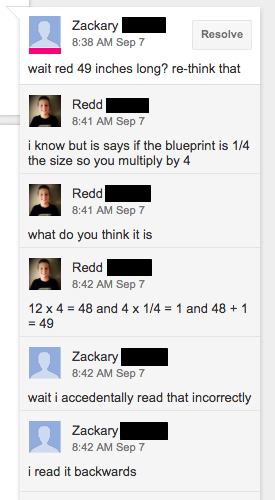
forblog.pngActually working together to complete a task in their virtual classroom has been a new experience for them all. While being connected through Zoom, students have used Google Slides to collaborate during the work period. Zachary shared how that process works, “Since there's a chat button we chat to each other to share our ideas with each other.” Braylen goes on to say his collaboration in Google Slides is primarily done through the commenting feature. He and his partner are able to compare their answers and discuss any differences by leaving each other a comment. Both boys see great value in working collaboratively with their peers, both in person and virtually.

When asked what Zachary has enjoyed most about his experience in a virtual classroom, he said, “I like this because we get to connect with other people, learn new ideas from them, and work together with new classmates who have different math skills than everyone else in the classroom”.

Monday, May 23, 2016

Kid Created News

Teachers know the importance of communication from the classroom to the community. Our teacher challenged the class to come up with ideas of new ways to send out monthly newsletters to our parents. Getting students involved and to take charge of this classroom task was quite a challenge. Mrs. Degnan, 4th grade teacher, Nance Elementary had the students look at several options and once she picked her editors it became clear to use the subscription service called Smore.com.

The top editors were chosen by Mrs. Degnan and the class. Redd, McKenzi, and Lexi where honored with this position. All three students were chosen because of their leadership and their ability to get the job done. The team begun to hire other students for the different jobs: photographers and writers. Publications feature articles about each of our content area subjects, as well as the exciting happenings going on in 4th grade and around the building. Articles included, diagrams, fun facts, pictures and/or videos. We used the classroom iPads at first for our choice of device, but sometimes quality was an issue. We eventually hired a student who was a professional photographer/videographer who participated in the photography club at school. This made our pictures and videos much higher quality! We also borrowed laptops from 5th grade because they were more adept at meeting our needs and were easier to navigate than the ipads.

Over time we wanted to include student made video tutorials explaining how they did the problems in math (division, multiplication, etc.). We also added many science videos too. We had another great idea...interviews! It became our mission to feature all students in our classes. It was easy to feature kids that stand out, but we found that some of our reluctant or shy students have loved having the opportunity to be highlighted. Some of the students in our class were really good at interviewing people so we hired them. These students chose special people to interview and even formed their own questions. We interviewed people like Mrs. Chaney, the principal, PTA members, and teachers and they became part of our interactive newsletter. This exchange of information became a teaching/learning tool as well. Students that missed concepts or did not understand a concept would ask for videos to made for better understanding. Students led these informal tutoring sessions and parents were delighted to understand how their child was learning in school.

To engage our readers, we added an interesting piece called “Fun Facts”. Throughout the given school day students would walk around ask weird things like “How many teeth does a rhino have?” so we researched them and posted them on our newsletter. Our students here at Nance are extremely good writers so we have a section to showcase student work like essays and poems. A LOT OF POEMS! Again, student work became the highlight of our newsletter. We wanted to give all students a voice in our newsletter.

Our teacher nominated us to present our newsletters at TechnoExpo 2016. We had a blast preparing our presentation and as luck would have it, one of our editors came down with Pneumonia. McKenzi and Lexi brainstormed ways that Redd could still participate even though he had become very ill. We called our campus IT Coach and she suggested why not use the web conferencing tool called Zoom? With her help we ZOOMED Redd in and they presentation went as scheduled – the girls were at NHS and Redd was at home. We felt empowered and our presentation was great!


Our newsletter has sparked the interest of hundreds of followers around the world. We have been delighted in the response. Check us out! We really are fabulous!

We hope to inspire students all across the world to use technology to present and share their work to others.

This article was written by Redd, Lexi, and McKenzi in collaboration with Mrs. Egle

Click each image to view our newsletters


Monday, May 9, 2016

Finger Snappin' Good


Seventh graders in Mrs. Davis and Ms. Brown’s ELA classes at Chisholm Trail Middle School recently took an in depth look at the various structures, styles and literary devices used in poetry. Students used their new knowledge of poetry to compose original narrative poems revolving around the concept of choice. Ava said, “I learned that poetry can take any moment and emphasize it to where it becomes bigger than it really is.”

By utilizing Google Drive, students were able to work both independently and in groups to write, revise, edit, publish, and present their original poems. Google was utilized as a platform for drafting, revising, editing, and publishing the poems. This platform allowed students to collaborate in composing the poems, authentically.

“The most challenging part of the project was trying to convey our message to the listener and/or reader in a way that could show what we had in our heads”, says Makeeda. After composing and rehearsing their poetry, students presented their narrative poems in a poetry slam with their respective classes. Using a traditional scoring method of a 1-10 scale, peer evaluation determined which students from each class would be moving on to the next round. Careful consideration was given to both the poem itself and the performance of the piece while scoring.

The winners from the in-class poetry slams went on to present their poems in the cross-district poetry slam held via Zoom Conference with Medlin Middle School. Students from both campuses were able to share their poems with students across the district through live-streaming. Classes were able to interact throughout the Poetry Slam by using Today’s Meet, as they discussed and provided feedback, while a Google Form was used to provide student presenters with more detailed feedback from their peers.

Ashton shared her thoughts on the poetry slam. “Google helped us by being able to have others edit our poem and add feedback. It also helped because my partner and I were both able to edit our poem at the same time. Zoom allowed us to present to Medlin and receive their feedback.” Students and teachers are hopeful this event can expand throughout the district next year.


Wednesday, March 2, 2016

Virtual Feedback

The Wind Ensemble and Symphonic Band at Gene Pike Middle School have been busy preparing for UIL.  In search for authentic feedback their director, Mr. Forbis, reached out to the two composers of the pieces that will be playing for their UIL competition. Using the video conferencing tool Zoom Wind Ensemble students were able to connect with Mr. Randall Standridge in Arkansas about his piece titled: Darklands March.  The Symphonic Band zoomed with Mr. Vince Gassi in Canada about the piece titled Crusade.  Both composers were able to listen to the band play their piece and then spend some time giving them particular measures to work on.  When talking with Mr. Gassi, students were able to tweak portions of the piece and have him listen each time to provide immediate suggestions for them. These composers took an opportunity to talk with students about the piece they were playing and how or why they chose to write that piece.  At the end of the session, students were able to ask questions that they had prepared the day before.  It was such an awesome experience for everyone involved.


Mr. Forbis has since been in contact with both composers and they plan to virtually meet again next month for last minute tips for UIL.

Monday, December 14, 2015

Authentic Audiences = Legit Learning


Is there a guideline currently in place on your campus that needs to be evaluated? What about rules… are there any that need to be updated? Or maybe there is an issue on campus that needs to be addressed. Are you passionate enough about that topic to compose a policy speech that can be delivered to an authentic audience? These were just some of the questions seventh graders at Chisholm Trail Middle School were asked as they were tasked with identifying and evaluating guidelines, rules, or issues currently in place on their campus.

After speech topics were decided, students began researching and gathering information that would support their stance on the chosen topic. Topics included: the district’s grading policy, school safety, homework, cafeteria portions, listening to music in class, recess for middle school, overcrowded buses and more! John, one of the students who chose to write about the buses said, “We had been having issues with the buses, especially my bus, so I felt compelled to address the issue”.

Many students chose to compose their speeches using Google Docs. This allowed their teacher, Ms. Brown, to give them feedback and suggestions as they worked. Students were also encouraged to share their speech with peers to receive feedback. Google Docs allowed collaborative conversations to
 take place throughout the entire speech writing process.

Once speeches were finished and ready to be delivered, Ms. Brown helped arrange an authentic audience for each student. For some students that meant they would be delivering their speech face to face with their campus principal, counselor, or other district officials. Other students connected with various people throughout the district via Zoom, a free video conferencing resource. Ava said, “The thing I enjoyed most about this project was the Zoom conferencing, because I had a real audience instead of just my class. I presented to Dr. Thornell and he gave me real feedback that can actually be effective”.


When asked how having an authentic audience changed the way they approached their project, Brendyn said it best. “It made it feel real or in other words more important. It made me strive for excellence rather than just get by”. Brendyn presented his policy speech regarding the student BYOD (bring your own device) Policy to the IT Department via Zoom. Zachary also presented to the district’s technology department and he commented on how the feedback he received from Mr. Smith changed his thinking. “I enjoyed getting the tech people's point of view, because it allowed me to find another view of how their job is”.

Students were engaged throughout this entire project. The real world experiences they were provided, especially through their connection with an authentic audience, will be something they remember forever. As Zachary said after this project was assigned, "This project is legit!"