Showing posts with label 7th Grade. Show all posts

Monday, September 23, 2019

When Characters Come Alive

Kirstie Cooper’s ELA class at Adams Middle School is one that students are consistently engaged, challenged, and having fun. She takes everyday lessons and turns them into learning experiences for her students. 
"All Summer in a Day" is a Science Fiction short story by Ray Bradbury. Cooper gave her students a digital copy though Google Classroom, which streamlines the process of sharing files between teachers and students. As they read the story they used Kami to annotate the text. Students focused on the characterization of Margot as they read.When finished, an analysis of the text which included looking at elements such as point of view, figurative language, and theme was done. Once students completed that task, they began compiling all of their knowledge of the text to incorporate into the final task.


To begin, Cooper used Flippity to do a random group generator. The kids weren’t thrilled that they didn’t get to choose groups, but Flippity eliminated that potential management struggle. Next, students created a Google Doc, which they collaborated with each other on, shared with the teacher, and begin creating a script. Students were tasked with creating a “talk show” style script where there would be hosts who interviewed the two main characters of “All Summer in a Day”, Margot and William. Students had to create 3 questions per guest and formulate their response based on inferences from the text and the characterization of Margot and William. Finally, once students finished their script, they used Flipgrid to record themselves hosting their talk show. This gave quiet students a voice, it allowed us to see the profound thoughts you didn't know were there, and took their learning to a deeper level than you thought possible for this learning opportunity.
Student Talk Show Example


Student Talk Show Example

Monday, April 22, 2019

The Game of Life: A Financial Literacy Project


At Adams Middle School, Hanna Patredis and Ashley Dacus wanted to turn their financial literacy project that was all paper and pencil into a interactive hyperdoc for the students to really engage in real world situations. They wanted their students to truly see how their choices affect their future wealth. Students were asked to estimate the cost of a college education, calculate the school loans, determine simple and compound interest formulas, and make a household budget.

The lesson was created on a hyperdoc where students were able to interact and input their answers in the google slide that was copied for each student. The teachers used the grey space in slides to give instructions and place extra information needed. A YouTube video of dice being rolled was used when the students were asked to roll dice. All of these intentional moves set up by the teachers, created an experience for the students that was interactive. Lucy, a student on Mrs. Dacus’ class said, “I like designing my own life using math skills throughout the year. The digital format helped my

ideas stay organized and I could access it anywhere.” Check out Lucy’s work here.

At the end of the experience, students had voice and choice in how they wanted to represent their knowledge of the financial literacy unit. Students choose from a menu board on how they want to present their work creatively. Check out some of their work below:

Tuesday, February 19, 2019

Collaboration that BLEW our Mind and FLOODED our Learning!

“This project was so cool! We got do our own research and meet 7th graders who learned about tornadoes and floods too.” -Alondra (4th Grade Hughes Elementary)


Virtual Connection via Zoom

From research to organization to collaboration, and then feedback and revision, students in Mrs. Turner and Mrs. Covarelli’s class had a learning experience that they won’t forget!


As a part of a Lucy Calkins unit, students were put into groups based on interested level to research a natural disaster or weather event. They were responsible for taking the overarching topic and creating subtopics within that. They did their own research, took notes, and cited sources to write a final essay with their research. After writing the essay, groups then created videos using FlipGrid to share what they learned about their event.

RESEARCH AND WRITING:
According to Alondra, the most challenging parts of this project was the research. “When you type too much in your search, sometimes you don’t get what you need. We had a hard time finding just the right information.” Mrs. Covarelli agreed that research was the most difficult part for her students. She points out, “Students struggled with how to use keywords in search engines to find the results they were hoping for. We did mini lessons on how to use keywords when researching. Some students also had a hard time finding research on their subtopic, so they changed subtopics based on the research they were finding online.” Alondra added, “Our teachers helped us by giving us safe search websites. It was nice that Mrs. Covarelli was protecting us from any bad websites.”

ORGANIZING AND PUBLISHING:
Two specific groups took their information and organized it within a Google Site to submit for Expo 2019. Naomi's group researched floods. She states, “I liked creating a Google Site with my group because we could all work together. We could see each other’s work and get feedback from each other. If someone was absent we could still see their work.” Mrs. Turner helped students learn the importance of organizing a website and making information engaging and clear for others. Students added their Flipgrid video to the website along with photos, and even maps to bring their research to life for their audience.

COLLABORATING AND RECEIVING FEEDBACK:
7th Grade and 4th Grade Partner Up on Collaborative Slides
It just so happened that 7th grade students at Tidwell Middle School were learning about catastrophic events the same time that these 4th grade students were doing research. Mrs. Wellborn and Mrs. Christian's were part of a scheduled ZOOM meeting that allowed them to provide feedback for 4th grade and share a little about what they learned about tornadoes, floods, and the effects these disasters had on the environment. “It was nice to hear feedback so that we could fix parts of our website," Said Alondra. She added, "it was also nice because when we were texting (AKA: typing on collaborative Google Slides), my partner sent us a link to their 7th grade project. It was cool to learn more facts from them.” Naomi added, “I liked that we got to learn with the 7th graders that we got to see some of what we are going to learn in 7th grade. We even got to meet our future 7th grade teachers!”
Mrs. Wellborn and Mrs. Christian Meeting 4th Grade Students at Hughes Elementary

SHARING: Not only did these students share their site with 7th graders, but they have also been selected to present at Expo 2019! Come learn more about their experience on February 28th! "I'm so excited about Expo. I went in 2nd grade, but I’m glad to get to share my project again this year," said Aislynn. “I’m very excited about Expo. It’s my first time doing it,” added Naomi. For Adelais, this will be her second time at Expo. “ I went in 2nd grade, but I’m glad to get to share my project this year and even see other people’s projects.” Presentation times can be found at: https://expo.nisdtx.org/

Click the images below to view student websites:
Floods by Aislynn, Landon, Yosari, Lia, Rachel, and Naomi 
Tornadoes by Adelais, Alondra, and Bella 


ISTE STANDARDS:
Knowledge Constructor:
  • 3a - Students plan and employ effective research strategies to locate information and other resources for their intellectual or creative pursuits.
  • 3b - Students evaluate the accuracy, perspective, credibility and relevance of information, media, data or other resources.
  • 3c - Students curate information from digital resources using a variety of tools and methods to create collections of artifacts that demonstrate meaningful connections or conclusions.
Creative Communicator

  • 6a - Students choose the appropriate platforms and tools for meeting the desired objectives of their creation or communication.
  • 6b - Students create original works or responsibly repurpose or remix digital resources into new creations.
  • 6c -Students communicate complex ideas clearly and effectively by creating or using a variety of digital objects such as visualizations, models or simulations.
  • 6d - Students publish or present content that customizes the message and medium for their intended audiences.

Global Collaborator

  • 7a - Students use digital tools to connect with learners from a variety of backgrounds and cultures, engaging with them in ways that broaden mutual understanding and learning.
  • 7b - Students use collaborative technologies to work with others, including peers, experts or community members, to examine issues and problems from multiple viewpoints.
  • 7c -Students contribute constructively to project teams, assuming various roles and responsibilities to work effectively toward a common goal.


Monday, January 28, 2019

The Real World is In Your Classroom


Visualize a small group of kids huddled in a middle school flex space, Expo marker in hand and video camera staged in front of them, confidently drawing shapes and lines on the whiteboard as they explain the steps to solve an equation. Picture students, who otherwise avoid math, passionately debating the best place to ask a question: is it before or after an example? Can you hear them, animated, discussing the best way to teach someone about complementary and supplementary angles?

This was the scene in Jennifer White’s math class at Pike Middle School when she challenged her students to create Edpuzzles that teach other students new math concepts. Determined to engage her students in rigorous and authentic learning, she asked them to design video lessons that would be used as warm-ups and tutorials in other classes.


If you don’t know, EdPuzzle is a video platform that lets teachers turn any video into a lesson by embedding questions, comments, and/or audio. Teachers then assign their video lessons to students and collect formative data, like who watched the video and what they understood. Because the videos are self-paced, students can re-watch them as many times as they need, and even share them with others.

For this project, in teams of 2-3, students chose a topic from their next unit of study. Before creating their video lessons in EdPuzzle, they explored resources, researched their topics, and planned what comments and questions would best help their audience learn the concepts.

White gave students a choice to either find an existing video or create their own to use in the EdPuzzle. Some were excited to make their own videos using their Chromebooks. Giving choice helped her differentiate for students who needed more time during the ‘discovery phase’ and for those who needed an extra challenge.

Before publishing and sharing their work with their audience, students gave each other feedback (using Google Forms) about how they could improve their lessons. Mrs. White gave students time to apply the feedback they collected. This step also worked to expose students to all of the terms they needed to know, and to reinforce the concepts they would eventually see in class.

In the end, this whole project took 3-4 days, provided a whole department with student-created peer tutorial resources, and gave students the chance to learn with a purpose. You can see examples of student work here: Example 1 & Example 2

It is hard to imagine what authentic learning looks like in practice because there isn’t a ‘single right way’ to approach it. John Lamar, with bie.org, put it simply, “In fully authentic work, students are doing work that is real to them... [it has] a direct impact on or use in the real world. (The “real world,” by the way, could still be school, which is a very real place for students.)”

It’s easy to get caught up in preparing kids for the future, but don’t forget: to our students, the real world is here and now. The real world is in your classroom as much as it is outside of it.

One of Mrs. White's biggest takeaways from this project was that students owned their learning throughout the entire process. That happened because she gave students a purpose and audience for their learning. Students were proud to contribute to their immediate environment and motivated knowing that other people would see and benefit from their work.

Ultimately, when educators design authentic learning opportunities they empower students in the present. Instead of hoping students will become leaders, creators, and good citizens one day, teachers can give students the chance to be those people today, to contribute to their real world in the here and now.

Monday, January 29, 2018

Teaching Your Future Forgetful Self

From homework, to extra-curriculars, lunch, friendships/other relationships, as well as chores and other duties at home, so much "life" happens in between today's class period and tomorrow's. Units of study are typically scheduled to end on Fridays so that students can cultivate skills throughout the week and test on Friday with the weekend being a mental break and a new unit/topic starting the following Monday. As much as a week-long Thanksgiving Break is desired, it occurred in the middle of a 7th Grade Math Unit causing Medlin Middle School teachers, N. James and B. Salazar, to get creative in overcoming this potential forgetfulness.

Following a rigorous Scope-and-Sequence, students began studying TEKS 11A (model and solve one-variable, two-step equations and inequalities) and 11B (determine if the given value(s) make(s) one-variable, two-step equations and inequalities true) with only three days remaining before Break. In having this unit resume upon return, James and Salazar wanted to find a way for students to not only learn the foundational skills within the limited time, but also retain the information post-break to maximize instructional time focused on next-steps with minimal review.

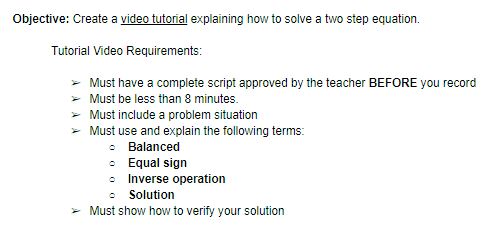
What better way to remember content than become your own future self's tutor! To do so, students were tasked with creating a video tutorial utilizing Sketch IO and Screencastify that included the following requirements.


Multiple scaffolds were put in place to ensure students were reinforcing correct information. To start, these on-level students were allowed to be in groups no larger than 3 so peer-teaching could be utilized to support and clarify learning. Additionally, students were tasked with prewriting a script which encouraged planning and preparation instead of an on-the-fly performance; furthermore, this script had to include a few Key Terms in order to provide structure to the video whose remaining components were largely decided by student-choice.


Upon return from the week-long Thanksgiving Break, students had access to their own tutorial as well as a shared Google Folder containing their classmate's videos. This repository was valuable because students could hear and see explanations in student-friendly language from multiple viewpoints and problem sets. Creation of this video is at the highest level of Blooms Taxonomy in which students must synthesize information to create their own original work. Through creating a tutorial to teach yourself and others, students not only had to remember, understand, and apply these math concepts, but then use this to analyze the required steps and evaluate their order and purpose so that they could formulate this video. Applying higher level thinking commonly solidifies the learning to long-term memory so that instruction could resume right where they left off before Break with the tutorial videos available for memory jogging and review.

This activity meets ISTE's standard of being a 'Knowledge Constructor' in which "Students curate information from digital resources using a variety of tools and methods to create collections of artifacts that demonstrate meaningful connections or conclusions." (3c)

Monday, December 18, 2017

Mastering the Madness of Mythology


Mythology is a genre most students enjoy reading and studying, however few truly comprehend.  In order to help students deeply analyze the elements of this genre and demonstrate their understanding of the structure, Mrs. Davis, 7th grade GT ELA teacher at Chisholm Trail Middle School, challenged students to write their own original myth.

Students were asked to collaborate with peers to craft creation myths.  Through each unique tale, students explained how a natural phenomena came to be, while teaching the audience a valuable lesson about the choices we make and the impact they can have.  Students spent a week working through the process described below.  

Planning and Drafting
A key part of this project involved students collaborating on all aspects of the myth.  In order to easily facilitate collaboration, Mrs. Davis shared template resources with students through Google Classroom.  Student groups were then able to access the files from their own Google Drive and work together  to develop a solid plan.  Students also relied on Google Drive as they drafted the first version of their myth.  Google Docs allowed students to simultaneously access the same document so all group members could serve as active participants.  The use of the “History” feature available with this tool enabled the teacher to clearly see the individual contribution of each group member.  This encouraged full participation and aided in the assignment of individual student grades.

Publishing
When it came time to publish, students were given the option of using Adobe Spark Video or Pages.  Spark considers itself, “a one-stop content shop for creating and sharing visual stories that will wow any audience on any device.”  This was the perfect tool for students to blend their text with images, bringing their stories to life!  Click on the images below to see their creations.


Screen Shot 2017-10-25 at 4.06.20 PM.png         Screen Shot 2017-10-25 at 4.07.10 PM.png     
Screen Shot 2017-10-25 at 4.08.21 PM.png       Screen Shot 2017-10-25 at 4.05.06 PM.png


Reflection & Feedback
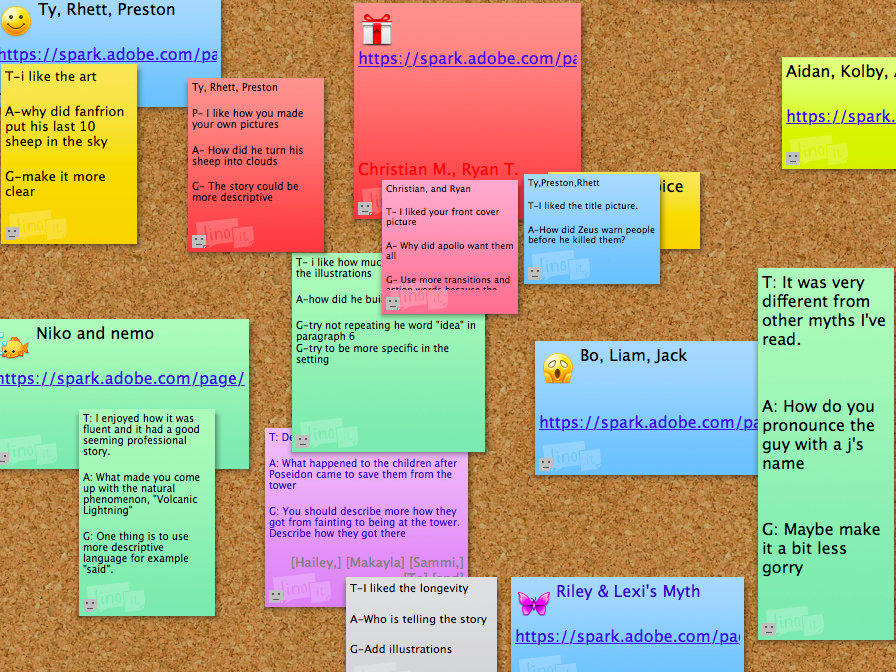
Mrs. Davis utilized Lino sticky canvas for students to provide feedback to one another.  The canvas was created by the teacher and then shared with students.  Each group created a note with their names and a link to their presentation.  Groups were required to view at least 2 projects and use the TAG feedback strategy to provide authentic peer feedback.  The collaborative aspect of Lino allowed all students to view one another’s projects, as well as access the feedback.  While Mrs. Davis was happy with the overall experience Lino provided students, she did mention that she would set things up differently if she utilized the tool again in the future.  She suggests creating the original notes for each groups and then allowing students to comment around them.  This would allow the teacher to lock the notes in place and prevent any confusion caused by a lack of organization.

Screen Shot 2017-10-25 at 11.38.33 AM.png


In years past, students completed this project using paper and art supplies.  It’s always been a project students love, but this year, the integration of technology took things to an entirely new level.  A common frustration reported previously was the limited time students had to complete the myth.  With the use of collaborative tools, students could access their work anytime, anywhere.  The increased accessibility, improved the overall quality of the projects and provided students a deeper understanding of the content.  While all of these benefits make the project worthwhile, the most meaningful benefit would be the ability to instantly provide students with a global audience.  Since the assignment was completed using a digital tool, students were able to link their Adobe Spark Videos or Pages to their ePortfolios.  This will be an experience students can look back on and share for years to come.

Sunday, March 19, 2017

Students Teaching Students

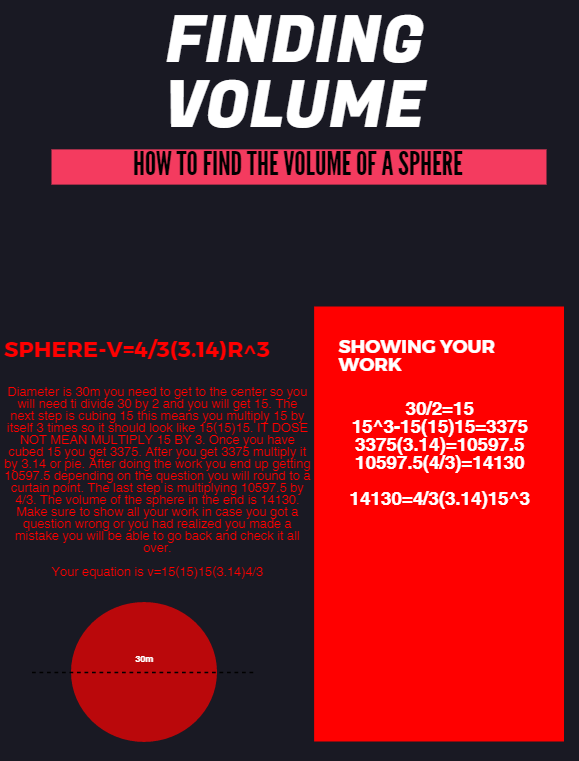
According to instructional technology Guru Alice Keeler, "The person doing the work is the person doing the learning." At the end of the day, are you tired or are your students?  Yari Kemp, math teacher at Chisholm Trail Middle School, makes sure she sends her kids home each day exhausted from learning!  As a math teacher, Mrs. Kemp works tirelessly to provide students opportunities to think deeply and reflect on their learning.  Recently, students and teacher traded roles when students were asked to create “How-To” style tutorials teaching a classmate about Volume.

7th grade PreAP and 8th grade On-Level classes studied Volume for several weeks.  At the conclusion of the unit, students were challenged with the task of utilizing a digital tool to create a tutorial for classmates still struggling with the topic.  Students could choose from Canva, Google Draw, WeVideo, Adobe Spark, or Piktochart to complete the assignment.  Since students were encouraged to select their own tool, this project allowed for limitless creativity, evident in the completed products.  Take a look at a few examples below.


Kasey, an 8th grade student in Mrs. Kemp’s class, transferred to CTMS from another district and says he is enjoying math so much more.  He shared he loves the technology integration and working on his Chromebook in math helps keep him engaged.  Kasey used Piktochart to create the tutorial anchor chart shown below.


In this activity, students were empowered by the opportunity to be instructional leaders to their fellow classmates.  According to the ISTE standards, 21st Century learners should “contribute to the learning of others.”  In this powerful classroom example, Mrs. Kemp’s students learned a valuable lesson in communication, collaboration, and supporting others.  

Monday, January 23, 2017

Let's Plan a Party!

Have you ever been responsible for planning a party for a big event? The 7th graders at Pike Middle School were asked by the Principal to plan the 7th grade End of Year Party. A big task, right? The students in Mrs. Morton’s Pre-AP Math class embraced the real-life challenge of being an event planner. They had to put their knowledge of patterns, equations, and rates of change to the test.

“Our project was to plan a party for Mr. Jones. We could choose where to eat and what activity to do, the challenge was to find the best deal so that we could spend the least amount of money as possible.” -Joseph


"The project was fun and took a lot of brain power because you had to think through the problems. We used the comments feature to talk back and forth to one another when we were confused. We don't live close to each other so the comment feature allowed use to collaborate from home." -Evelyn

"We used the website, Create a Graph Classic to make the graphs. Last year in math class, we made pie charts using that website so I figured I could go back to that website and make these graphs."-Raegan


This project challenged the students to be a proctor of their own learning. It is no surprise that they ended this project with more knowledge of real world experiences in the field of Math and had some fun planning a party at the same time. The International Society for Technology in Education would describe these scholars as; knowledge constructors, computational thinkers, and global collaborators.

Monday, November 28, 2016

Science: Inside Out

Seventh graders in Mr. Crawford’s science class, at Medlin Middle School, recently took a closer look at their inner selves. Literally! In studying the systems of the body, students participated in a dress up day. Their “costume” would be one of the eleven systems of the body they recently studied in class. Using various supplies to represent and label the major organs of a body system, the entire campus was able to see detailed visuals of the learning taking place in Mr. Crawford’s classroom.

Additionally, students were challenged to assume the role of a scientific graphic designer. Their task was to create a digital flyer that represented their new learning of the systems of the body. Working in groups of three and four, students began researching and designing. Initial planning for the flyer took place in Google Slides. Using information gathered through their research, students were able to collaboratively contribute their portion of the project to a shared presentation before moving on to their final product. Eleanor especially enjoyed researching the body systems online stating, “it helped me enhance my learning by giving me endless answers compared to what you get out of a textbook, which is limited information.”

It was also an expectation that their digital flyer would include an original video created by the group. The video should contain information about the body system they researched, and could be presented through a variety of methods. Some groups chose to interview a professional in the field, while others created music videos or newscasts. Fliers included content from their research and images too.


When asked what he enjoyed most about the project, Luke said, “the best thing about using technology in class is that it makes things much easier and quicker. It changes the way I learn by engaging me more and getting me more interested in the project.” Dodge said he especially enjoyed, “interacting with his group in Google and FaceTiming with them while working in Smore.”

It’s no surprise that all students walked away from this project knowing so much more about themselves than when they began. They also walked away with a number of skills that will enable them to function in a digital world, as referenced in the ISTE Standards for Students.

Additional student can be viewed using the links below:

Monday, May 9, 2016

Finger Snappin' Good


Seventh graders in Mrs. Davis and Ms. Brown’s ELA classes at Chisholm Trail Middle School recently took an in depth look at the various structures, styles and literary devices used in poetry. Students used their new knowledge of poetry to compose original narrative poems revolving around the concept of choice. Ava said, “I learned that poetry can take any moment and emphasize it to where it becomes bigger than it really is.”

By utilizing Google Drive, students were able to work both independently and in groups to write, revise, edit, publish, and present their original poems. Google was utilized as a platform for drafting, revising, editing, and publishing the poems. This platform allowed students to collaborate in composing the poems, authentically.

“The most challenging part of the project was trying to convey our message to the listener and/or reader in a way that could show what we had in our heads”, says Makeeda. After composing and rehearsing their poetry, students presented their narrative poems in a poetry slam with their respective classes. Using a traditional scoring method of a 1-10 scale, peer evaluation determined which students from each class would be moving on to the next round. Careful consideration was given to both the poem itself and the performance of the piece while scoring.

The winners from the in-class poetry slams went on to present their poems in the cross-district poetry slam held via Zoom Conference with Medlin Middle School. Students from both campuses were able to share their poems with students across the district through live-streaming. Classes were able to interact throughout the Poetry Slam by using Today’s Meet, as they discussed and provided feedback, while a Google Form was used to provide student presenters with more detailed feedback from their peers.

Ashton shared her thoughts on the poetry slam. “Google helped us by being able to have others edit our poem and add feedback. It also helped because my partner and I were both able to edit our poem at the same time. Zoom allowed us to present to Medlin and receive their feedback.” Students and teachers are hopeful this event can expand throughout the district next year.


Monday, March 7, 2016

Choice is Voice!

For students, having a choice in their day-to-day learning is huge. Choice gives them a voice of their own to express what they are learning and to showcase it. By combining technology with students choices, you can empower students and allow them to increase their learning and ownership of the classroom. Student choice is most effective when teachers provide clear, simple options and if appropriate, leave room for kids to change their minds so that they can explore and learn.

Mrs. Famigletti's 7th Grade Pre-AP Science classroom at Medlin Middle School is an example where both technology use and student choice is evident on a regular basis. While assignments and projects often have clear guidelines for a final product, the method of creating that product is generally theirs to choose. For example, this past week the class had a two day assignment where the goal was to create an energy diagram of consumers and producers in the natural ecosystem around the school. For the first day of the assignment, students took pictures using their tablets or their phones, properly identified their place in the energy pyramid, and then uploaded these on a Padlet wall.

On the second day, students formed groups and created an energy diagram with three energy pyramids from the pictures on the Padlet wall. Students got to choose which platform they would use to create their diagram.  They could create their diagram digitally using a new program or one of the programs they've used in the past, or draw it on poster paper. The group of Miles, Daniel and Edward said they "appreciate that we have a choice to use programs that are more user-friendly, or that we are more comfortable with. We like having the option of how we are going to work."  Their group began using Microsoft Publisher 2016 but then opted to use a poster instead, showcasing not only their power to choose but also the ability to change their mind about how they were creating their own project. Another student opted to use Microsoft Word to create his energy pyramids and then uploaded them to Smore to present them. Another group decided to use Google Docs and Google Drawings to collaborate and draw their diagram together. Even groups who opted to use posters had their tablets or phones open to access the pictures via Padlet and class notes via Moodle while creating their diagrams. Morgan, a student in a group making a poster, explained to me that "we use digital stuff all the time in our class, but sometimes it's easier to just draw or make something with our hands."  The option to choose is not lost on these students and they are appreciative of it.

Check out the pictures and links below to see their work in action! The choice is yours and that is what's important!


Monday, January 11, 2016

Cell Analogy Project - Making A Real Life Connection

Digital age learning lends itself to create and promote a culture that provides rigorous, relevant, and engaging education for all students.  In Mrs. Greiner’s 7th grade class at Wilson Middle School, students were asked to create an analogy to show their understanding cells. Analogies help students make connections that enhance comprehension and no longer makes a topic difficult to grasp. Students got to choose which tool would best help them present their work.  Below are two outstanding projects that show depth of thinking and understanding. Both of these projects will be showcased in TechnoExpo 2016.   
  
Nick did an excellent job and compared his cell to a football stadium using the format of Smore


Haley transformed her learning into an interactive experience using the tool of ThingLink

7th Grade, Science, Cell, Collaboration, Analogy, Wilson Middle School, Thinglink, Smore, TechnoExpo, Digital Learning, Comprehension


Through student collaboration and a bit of research, students were able to quickly create an informative and creative presentation.  The final product provided students with a link that can be shared via the internet so that others can learn from their discoveries beyond their own classroom.  You will see these and many other GREAT technology based projects at TechnoExpo2016.

Monday, December 14, 2015

Authentic Audiences = Legit Learning


Is there a guideline currently in place on your campus that needs to be evaluated? What about rules… are there any that need to be updated? Or maybe there is an issue on campus that needs to be addressed. Are you passionate enough about that topic to compose a policy speech that can be delivered to an authentic audience? These were just some of the questions seventh graders at Chisholm Trail Middle School were asked as they were tasked with identifying and evaluating guidelines, rules, or issues currently in place on their campus.

After speech topics were decided, students began researching and gathering information that would support their stance on the chosen topic. Topics included: the district’s grading policy, school safety, homework, cafeteria portions, listening to music in class, recess for middle school, overcrowded buses and more! John, one of the students who chose to write about the buses said, “We had been having issues with the buses, especially my bus, so I felt compelled to address the issue”.

Many students chose to compose their speeches using Google Docs. This allowed their teacher, Ms. Brown, to give them feedback and suggestions as they worked. Students were also encouraged to share their speech with peers to receive feedback. Google Docs allowed collaborative conversations to
 take place throughout the entire speech writing process.

Once speeches were finished and ready to be delivered, Ms. Brown helped arrange an authentic audience for each student. For some students that meant they would be delivering their speech face to face with their campus principal, counselor, or other district officials. Other students connected with various people throughout the district via Zoom, a free video conferencing resource. Ava said, “The thing I enjoyed most about this project was the Zoom conferencing, because I had a real audience instead of just my class. I presented to Dr. Thornell and he gave me real feedback that can actually be effective”.


When asked how having an authentic audience changed the way they approached their project, Brendyn said it best. “It made it feel real or in other words more important. It made me strive for excellence rather than just get by”. Brendyn presented his policy speech regarding the student BYOD (bring your own device) Policy to the IT Department via Zoom. Zachary also presented to the district’s technology department and he commented on how the feedback he received from Mr. Smith changed his thinking. “I enjoyed getting the tech people's point of view, because it allowed me to find another view of how their job is”.

Students were engaged throughout this entire project. The real world experiences they were provided, especially through their connection with an authentic audience, will be something they remember forever. As Zachary said after this project was assigned, "This project is legit!"