Showing posts with label google docs. Show all posts

Wednesday, October 16, 2019

Comprehending WILD Literature


Back to school in the FALL at Justin Elementary is all about policies, procedures, routines, and setting expectations with students.  One of the goals for 5th-grade teachers Ms. Haley Donaldson and Mrs. Becky Carlson is for students to take risks and try new things to enhance their reading comprehension. With that goal, both teachers are committed to incorporating relevant technology into her lessons to help students reach their goals across multiple literary elements.  After finishing the read-aloud Hatchet by Gary Paulsen, students were given the choice to produce a technology-infused product that represented: Theme, Character, Comparing, Setting, and Plot.


Emma N. from Mrs. Donaldson’s class really enjoyed making the WILD Wordcloud project.  She stated, “ I liked doing this project digitally because I got to be creative to choose my own words, design my own colors, and I chose a plane as the background. I found my idea to make the flipbook on Youtube.”

3-5, Becky Carlson, Canva, Chromebooks, ELA, google docs, Google Drawings, Hailey Donaldson, Justin Elementary, literacy, Literary Elements, Reading, Voice and Choice, WeVideo, Writing,


Students were challenged to capture the essence of the novel and give the reader a good idea of what the book was about.  In this novel, thirteen-year-old Brian is flying on a bush plane when the pilot suddenly has a heart attack and dies. Brian manages to keep the plane level until it crashes into a lake in the Canadian wilderness. Brian survives the crash, but that was just the beginning. Characters in many novels go on adventures and through their journeys teach the reader much about life and themselves. Below are more projects that follow Brian’s WILD  journey into the wilderness. Students used their Chromebooks and were given the choice of four types of tools to elaborate on their literary elements: Google Draw, Canva, Adobe Spark, and Wordcloud.  

In this video, Seth L. from Mrs. Carlson's class wanted to publish a video about what the WILD Canadian setting looked like to him after reading the book. Click here to view


Cameron L. said, “My favorite part was typing my paper in Google Docs since I have bad handwriting. I am really proud when I get my papers typed up, they look professional.”

Emory H. from Ms. Donaldson’s class chose to show the reader about the WILD setting of the book by using Google Draw.
3-5, Reading, Literacy, Goals, Becky Carlson, Hailey Donaldson, Justin Elementary, Google Docs, Google Draw, Canva, WeVideo, Writing, Creative, Expo, Voice and Choice


Brady T. from Mrs. Carlson’s class showed voice and choice by producing a WILD monthly newscast in WeVideo about the book. To show his creative side he even interviewed his teacher as if she had the main character Brian in her class.  To watch the video - click here


Haley B. from Ms. Donaldson’s class used Canva to entice readers to come to visit WILD Hatchet by creating a magazine about the book. Click here to view the project.


These projects are showcased on the board outside the classroom in the hallway for all visitors to see. Also, they will be submitted to our district's learning showcase event EXPO in February.  More information can be found at http://expo.nisdtx.org  In closing, students demonstrated content-specific skills. This project utilized technology in a way that enabled students to demonstrate how they have empowered learners and creative communicators, crucial skills for being future-ready. (ISTE Student Standards)


Monday, September 23, 2019

When Characters Come Alive

Kirstie Cooper’s ELA class at Adams Middle School is one that students are consistently engaged, challenged, and having fun. She takes everyday lessons and turns them into learning experiences for her students. 
"All Summer in a Day" is a Science Fiction short story by Ray Bradbury. Cooper gave her students a digital copy though Google Classroom, which streamlines the process of sharing files between teachers and students. As they read the story they used Kami to annotate the text. Students focused on the characterization of Margot as they read.When finished, an analysis of the text which included looking at elements such as point of view, figurative language, and theme was done. Once students completed that task, they began compiling all of their knowledge of the text to incorporate into the final task.


To begin, Cooper used Flippity to do a random group generator. The kids weren’t thrilled that they didn’t get to choose groups, but Flippity eliminated that potential management struggle. Next, students created a Google Doc, which they collaborated with each other on, shared with the teacher, and begin creating a script. Students were tasked with creating a “talk show” style script where there would be hosts who interviewed the two main characters of “All Summer in a Day”, Margot and William. Students had to create 3 questions per guest and formulate their response based on inferences from the text and the characterization of Margot and William. Finally, once students finished their script, they used Flipgrid to record themselves hosting their talk show. This gave quiet students a voice, it allowed us to see the profound thoughts you didn't know were there, and took their learning to a deeper level than you thought possible for this learning opportunity.
Student Talk Show Example


Student Talk Show Example

Tuesday, September 11, 2018

A Recipe for Success: "Stringing" A Rhythmic Pattern


Learn.
Act.
Reflect.
Goal Set.

Repeat.


Is nailing down this process a Science or an Art? I'd argue it’s an Art - Fine Arts to be exact. Students in Gary Keller and Sessalie Shapley’s Orchestra class at Byron Nelson High School have perfected this process on a continual, weekly basis to improve students' overall abilities. One might think that Technology doesn’t doesn't have a logical place in an instrumental-based class, but that's far from the truth as this Orchestra class is fully dependent on the technology used in preparation for and reflection of daily performance.


Each class is infused with technology from start to end. For example, students are tasked with the responsibility of tuning their own instrument at the start of class each day; they use readily available, free, phone-based tuning apps such as DaTuner and InsTurner to put the accountability on themselves rather than the teacher to ensure the instrument is in the right key. This process is critical to harmonizing as an Orchestra and developing a natural ear for the correct sounding notes.


To continue in the lesson design, classes often provide traditional opportunities such as learning new music and practicing as a full Orchestra. However, the power of technology is truly evident in the individual practice times. During these times, students participate in the general format as follows:


Recipe for Success:
  1. Students create a video of themselves playing a specific song or section of a song determined by the instructor. During this time, students use a combination of their phone and their computer to have both the online metronome and video camera co-functioning. This video serves as a pre-assessment to create a base-line of performance and needs assessment for the week.
  2. Self-critique that video to identify one specific goal to work towards throughout the week. This then becomes the targeted focus for all practice times throughout the week. Topics of suggested focus include intonation, bow placement, vibrato, dexterity confidence, or other of choice.
  3. The student then creates an end of week video over the same content and again uses that as direct evidence to self-assess progress towards goals.
  4. Upload and reflect upon these artifacts in Google Classroom. The Orchestra instructors then review each student's performance to provide individualized attention and feedback focused specifically on the students' performance and self-set goal.
  5. Based on their self-assessment and teacher feedback, the student then goal-sets via a Google Doc for the following week to continually focus on targeted instruction and self-improvement.

Each of these weekly goal sheets provide evidence for the student to reflect up on their progress towards goals and make new objectives based on previous performance. Since the evidence gets uploaded to Google Classroom, students have a personal Google Folder within their own Google Drive which serves as a private portfolio that stores their yearly progress. Students then have the ability to select which pivotal pieces they would like to showcase within their published ePortfolio.

Assistant Orchestra Director, Sessalie Shapley, comments on the power of infusing technology into their classroom, "Google Classroom video recordings allow me to give feedback to every student based on what I see and hear in their recordings. It is a far more efficient use of time letting the recording and grading happen outside of class instead of one at a time, in class, while all of the other students are waiting;" furthermore, "The video recording assignment allows and even encourages students to record themselves multiple times in order to get their “best” recording" which is the ultimate goal: student-driven success fueled by continual practice in perfecting their art. Best of all, the power of technology has helped Mr. Keller and Ms. Shapley build connections beyond what would be traditionally capable with a large Orchestra on a time-restricted class period as Sessalie continues, "The goal sheets and comments have given me several opportunities to discover something about the student’s expectations and other musical talents, gifts and thoughts, which then allowed for deeper discussion about their playing and their musicianship."

As a natural final step, students reflect on their year in an open-ended format. The power of reflection, goal-setting, and improvement shine through in the following student final responses:

Student 1:
“I thought that the goals were a great way to stay conscious of our playing abilities - to constantly be reminded of our strengths and weaknesses so that we can improve on them over time. I also believe that the exercises we were given are great practice strategies for improving many aspects of musicianship like dexterity and intonation.  I think I have certainly seen evidence of our goals in action as the progressed. Some of the goals on the goal sheets did not always pertain to me, but still having to look at them on a regular basis caused me to think more upon how I can always channel my actions in class and practice towards furthering the goals and the overall quality of our orchestra.”


Student 2:
“This year I have heard and felt so much progress in my playing. This was the first year I took private lessons, and I think that was extremely beneficial by itself. But beyond that I have felt so much more confidence in my playing. This was the first year I made it through a solo contest without crying, and the first year I came out of an audition room feeling proud of myself. And confidence alone has made a world of difference in my playing. I have also noticed a lot of progress related to our goals and goal videos. I didn’t realize it in the beginning, but when we came back near the end of the year and redid the dexterity video, it was actually really cool to find how much easier it was for me to do and how much clearer I sounded than in the beginning of the year. It was also useful to see the goals and realize that it’s okay to experiment with the bow and with the left hand, and just that everyone is doing what they can to make beautiful music in the outcome. I have seen so much progress this year in my playing and how I feel about it and I hope to see even more in years to come.”

The presence of technology has empowered these students to find value in the daily struggle of learning, trying, and occasionally failing all while appreciating their own growth that would otherwise not be as apparent strictly as perceptions and memories.

This intentional goal-setting and reflection process meets the following Student ISTE Standards:
Empowered Learner: Students leverage technology to take an active role in choosing, achieving and demonstrating competency in their learning goals, informed by the learning sciences.
  • 1a: Students articulate and set personal learning goals, develop strategies leveraging technology to achieve them and reflect on the learning process itself to improve learning outcomes.
  • 1c: Students use technology to seek feedback that informs and improves their practice and to demonstrate their learning in a variety of ways.
This also exemplified the following TEA Music Level 1 TEKS in which the student is expected to develop processes for self-evaluation and select tools for personal artistic improvement (6c).

Wednesday, March 21, 2018

The Basics of Blending


In the book, Blended Learning in Action, Catlin Tucker, Tiffany Wycoff, and Jason Green hit the “pulse” of the blended learning movement as they discuss the need for a shift in the way schools “puree” and present content to meet the needs of today’s learners.

They explain this by saying, “We are at the moment in education when our schools can determine if they are Netflix or Blockbuster, Amazon or Borders, Samsung or Blackberry. In each of these cases, the successful organization saw that the entire world was changing and decided they were going to change to be ready for it…shifting vision and culture at the time when it was most critical to their survival.” The point here is that current education models are “crushing” student opportunity by “chopping” key elements needed to engage students and prepare them for “shredding” the future demands of a global marketplace. In an effort to address this need, Northwest ISD has begun piloting blended learning courses where that missing link is helping to fill the gap and expose students to nontraditional forms of instruction by providing learning experiences that aid in better acquisition of future ready skills.

There are common misconceptions about blended learning and what it entails. It is not only integrating technology into the classroom, “flipping” lessons, or even implementing problem based learning strategies. Blended learning includes a “mixture” of those things and more! An article by Michael B. Horn and Heather Staker described blended learning as, “any time a student learns at least in part at a supervised brick-and-mortar location away from home and at least in part through online delivery with some element of student control over time, place, path, and/or pace.” Successfully implementing blended learning requires a complete shift of culture that empowers both teachers and students to be active participants in creating learning opportunities. Horn and Staker explain that making blended learning a reality requires “letting go of the idea that we always have to teach something in order for students to have learned it.” Empowering students by allowing them choice and independence within the pace and structure of the course as well as connecting the traditional, face-to-face learning time with digital learning time is all key to the success of blended learning courses and eventually strengthens student capacity for independent problem solving and critical thinking.

Jennifer Hamzy, a teacher at V.R. Eaton High School, facilitates the current blended AP Psychology course there and she feels that the digital days incorporated into the course create an opportunity for “differentiation and for students to decide what works best for them.” She also appreciates how the blended format puts more responsibility on the students to develop “better study skills” and to “learn how to independently read a college text.” Jennifer frequently encourages collaborative strategies to help guide students on digital days. They are encouraged to utilize Google Suite tools as well as various digital study aids like Quizlet, YouTube videos, and online practice assessments to learn and reinforce concepts on their own while allowing more in person class time for discussion, teacher guidance, and whole group activity. AP Psychology students, Anya and Patricia, stated that they enjoyed having “more time to get work done” independently while also having the option to “meet up to work together” with other students either digitally or in person.


Although blended learning has been largely successful in Mrs. Hamzy’s class and she is extremely well-versed in problem based learning strategies, student goal setting, and differentiation, she feels that she can improve her blended learning course by providing more specific expectations to students early on in order to guide them in productive ways to spend their digital days as well as by incorporating more flipped techniques to help ensure that students have the necessary background knowledge and preparation to complete problem-based tasks and projects. Mrs. Hamzy regularly utilizes Google Suite, Moodle, and other digital resources to engage students with content independently and collaboratively but is constantly making adjustments and trying new tools to help her create additional independent learning opportunities for students. Online resources such as Pear Deck, edpuzzle, FlipGrid, Formative, Screencastify, and even digital badging can all increase student engagement with content while allowing students room to individually and collaboratively remediate, accelerate, or manipulate their own interactions with concepts and skills. Hamzy describes the transition to a blended learning course as “a process” and says that teachers new to it should “give themselves a break the first year” as they take risks with a new role, different strategies, and unfamiliar resources. She says that as you progress, “you discover that some things work and some do not but that’s okay” because you adjust and improve for the next time.

As the availability of blended learning courses to NISD students increase over the next few years, other EHS teachers, like Renata Schlotzhauer and Ashley Harden, will be expanding this course structure to other content areas such as science and World Languages. Mrs. Harden says that she is looking forward to “students growing academically and personally as they are given more responsibility.” She also feels that it will help to deepen student understanding in science because they are allowed to cover more information at a more personalized pace.”
Prior to the course selection process for next year’s classes, both Mrs. Harden and Mrs. Schlotzhauer took time to speak with incoming students about what they could expect and Mrs. Schlotzhauer explained that she felt there were “unlimited possibilities for delivery of content, student collaboration, and exploration of new concepts.” Students will have real opportunities to grow as self-sufficient, critical thinkers as they are forced to begin thinking and working in more organic and experiential ways through these blended classrooms. Tucker, Wycoff, and Green state that, “…it is the advent of modern technology that now makes this type of learning experience possible in every classroom and for every child” and that “the rewards of student learning, engagement, and empowerment will be manifold.”

Monday, February 5, 2018

Create Your Own Adventure Books: Real Authors with Real Readers

Authors in Mrs. Bass' 5th grade class at Hughes elementary recently published work for an authentic
audience at their own school! 1st grade students were learning about Caribou while 2nd grade was studying Christmas traditions around the world. Knowing their needs, Mrs. Bass allowed her students to write both fiction and nonfiction stories that the younger students could learn from. These were not ordinary stories. Students used their knowledge of story elements and plot to write create your own adventure books. The beginning and middle of the story was written collaboratively as a class, while the ending was written by each individual. Students choose a unique ending and a picture icon that symbolized what their ending was about to hook the reader and give them a hint.

Zoe, Aubree, Lainey, Hailey, and Terrance got a lot out of this project. When asked what they enjoyed most about the project, Aubree stated, "I loved that we got to write to younger students. We knew lots of people would be reading our work. I also enjoyed getting to read other people's stories and seeing how creative they were." Haliey added, "I loved that every ending was completely different." Some stories ended in Canada, while others ended in Hawaii, Times Square, giant homes, and even Krusty Krab's House.

Terrance explained the project in his own words, "At first we wrote as a squad and then we went solo. I'm glad we got to choose between fiction and nonfiction stories." Terrance is new to Hughes this year and said that he learned a lot about Google docs and how to format documents. He has also noticed that he got better at typing the more he wrote. This project allowed students to learn about writing, while simultaneously learning technology standards. Lainey comments, "I learned that every story needs to have a problem and a solution." Aubree adds, "we also learned how to get a shareable link for our Google Doc and copy and paste shortcuts such as Ctrl C and Ctrl V."

"The hardest part of this project was deciding on the beginning of the story with the group," states Lainey. "We all had ideas and had to choose which one would be best."

Perhaps the best part about this project was getting to share writing with others. All of the stories were published on a Padlet wall for readers to not only read the books, but also give them a 1-5 star rating. "My mom loved me story," said Hailey. "Over Christmas break I read everyone's story from the class. They were all so interesting." The class hopes to have the Padlet bookshelf available in the library for others to read. They are hoping that more people read and rate their stories.

Terrance concludes by saying, "I hope next year's 5th grade class gets to have as much fun doing this project as we did. We learned a lot about writing, but we had a lot of fun at the same time. This project was good for everyone, even the students who are shy because we start in a group, but then get to finish on our own. We all got to show our creative side."

These students are excited to present this project at EXPO 2018 in February!

Read and Rate Student Created Stories Here:
https://padlet.com/cbass5/ReindeerWriting

Made with Padlet

Highlighted Student ISTE Standards
Students communicate clearly and express themselves creatively for a variety of purposes using the platforms, tools, styles, formats and digital media appropriate to their goals.

  • 6d Students publish or present content that customizes the message and medium for their intended audiences.
Students use digital tools to broaden their perspectives and enrich their learning by collaborating with others and working effectively in teams locally and globally.
  • 7C Students contribute constructively to project teams, assuming various roles and responsibilities to work effectively toward a common goal.

Tuesday, December 12, 2017

Discovering Jamestown – a Multi Grade Level Approach


Mrs. Swearingen, Mrs. Franco, and Mrs. Ahmad , all fifth grade teachers at Sendera Ranch
Elementary, know the power of feedback and praise.  They wanted their students to experience learning about Jamestown in a new and exciting way.  Mrs. Swearingen contacted an eighth grade teacher, Mrs. Kristen Mouser from Wilson Middle School.  The two teachers began to brainstorm to take the learning outside the four walls of the classroom.

First, the students in fifth grade classes were presented with the two learning targets for this project.
  • I will analyze a DBQ document, so I can answer the question, “Why did so many colonists die?”
  • I am successful when I can write a paragraph to explain my thinking.
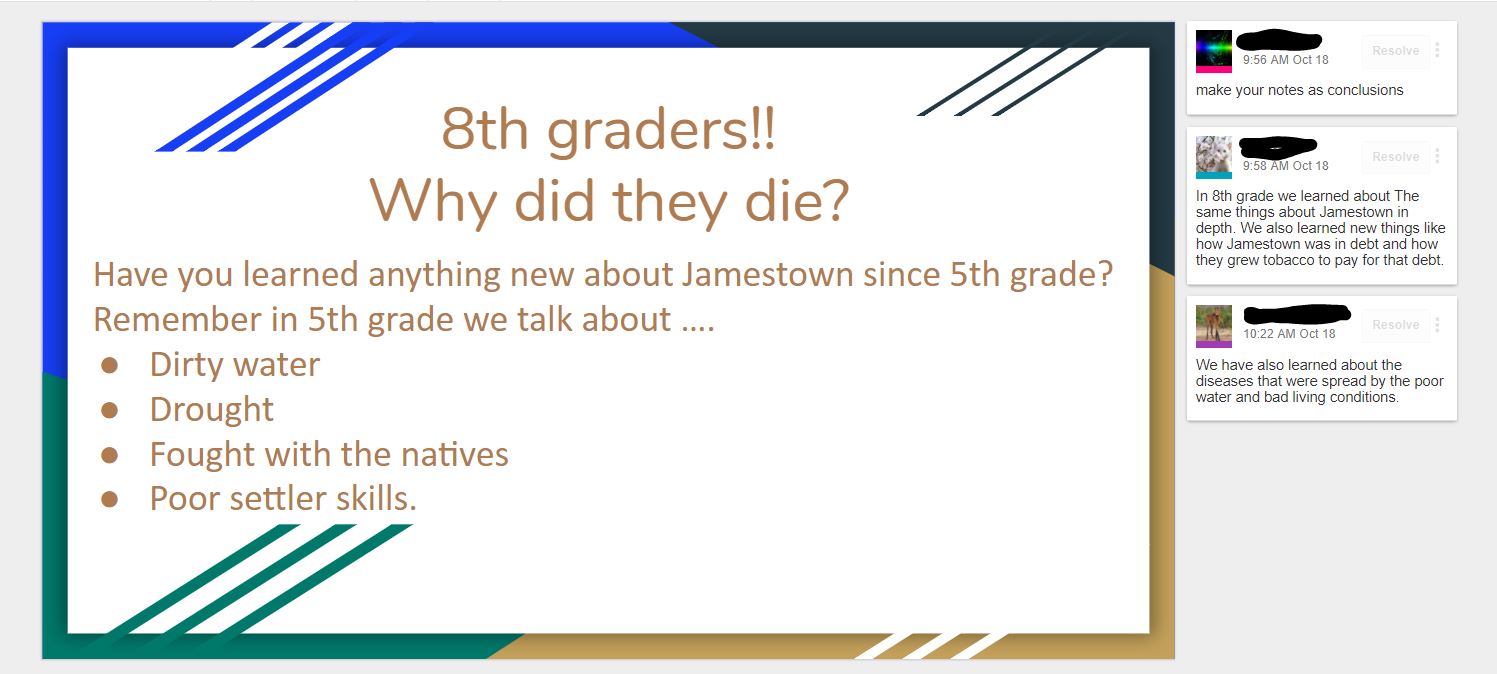
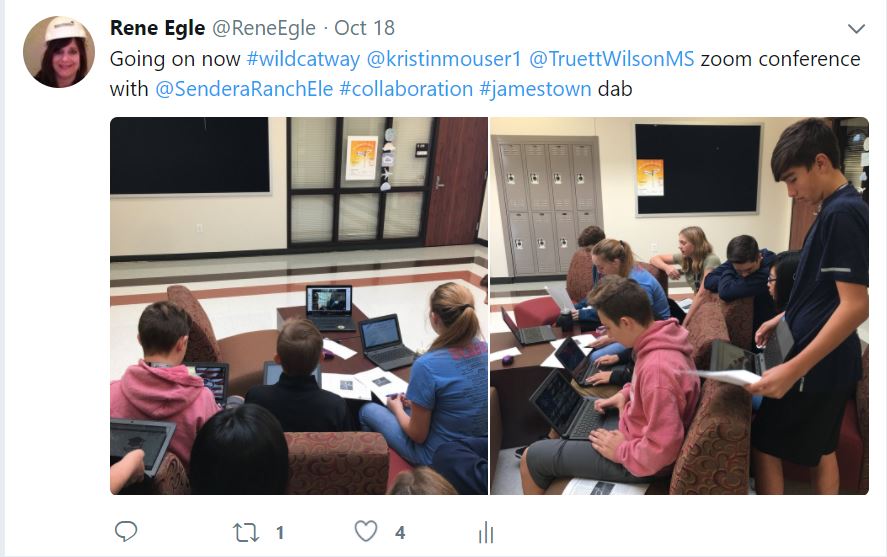
Immediately students went to work and created a collaborative slideshow to brainstorm questions they wanted to know about Jamestown. The next day, students found out Mrs. Swearingen and Mrs. Mouser had set up a time for the eighth graders and fifth graders to Zoom to have conversations. Zoom is a web-based tool that allows anyone to virtually connect and host a video web conference.  


5th Grade, 8th Grade, Google Docs, Sendera Elementary, Wilson Middle School, Zoom, Fifth Grade, Eighth Grade, Collaboration, Peer Feedback, Social Studies, Jamestown, DBQ, ELA


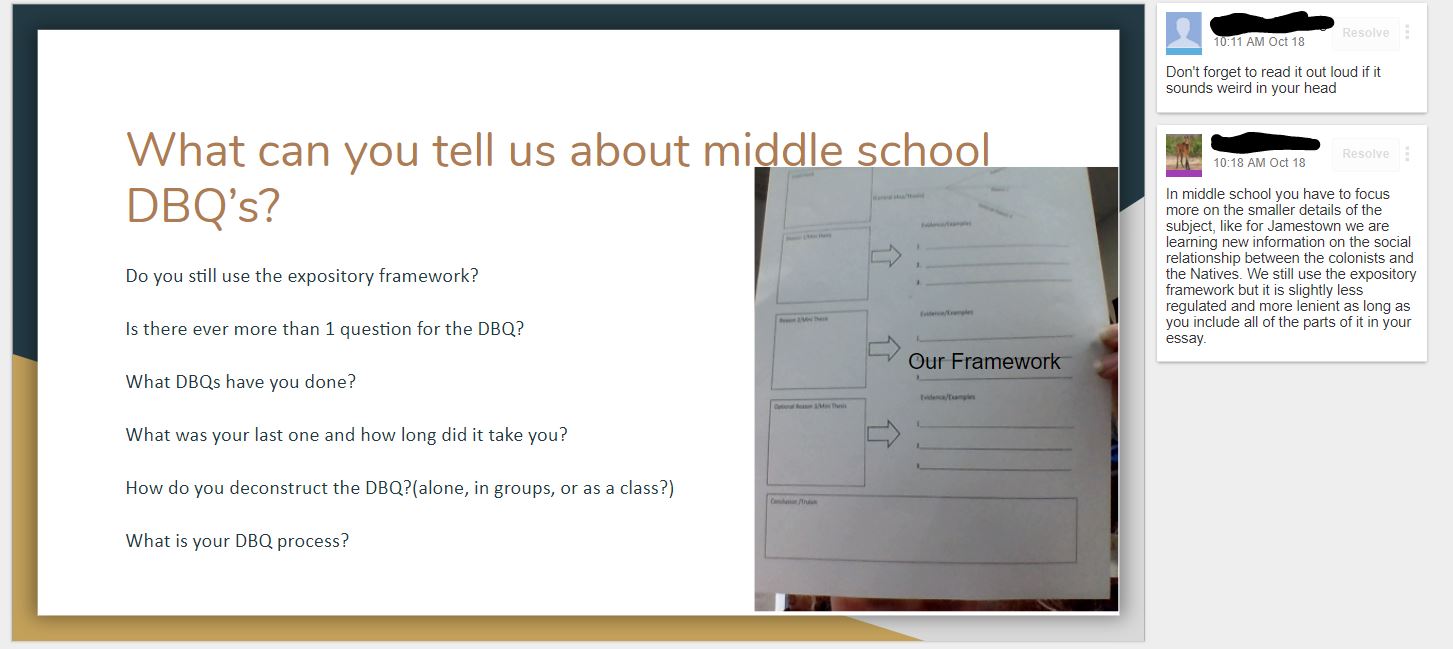
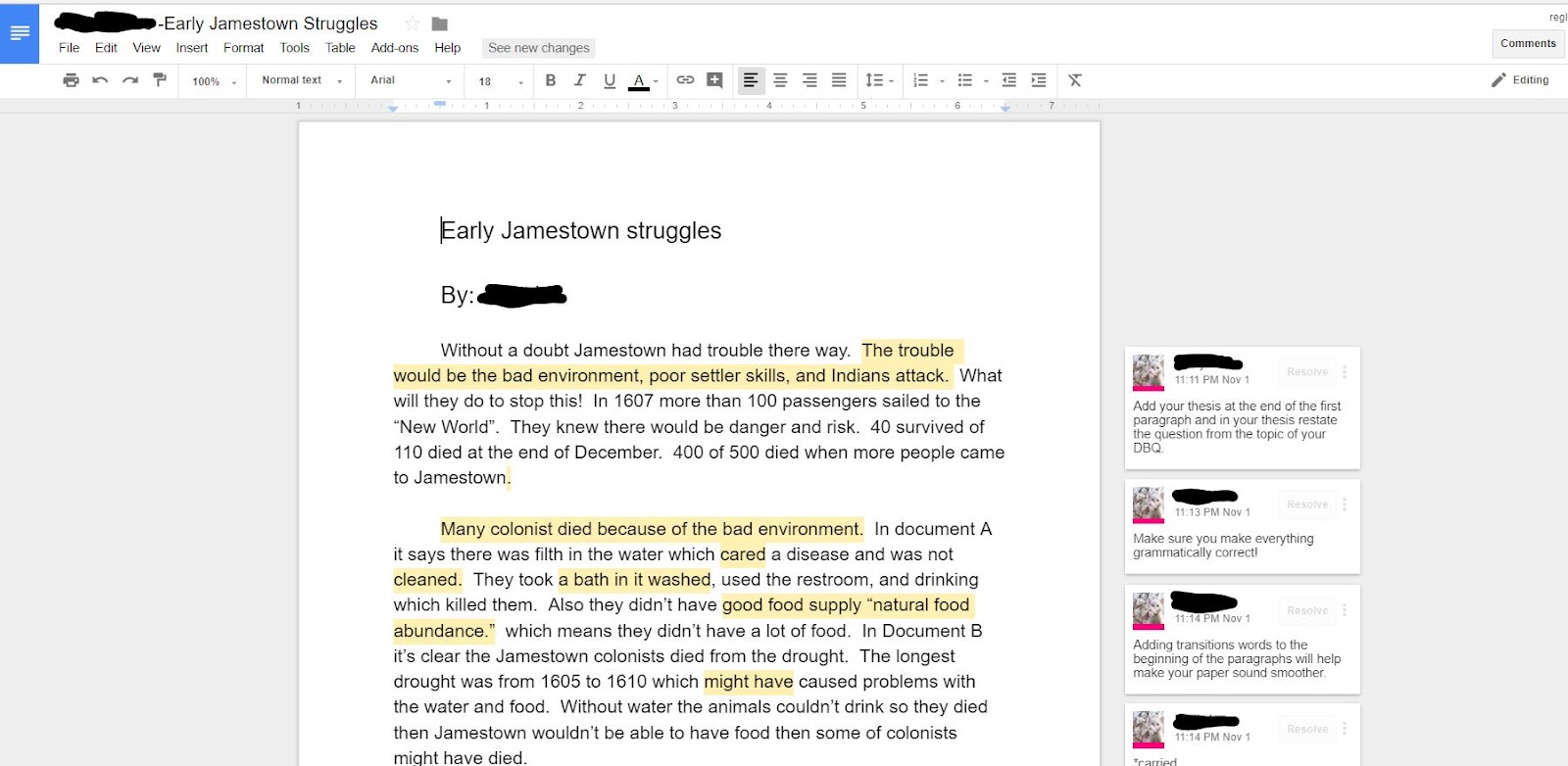
A few days later students began to write their paragraphs using Google Docs.   Using Google Docs allowed communications and collaboration for students to receive comments

and feedback from their peers.


“I liked reading what the 8th graders said.  They had some good ideas of how to make my DBQ
better.” said Brooke


“It was fun to see the 8th graders and hear what 8th grade was like and what an 8th grade DBQ was like.  They do it a lot faster than we do.” stated Logan

Research supports the value of peer collaboration and discussion across all content areas and concepts. By providing students the opportunity for peer feedback on their writing, students were able to offer one another constructive critique in order to improve their own communication skills. Extending, receiving, and evaluating feedback is a critical skill for all 21st Century Learners.  
1. Empowered Learner - Students leverage technology to take an active role in choosing, achieving and demonstrating competency in their learning goals, informed by the learning
sciences.
 - 1b. build networks and customize their learning environments in ways that support the learning process.
 - 1c. use technology to seek feedback that informs and improves their practice and to demonstrate their learning in a variety of ways

2. Digital Citizenship - Students recognize the rights, responsibilities and opportunities of living, learning and working in an interconnected digital world, and they act and model in ways that are safe, legal and ethical.
 - 2b. Students engage in positive, safe, legal and ethical behavior when using technology, including social interactions online or when using networked devices.

3. Knowledge Constructor - Students critically curate a variety of resources using digital tools to construct knowledge, produce creative artifacts and make meaningful learning experiences for themselves and others.
 - 3a. Students plan and employ effective research strategies to locate information and other resources for their intellectual or creative pursuits.
 - 3b. Students evaluate the accuracy, perspective, credibility and relevance of information, media, data or other resources.
 - 3c. Students curate information from digital resources using a variety of tools and methods to create collections of artifacts that demonstrate meaningful connections or conclusions.
 - 3d. Students build knowledge by actively exploring real-world issues and problems, developing ideas and theories and pursuing answers and solutions.

Wednesday, April 12, 2017

Digital Learning Can Be a Zoo!


Students at Northwest ISD's STEM Academy recently finished an extensive project across two classes to research, design, and create a functional zoo habitat for a specific type of animal.  Students who were enrolled in both Mrs. Goodwin's Biology class and Mrs. Garrett's Intro to Engineering and Design class used their knowledge from both subjects to informatively create their habitats.

Initial Hand Drawn Plans
Austin, a student who worked on the Elephant Habitat Project, said that "the design part of the project had multiple steps.  The first plans were hand drawn and then scanned in so we had a copy of them.  Then I used inventor to create the digital model of the habitat."  Inventor is a 3D modeling program that offers professional-grade 3D mechanical design, documentation, and product simulation tools.  Student's in Mrs. Garrett's class use Inventor for numerous projects throughout the year, including this one.  "I started by creating a general shape of the habitat, then cut into it with features like stairs, rails, and trees," said Austin.

The project had many parts other than the actual modeling aspect.  Students had to research many aspects of their chosen animal's living needs and incorporate those into their design.  Factors such as natural habitat, environmental niche, food web, behavior, adaptations, and limiting resources were all considered.  Groups created folders in Google Drive to share and collaborate on their project portfolios while completing their research.   "My favorite part of the project was designing the zoo habitat so it resembled a real habitat," said student Marla, who worked on the Harpy Eagle Habitat Project.  "We discovered things during our research that changed out initial designs.  For example, two harpy eagles in the wild occupy an area of over 20 square miles and they typically nest at a specific height.  Because of this, we had to change our initial design which wasn't large or high enough."

Austin agreed with Marla, saying that "concepts for our design were created over and over, including many drafts as we did research."  But not only animal factors had to be taken into account when creating their zoo habitat, as they had to ensure that designs accounted for humans visiting as well. "For example, the [Americans with Disabilities Act] requires that all stairs be between 30 and 50 degree elevation, so we had to take that into account as well," said Austin.
Elephant Habitat Final Project Portfolio
This project incorporated technology for in-depth research as well as informed design using cutting edge modeling software, allowing students to explore multiple facets of what it takes to create a real zoo habitat.  If you'd like to examine some of the projects in more detail, check out the links below!


Monday, October 17, 2016

Writing Process Gone Digital

Teachers and students would easily agree revision is an important part of the writing process; however it is often cumbersome and difficult to accomplish within the constraints of a 45 minute class period.  Students in Mrs. Davis’ 8th grade GT class have taken this mundane task to the next level with a little help from Google.  

A structured process has been created in order for students to successfully collaborate with their peers as they work through the writing process digitally.  Students begin by drafting their original essay in Google Docs and then “share” their document with a classmate for feedback.  The partner is able to access the essay and provide “real-time” feedback by utilizing the comment feature available in Google Docs. The student writer is then able to view the feedback and reflect on their own work before progressing to the next stage.  As students analyze the comments received, they are able to evaluate changes they should make to their essay.  This allows students to take full advantage of the peer revision technique, while maintaining ownership of their writing. Once students are ready to share their published piece of writing with an authentic audience, they can feel confident in knowing their work is polished.  


In the example above, Anna and John were partners for the revision of their Definition of a Hero Essay.  Anna says one of the greatest benefits of this experience is, "Not having to stop to write on a sticky note or separate piece of paper. Often the comments on paper are unclear. This makes it easier to see the person's feedback and reply." John also expressed his appreciation for the ease of use associated with digital feedback, "The instantaneous collaboration is great! You and your partner can work from anywhere and you can both see what the other is doing."

Research supports the value of peer collaboration and discussion across all content areas and concepts. By providing students the opportunity for peer feedback on their writing, students were able to offer one another constructive critique in order to improve their own communication skills.  Extending, receiving, and evaluating feedback is a critical skill for all 21st Century Learners.  

Tuesday, May 31, 2016

Google Drive Classroom

Students in Mrs. Gierisch's 2nd grade class at Wayne A. Cox Elementary have turned their classroom inside out.  They were given the opportunity to test out a class set of Chromebooks.  The students had never logged into Google, and their teacher had only used Google Drive a little bit.  After 3 weeks these kids were on fire.  They are now using Google Drive daily.
  At first, they just practiced their Google log in, then slowly they explored adding folders, Docs, Slides, and Draw.  Mrs. Gierisch also taught them the importance of their email.  Through a shared Google Doc they can access a link straight to their NISD email.  They have practiced checking it daily.  Students have always come into the room each day and completed morning work, only now their work might be sent through email or even posted in a shared folder from their teacher.


Example of Morning Work

Students First Shot at Google Slides
                           

Over the last month, these students have learned so much! For example in Science, they learned about Kiddle.co and researched different stages of a butterfly lifecycle. Then worked in groups to collaborate and create this google slide to present their learning. Last week they were even confident enough in their latest learning of Google Slides to present at our district's Night of No Limits.  Google Drive has changed the way these students learn!