
Showing posts with label creativity. Show all posts
Showing posts with label creativity. Show all posts
Monday, March 6, 2023

Monday, October 15, 2018
"Breaking out" and "Escaping" to Active Learning
 Scenario: You are a student sitting in class, eyes glancing
at the clock, counting the minutes to the bell, wanting to “escape”…Unless, you
are in Rachelle Enax’s AVID classroom at Eaton High School where your only
glances at the clock are in hopes for more time. Mrs. Enax’s students have
already spent several class periods this school year wishing for more time to
access information that will give them much needed clues for solving mysteries within educational breakout games. The escape room or breakout concept began in Japan in the
early 2000’s with escape rooms created for entertainment purposes. As the trend
grew, educators began to adopt this idea and evolve it into a type of classroom
activity that empowers students to independently search for themed content
needed to solve puzzles and unlock a series of clues, eventually “escaping” a fictional
scenario.
Scenario: You are a student sitting in class, eyes glancing
at the clock, counting the minutes to the bell, wanting to “escape”…Unless, you
are in Rachelle Enax’s AVID classroom at Eaton High School where your only
glances at the clock are in hopes for more time. Mrs. Enax’s students have
already spent several class periods this school year wishing for more time to
access information that will give them much needed clues for solving mysteries within educational breakout games. The escape room or breakout concept began in Japan in the
early 2000’s with escape rooms created for entertainment purposes. As the trend
grew, educators began to adopt this idea and evolve it into a type of classroom
activity that empowers students to independently search for themed content
needed to solve puzzles and unlock a series of clues, eventually “escaping” a fictional
scenario.

This increasingly popular active approach to classroom
instruction is part of a growing movement of educational strategies that puts responsibility for learning into the hands of the students, reversing traditional teacher-centered instructional strategies. These methods create more opportunities for engagement, collaboration, creativity, and excitement over the same content.
The critical thinking and problem solving required of students in these
scenarios tap into key academic and life skills needed while also exposing them
to course content.
When reflecting back on the activities done in
class so far, Mrs. Enax’s students credit their breakout experiences with improved
team building and communication skills and they are excited to see what
additional opportunities they will experience with future breakouts, maybe even getting to create their own.
Monday, February 5, 2018
Create Your Own Adventure Books: Real Authors with Real Readers
 Authors in Mrs. Bass' 5th grade class at Hughes elementary recently published work for an authentic
audience at their own school! 1st grade students were learning about Caribou while 2nd grade was studying Christmas traditions around the world. Knowing their needs, Mrs. Bass allowed her students to write both fiction and nonfiction stories that the younger students could learn from. These were not ordinary stories. Students used their knowledge of story elements and plot to write create your own adventure books. The beginning and middle of the story was written collaboratively as a class, while the ending was written by each individual. Students choose a unique ending and a picture icon that symbolized what their ending was about to hook the reader and give them a hint.
Zoe, Aubree, Lainey, Hailey, and Terrance got a lot out of this project. When asked what they enjoyed most about the project, Aubree stated, "I loved that we got to write to younger students. We knew lots of people would be reading our work. I also enjoyed getting to read other people's stories and seeing how creative they were." Haliey added, "I loved that every ending was completely different." Some stories ended in Canada, while others ended in Hawaii, Times Square, giant homes, and even Krusty Krab's House.
Terrance explained the project in his own words, "At first we wrote as a squad and then we went solo. I'm glad we got to choose between fiction and nonfiction stories." Terrance is new to Hughes this year and said that he learned a lot about Google docs and how to format documents. He has also noticed that he got better at typing the more he wrote. This project allowed students to learn about writing, while simultaneously learning technology standards. Lainey comments, "I learned that every story needs to have a problem and a solution." Aubree adds, "we also learned how to get a shareable link for our Google Doc and copy and paste shortcuts such as Ctrl C and Ctrl V."
"The hardest part of this project was deciding on the beginning of the story with the group," states Lainey. "We all had ideas and had to choose which one would be best."
Perhaps the best part about this project was getting to share writing with others. All of the stories were published on a Padlet wall for readers to not only read the books, but also give them a 1-5 star rating. "My mom loved me story," said Hailey. "Over Christmas break I read everyone's story from the class. They were all so interesting." The class hopes to have the Padlet bookshelf available in the library for others to read. They are hoping that more people read and rate their stories.
Terrance concludes by saying, "I hope next year's 5th grade class gets to have as much fun doing this project as we did. We learned a lot about writing, but we had a lot of fun at the same time. This project was good for everyone, even the students who are shy because we start in a group, but then get to finish on our own. We all got to show our creative side."
These students are excited to present this project at EXPO 2018 in February!
Read and Rate Student Created Stories Here:
https://padlet.com/cbass5/ReindeerWriting

Highlighted Student ISTE Standards:
Students communicate clearly and express themselves creatively for a variety of purposes using the platforms, tools, styles, formats and digital media appropriate to their goals.
- 6d Students publish or present content that customizes the message and medium for their intended audiences.
Students use digital tools to broaden their perspectives and enrich their learning by collaborating with others and working effectively in teams locally and globally.
- 7C Students contribute constructively to project teams, assuming various roles and responsibilities to work effectively toward a common goal.
Wednesday, May 10, 2017
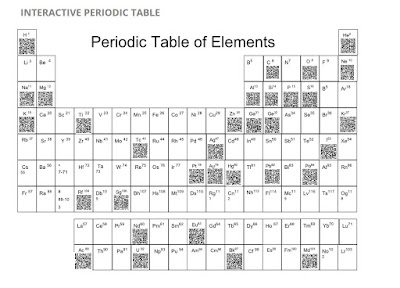
Interactive Periodic Table of Elements Using #GAFE
Sixth
graders at Wilson Middle School were challenged to design and create digital
posters of a chosen element from The Periodic Table of Elements using
Google Draw. Google Draw allows its’ users to collaboratively design
their element posters. Students were advised of the rubric
and each element poster was shared.


After creating their own unique QR
Code for each element, the students were able to embed them on the digital
table.
Sydney and Reese both
said, “This surely wasn't an individual project. We had a team that worked hard
together and completed this project as fast and precisely as we could.” Gabriel
and Jenna summed it up well, "We loved this project because we got to
learn facts about the Periodic Table of Elements in a fun way. We didn’t just
have to listen to the teacher talk, we got to create and learn at the same
time." They both agreed that next year's class should do this project.
"I think they’ll have fun," said Carson.


Mrs. Lindsey loves how Google tools make quick, effective collaboration and
communication a snap. “It frees more time to spend on teaching and
learning which makes this an ideal environment for the 21st century classroom,”
she stated. This
completed site was posted onto Mrs. Warren’s Moodle page to allow students to
access 24/7 for reflection and review.
1. Empowered Learner - Students leverage technology to take an active role in choosing,
achieving and demonstrating competency in their learning goals, informed by the
learning sciences. Students: a. Build networks and customize
their learning environments in ways that support the learning process.
b. Use technology to seek feedback that informs and improves their practice and to demonstrate their learning in a variety of ways.
b. Use technology to seek feedback that informs and improves their practice and to demonstrate their learning in a variety of ways.
2. Digital Citizen - Students recognize the rights, responsibilities and opportunities of living, learning and working in an interconnected digital world, and they act and model in ways that are safe, legal and ethical. Students:a. Engage in positive, safe, legal and ethical behavior when using technology, including social interactions online or when using networked devices.
3. Knowledge Constructor - Students critically curate a variety of resources using digital tools to construct knowledge, produce creative artifacts and make meaningful learning experiences for themselves and others. Students:
a. Plan and employ effective research strategies to locate information and other resources for their intellectual or creative pursuits.
b. Curate information form digital resources using a variety of tools that methods to create collections of artifacts that demonstrate meaningful connections or conclusions.
4. Innovative Designer - Students use a variety of technologies within a design process to identify and solve problems by creating new, useful or imaginative solutions. Students:
a. Select and use digital tools to plan and manage a design process that considers design constraints and calculated risks.
6. Creative Communicator - Students communicate clearly and express
themselves creatively for a variety of purposes using the platforms, tools,
styles, formats and digital media appropriate to their goals. Students:
a. Choose the appropriate platforms and tools for meeting the desired objectives of their creation or communication.
a. Choose the appropriate platforms and tools for meeting the desired objectives of their creation or communication.
b. Create original works or responsibly re purpose or remix
digital resources into new creations.
c. Communicate complex ideas clearly and effectively by creating or using a variety of digital objects such as visualizations, models or simulations.
c. Communicate complex ideas clearly and effectively by creating or using a variety of digital objects such as visualizations, models or simulations.
d. Publish or present content that customizes the message and
medium for their intended audiences.
7. Global Collaborator - Students use digital tools to broaden their perspectives and enrich their learning by collaborating with others and working effectively in teams locally and globally. Students:
a. Use
digital tools to connect with learners from a variety of backgrounds and
cultures, engaging with them in ways that broaden mutual understanding and
learning.
b. Use
collaborative technologies to work with others, including peers, experts or
community members, to examine issues and problems from multiple viewpoints.
c. Contribute
constructively to project teams, assuming various roles and responsibilities to
work effectively toward a common goal.
Monday, April 24, 2017
A Digitized Novel Study

Third graders at Beck Elementary recently completed their reading of The Miraculous Journey of Edward Tulane by Kate DiCamillo. Throughout the reading of this novel, students were tasked with maintaining a digital notebook that would document their discussions, experiences, and learning.
Students responded to the text in a variety of ways. Getting to know the key characters in the book provided students with the opportunity to analyze character traits that could be supported with text evidence. Beckett, in Mrs. Bell’s class, said, “using different apps, like the whiteboard app, helped us have evidence for our thoughts and allows us show response in pictures and drawing.” Digital tools, such as, the Aww App and Tagul were introduced to students as a way for them to share their thinking about the novel’s characters.
 Mrs. Phillips’ student, Wyatt, felt challenged throughout his work on his digital notebook and his Recap responses. “The most challenging part of our digital novel study was the questions were really tricky and you had to really think and deeply analyze the novel to understand it.” Responding to their reading verbally, using Recap, encouraged students to think deeply about their responses. It was especially empowering for their voices to be heard by their peers as they shared their recorded responses.
An extension menu was also provided to students to access throughout the study. This menu provided students with choice as they responded to their reading in a variety of ways. Support for completing the tasks on the extension menu was provided by the teachers via Screencastify. Instructional videos created by the teacher allowed students to work independently, at their own pace. The extension menu exposed students to new tech tools and provided differentiated learning experiences to students based on their strengths and needs.

On any given day, throughout the novel study, students within their classrooms could be found working on projects of their choice in response to their reading using Buncee, Google Docs, Google Slides and a variety of other digital tools. With choices on the extension menu such as: creating a personal intriguing word wall from each chapter, keeping a summary journal from their reading, publishing a “must read” newspaper article and designing a digital poster to represent a character, it was no surprise that student engagement was through the roof.
As their reading of the novel came to a close, students had choice again in their final product. Options included creating a book trailer, writing a reader’s theater script or creating an interview with the main character, Edward. These risk-free tasks provided students with a platform to create and collaborate on their learning from the novel study. Some of these tools used to complete these projects were Animoto, DoInk and Canva. Students added their final product as a slide to their digital journal.
Loseli, also in Mrs. Bell’s classroom, found this project to be good preparation for future learning. “The digital notebook enhanced my learning by introducing me to new websites that can help me with more of my extension projects or more of my learning throughout the year.”
Additional student notebooks can be viewed HERE.
Monday, October 31, 2016
Triple Threat… Culture, Creativity, and Technology
When you think of a traditional art class in elementary, what comes to mind? Pencil, paper, paint, pottery and maybe a few other ways to create. At Peterson Elementary, Mrs. Mock and Mrs. Ericsson’s 5th grade art classes are taking it up a notch. They are incorporating 21st Century Skills and school culture into Fine Arts Education.
 |
| Making of the movie...ACTION! |
After viewing a variety of stop motion animation videos, a technique that makes inanimate objects appear to be moving, the students were given the task to create their own. They were given the prompt “How We Do Things at Peterson” and were able interpret that idea however they saw fit, giving students ownership and choice. Once they were in their groups, students assigned roles and split up tasks. Being able to develop, implement and communicate new ideas to others effectively is an important skill to learn at this age. Everyone had different ideas on what they thought the video should be about. Presley pointed out, “We had to work together to come up with a plan. We knew we wanted to make sure that we represented what we do here at Peterson, so something that is really big here is our assemblies.”
Once the plan was in place, the groups created comic strips of the story they wanted to tell in the stop motion video. Mrs. Mock and Mrs. Ericsson gave them all different types of materials to to choose from for the creation of the background scene and characters.
Now it was time for the making of the movie! Students took images of their characters, moved the objects frame by frame, and created an illusion of movement in the iMotion app on the iPad. For many of the students, it was their first trying stop motion animation, and they were surprised how easy it was to create. Some groups wanted to take their movie up a level and add sound. They decided to smash the app Shadow Puppet Edu to voice over their video. Sydney commented, “Adding the second app was fun, it made our video more exciting and we were able to tell our story better.”
Mrs. Mock and Mrs. Ericsson found a way for 21st Century Learners to explore creativity, find the value of the importance of school culture, and actively use technology in the Fine Arts classroom.
Monday, October 3, 2016
No Markers, Map Colors, or Crayons Here
6th grade science students at Wilson Middle School were given the opportunity to not only read about Mars, but experience it visually through creation. Mr. Jason Deardorff and Mrs. Lindsey Warren challenged students to build a civilization on Mars digitally. Their final product had to solve at least 2 of the problems below and demonstrate solutions to the problems both of which strengthens the critical thinking skills. Students were given the Product Rubric at the beginning of the project to set the expectations high.
Topics of Choice:
1. How can humans live on Mars with the atmosphere? How can you change the atmosphere to be more like Earth’s? How can you invent a way that we can breathe the air on Mars?
2. What kind of accommodations would a vehicle need to be able to provide transportation on Mars with its terrain and gravity? Can you design a vehicle with the necessary components to navigate the surface of Mars safely and efficiently?
3. How can you provide food for your colony? Will you be able to grow food as in vegetables and other edible animals? How will you accommodate for the differences in the weather, minerals, atmosphere, soil quality, irrigation?
4. How will you stay safe on Mars? What will your shelter need to provide in order to protect your colony from the harsh conditions of Mars? (atmosphere, weather, terrain)
5. What is the difference in gravity between Earth and Mars? What are the effects of the different amount gravity on the human body? How will you design a way to cope with the different amount of gravity?
Several students chose the website www.thinglink.com which made this learning fun and interactive while allowing for collaboration and sharing of ideas while on the new school issued Dell Chromebook. Callie, Christopher, and Natalie not only created great products, but came away from the lesson with a deep knowledge of how to create an atmosphere that would provide living on another planet such as Mars. Click on the picture below to view their projects.

https://www.thinglink.com/scene/830842384693592064
Ava, Maggie, and Emma stated, “We were given a PBA to civilize Mars. We then had to pick to real problems astronauts would have to face when going on Mars which is normal food and shelter. Our project shows how we solved this problem with an audio recording, a video, 4 images, 1 video, and lots of text boxes.” Check out their product below.

https://www.thinglink.com/scene/830867904558792705
To showcase the student products, the teachers created a GALAXY WALK in order for students to visually interact and with each group product in one class period.

During the walk students would leave reflective feedback posts at each station. All of the students stated how much they enjoyed learning about Mars this way.

Topics of Choice:
1. How can humans live on Mars with the atmosphere? How can you change the atmosphere to be more like Earth’s? How can you invent a way that we can breathe the air on Mars?
2. What kind of accommodations would a vehicle need to be able to provide transportation on Mars with its terrain and gravity? Can you design a vehicle with the necessary components to navigate the surface of Mars safely and efficiently?
3. How can you provide food for your colony? Will you be able to grow food as in vegetables and other edible animals? How will you accommodate for the differences in the weather, minerals, atmosphere, soil quality, irrigation?
4. How will you stay safe on Mars? What will your shelter need to provide in order to protect your colony from the harsh conditions of Mars? (atmosphere, weather, terrain)
5. What is the difference in gravity between Earth and Mars? What are the effects of the different amount gravity on the human body? How will you design a way to cope with the different amount of gravity?
Several students chose the website www.thinglink.com which made this learning fun and interactive while allowing for collaboration and sharing of ideas while on the new school issued Dell Chromebook. Callie, Christopher, and Natalie not only created great products, but came away from the lesson with a deep knowledge of how to create an atmosphere that would provide living on another planet such as Mars. Click on the picture below to view their projects.
https://www.thinglink.com/scene/830842384693592064
Ava, Maggie, and Emma stated, “We were given a PBA to civilize Mars. We then had to pick to real problems astronauts would have to face when going on Mars which is normal food and shelter. Our project shows how we solved this problem with an audio recording, a video, 4 images, 1 video, and lots of text boxes.” Check out their product below.
https://www.thinglink.com/scene/830867904558792705
To showcase the student products, the teachers created a GALAXY WALK in order for students to visually interact and with each group product in one class period.

During the walk students would leave reflective feedback posts at each station. All of the students stated how much they enjoyed learning about Mars this way.

Subscribe to:
Posts (Atom)