Showing posts with label CTMS. Show all posts

Monday, December 18, 2017

Mastering the Madness of Mythology


Mythology is a genre most students enjoy reading and studying, however few truly comprehend.  In order to help students deeply analyze the elements of this genre and demonstrate their understanding of the structure, Mrs. Davis, 7th grade GT ELA teacher at Chisholm Trail Middle School, challenged students to write their own original myth.

Students were asked to collaborate with peers to craft creation myths.  Through each unique tale, students explained how a natural phenomena came to be, while teaching the audience a valuable lesson about the choices we make and the impact they can have.  Students spent a week working through the process described below.  

Planning and Drafting
A key part of this project involved students collaborating on all aspects of the myth.  In order to easily facilitate collaboration, Mrs. Davis shared template resources with students through Google Classroom.  Student groups were then able to access the files from their own Google Drive and work together  to develop a solid plan.  Students also relied on Google Drive as they drafted the first version of their myth.  Google Docs allowed students to simultaneously access the same document so all group members could serve as active participants.  The use of the “History” feature available with this tool enabled the teacher to clearly see the individual contribution of each group member.  This encouraged full participation and aided in the assignment of individual student grades.

Publishing
When it came time to publish, students were given the option of using Adobe Spark Video or Pages.  Spark considers itself, “a one-stop content shop for creating and sharing visual stories that will wow any audience on any device.”  This was the perfect tool for students to blend their text with images, bringing their stories to life!  Click on the images below to see their creations.


Screen Shot 2017-10-25 at 4.06.20 PM.png         Screen Shot 2017-10-25 at 4.07.10 PM.png     
Screen Shot 2017-10-25 at 4.08.21 PM.png       Screen Shot 2017-10-25 at 4.05.06 PM.png


Reflection & Feedback
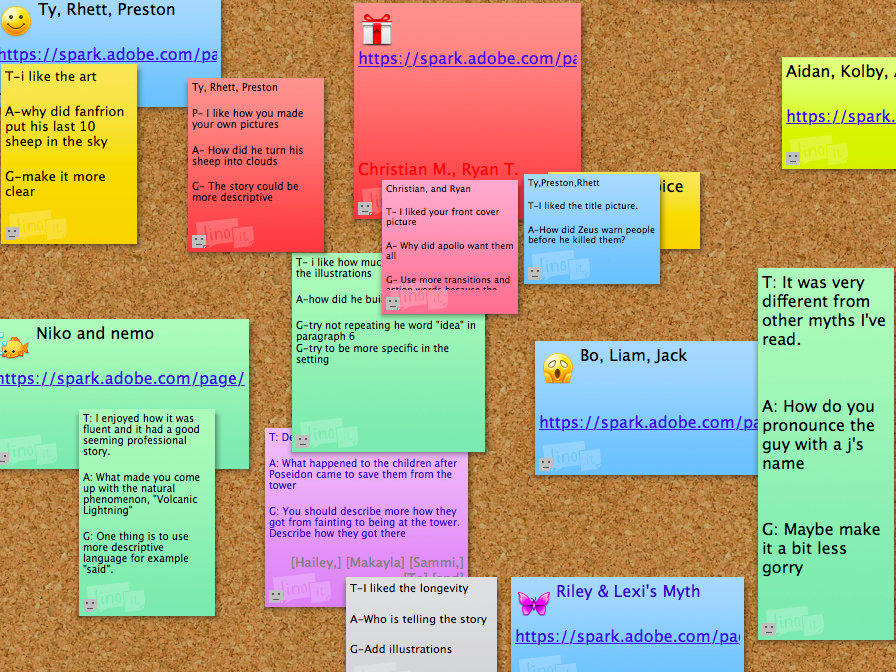
Mrs. Davis utilized Lino sticky canvas for students to provide feedback to one another.  The canvas was created by the teacher and then shared with students.  Each group created a note with their names and a link to their presentation.  Groups were required to view at least 2 projects and use the TAG feedback strategy to provide authentic peer feedback.  The collaborative aspect of Lino allowed all students to view one another’s projects, as well as access the feedback.  While Mrs. Davis was happy with the overall experience Lino provided students, she did mention that she would set things up differently if she utilized the tool again in the future.  She suggests creating the original notes for each groups and then allowing students to comment around them.  This would allow the teacher to lock the notes in place and prevent any confusion caused by a lack of organization.
Screen Shot 2017-10-25 at 11.38.33 AM.png


In years past, students completed this project using paper and art supplies.  It’s always been a project students love, but this year, the integration of technology took things to an entirely new level.  A common frustration reported previously was the limited time students had to complete the myth.  With the use of collaborative tools, students could access their work anytime, anywhere.  The increased accessibility, improved the overall quality of the projects and provided students a deeper understanding of the content.  While all of these benefits make the project worthwhile, the most meaningful benefit would be the ability to instantly provide students with a global audience.  Since the assignment was completed using a digital tool, students were able to link their Adobe Spark Videos or Pages to their ePortfolios.  This will be an experience students can look back on and share for years to come.

Sunday, March 19, 2017

Students Teaching Students

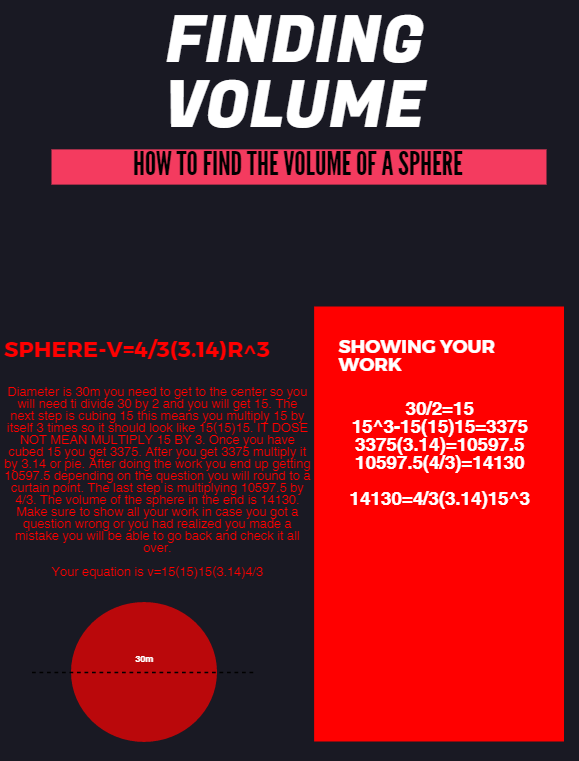
According to instructional technology Guru Alice Keeler, "The person doing the work is the person doing the learning." At the end of the day, are you tired or are your students?  Yari Kemp, math teacher at Chisholm Trail Middle School, makes sure she sends her kids home each day exhausted from learning!  As a math teacher, Mrs. Kemp works tirelessly to provide students opportunities to think deeply and reflect on their learning.  Recently, students and teacher traded roles when students were asked to create “How-To” style tutorials teaching a classmate about Volume.

7th grade PreAP and 8th grade On-Level classes studied Volume for several weeks.  At the conclusion of the unit, students were challenged with the task of utilizing a digital tool to create a tutorial for classmates still struggling with the topic.  Students could choose from Canva, Google Draw, WeVideo, Adobe Spark, or Piktochart to complete the assignment.  Since students were encouraged to select their own tool, this project allowed for limitless creativity, evident in the completed products.  Take a look at a few examples below.


Kasey, an 8th grade student in Mrs. Kemp’s class, transferred to CTMS from another district and says he is enjoying math so much more.  He shared he loves the technology integration and working on his Chromebook in math helps keep him engaged.  Kasey used Piktochart to create the tutorial anchor chart shown below.


In this activity, students were empowered by the opportunity to be instructional leaders to their fellow classmates.  According to the ISTE standards, 21st Century learners should “contribute to the learning of others.”  In this powerful classroom example, Mrs. Kemp’s students learned a valuable lesson in communication, collaboration, and supporting others.  

Monday, October 17, 2016

Writing Process Gone Digital

Teachers and students would easily agree revision is an important part of the writing process; however it is often cumbersome and difficult to accomplish within the constraints of a 45 minute class period.  Students in Mrs. Davis’ 8th grade GT class have taken this mundane task to the next level with a little help from Google.  

A structured process has been created in order for students to successfully collaborate with their peers as they work through the writing process digitally.  Students begin by drafting their original essay in Google Docs and then “share” their document with a classmate for feedback.  The partner is able to access the essay and provide “real-time” feedback by utilizing the comment feature available in Google Docs. The student writer is then able to view the feedback and reflect on their own work before progressing to the next stage.  As students analyze the comments received, they are able to evaluate changes they should make to their essay.  This allows students to take full advantage of the peer revision technique, while maintaining ownership of their writing. Once students are ready to share their published piece of writing with an authentic audience, they can feel confident in knowing their work is polished.  


In the example above, Anna and John were partners for the revision of their Definition of a Hero Essay.  Anna says one of the greatest benefits of this experience is, "Not having to stop to write on a sticky note or separate piece of paper. Often the comments on paper are unclear. This makes it easier to see the person's feedback and reply." John also expressed his appreciation for the ease of use associated with digital feedback, "The instantaneous collaboration is great! You and your partner can work from anywhere and you can both see what the other is doing."

Research supports the value of peer collaboration and discussion across all content areas and concepts. By providing students the opportunity for peer feedback on their writing, students were able to offer one another constructive critique in order to improve their own communication skills.  Extending, receiving, and evaluating feedback is a critical skill for all 21st Century Learners.  

Monday, May 9, 2016

Finger Snappin' Good


Seventh graders in Mrs. Davis and Ms. Brown’s ELA classes at Chisholm Trail Middle School recently took an in depth look at the various structures, styles and literary devices used in poetry. Students used their new knowledge of poetry to compose original narrative poems revolving around the concept of choice. Ava said, “I learned that poetry can take any moment and emphasize it to where it becomes bigger than it really is.”

By utilizing Google Drive, students were able to work both independently and in groups to write, revise, edit, publish, and present their original poems. Google was utilized as a platform for drafting, revising, editing, and publishing the poems. This platform allowed students to collaborate in composing the poems, authentically.

“The most challenging part of the project was trying to convey our message to the listener and/or reader in a way that could show what we had in our heads”, says Makeeda. After composing and rehearsing their poetry, students presented their narrative poems in a poetry slam with their respective classes. Using a traditional scoring method of a 1-10 scale, peer evaluation determined which students from each class would be moving on to the next round. Careful consideration was given to both the poem itself and the performance of the piece while scoring.

The winners from the in-class poetry slams went on to present their poems in the cross-district poetry slam held via Zoom Conference with Medlin Middle School. Students from both campuses were able to share their poems with students across the district through live-streaming. Classes were able to interact throughout the Poetry Slam by using Today’s Meet, as they discussed and provided feedback, while a Google Form was used to provide student presenters with more detailed feedback from their peers.

Ashton shared her thoughts on the poetry slam. “Google helped us by being able to have others edit our poem and add feedback. It also helped because my partner and I were both able to edit our poem at the same time. Zoom allowed us to present to Medlin and receive their feedback.” Students and teachers are hopeful this event can expand throughout the district next year.


Monday, March 28, 2016

ELA Podcasting

Students in Mrs. Bush’s 8th Language Arts at Chisholm Trail MS class have recently discovered the wonderful world of podcasting. Before actually creating their own podcasts, students learned a lot about the process that leads up to being ready to record: research, script writing, editing, recording, publishing. Part of the process included finding and listening to podcasts for inspiration.

For this project, Mrs. Bush had students individually brainstorm a list of hobbies and interests they would feel confident talking about. Students then shared and discussed the topics on their cards with their peers and were able to partner up as they found commonalities among interest and hobbies. These partners became teams that would collaborate on the podcast. They created a title for their podcast and began scripting their first episode. Partners worked with Google Docs to collaboratively write their podcasting scripts. Their scripts were shared with Mrs. Bush for feedback along the way. When it was time to record, students used Audacity and shared their recordings on a Google Site.

Canaan and Asia partnered up due to their passion for debate. It was decided their podcasts would center around various topics of their choosing that the two would choose a side and debate it out. Their first episode was a debate over which era of music was better, the 80’s or 90’s. Canaan had never heard of podcasts before this project. “I enjoyed having the voice in my writing actually be heard. Pen and paper writing can cause your voice to be lost and the reader to not truly understand that you are saying.” Both students agreed that their communication and writing skills were strengthened through this project. 


These students also had the opportunity to present their podcast at this year’s Techno Expo. Asia said, “It was so much fun presenting our work and such a different experience. Having an audience made us feel like people really cared about the work we were doing”. Receiving feedback from their audience at Expo provided them with possible topic ideas for future podcasts, as well as suggestions for ways to improve their next episode. 

Mrs. Bush hopes to continue using podcasts throughout the year. She would like to see her students eventually begin creating podcasts in response to books they have chosen to read for the campus 25 book challenge. Because of this project, both Canaan and Asia have expressed an interest in joining their future high school debate teams. Stay tuned!

Monday, December 14, 2015

Authentic Audiences = Legit Learning


Is there a guideline currently in place on your campus that needs to be evaluated? What about rules… are there any that need to be updated? Or maybe there is an issue on campus that needs to be addressed. Are you passionate enough about that topic to compose a policy speech that can be delivered to an authentic audience? These were just some of the questions seventh graders at Chisholm Trail Middle School were asked as they were tasked with identifying and evaluating guidelines, rules, or issues currently in place on their campus.

After speech topics were decided, students began researching and gathering information that would support their stance on the chosen topic. Topics included: the district’s grading policy, school safety, homework, cafeteria portions, listening to music in class, recess for middle school, overcrowded buses and more! John, one of the students who chose to write about the buses said, “We had been having issues with the buses, especially my bus, so I felt compelled to address the issue”.

Many students chose to compose their speeches using Google Docs. This allowed their teacher, Ms. Brown, to give them feedback and suggestions as they worked. Students were also encouraged to share their speech with peers to receive feedback. Google Docs allowed collaborative conversations to
 take place throughout the entire speech writing process.

Once speeches were finished and ready to be delivered, Ms. Brown helped arrange an authentic audience for each student. For some students that meant they would be delivering their speech face to face with their campus principal, counselor, or other district officials. Other students connected with various people throughout the district via Zoom, a free video conferencing resource. Ava said, “The thing I enjoyed most about this project was the Zoom conferencing, because I had a real audience instead of just my class. I presented to Dr. Thornell and he gave me real feedback that can actually be effective”.


When asked how having an authentic audience changed the way they approached their project, Brendyn said it best. “It made it feel real or in other words more important. It made me strive for excellence rather than just get by”. Brendyn presented his policy speech regarding the student BYOD (bring your own device) Policy to the IT Department via Zoom. Zachary also presented to the district’s technology department and he commented on how the feedback he received from Mr. Smith changed his thinking. “I enjoyed getting the tech people's point of view, because it allowed me to find another view of how their job is”.

Students were engaged throughout this entire project. The real world experiences they were provided, especially through their connection with an authentic audience, will be something they remember forever. As Zachary said after this project was assigned, "This project is legit!"

Monday, October 26, 2015

Digital Journaling

Seventh and Eighth graders in Ms. Brown and Mrs. Bush’s Pre-AP Language Arts classes have taken their notebooking to a whole new level. This year, students are utilizing OneNote as an alternative to traditional pencil paper notebooks. OneNote allows users to collect and organize resources in once place. Notes (handwritten or typed), drawings, documents, and audio files can be uploaded and shared collaboratively with others online. In these classrooms, digital notebooks are used daily for note taking, goal setting, progress monitoring, class assignments, completed student work, reading logs and much more.

Ms. Brown and Mrs. Bush set up the initial notebook and had students make a copy that would become their own to maintain. That allowed for some consistency amongst students as far as tabs and organization were concerned. Students were then free to add additional tabs to customize their notebooks. Springboard lessons and other resources are housed on the teacher’s Moodle page and students are instructed to add them to their individual notebooks as necessary. The expectation is that students will maintain their notebook to reflect work they’re doing in class. Teachers conference with students once a six weeks and do a “OneNote Check” to ensure students are successful with digital notebooking.    

Kat was excited to share her experiences with using OneNote in the classroom. “We are more engaged in our learning. Everything we need for class is on our tablet. You don’t have to worry about leaving your homework at home because it’s always on your tablet and you should always have your tablet with you. It [OneNote] was hard at first, but once we learned how to use it, it became easier.” She goes on to talk about how she found herself able to be more efficient when using OneNote. “It’s easy for me to work on my digital notebook. It keeps me organized, and I was not organized with my notebooks last year. Everything is typed and it’s quicker and easier than actually handwriting it out.” In the video below, Below Kat uses Screencast-O-Matic to share her OneNote journal and highlights the things she likes most about using it in class.


Anna is quite impressed with her OneNote digital notebook as well. She points out how the tabs at the top of her notebook keeps things organized and accessible for class. “In my Reading Reflections tab, I use the check marks to mark off assignments that I have completed. I can keep track of the goals I am working on or have met.” Anna also mentioned how she is much more organized this year. All of her lessons, notes and charts are inserted into her notebook and says she is encouraged to use those resources while completing assignments. To preview Anna's OneNote journal, check out her screencast below.


Although these students have not published their notebooks to the web (requiring a Microsoft Live account), they have them set to sync automatically with their h:drive. Both students like having their reading logs digitized and made reference to how it easily allows them to keep up with their reading for this year’s campus book challenge. They also value the annotation feature available through their notebooks. Using OneNote has brought about a new excitement for learning for these students.

Monday, February 2, 2015

Blogging Your Passion

Sixth, seventh and eighth graders at Chisholm Trail Middle School are expressing themselves differently these days. Under their newly formed aliases, they have identified topics they are passionate about and have begun publishing posts to their very own blogs. Their teacher, Ms. Brown, began blogging over the summer and instantly knew she wanted to share this outlet with her students. You can follow Ms. Brown's blog HERE.

Before beginning their blogs, classes created a Blogging 101 poster. It was discussed how blogs are used for a variety of purposes. Some bloggers even get paid! As a class, they generated ideas to blog about: cooking, fashion, sports, video gaming, etc...Total buy in for this endeavor came when Ms. Brown made two promises: 1. she would never grade their blog and 2. she would never tell them what to blog about. It was for their own personal interest as they explored their passion and shared it with others. 

Each class period begins with "independent interest" time. That time is designated for students to read or write. More and more students are choosing to use that time for blogging and publishing a new post. Students are begging for blog time each day. They are engaged and motivated to publish something new for their readers. 

Additionally, blogging lessons are integrated into their lessons each Friday. Students have learned how to view statistics from the traffic their blog receives, as well as, identify where their readers are located globally. It has been exciting for them to gain followers and see that some blogs have even been visited by readers outside the country. Ms. Brown has also taught mini lessons on the various design elements available through Blogger. Because students have created their blogs through their Google accounts, it's a true work in progress that can follow them indefinitely.

http://glittergirlkat.blogspot.com/
Kat (a.k.a. Glitter Girl) is the author of a fashion blog, The "Kat" Walk. She says, "Blogging is fun because I get to choose what I want to blog about. I'm really into fashion and I feel like if I can share a piece of fashion advice, I may be able to save someone from a fashion catastrophe". She goes on to say that blogging is trendy and that more and more blogs are becoming popular because of today's social media craze. 


http://andtheysaidwritinggotyounowhere.blogspot.com/
Bailey (a.k.a. Frenchie) blogs with a true passion for writing. Her blog, And They Say Writing Got You Nowhere, is a collection of her writing she is most proud of. She says, "My blog is a collection of poetry and fiction work. I like people to see what I've done and what my best is. I like for others to see my strengths. I like to write, and the fact that we get to blog makes me feel special. Ms. Brown has non say about what goes on our blog, so I feel I can be as create and descriptive as I know I can be without fear of someone saying I can't."


Be sure to check out these blogs! Glitter Girl and Frenchie would love some new followers.

Monday, July 7, 2014

Life's a Journey, Blog It


For the first twenty minutes of class on Thursdays and Fridays, Mrs. Thompson's 7th grade language arts students at Chisholm Trail Middle School begin their day by journaling. Their journals are kept online in a blog created by them, for them. Although most students write about personal experiences, they have the choice to choose their topic. "They may blog about anything, from what is going on in their life, what's on their mind to world news and hot topics."

The requirements are that their journal entries are complete, thorough, show bits and pieces of who they are, use great voice, and of course, use correct spelling and grammar. "Some journal entries take a serious tone while others are more lighthearted and whimsical. These journal entries are something they can look back at later and serve as a source of pride. This outlet also gives the students a global audience and provides a platform to make connections outside of the classroom."

6-8, Blogging, Choice, CTMS, Journaling, Language Arts, Middle School, Secondary, Writing, Writing Across the Curriculum, Ashley Chapman, Click HERE to view Jenna's Blog