Showing posts with label 8th grade. Show all posts

Tuesday, October 11, 2022

You Get a Slide… You Get a Slide… You Get a Slide...


The concept of journaling is not new in education.  Teachers and students around the world know the benefits of students keeping journals to take notes, practice concepts, and reflect upon learning experiences.  Eighth graders in Mrs. Karen Groves’ science class have taken their journals to a whole new level. 

One myth about education is that outsiders think that teachers do not do anything during the summer during time away from school.  Nothing is further from the truth!  This entire process began at a summer ADI conference that Mrs. Groves was attending. The Argument Driven Inquiry is an instructional model and it teaches students to use argument to construct, support, and evaluate scientific claims of their own. It pushes students to dig deeper into important content as they gain a better understanding of the science. Keeping a student journal is especially important in this model of learning for reflection. Attending conferences allows educators to network with other teachers. During one of her lunches she met three other educators from the DFW area and they were discussing a tool that they used to support ADI and it was Google Slides Add-On called Slip-in-Slide.   The add on pushes any number of slides to an entire folder of student presentations making distribution of new materials quick and easy.  It Integrates with the folder structure of Google to send your slides directly into students' existing presentations. Mrs.Groves created an assignment in Canvas which forced a copy of her original set of slides to each student.  She then created a Google Form for her students to collect the shareable slide links and now can see student progress in real time as students add text, images, and/or videos. Students can access their notebook any way and any time. This product includes a full-access free 60 day trial, but eventually will cost $10 for a LIFETIME subscription. Mrs. Groves partnered up with three other teachers to practice and learn about the add on and the rest is classroom history for this school year.  

Adams Middle School,Science, Slip-in-Slide, Argument Driven Inquiry, ADI,8th grade, Karen Groves,critical thinking,


One of the best parts of my job as an Instructional Technologist is the opportunity to walk into a classroom and observe great teachers doing great things to increase student learning. Mrs. Groves was so excited to have me come in and observe as she was in the process of pushing out seven slides that the students would need that day for the lesson.  A few of them were notes and the others required students to interact with them to learn. As I walked around the classroom, Cole Bolton said, “this process makes it easier for me because I do not have to open up multiple tabs. I can also keep all my slides for the entire year in one location to help me study.”


Prapti Paudel was excited to share her experiences with using Google Slides in the classroom, “I like how I do not have to cut and glue in papers into my journal. The new slides I get from my teacher each unit helps to keep me organized and easier to access my journal anyway at any time.”


Elijah Akion was quite impressed with his interactive notebook as well. He states, “I can design, annotate, insert images or videos, draw, type, and have everything in my digital notebook.” He also pointed out how easy the slides are to manage because she has added a hyperlinked table of contents. 


Mrs. Groves not only saves time with interactive notebooks, but she's able to see student work in real time. She is able to give students the skill of looking at work over time and managing an ongoing digital notebook. The Add On Mrs. Groves learned about this summer, makes this ongoing process a reality.  She states, “Prior to this we would open multiple slideshows and post numerous links for kids to access in our LMS. These cumulative and interactive notebooks have definitely been a game changer in my classroom!” 


Monday, September 17, 2018

Word Up! Using Technology to Teach, Reinforce and Support the Learning of Academic Language

After successfully completing Technology Integration Academy, Mark Anthony Page, felt better equipped to bring even more technology to the classroom.  Being at Adams Middle School , the new campus, Mr. Page and his teaching partner, Kris Mouser wanted to embrace technology and set a standard for the campus and be a model department for their program Career and College Readiness/Professional Communication. (CCR)
Mr. Page and Mrs. Mouser are integrating Vocabulary.com into their weekly routine. Once a week students log into their Vocabulary.com site and work to build their academic language skills. For years’ teachers have included Word Walls as a part of their curriculum. Using a digital platform like Vocabulary.com takes students learning to the next level. The platform allows students to operate in a safe space where their success and struggles can be private. This may seem small but ability to work independently gives students the confidence to try.
Mr. Page and Mrs. Mouser, use the website to teach new language. When the CCR duo is introducing a new lesson they go into the program and create a word bank for their students to get acclimated with the new terminology. The program takes the words and builds a game in which their 8th graders can match words with definitions. They also, use the program to reinforce terms that students are already familiar with by giving them extra time to practice seeing the terms in different sentence structures and context. Further building their own knowledge of the words. Finally, the program is used to support students who have low or limited vocabulary in the English language.The program adds support for ESL students who are still grasping at trying to understand the language and the many functions that words in the English language can have.

Mr. Page & Mrs. Mouser’s classrooms are leading the way at integrating technology and making sure their students are prepared to be global leaders.What they are accomplishing at Leo Adams is setting the standard of what can be accomplished with technology.

Tuesday, December 12, 2017

Discovering Jamestown – a Multi Grade Level Approach


Mrs. Swearingen, Mrs. Franco, and Mrs. Ahmad , all fifth grade teachers at Sendera Ranch
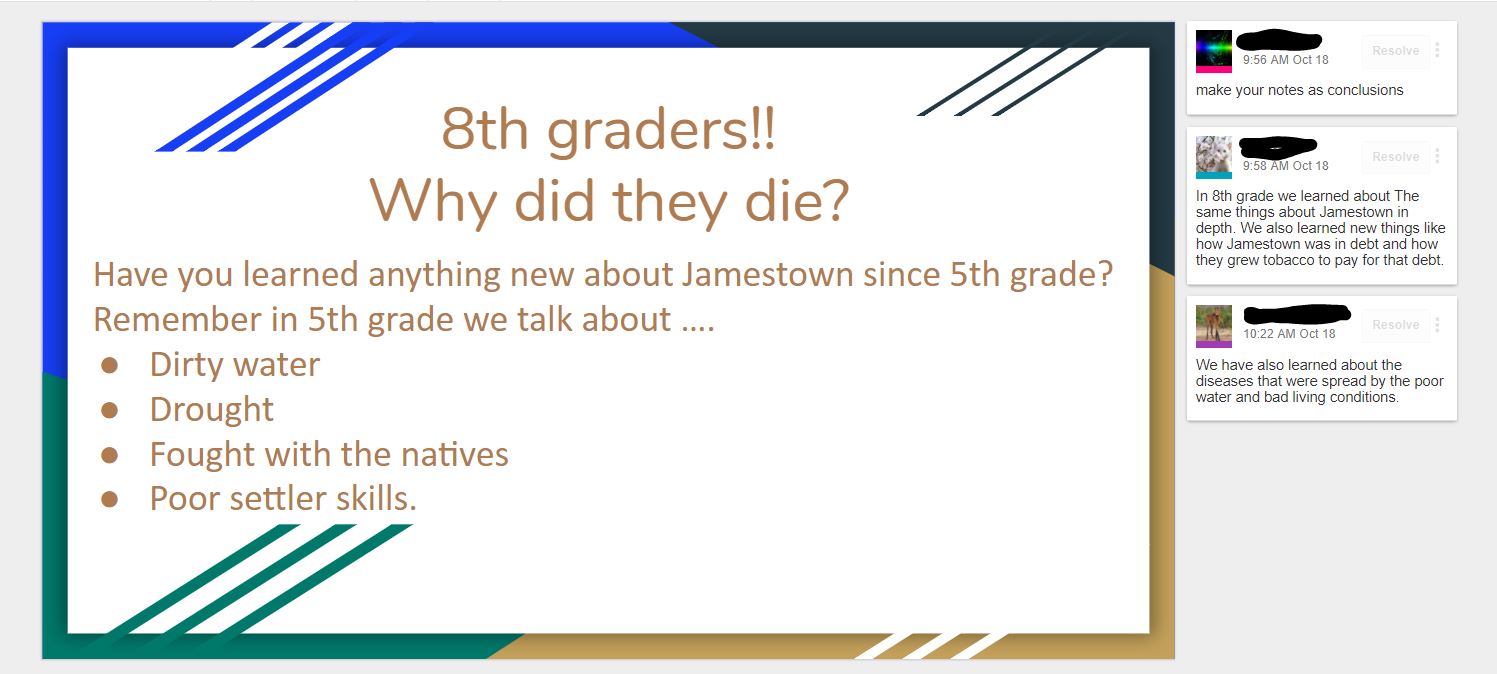
Elementary, know the power of feedback and praise.  They wanted their students to experience learning about Jamestown in a new and exciting way.  Mrs. Swearingen contacted an eighth grade teacher, Mrs. Kristen Mouser from Wilson Middle School.  The two teachers began to brainstorm to take the learning outside the four walls of the classroom.

First, the students in fifth grade classes were presented with the two learning targets for this project.
  • I will analyze a DBQ document, so I can answer the question, “Why did so many colonists die?”
  • I am successful when I can write a paragraph to explain my thinking.
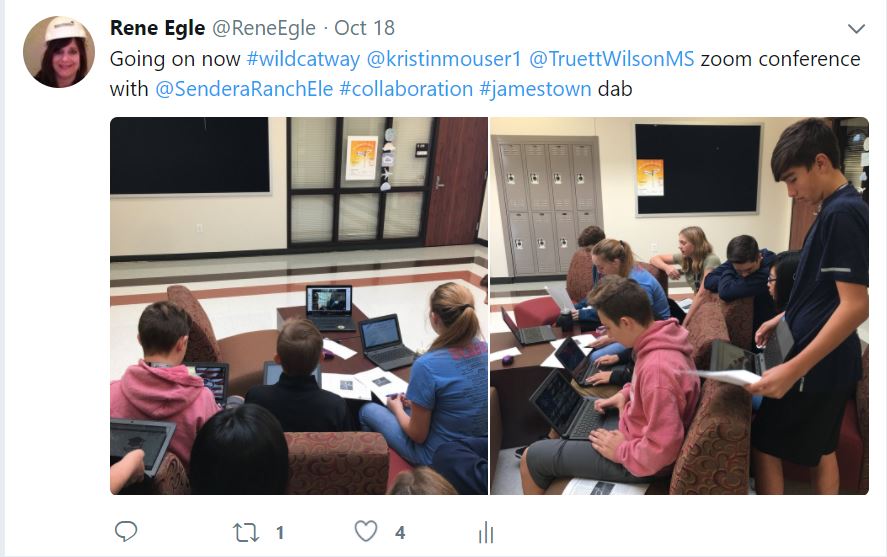
Immediately students went to work and created a collaborative slideshow to brainstorm questions they wanted to know about Jamestown. The next day, students found out Mrs. Swearingen and Mrs. Mouser had set up a time for the eighth graders and fifth graders to Zoom to have conversations. Zoom is a web-based tool that allows anyone to virtually connect and host a video web conference.  


5th Grade, 8th Grade, Google Docs, Sendera Elementary, Wilson Middle School, Zoom, Fifth Grade, Eighth Grade, Collaboration, Peer Feedback, Social Studies, Jamestown, DBQ, ELA


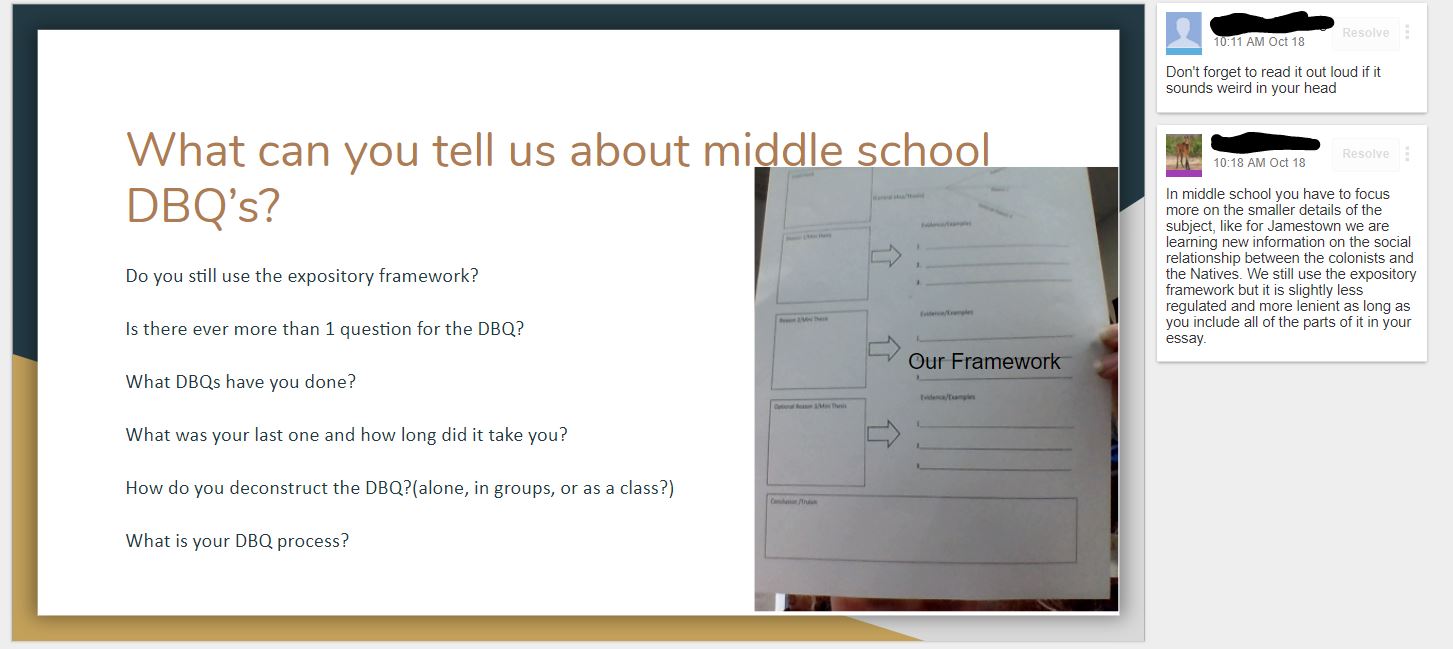
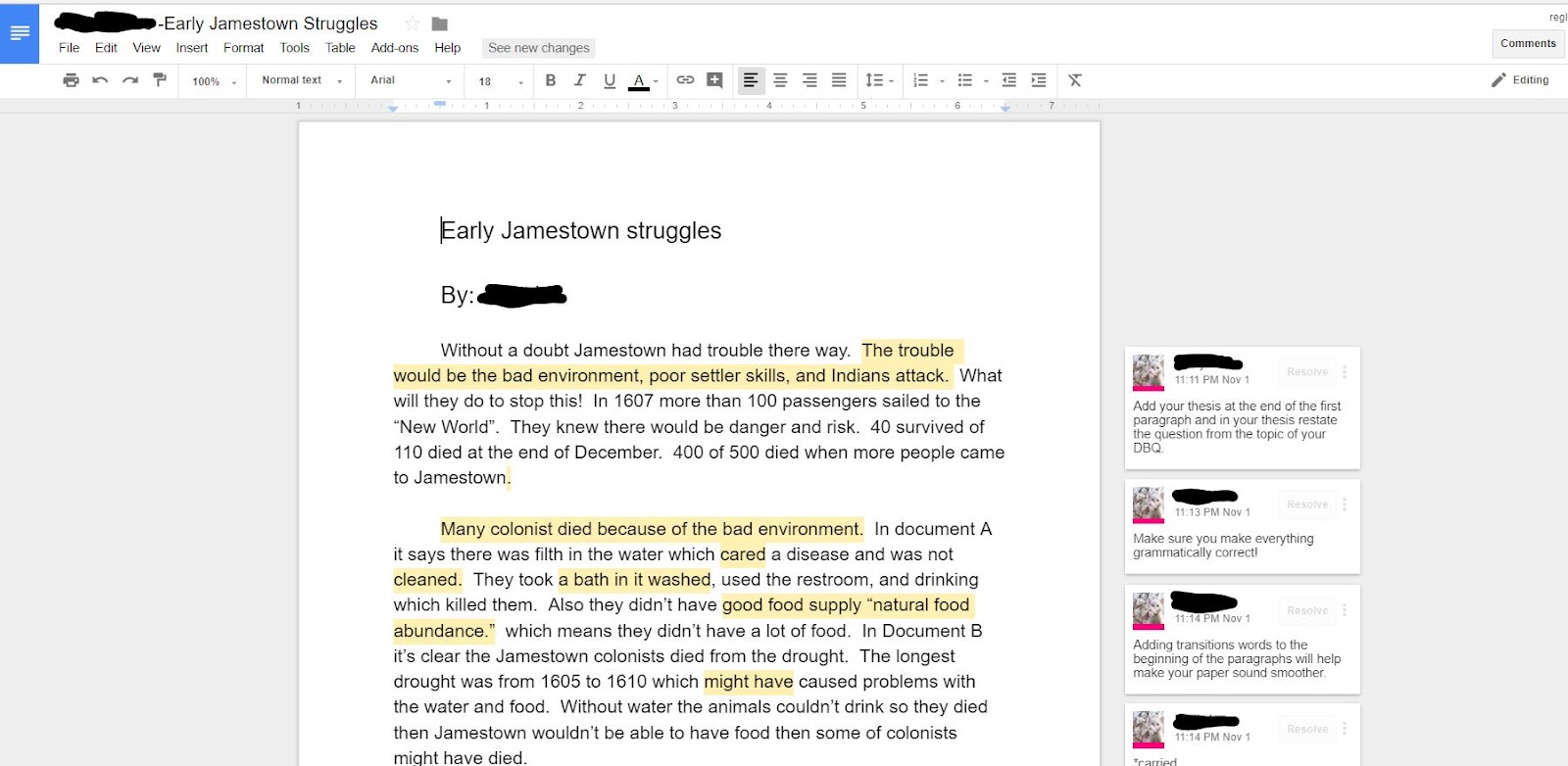
A few days later students began to write their paragraphs using Google Docs.   Using Google Docs allowed communications and collaboration for students to receive comments

and feedback from their peers.


“I liked reading what the 8th graders said.  They had some good ideas of how to make my DBQ
better.” said Brooke


“It was fun to see the 8th graders and hear what 8th grade was like and what an 8th grade DBQ was like.  They do it a lot faster than we do.” stated Logan

Research supports the value of peer collaboration and discussion across all content areas and concepts. By providing students the opportunity for peer feedback on their writing, students were able to offer one another constructive critique in order to improve their own communication skills. Extending, receiving, and evaluating feedback is a critical skill for all 21st Century Learners.  
1. Empowered Learner - Students leverage technology to take an active role in choosing, achieving and demonstrating competency in their learning goals, informed by the learning
sciences.
 - 1b. build networks and customize their learning environments in ways that support the learning process.
 - 1c. use technology to seek feedback that informs and improves their practice and to demonstrate their learning in a variety of ways

2. Digital Citizenship - Students recognize the rights, responsibilities and opportunities of living, learning and working in an interconnected digital world, and they act and model in ways that are safe, legal and ethical.
 - 2b. Students engage in positive, safe, legal and ethical behavior when using technology, including social interactions online or when using networked devices.

3. Knowledge Constructor - Students critically curate a variety of resources using digital tools to construct knowledge, produce creative artifacts and make meaningful learning experiences for themselves and others.
 - 3a. Students plan and employ effective research strategies to locate information and other resources for their intellectual or creative pursuits.
 - 3b. Students evaluate the accuracy, perspective, credibility and relevance of information, media, data or other resources.
 - 3c. Students curate information from digital resources using a variety of tools and methods to create collections of artifacts that demonstrate meaningful connections or conclusions.
 - 3d. Students build knowledge by actively exploring real-world issues and problems, developing ideas and theories and pursuing answers and solutions.

Tuesday, October 10, 2017

Notebooking Unleashed

Chisholm Trail Middle School and Prairie View Elementary School share a lot more than just a parking lot. Both campuses are brimming with innovative and creative professionals, continually seeking opportunities to transform student learning.  Mrs. Branstetter, fifth grade ELA teacher at Prairie View, Mrs. Bush, eighth grade ELA teacher from Chisholm, and Mrs. Thompson, eighth grade ELA teacher at Chisholm decided to think outside the box this year! All three teachers have been exploring options for students to digitally record and organize writing assignments completed in class.   Teachers hoped to provide a way for students to collect work so they could easily revisit content throughout the year, independently seeking feedback and monitoring their own progress.
Often times, the most common barrier teachers face when implementing more opportunities for feedback and progress monitoring is management.  Teachers are left wondering… How do I provide adequate feedback to all my students?  With 100+ students, how can I access all these stacks of journals anytime, anyplace?  How can I ensure it’s timely?  All of these questions bring up valid points.  In the article, 7 Keys to Effective Feedback, Grant Wiggins utilizes the research of John Hattie to develop the essentials of providing feedback.  Wiggins states feedback should be actionable, user-friendly, timely, ongoing, and consistent.  He also encourages educators to “work overtime to figure out ways to ensure that students get more timely feedback and opportunities to use it while the attempt and effects are still fresh in their minds.”  He goes on to say, “Before you say that this is impossible, remember… technology is one powerful tool.”  

These 3 teachers did just what Wiggins suggested, working overtime and turning to technology to find a solution!  The answer they had been searching for was interactive digital notebooks.  While maintaining a paper journal in class remains a priority, when appropriate, students also utilize a digital notebook for assignments where interactive feedback would be beneficial.  

Screen Shot 2017-10-08 at 11.15.35 AM.png


Through the use of Google Sites, students are able to upload writing assignments and organize them in a fashion that’s easy to follow.  This process allows students to share their work easily with their teacher, classmates, and even parents.  By publishing their notebook, students can even reach an audience outside the walls of their classroom.  Imagine the implications of this for a student applying for a job, internship, or even college scholarship.  All of their work is at their fingertips and only a click away from sharing with the world.  With the potential for such a large audience at play, Northwest ISD has recommendations in place for students with regards to keeping their personal information private.  Classroom teachers have also explored ways for students to maintain utmost privacy on personal documents, such as progress monitoring.  For example, when students in Mrs. Branstetter’s class upload their grade monitoring document to their site, they will enable the “share” settings for only their teacher to be able to see.  When visitors click on this part of their site, they will receive a message that they do not have access to this individual document.  It’s the best of both worlds!    


Click the pictures below to enlarge the images and see a glimpse of a student notebook. In this example, the assignments from Unit 1 have been collected and organized on one page. The second image shows the section reserved for student Cornell Notes.


Looking ahead, these teachers see limitless possibilities for student success using this digital format.  As teachers attempting to prepare their students for a transition to the next level of school, either Middle School or High School, teachers are considering the potential of sharing these notebooks with teachers from the feeder campus students will attend.  At the end of the school year, students could give their soon to be teachers, a glimpse of what they have accomplished, prior to embarking on their next level in school.  Teachers would have a window into the classrooms of the previous year.  The vertical alignment this would allow for is priceless. With a little research and a lot of hard work, these teachers transformed an often mundane task into a dynamic learning experience for their students'.

Sunday, March 19, 2017

Students Teaching Students

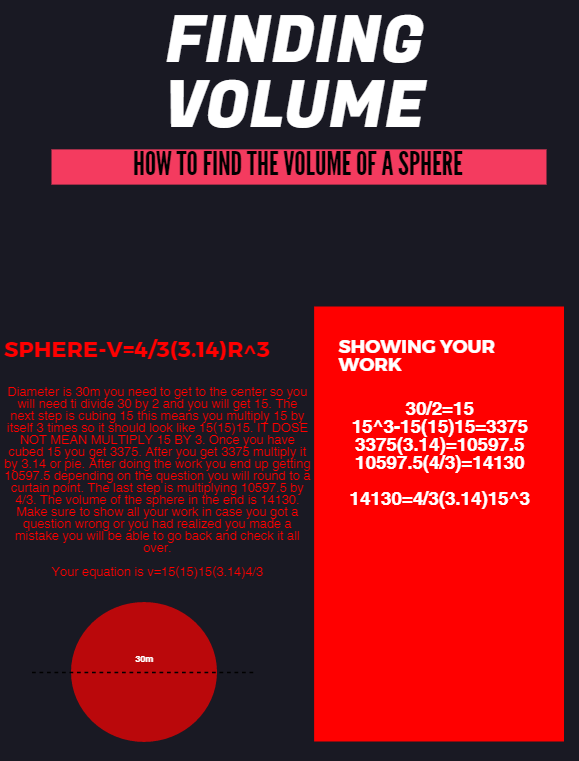
According to instructional technology Guru Alice Keeler, "The person doing the work is the person doing the learning." At the end of the day, are you tired or are your students?  Yari Kemp, math teacher at Chisholm Trail Middle School, makes sure she sends her kids home each day exhausted from learning!  As a math teacher, Mrs. Kemp works tirelessly to provide students opportunities to think deeply and reflect on their learning.  Recently, students and teacher traded roles when students were asked to create “How-To” style tutorials teaching a classmate about Volume.

7th grade PreAP and 8th grade On-Level classes studied Volume for several weeks.  At the conclusion of the unit, students were challenged with the task of utilizing a digital tool to create a tutorial for classmates still struggling with the topic.  Students could choose from Canva, Google Draw, WeVideo, Adobe Spark, or Piktochart to complete the assignment.  Since students were encouraged to select their own tool, this project allowed for limitless creativity, evident in the completed products.  Take a look at a few examples below.


Kasey, an 8th grade student in Mrs. Kemp’s class, transferred to CTMS from another district and says he is enjoying math so much more.  He shared he loves the technology integration and working on his Chromebook in math helps keep him engaged.  Kasey used Piktochart to create the tutorial anchor chart shown below.


In this activity, students were empowered by the opportunity to be instructional leaders to their fellow classmates.  According to the ISTE standards, 21st Century learners should “contribute to the learning of others.”  In this powerful classroom example, Mrs. Kemp’s students learned a valuable lesson in communication, collaboration, and supporting others.  

Monday, February 13, 2017

Striking It Up: Innovator's Day

Eighth graders in Mrs. Nolan’s Communication Applications class at Medlin Middle School recently explored what it meant to be an innovator. As part of this process, students participated in activities that would lead them to develop an original business, charity, or product that would culminate into a formal professional presentation in front of their class.

To begin, using Genius Hour concepts and Thinking Maps, students brainstormed their passions. This process helped guide them through decisions for which passions they would move forward with in developing their business, charity, or product. After narrowing their list down to their two best ideas, they began doing some in class market research by conducting survey interviews with their peers. This enabled them to see how their idea fit with the need in the market. They also did research online to ensure the idea was unique, yet still directly related to their passion.


Using the Organizational piece from WICOR, students kept their ideas in a booklet provided to them by Mrs. Nolan. This booklet was an integral part to the process and it contained everything they needed to know about their business, charity or product as they moved it towards a digital presentation.

Their next step to building this concept would be designing a logo, slogan, and jingle that would represent their idea. Their jingle would need to be an original tune, or it could be a tune that already existed with new original lyrics. It was especially neat to hear Mrs. Nolan featured as the voice behind several jingles. Tess says, “My favorite part was getting to design my logo for my company that would go into my commercial. It let me express my own artistic skills and it was fun to do.”

Although each student was tasked with coming up with their own ideas, during the process of building their concept, the students sat with the same group of peers each day in class. They collaborated with their peers and were encouraged throughout the process to get feedback from their groups in many of the decisions made about their business, concept or charity. When it came time for their formal presentation in front of the class, students shared about their journey and the development of their idea. Their peer group also stood with the presenter and reported what they contributed during the developmental process.


“Technology helped me learn what a realistic commercial looks like and it gave me a chance to learn about making my own commercial by giving me the resources to do so”. (Tess)

The majority of the class decided to use PowToon to create their commercial. The commercial had to include their logo, jingle, a voiceover, and a minimum of four advertising techniques studied throughout the semester. Student discovered various web tools to tie things together. Many of them are credited for teaching their peers how to try something new on the Chromebook.


When asked about using technology in class, Serena said, “I love using technology in class because it's not boring to learn about different subjects. I get really excited when teachers say we can use technology to do projects or research things because I really enjoy learning online and using my technology. Also, its easier to understand things online than it is in real life." Both Serena and Tess will be presenting their commercials at this year's Techno Expo event.

Additional projects that will be presented at Techno Expo:

Monday, October 17, 2016

Writing Process Gone Digital

Teachers and students would easily agree revision is an important part of the writing process; however it is often cumbersome and difficult to accomplish within the constraints of a 45 minute class period.  Students in Mrs. Davis’ 8th grade GT class have taken this mundane task to the next level with a little help from Google.  

A structured process has been created in order for students to successfully collaborate with their peers as they work through the writing process digitally.  Students begin by drafting their original essay in Google Docs and then “share” their document with a classmate for feedback.  The partner is able to access the essay and provide “real-time” feedback by utilizing the comment feature available in Google Docs. The student writer is then able to view the feedback and reflect on their own work before progressing to the next stage.  As students analyze the comments received, they are able to evaluate changes they should make to their essay.  This allows students to take full advantage of the peer revision technique, while maintaining ownership of their writing. Once students are ready to share their published piece of writing with an authentic audience, they can feel confident in knowing their work is polished.  


In the example above, Anna and John were partners for the revision of their Definition of a Hero Essay.  Anna says one of the greatest benefits of this experience is, "Not having to stop to write on a sticky note or separate piece of paper. Often the comments on paper are unclear. This makes it easier to see the person's feedback and reply." John also expressed his appreciation for the ease of use associated with digital feedback, "The instantaneous collaboration is great! You and your partner can work from anywhere and you can both see what the other is doing."

Research supports the value of peer collaboration and discussion across all content areas and concepts. By providing students the opportunity for peer feedback on their writing, students were able to offer one another constructive critique in order to improve their own communication skills.  Extending, receiving, and evaluating feedback is a critical skill for all 21st Century Learners.  

Monday, March 28, 2016

ELA Podcasting

Students in Mrs. Bush’s 8th Language Arts at Chisholm Trail MS class have recently discovered the wonderful world of podcasting. Before actually creating their own podcasts, students learned a lot about the process that leads up to being ready to record: research, script writing, editing, recording, publishing. Part of the process included finding and listening to podcasts for inspiration.

For this project, Mrs. Bush had students individually brainstorm a list of hobbies and interests they would feel confident talking about. Students then shared and discussed the topics on their cards with their peers and were able to partner up as they found commonalities among interest and hobbies. These partners became teams that would collaborate on the podcast. They created a title for their podcast and began scripting their first episode. Partners worked with Google Docs to collaboratively write their podcasting scripts. Their scripts were shared with Mrs. Bush for feedback along the way. When it was time to record, students used Audacity and shared their recordings on a Google Site.

Canaan and Asia partnered up due to their passion for debate. It was decided their podcasts would center around various topics of their choosing that the two would choose a side and debate it out. Their first episode was a debate over which era of music was better, the 80’s or 90’s. Canaan had never heard of podcasts before this project. “I enjoyed having the voice in my writing actually be heard. Pen and paper writing can cause your voice to be lost and the reader to not truly understand that you are saying.” Both students agreed that their communication and writing skills were strengthened through this project. 


These students also had the opportunity to present their podcast at this year’s Techno Expo. Asia said, “It was so much fun presenting our work and such a different experience. Having an audience made us feel like people really cared about the work we were doing”. Receiving feedback from their audience at Expo provided them with possible topic ideas for future podcasts, as well as suggestions for ways to improve their next episode. 

Mrs. Bush hopes to continue using podcasts throughout the year. She would like to see her students eventually begin creating podcasts in response to books they have chosen to read for the campus 25 book challenge. Because of this project, both Canaan and Asia have expressed an interest in joining their future high school debate teams. Stay tuned!

Tuesday, October 13, 2015

Infographics: a Picture is Worth a Thousand Words

What is an infographic?  Surprisingly, most people who know exactly what one is aren't even aware that it is called an infographic.  An infographic is a visual image that usually includes a chart or diagram in order to represent information or data.  By utilizing graphics to enhance the presentation of the data, an infographic taps into our visual system’s ability to see patterns and trends. But don't take my words for it, check out this infographic ABOUT infographics!

It's easy to see why infographics are so popular, and that's exactly why their use has become so widespread. Over recent years they have become increasingly common in mass communication and are seen everywhere from newspapers to the internet.  Mrs. Nolan, the Communication Applications teacher at Medlin Middle School, knows this and wants her students to realize it too.  That's why her students spent time this six weeks learning about and creating their own infographics.  Students were asked to poll their fellow classmates about a topic important to them, such as "What breed of dog do you prefer" or "What social media platform do you use the most?"  Students created a survey via pencil and paper and verbally polled the students in their class. The survey had to include specific data that can be seen in the instructions in the photo below.

  
Once they collected their survey data they had to take that data and use it with the website Piktochart to create an infographic.  Students not only had to choose what type of chart or diagram would be most helpful, but they also had to complete their own graphic design as well.  They were taught that infographics should be visually engaging, contain information that is easy to process, and should be supported by the content it is paired with.  This project allowed them to explore their artistic side as well as learn new way to analyze and look at data and communicate it to others. Check out some of their works in progress below:

At the end of the project, the hard work of the students was evident.  By learning to create these infographics the students have learned a new skill that will be helpful for both future classes and careers!  Check out some of the awesome finished products below (pictures and links), and remember, a picture is worth a thousand words... but an infographic is worth so much more!

Preferred Music Type | Piktochart Infographic Editor
Samsung vs iPhone | Piktochart Infographic Editor
Which sport would you choose to play? | Piktochart Infographic Editor

Monday, January 26, 2015

Simplifying the Principles of Newton's Laws


Student Rachel Hopkins, 8th grader at Wilson Middle School, embraced a challenge from science teacher, Mrs. McCown. The challenge: show other students a creative way to learn about Newton’s Laws.  Rachel describes to her audience the properties of motion with her unique approach to create a project that makes the concept understandable for her peers.  Newton’s laws are useful when people design airplanes, trains, cars, sports equipment, toys and many things that have to do with motion.  Some people have trouble understanding Newton’s laws without any applicable examples that relate to everyday life.  Rachel addresses these misunderstanding through filming and then using video production software to best address the learning needs of her audience. Her completed video was uploaded to YouTube to broadcast to a global audience so that she not only made a difficult concept understandable to her classmates but learners around the world.


6-8, 8th grade, Wilson Middle School, STEM, Video, Science, Global Learning, TechnoExpo,
"Sir Isaac Newton (1643-1727)" by Sir Godfrey Kneller - http://www.phys.uu.nl/~vgent/astrology/images/newton1689.jpg]. Licensed under Public Domain via Wikimedia Commons - http://commons.wikimedia.org/wiki/File:Sir_Isaac_Newton_(1643-1727).jpg#mediaviewer/File:Sir_Isaac_Newton_(1643-1727).jpg


Monday, January 12, 2015

It's All About Perspective

8th grade students at Tidwell Middle School were given the task of describing the American Revolution from the perspective of the Loyalists and the Patriots.  Mrs. Jennings and Mrs. Malone decided to give their class choice as to how they would express their different perspectives.  With the same goal in mind, Sarah, Chase, and Zac all took a different approach.  They each used different digital tools to display their learning and appeal to their audience.

According to Sarah, the essay that she wrote allowed her to gather information, but making a video allowed her to better portray her ideas for her audience. Sarah used iMovie to complete her project.  "I really worked on choosing appropriate images and getting the timing and annotations correct, so that each step was explicit, short, and concise."

Chase created a flipbook and specifically chose and cited images that would help portray each perspective.  "I really enjoyed getting to choose how to do my project. My final product should not look like everyone else's project.  I wanted something that would be appealing and unique."  Throughout the entire project, Chase learned that each side believed that they were fighting for what was right. "Both sides thought that they were right and that is what caused the war."

Zac decided to use Google Docs and chose font that would appear to look like old journal entries.  Zac comments, "I chose to use Google Docs because it gave me easy access to my document from home and it saves automatically."


Chase's Flip Book (using youblisher)

Zac's Google Document 

Monday, November 17, 2014

Reality and Redefining Persuasive Writing

From a mere four reality TV shows in 2000 to a staggering 340 in 2010, this phenomenon has captured audiences and changed the face of television. So, how could a topic you are passionate about be transformed into a reality show? This is the question that Ms. Appel, from Medlin Middle Sschool, posed to her 8th grade language arts students. Students were tasked with collaborating to design a persuasive multimedia pitch for a reality tv show. 

Students worked in teams to develop a reality show name, a concept, a catch phrase, and conducted  research to identify the network that would be the best for for their show. After developing the foundation for their show, the groups created a storyboard and had the opportunity to chose the media or presentation tool they would utilize to present their persuasive pitch. The last piece of the puzzle was presenting their multi-media presentation to an audience and receiving feedback.

Josey, Brydon, and Shayleigh developed a showed called Fiction Wars. "Our mission is to get multimedia representation for readers, and their books, everywhere. Our show puts readers into mind bending situations based on their favorite book, testing their knowledge and resilience under pressure.  We believe that CBS is the best fit for our show because not only is it a major network, it has a strong reputation in the gameshow world."


"I felt like this was a great idea for a project. It allowed me to feel free to choose a topic I was passionate about. I was fun to get to come up with an idea and work through the process. Getting to choose our own tool allowed us to find what works best and make it our own. Using technology enable us to make our project more professional than we could have on paper. We were able to combine audio, visual and imagery to create a fun presentation for our audience." Shayleigh added that they were confident their persuasive technique was effective based on the clapping their group received at the end of their presentation. She found that this was a fun way to learn about persuasion while incorporating it with an idea they were passionate about.

Click here to view the rubric for this project.