Showing posts with label Feedback. Show all posts

Monday, November 8, 2021

Growing Beyond "Normal" with Digital Feedback

When Maya Angelou said, “If you are always trying to be normal you will never know how amazing you can be,” her intent was likely to address a different definition of “normal,” but her words are absolutely applicable in today’s schools. We are at a turning point as educators and the recent pandemic has to become less about us going back to “normal,” or where we were before, and more about embracing growth and creating new and better ways of doing things.

Educators everywhere have recently been impelled to adapt and find digital ways to give feedback to students. Some of those strategies have persisted and even prompted teachers like Cathy Slagle, a business pathway teacher at Eaton High School, to provide her students with immediate and relevant feedback on digital assessments by taking advantage of the answer feedback option in Google Forms quizzes. This feature allows teachers to add comments, instructions, embedded videos, or links to previous course resources so that students can review missed concepts and even extend their learning.

Craig Hardin, another Eaton High School educator, uses Google Slides with his athletes as a creative way to review performance and prepare for upcoming competitions. Coach Hardin recently learned about the comment features in Google Workspace and has begun using written comments to provide timely, meaningful, consolidated, and personalized feedback to his athletes. Coach Hardin says that the team has found this extremely valuable for post-game reflection and says using this strategy for giving student feedback is saving him hours each week as he works individually with athletes in an easier to manage digital platform.

Patricia Smith in Eaton’s Business Management and Entrepreneurship Academy stated that she is “very excited to try out Mote,” an audio recording tool, as a different way to provide feedback for her Academy students. Not only is she using Mote to help record feedback for her students as part of an upcoming assignment but she is also having her students use it in Google assignments to comment and reflect on their work and provide peer feedback within their groups. Using resources like Mote allows teachers the ability to spend less time grading by hand and also engages the students directly in the feedback process. By incorporating a digital feedback resource into her lessons, Mrs. Smith has saved herself valuable time and empowered her students to become more active in the learning process.

Over the course of the last year, as responsibilities and approaches to classroom instruction have been forced to evolve, each of these educators are meeting their classroom needs by adapting the ways they give students feedback. These efforts not only save them time, in comparison to traditional forms of feedback, but the strategies implemented have provided their students with timely, meaningful, and actionable feedback that can be used for reflection and growth, allowing both teachers and students to spend more time creating and learning and realizing “how amazing they can be.”

Saturday, September 25, 2021

How Summer PD Impacts Student Learning!


“Implementing Hyperdocs was a complete push out my comfort zone. Relinquishing the control early in the school year was not something I was used to” comments Mrs. Spring, 4th grade at Nance Elementary. Kim Spring has not only been intentional about the professional development she attends, but also intentional about implementing her learning in meaningful ways with students. Two years ago, Kim helped co-lead “Delivering Engaging Lessons with Pear Deck.” This was a tool Kim learned and then implemented consistently with her students. Pear Deck wasn’t just a new tool for Kim. Pear Deck meant continual formative assessment, intentional student discourse, and even a way for students to create assessments for their classmates. By attending and leading Pear Deck sessions, Kim was able to maximize the use of Pear Deck to meet campus and district learning goals. 

Last year, Kim decided to attend “Save Time and Give Choice with Hyperdocs” led by Instructional Technologists Shelly Hall and Kylie Lloyd. Immediately after the session, I received an email from Kim with her takeaways and goals for implementing a hyperdoc with her class. Designing a hyperdoc takes intentional planning. Mrs. Spring used backward design and considered her learning targets and desired outcomes as she created each aspect of her hyperdoc. Since this would be a self-paced lesson, she had to plan ahead for students. 

During the 3rd week of school, Kim’s students experienced their first hyperdoc! This unit on Place Value was not only engaging and interactive, but also allowed for gradual release of the content and self paced learning. Gabriella, Tommie, and Abby were three students that specifically enjoyed this unit. Gabby mentioned, “I liked learning at my own speed and pace. I was able to take things one step at a time, but always had something I was working on.”  


The unit started with students ENGAGING in the topic of place value through direct instruction and focused videos for students to watch. After students had a grasp on place value they were asked to EXPLAIN their learning in Flipgrid. The Flipgrid check in allowed Mrs. Spring to see who understood the content and who needed extra support. Mrs. Spring pointed out, “Flipgrid comes in handy as I'm able to hear the kids verbally explain their reasoning and see their work. I am able to leave feedback to them as well.” 

As students progressed through the hyperdoc, they were asked to APPLY their learning. Mrs. Spring had students complete a self-paced Pear Deck to assess their knowledge up to this point. She pointed out,  “I LOVE Pear Deck. It allows for self-paced lessons and I’m able to leave feedback at any given time. It helps me keep track of who has finished, so I know where each student is. It’s a great teacher sidekick!” 

Instructor and Student Paced Pear Decks Throughout The Unit

Next, students SHARE and REFLECT with their peers. They look at problems they’ve completed in their Stepping Stones book, along with the work they’ve explained in Pear Deck and Flipgrid to answer the following questions with others: 

1) What was your favorite part of this unit?

2) Was there a part of this unit that confused you?

3) Show a partner how you explained place value to the millions on slide 4.

Lastly, students are given an opportunity to EXTEND their learning. Not all students will have time for this section of the learning, but it’s a great way to challenge students who have successfully grasped the content. In fact, this is a great way to differentiate learning for students. Students were given the opportunity to create their own Pear Deck to share with the class. This task required students to apply their learning by creating their own questions. Both Tommie and Abby pointed out “The most challenging part of this unit was creating the Pear Deck. It was tough making the questions.” 

All in all, Mrs. Spring’s first hyperdoc was a success! “I love the independence of it all,” states Kim. “It was really neat to watch the kids take such quick ownership of their hyperdoc. I have a large group of students that are pretty above level in math. This helped with my fast finishers. They instantly went into their hyperdocs and got going!” 

This unit is a prime example of the NISD Learning Framework and the intentionality that goes into a well designed lesson in NISD: 

Click HERE to Enlarge Image


Monday, April 20, 2020

No One SAW this Coming, but we SEE NISD Keeping Learning Alive!


We can all agree that the current situation is not ideal. Educators are unable to expect what they normally would from students. While teachers can’t recreate their normal classroom environment, our Northwest ISD educators are amazing! They have been able to keep learning and literacy alive, connect with their students, capture their voice, provide personalized feedback, and involve families as an integral part of their child’s growth. For K-2 teachers, Seesaw has been the platform for making these goals a reality. Mrs. Fitch, Mrs. Perry, Mrs. Davis, Mrs. Embry, and Mrs. Moore from Granger Elementary have not only used Seesaw with fidelity all year, they’ve gone up and beyond to meet the needs of their students as they learn and grow from home. 


Continual Learning: 
Each Sunday, teachers send required and optional assignments home for students to complete. Perhaps one of the best features within Seesaw is the ability to capture student voice by allowing students to explain their thinking. With provided structure through Seesaw activities, teachers can encourage students to take their learning deeper with questions and question stems. One of Mrs. Davis’ favorite activities during remote learning is the Animal Adaptations science activity. Listen to the student’s understanding of adaptation, their language of the discipline used, and their ability to apply this learning to a real life situation. 

Click HERE to Enlarge and Listen

Continual Literacy: 
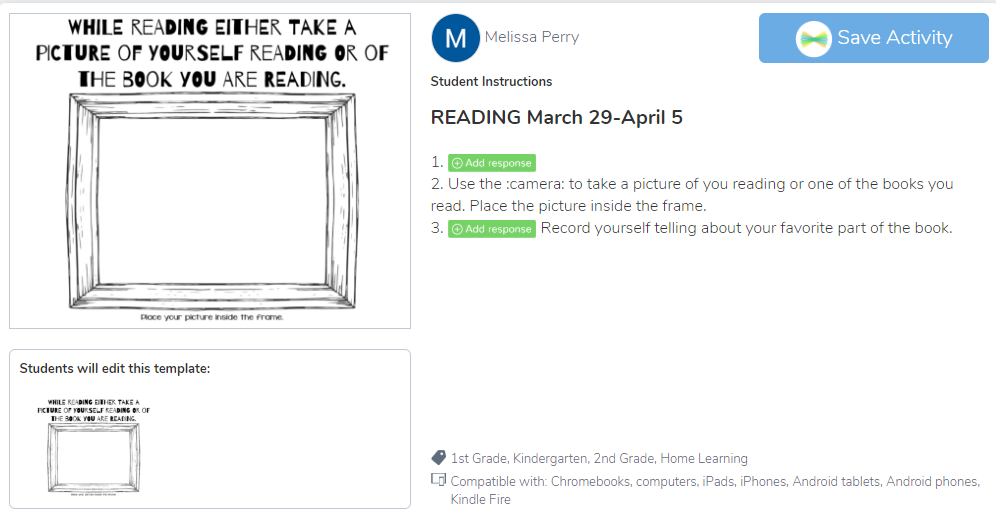
One of NISD’s goals for this year is literacy. Seesaw has allowed teachers to encourage students to keep reading and share their reading while they’re at home. One of Mrs. Perry’s favorite activities sent home to her Kinder class encouraged her readers to simply capture a picture of themselves reading. Mrs. Perry shares, “This activity not only encourages reading, but gives me a chance to see and listen to them read.”  
Click HERE to Enlarge and Listen

ELA coach Rebecca Maddox points out, “Seesaw is benefiting students, parents and teachers during this remote learning time with it's ease of use. Seesaw has allowed our youngest readers and writers the ability to respond and capture their thinking in a variety of ways. They use pictures and voice recordings to capture their thinking for others to view. It is great to see that students can document their reading and writing lives in this format to capture how they continue to grow and learn!”
Students from across NISD are reading and sharing their reading. The first week of extended break, Mrs. Moore sent an optional Seesaw activity to her class asking them to share about a book they read and one they are hoping to finish. These activities have since led to a deeper knowledge of books as the latest activity prompted readers to not only read, but to stop and jot information about the characters in their book. Get a glimpse into’s Reese’s reading HERE or by clicking the images below.

Click HERE to Enlarge and Listen

Stop and Jot (Week of April 12)

Engaging students in their learning is one of Mrs. Embry’s favorite aspects of Seesaw. She states, “Seesaw provides me the opportunity to create engaging lessons that allow students to respond in a way they are comfortable with. They can create a picture with drawing tools, type, or create a video.” Mrs. Embry, Mrs. Davis, and the Granger second grade team have personalized reading assignments by linking in an Adobe Spark video encouraging students to find fun places to read as they work on their reading stamina. It's fun for students to connect with their teachers by seeing them teach and encourage in the videos they send home.


Click HERE to Enlarge 
Mrs. Embry’s Spark Video
Mrs. Davis’ Spark Video 

Connecting with Students (SEL): 
It’s tough not seeing student’s faces each day. It’s important that students know how to identify their feelings, but also that they have a platform to share and be heard. NISD has prioritized social and emotional learning this year, which has helped equip our students beyond their content knowledge. Granger students are especially familiar with “Seesaw Feeling Checks.” These activities have become especially important as teachers get a pulse for how their students are doing, even when they can’t see them each day. Click on the image below to see an example of Mrs. Perry and Mrs. Moore’s feelings check. 

Click HERE to Enlarge

Mrs. Fitch points out, “My favorite part of using Seesaw is being able to connect with my students! I love being able to post videos directly to their journals and I love getting videos from them even more. It is nice to be able to post work for one student, or the entire class with one click.” Mrs. Fitch continually provides her students with personalized video feedback. Check out how Mrs. Fitch used Seesaw to wish one special student a Happy Birthday and make her feel special even from afar.
The heart of our NISD teachers is what makes students excited to learn!
Click HERE to Enlarge and Listen

Providing Personalized Feedback: 
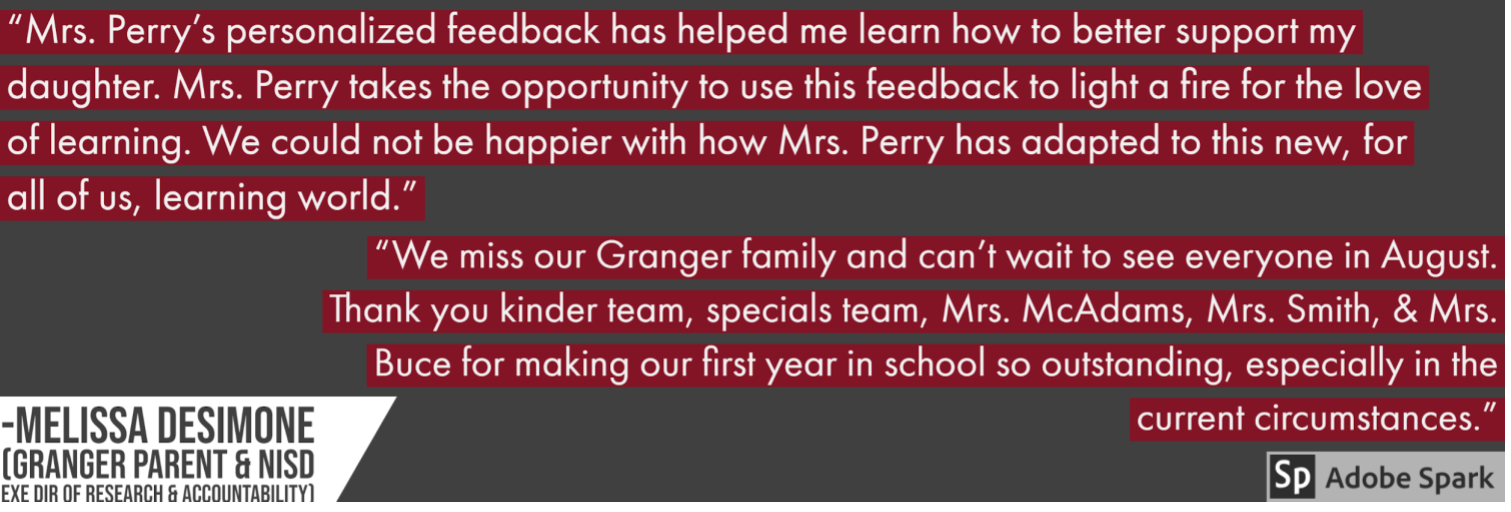
Another benefit of Seesaw is that it protects the privacy of our students and allows teachers to differentiate and provide personalized feedback for students without displaying that feedback to the entire class. Mrs. Perry is very intentional about giving writing feedback on student work. Click on the image below to see samples from the last few weeks. 
Click HERE to Enlarge
Seesaw allows feedback to be written, voiced in an audio comment, or even a personalized video.
Inviting Families Into The Learning:
Mrs. Davis comments, "By using Seesaw daily, parents are able to see what content we are working on and what products their child is creating.  Parents have been very thankful for this program as Seesaw is sparking conversations as home, and parents are able to connect our learning at school to real world situations at home."
Click HERE to Enlarge

Student Growth: 
Lastly, another NISD goal for the year is that students showing yearly growth. Since Seesaw is the house for these student’s learning, teachers are able to see growth over time. Mrs. Davis states, “We have used Seesaw since day one as our students’ academic portfolio, so seeing growth is easy when you compare assignments from the first few weeks of school to their current work.”
Mrs. Fitch adds, “Being able to provide feedback and having the students go back and check their work has allowed me to see growth in their writing. I have assigned the Daily Oral Language activity for three weeks and have seen growth from week to week.” 
NISD is the Place to Be: 
Our NISD teachers are a walking example of this quote by George Couros, “Technology will not replace great teachers, but technology in the hands of great teachers can be transformational.” Our teachers have thrived in a season of uncertainty. While the situation is not ideal, these teachers have not thrown in the towel. They’ve connected in a way that shows their heart for students and their heart for learning. 

*The NISD IT Team is happy to announce that NISD has purchased Seesaw for Schools for the upcoming school years. This purchase is for all NISD schools ages Pre-K to 5th grade. Click HERE to learn more.

Monday, December 9, 2019

An Unlikely Partnership: ePortfolios from a Fresh Lens

ePortfolios are a platform for showcase, goal setting, and reflection in every grade and on each campus in Northwest ISD. While the platform and benefits of having an ePortfolio are similar for everyone, the why, design, and purpose of the ePortfolio will change based on the student’s age, goals, and target audience. This is why the virtual and time flexible Hughes ES and Steele HS ePortfolio partnership has been both beneficial and mind blowing for our students!

Students in Mrs. Champion’s 5th grade GT class and Coach Hayes' CTE classes were put into a collaborative Google Slides with an assigned partner. Fifth grade kicked off this partnership by first examining their own ePortfolio and recognizing specific areas in which they’d like feedback (Quality of Content, Web Design/Organization, or Personalization).

Collaborative Google Slides 

After doing some introspective work, students explored their partner’s high school ePortfolio. They took notes and then provided written feedback in slides and verbal feedback via Flipgrid. The written feedback allowed students to narrow their focus into a few sentences, while the video feedback allowed students to get to know and encourage their partner. Flipgrid allowed students to have a relevant audience outside of their classroom, school, and grade. It was fun for students to hear from someone that was looking at their ePortfolio with a fresh and new perspective.


The Lifelong Skill of Giving and Receiving Feedback 
Not only did students learn get inspiration and ideas for improving their ePortfolio, but they also learned how to give and receive feedback. Feedback should be specific, constructive, and align with their partner’s goals.  Both giving and receiving feedback via Flipgrid helped students polish the lifelong skill of working alongside others for continual improvement.  Even the high school students appreciated a fresh set of eyes. In fact, Steele Senior George Peterson states, “I enjoyed learning about my strengths and weaknesses. It's very refreshing to hear feedback from somebody outside my personal and professional bubbles because I know it's very objective. This is an opportunity for me to apply the feedback and grow from it.” Charlotte (Hughes ES) adds, "I've learned from my Steele buddy that I can always improve. Some people don't appreciate feedback, but Jordan has given me some GREAT suggestions!"


The Vulnerability of Sharing a “Work in Progress” 
Students, and even adult learners have been conditioned to work on a product until it has reached “turn in” status before sharing with others. It takes vulnerability, confidence, and humility to share a “work in progress.” While we do want to reach a “publish” point with our ePortfolio, this process has been refreshing for students to have a partner that wants to meet them right where they are. This has been an amazing opportunity to learn about continual improvement.  Parker Younger (Junior at SAHS) comments, “From this partnership I have learned that my ePortfolio is always changing. After my Hughes partner gave me their feedback, I realized that even the smallest details about my life could and should in included in my ePortfolio. These details help to make my ePortfolio personalized and professional.” Isaac (Hughes ES) has truly appreciated the feedback that he has received and is excited to take next steps in making his ePortfolio even better. He states, “By the end of 5th grade, I hope to have added an elementary school recap to show how much I have learned and changed. I have received some feedback that has really helped me like making a school studies tab, instead of having all of my subjects jumbled around in my ePortfolio." 

It's been inspiring for Hughes students to see the possibilities that lie ahead for their ePortfolio. The didn't feel intimidated by their partner, but rather encouraged to take next steps knowing that they have year to perfect their site. Isaac emphasizes this point in his feedback when he records,"First of all, your ePortfolio looks really good. I really hope that mine might be like that someday." 


What’s Next for These Students? 
This experience was such a beneficial process for both the elementary and high school classes. As a result, Mrs. Champion and Coach Hayes have decided to continue the same process for a round two of feedback starting December 19th. It will be powerful for students to have the accountability of updating their ePortfolio and using the feedback they've been given. Students have also been asking about opportunities to meet their partner in person. Teachers are working to find an opportunity for students to meet up in the spring for a round robin type ePortfolio showcase where they can see a variety of ePortfolios and the growth that has been made. You may even see some of these partnerships at Expo 2020 in February!


Monday, November 18, 2019

Answering "Am I Doing This Right?" with Tech-Facilitated Feedback
"Am I doing this right?"
"I'm stuck!"
"I don't know how else to make it better."
"I think I have the hang of it?"

These phrases are ones that are muttered on a daily basis in every content and at every grade. Students are learning new material and are trying their best to show mastery, but are often unsure if they are on the right track or are meeting expectations. Unfortunately, these questions typically don't get answered until the end of a unit through some sort of summative assignment in which the student gets a grade, sees their marked errors, and then immediately moves on to the next topic of study instead of using the feedback for growth towards improvement.

You can't blame the teacher though, right? With 30+ students per class and having several class periods in a day, the shear combined class load of 150+ students to grade is overwhelming, not to mention and it's near impossible to hold a meaningful conference with every student within a 45 minute class period. To add, many teachers are already spending several hours after school preparing for the next school day. Is all hope lost? Do we accept that's just how it is? Is there a better way? YES! 

Check out these highly effective ways to maximize use of technology in delivering immediate, personalized feedback to every student. 

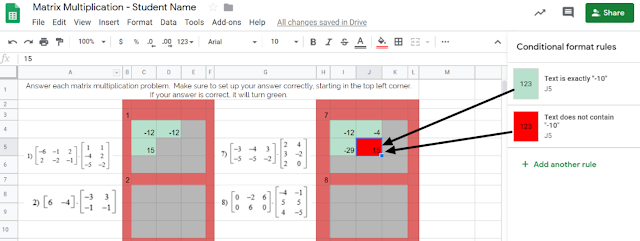
Tip #1: Incorporate tools that automate the process of providing immediate feedback. Check out this example from Carla Dalton's AQR (Advanced Quantitative Reasoning) class in which she maximized the 'conditional formatting' function within Google Sheets to efficiently check progress towards mastery. This auto-coloring box allows the student to know immediately if their calculation was right or wrong. Immediate feedback of this nature enables students to self-monitor the need for referring back to notes or self-regulation of knowing when to ask for help. This also is intended to correct misunderstandings as they occur, rather than addressing misunderstandings the next day after a worksheet's worth of doing it wrong and solidifying incorrect thinking.


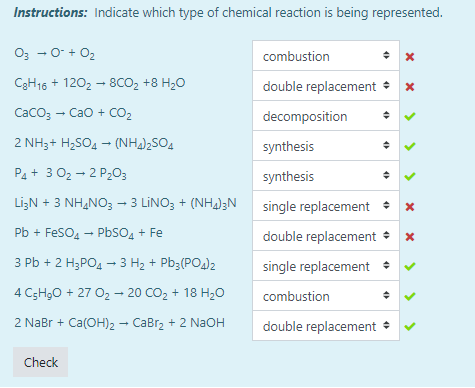
Another example of this automated immediate feedback is done through the use of Moodle quizzes when set to behave in Adaptive Mode, such as this example from Tiffany Mackerley's Chemistry class. This mode turns a traditional quiz into a series of formative questions that has a "check" button which allows students to immediately see which answers are right or wrong. Based on the immediate feedback, students can adjust their response accordingly; the teacher can additionally have it be set up to lose a certain percentage of points with each incorrect answer to minimize random, blind guesses.

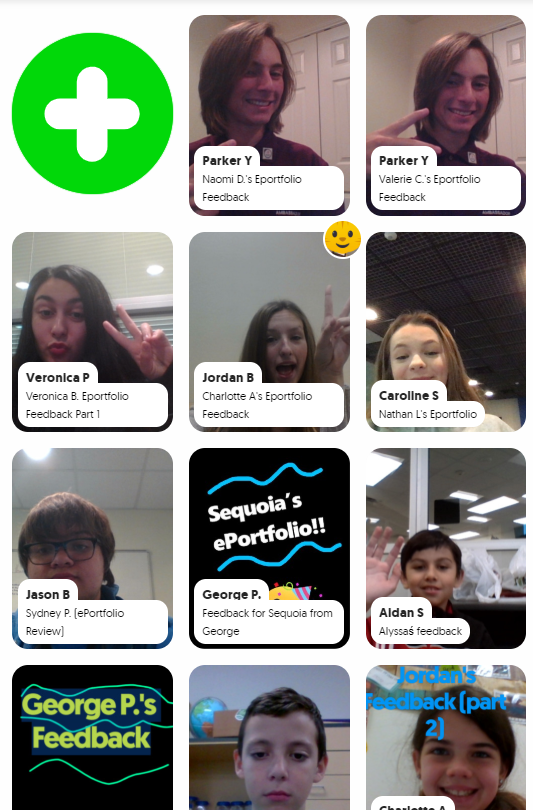

Tip #2: Empower your students have their voices be heard as a welcomed source of feedback. In April Heffley's Art IV class, students gave anonymous, critical feedback to their peers' artwork in order to make improvements on what was considered "final" artwork for the time-being. The anonymity allows students to be honest about their thoughts while the teacher is able to monitor students responses through the Teacher Dashboard. Though it does save the teacher time from not being the sole giver of feedback, but it it also valuable to the student receiving the feedback as this process allows varied opinions and perspectives that might not have been considered. Not to mention, it also targets higher order thinking skills by those giving the feedback considering evaluation is the second highest cognitive level in Bloom's Taxomony. Beyond collecting the feedback, Mrs. Heffley then uses the peer's feedback to hold individual conferences with each student artist as they review the feedback together; during this time, the teacher assumes a partner position, rather than evaluator position, in supporting the students' growth.


Tip #3: Seek new opinions from audiences outside the walls of your classroom.
Opening the virtual-doors to your classroom does not have to mean you are connecting with people literally across the globe or are blindly matching with unknown audiences. Patti Hayes' 10th-12th graders at Steele Accelerated High School partnered up with Sandra Champion's GT 5th graders at Hughes Elementary School to review each other's ePortfolios and provide feedback to one another. Google Slides were used to pair up the students, collect written feedback, and link to a FlipGrid that facilitated introductions and oral feedback. This partnership benefited both audiences as the younger students were able to hear from more experienced students in this area, while the older students had their content viewed from true 'outsiders' which helped pinpoints things to be explained or clarified. For more information on this partnership, stay tuned for a blog post detailing this experience set to publish here on 12/9/19!
While all of these tips require time to be invested on the front end to prepare and set up, changing when and how feedback is given maximizes a student's understanding of the material by shifting mindset to viewing feedback as a tool for growth as opposed to a numerical final evaluation. Also note that giving quality feedback is a skill that is developed over time and you can't assume any student, regardless of age, should automatically 'know' how to give good feedback. When asking students to give each other qualitative feedback, sentence stems help focus thinking. Lastly, because feedback is a skill, the more times you ask students to give feedback, the more developed they will become in this area.

This post highlights examples of the following ISTE standards:
  • Students use technology to seek feedback that informs and improves their practice and to demonstrate learning in a variety of ways. (ISTE Student Standard 1c)
  • Use technology to design and implement a variety of formative and summative assessments that accommodate learner needs, provide timely feedback to students, and inform instruction (ISTE Teacher Standard 7b)

Tuesday, February 19, 2019

Collaboration that BLEW our Mind and FLOODED our Learning!

“This project was so cool! We got do our own research and meet 7th graders who learned about tornadoes and floods too.” -Alondra (4th Grade Hughes Elementary)


Virtual Connection via Zoom

From research to organization to collaboration, and then feedback and revision, students in Mrs. Turner and Mrs. Covarelli’s class had a learning experience that they won’t forget!


As a part of a Lucy Calkins unit, students were put into groups based on interested level to research a natural disaster or weather event. They were responsible for taking the overarching topic and creating subtopics within that. They did their own research, took notes, and cited sources to write a final essay with their research. After writing the essay, groups then created videos using FlipGrid to share what they learned about their event.

RESEARCH AND WRITING:
According to Alondra, the most challenging parts of this project was the research. “When you type too much in your search, sometimes you don’t get what you need. We had a hard time finding just the right information.” Mrs. Covarelli agreed that research was the most difficult part for her students. She points out, “Students struggled with how to use keywords in search engines to find the results they were hoping for. We did mini lessons on how to use keywords when researching. Some students also had a hard time finding research on their subtopic, so they changed subtopics based on the research they were finding online.” Alondra added, “Our teachers helped us by giving us safe search websites. It was nice that Mrs. Covarelli was protecting us from any bad websites.”

ORGANIZING AND PUBLISHING:
Two specific groups took their information and organized it within a Google Site to submit for Expo 2019. Naomi's group researched floods. She states, “I liked creating a Google Site with my group because we could all work together. We could see each other’s work and get feedback from each other. If someone was absent we could still see their work.” Mrs. Turner helped students learn the importance of organizing a website and making information engaging and clear for others. Students added their Flipgrid video to the website along with photos, and even maps to bring their research to life for their audience.

COLLABORATING AND RECEIVING FEEDBACK:
7th Grade and 4th Grade Partner Up on Collaborative Slides
It just so happened that 7th grade students at Tidwell Middle School were learning about catastrophic events the same time that these 4th grade students were doing research. Mrs. Wellborn and Mrs. Christian's were part of a scheduled ZOOM meeting that allowed them to provide feedback for 4th grade and share a little about what they learned about tornadoes, floods, and the effects these disasters had on the environment. “It was nice to hear feedback so that we could fix parts of our website," Said Alondra. She added, "it was also nice because when we were texting (AKA: typing on collaborative Google Slides), my partner sent us a link to their 7th grade project. It was cool to learn more facts from them.” Naomi added, “I liked that we got to learn with the 7th graders that we got to see some of what we are going to learn in 7th grade. We even got to meet our future 7th grade teachers!”
Mrs. Wellborn and Mrs. Christian Meeting 4th Grade Students at Hughes Elementary

SHARING: Not only did these students share their site with 7th graders, but they have also been selected to present at Expo 2019! Come learn more about their experience on February 28th! "I'm so excited about Expo. I went in 2nd grade, but I’m glad to get to share my project again this year," said Aislynn. “I’m very excited about Expo. It’s my first time doing it,” added Naomi. For Adelais, this will be her second time at Expo. “ I went in 2nd grade, but I’m glad to get to share my project this year and even see other people’s projects.” Presentation times can be found at: https://expo.nisdtx.org/

Click the images below to view student websites:
Floods by Aislynn, Landon, Yosari, Lia, Rachel, and Naomi 
Tornadoes by Adelais, Alondra, and Bella 


ISTE STANDARDS:
Knowledge Constructor:
  • 3a - Students plan and employ effective research strategies to locate information and other resources for their intellectual or creative pursuits.
  • 3b - Students evaluate the accuracy, perspective, credibility and relevance of information, media, data or other resources.
  • 3c - Students curate information from digital resources using a variety of tools and methods to create collections of artifacts that demonstrate meaningful connections or conclusions.
Creative Communicator

  • 6a - Students choose the appropriate platforms and tools for meeting the desired objectives of their creation or communication.
  • 6b - Students create original works or responsibly repurpose or remix digital resources into new creations.
  • 6c -Students communicate complex ideas clearly and effectively by creating or using a variety of digital objects such as visualizations, models or simulations.
  • 6d - Students publish or present content that customizes the message and medium for their intended audiences.

Global Collaborator

  • 7a - Students use digital tools to connect with learners from a variety of backgrounds and cultures, engaging with them in ways that broaden mutual understanding and learning.
  • 7b - Students use collaborative technologies to work with others, including peers, experts or community members, to examine issues and problems from multiple viewpoints.
  • 7c -Students contribute constructively to project teams, assuming various roles and responsibilities to work effectively toward a common goal.


Tuesday, September 11, 2018

A Recipe for Success: "Stringing" A Rhythmic Pattern


Learn.
Act.
Reflect.
Goal Set.

Repeat.


Is nailing down this process a Science or an Art? I'd argue it’s an Art - Fine Arts to be exact. Students in Gary Keller and Sessalie Shapley’s Orchestra class at Byron Nelson High School have perfected this process on a continual, weekly basis to improve students' overall abilities. One might think that Technology doesn’t doesn't have a logical place in an instrumental-based class, but that's far from the truth as this Orchestra class is fully dependent on the technology used in preparation for and reflection of daily performance.


Each class is infused with technology from start to end. For example, students are tasked with the responsibility of tuning their own instrument at the start of class each day; they use readily available, free, phone-based tuning apps such as DaTuner and InsTurner to put the accountability on themselves rather than the teacher to ensure the instrument is in the right key. This process is critical to harmonizing as an Orchestra and developing a natural ear for the correct sounding notes.


To continue in the lesson design, classes often provide traditional opportunities such as learning new music and practicing as a full Orchestra. However, the power of technology is truly evident in the individual practice times. During these times, students participate in the general format as follows:


Recipe for Success:
  1. Students create a video of themselves playing a specific song or section of a song determined by the instructor. During this time, students use a combination of their phone and their computer to have both the online metronome and video camera co-functioning. This video serves as a pre-assessment to create a base-line of performance and needs assessment for the week.
  2. Self-critique that video to identify one specific goal to work towards throughout the week. This then becomes the targeted focus for all practice times throughout the week. Topics of suggested focus include intonation, bow placement, vibrato, dexterity confidence, or other of choice.
  3. The student then creates an end of week video over the same content and again uses that as direct evidence to self-assess progress towards goals.
  4. Upload and reflect upon these artifacts in Google Classroom. The Orchestra instructors then review each student's performance to provide individualized attention and feedback focused specifically on the students' performance and self-set goal.
  5. Based on their self-assessment and teacher feedback, the student then goal-sets via a Google Doc for the following week to continually focus on targeted instruction and self-improvement.

Each of these weekly goal sheets provide evidence for the student to reflect up on their progress towards goals and make new objectives based on previous performance. Since the evidence gets uploaded to Google Classroom, students have a personal Google Folder within their own Google Drive which serves as a private portfolio that stores their yearly progress. Students then have the ability to select which pivotal pieces they would like to showcase within their published ePortfolio.

Assistant Orchestra Director, Sessalie Shapley, comments on the power of infusing technology into their classroom, "Google Classroom video recordings allow me to give feedback to every student based on what I see and hear in their recordings. It is a far more efficient use of time letting the recording and grading happen outside of class instead of one at a time, in class, while all of the other students are waiting;" furthermore, "The video recording assignment allows and even encourages students to record themselves multiple times in order to get their “best” recording" which is the ultimate goal: student-driven success fueled by continual practice in perfecting their art. Best of all, the power of technology has helped Mr. Keller and Ms. Shapley build connections beyond what would be traditionally capable with a large Orchestra on a time-restricted class period as Sessalie continues, "The goal sheets and comments have given me several opportunities to discover something about the student’s expectations and other musical talents, gifts and thoughts, which then allowed for deeper discussion about their playing and their musicianship."

As a natural final step, students reflect on their year in an open-ended format. The power of reflection, goal-setting, and improvement shine through in the following student final responses:

Student 1:
“I thought that the goals were a great way to stay conscious of our playing abilities - to constantly be reminded of our strengths and weaknesses so that we can improve on them over time. I also believe that the exercises we were given are great practice strategies for improving many aspects of musicianship like dexterity and intonation.  I think I have certainly seen evidence of our goals in action as the progressed. Some of the goals on the goal sheets did not always pertain to me, but still having to look at them on a regular basis caused me to think more upon how I can always channel my actions in class and practice towards furthering the goals and the overall quality of our orchestra.”


Student 2:
“This year I have heard and felt so much progress in my playing. This was the first year I took private lessons, and I think that was extremely beneficial by itself. But beyond that I have felt so much more confidence in my playing. This was the first year I made it through a solo contest without crying, and the first year I came out of an audition room feeling proud of myself. And confidence alone has made a world of difference in my playing. I have also noticed a lot of progress related to our goals and goal videos. I didn’t realize it in the beginning, but when we came back near the end of the year and redid the dexterity video, it was actually really cool to find how much easier it was for me to do and how much clearer I sounded than in the beginning of the year. It was also useful to see the goals and realize that it’s okay to experiment with the bow and with the left hand, and just that everyone is doing what they can to make beautiful music in the outcome. I have seen so much progress this year in my playing and how I feel about it and I hope to see even more in years to come.”

The presence of technology has empowered these students to find value in the daily struggle of learning, trying, and occasionally failing all while appreciating their own growth that would otherwise not be as apparent strictly as perceptions and memories.

This intentional goal-setting and reflection process meets the following Student ISTE Standards:
Empowered Learner: Students leverage technology to take an active role in choosing, achieving and demonstrating competency in their learning goals, informed by the learning sciences.
  • 1a: Students articulate and set personal learning goals, develop strategies leveraging technology to achieve them and reflect on the learning process itself to improve learning outcomes.
  • 1c: Students use technology to seek feedback that informs and improves their practice and to demonstrate their learning in a variety of ways.
This also exemplified the following TEA Music Level 1 TEKS in which the student is expected to develop processes for self-evaluation and select tools for personal artistic improvement (6c).