Showing posts with label Moodle. Show all posts

Monday, November 18, 2019

Answering "Am I Doing This Right?" with Tech-Facilitated Feedback

"Am I doing this right?"
"I'm stuck!"
"I don't know how else to make it better."
"I think I have the hang of it?"

These phrases are ones that are muttered on a daily basis in every content and at every grade. Students are learning new material and are trying their best to show mastery, but are often unsure if they are on the right track or are meeting expectations. Unfortunately, these questions typically don't get answered until the end of a unit through some sort of summative assignment in which the student gets a grade, sees their marked errors, and then immediately moves on to the next topic of study instead of using the feedback for growth towards improvement.

You can't blame the teacher though, right? With 30+ students per class and having several class periods in a day, the shear combined class load of 150+ students to grade is overwhelming, not to mention and it's near impossible to hold a meaningful conference with every student within a 45 minute class period. To add, many teachers are already spending several hours after school preparing for the next school day. Is all hope lost? Do we accept that's just how it is? Is there a better way? YES! 

Check out these highly effective ways to maximize use of technology in delivering immediate, personalized feedback to every student. 

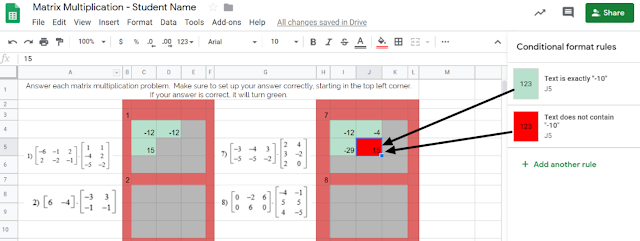
Tip #1: Incorporate tools that automate the process of providing immediate feedback. Check out this example from Carla Dalton's AQR (Advanced Quantitative Reasoning) class in which she maximized the 'conditional formatting' function within Google Sheets to efficiently check progress towards mastery. This auto-coloring box allows the student to know immediately if their calculation was right or wrong. Immediate feedback of this nature enables students to self-monitor the need for referring back to notes or self-regulation of knowing when to ask for help. This also is intended to correct misunderstandings as they occur, rather than addressing misunderstandings the next day after a worksheet's worth of doing it wrong and solidifying incorrect thinking.
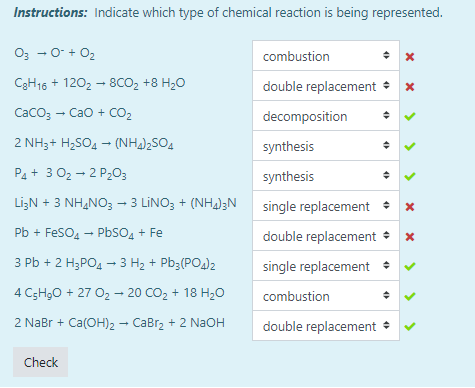
Another example of this automated immediate feedback is done through the use of Moodle quizzes when set to behave in Adaptive Mode, such as this example from Tiffany Mackerley's Chemistry class. This mode turns a traditional quiz into a series of formative questions that has a "check" button which allows students to immediately see which answers are right or wrong. Based on the immediate feedback, students can adjust their response accordingly; the teacher can additionally have it be set up to lose a certain percentage of points with each incorrect answer to minimize random, blind guesses.


Tip #2: Empower your students have their voices be heard as a welcomed source of feedback. In April Heffley's Art IV class, students gave anonymous, critical feedback to their peers' artwork in order to make improvements on what was considered "final" artwork for the time-being. The anonymity allows students to be honest about their thoughts while the teacher is able to monitor students responses through the Teacher Dashboard. Though it does save the teacher time from not being the sole giver of feedback, but it it also valuable to the student receiving the feedback as this process allows varied opinions and perspectives that might not have been considered. Not to mention, it also targets higher order thinking skills by those giving the feedback considering evaluation is the second highest cognitive level in Bloom's Taxomony. Beyond collecting the feedback, Mrs. Heffley then uses the peer's feedback to hold individual conferences with each student artist as they review the feedback together; during this time, the teacher assumes a partner position, rather than evaluator position, in supporting the students' growth.


Tip #3: Seek new opinions from audiences outside the walls of your classroom.
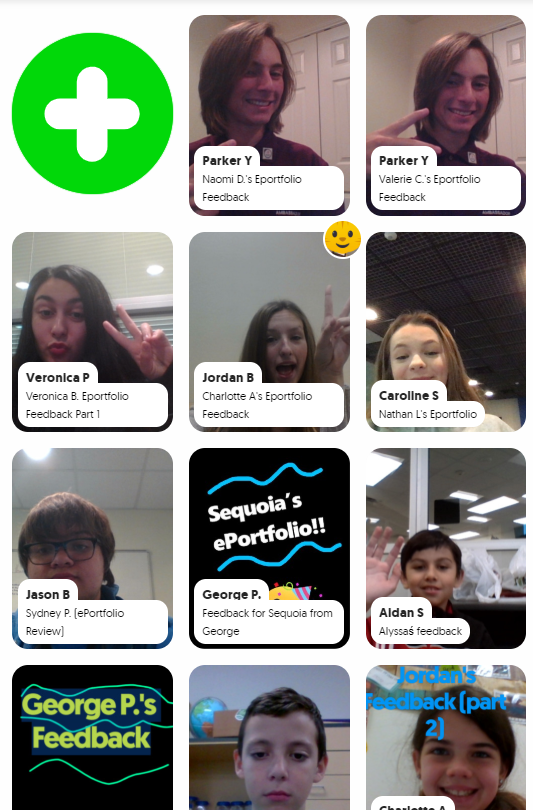
Opening the virtual-doors to your classroom does not have to mean you are connecting with people literally across the globe or are blindly matching with unknown audiences. Patti Hayes' 10th-12th graders at Steele Accelerated High School partnered up with Sandra Champion's GT 5th graders at Hughes Elementary School to review each other's ePortfolios and provide feedback to one another. Google Slides were used to pair up the students, collect written feedback, and link to a FlipGrid that facilitated introductions and oral feedback. This partnership benefited both audiences as the younger students were able to hear from more experienced students in this area, while the older students had their content viewed from true 'outsiders' which helped pinpoints things to be explained or clarified. For more information on this partnership, stay tuned for a blog post detailing this experience set to publish here on 12/9/19!
While all of these tips require time to be invested on the front end to prepare and set up, changing when and how feedback is given maximizes a student's understanding of the material by shifting mindset to viewing feedback as a tool for growth as opposed to a numerical final evaluation. Also note that giving quality feedback is a skill that is developed over time and you can't assume any student, regardless of age, should automatically 'know' how to give good feedback. When asking students to give each other qualitative feedback, sentence stems help focus thinking. Lastly, because feedback is a skill, the more times you ask students to give feedback, the more developed they will become in this area.

This post highlights examples of the following ISTE standards:
  • Students use technology to seek feedback that informs and improves their practice and to demonstrate learning in a variety of ways. (ISTE Student Standard 1c)
  • Use technology to design and implement a variety of formative and summative assessments that accommodate learner needs, provide timely feedback to students, and inform instruction (ISTE Teacher Standard 7b)

Wednesday, March 21, 2018

The Basics of Blending


In the book, Blended Learning in Action, Catlin Tucker, Tiffany Wycoff, and Jason Green hit the “pulse” of the blended learning movement as they discuss the need for a shift in the way schools “puree” and present content to meet the needs of today’s learners.

They explain this by saying, “We are at the moment in education when our schools can determine if they are Netflix or Blockbuster, Amazon or Borders, Samsung or Blackberry. In each of these cases, the successful organization saw that the entire world was changing and decided they were going to change to be ready for it…shifting vision and culture at the time when it was most critical to their survival.” The point here is that current education models are “crushing” student opportunity by “chopping” key elements needed to engage students and prepare them for “shredding” the future demands of a global marketplace. In an effort to address this need, Northwest ISD has begun piloting blended learning courses where that missing link is helping to fill the gap and expose students to nontraditional forms of instruction by providing learning experiences that aid in better acquisition of future ready skills.

There are common misconceptions about blended learning and what it entails. It is not only integrating technology into the classroom, “flipping” lessons, or even implementing problem based learning strategies. Blended learning includes a “mixture” of those things and more! An article by Michael B. Horn and Heather Staker described blended learning as, “any time a student learns at least in part at a supervised brick-and-mortar location away from home and at least in part through online delivery with some element of student control over time, place, path, and/or pace.” Successfully implementing blended learning requires a complete shift of culture that empowers both teachers and students to be active participants in creating learning opportunities. Horn and Staker explain that making blended learning a reality requires “letting go of the idea that we always have to teach something in order for students to have learned it.” Empowering students by allowing them choice and independence within the pace and structure of the course as well as connecting the traditional, face-to-face learning time with digital learning time is all key to the success of blended learning courses and eventually strengthens student capacity for independent problem solving and critical thinking.

Jennifer Hamzy, a teacher at V.R. Eaton High School, facilitates the current blended AP Psychology course there and she feels that the digital days incorporated into the course create an opportunity for “differentiation and for students to decide what works best for them.” She also appreciates how the blended format puts more responsibility on the students to develop “better study skills” and to “learn how to independently read a college text.” Jennifer frequently encourages collaborative strategies to help guide students on digital days. They are encouraged to utilize Google Suite tools as well as various digital study aids like Quizlet, YouTube videos, and online practice assessments to learn and reinforce concepts on their own while allowing more in person class time for discussion, teacher guidance, and whole group activity. AP Psychology students, Anya and Patricia, stated that they enjoyed having “more time to get work done” independently while also having the option to “meet up to work together” with other students either digitally or in person.


Although blended learning has been largely successful in Mrs. Hamzy’s class and she is extremely well-versed in problem based learning strategies, student goal setting, and differentiation, she feels that she can improve her blended learning course by providing more specific expectations to students early on in order to guide them in productive ways to spend their digital days as well as by incorporating more flipped techniques to help ensure that students have the necessary background knowledge and preparation to complete problem-based tasks and projects. Mrs. Hamzy regularly utilizes Google Suite, Moodle, and other digital resources to engage students with content independently and collaboratively but is constantly making adjustments and trying new tools to help her create additional independent learning opportunities for students. Online resources such as Pear Deck, edpuzzle, FlipGrid, Formative, Screencastify, and even digital badging can all increase student engagement with content while allowing students room to individually and collaboratively remediate, accelerate, or manipulate their own interactions with concepts and skills. Hamzy describes the transition to a blended learning course as “a process” and says that teachers new to it should “give themselves a break the first year” as they take risks with a new role, different strategies, and unfamiliar resources. She says that as you progress, “you discover that some things work and some do not but that’s okay” because you adjust and improve for the next time.

As the availability of blended learning courses to NISD students increase over the next few years, other EHS teachers, like Renata Schlotzhauer and Ashley Harden, will be expanding this course structure to other content areas such as science and World Languages. Mrs. Harden says that she is looking forward to “students growing academically and personally as they are given more responsibility.” She also feels that it will help to deepen student understanding in science because they are allowed to cover more information at a more personalized pace.”
Prior to the course selection process for next year’s classes, both Mrs. Harden and Mrs. Schlotzhauer took time to speak with incoming students about what they could expect and Mrs. Schlotzhauer explained that she felt there were “unlimited possibilities for delivery of content, student collaboration, and exploration of new concepts.” Students will have real opportunities to grow as self-sufficient, critical thinkers as they are forced to begin thinking and working in more organic and experiential ways through these blended classrooms. Tucker, Wycoff, and Green state that, “…it is the advent of modern technology that now makes this type of learning experience possible in every classroom and for every child” and that “the rewards of student learning, engagement, and empowerment will be manifold.”

Monday, October 16, 2017

Constructing Concrete Connections

Vanderbilt University professor H. Richard Milner IV wrote that, “…building relationships with students is about meeting students where they are, attempting to understand them, and developing connections with them.” Most educators know that connecting with students and building positive relationships are key strategies to developing student success and those relationships serve as a foundation for what is done each and every day in the classroom. Making those connections can sometimes be a challenge, especially when a student is more introverted or maybe lacks confidence in his or her own voice. These connections also rarely happen without a teacher’s willingness to be vulnerable and share authentic pieces of themselves with students which, in turn, help to build foundations of openness and trust that are essential in student motivation and growth.

Maslow's Hierarchy of Needs
Technology can be useful in transforming the ways we go about meeting the needs of our students while also providing a voice for those students who feel uncomfortable or who might not normally contribute in larger class settings. Effectively utilizing the right tool or resource can make a real difference in providing authentic, safe, and supportive connections, and ultimately learning experiences, that yield success for all students.
Katy Watson, a French teacher at V.R. Eaton High School explained that, “French I is the first time many students encounter a foreign language class in their entire academic career” and “it’s often a period of adjustment.” Mademoiselle Watson’s awareness of her students’ need for connecting and establishing a comfortable foundation for learning led her to utilize her YouTube channel to produce a video welcoming her students to the course and sharing basic expectations with both students and parents, prior to the first day of school. Mademoiselle Watson took time to introduce herself to students and their families while showing them her passion for both education and the French language. When asked about her goal for this video, she said, “I wanted to take some time to introduce parents and students to my program and to [help them] get an idea of what they can expect from my class. I’m hoping that parents will feel more empowered to speak to their students about my class…” and “to reach out to me if they need something, because they’ve put a face with a name and they feel more comfortable.” Her willingness to take that extra step to initiate personal contact with students and parents before anyone even set foot into the classroom is something that has had an impact on both students and families. Students came to class on the first day and felt encouraged to mention the video and make connections right away. Several students mentioned appreciating the effort and having a greater feeling of comfort and openness at the beginning of the course. Parents expressed a sincere appreciation for a chance to hear about the course and the instructor’s expectations and to have a positive communication from the teacher right at the start of the year.

Samuel Beck Elementary’s Ethan Dee is another example of an NISD educator who regularly uses technology in his classroom and, this year, he specifically used it to create authentic connections right at the start. Mr. Dee began by assigning a “Welcome Back Scavenger Hunt” where students were to visit a variety of websites gathering information about Mr. Dee and sharing information about themselves with him and the rest of the class. Mr. Dee utilized everything from a Smore newsletter, to Moodle, to Padlet, to the comments section of his school website, and even Animoto, where he created a video about himself. This scavenger hunt not only gave students a chance to get to know their teacher, but it also allowed them to begin interacting with each other in a positive way and previewing the types of tools they would use to learn and collaborate throughout the year. When speaking about the scavenger hunt assignment, Diane Tsapos, a fifth grade parent said, "...as a parent, I enjoyed sharing this." Aaron Reisman, one of Mr. Dee’s fifth grade students, shared that he is usually a bit quiet and nervous at the start of school and that he has felt more comfortable this year. He especially liked to see his classmate’s selfies posted on the scavenger hunt Padlet wall and thought that the part of Mr. Dee’s video, where he was dancing, was funny. Aaron expressed that he was definitely looking forward to spending the year in Mr. Dee’s class because he was already having fun exploring these tools and getting to know everyone better.

When we evaluate student academic experiences, we find out very quickly that although a lot of content is sometimes forgotten, the connections we make help us to solidify foundations of trust, social responsibility, and confidence, which then allows students to walk away with skills and experiences that are positively remembered and applied for the rest of their lives.

Student ISTE Standards:

1) Creativity and Innovation: Students demonstrate creative thinking, construct knowledge, and develop innovative products and processes using technology. 

  • 1.1: Apply existing knowledge to generate new ideas, products, or processes
  • 1.2: Create original works as a means of personal or group expression
2) Communication and Collaboration: Students use digital media and environments to communicate and work collaboratively, including at a distance, to support individual learning and contribute tot he learning of others.
  • 2.1: Interact, collaborate, and publish with peers, experts, or others employing a variety of digital environments and media

Monday, September 11, 2017

From Consumers to Creators: Students Design Curriculum

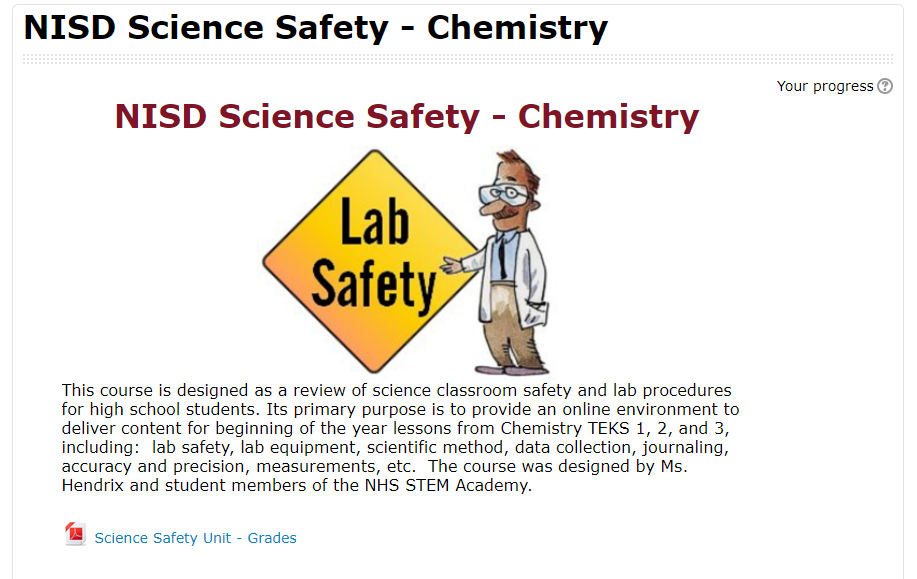
Tired of the traditional two-week review of safety rules each year, Ms. Hendrix at Northwest High School decided to put students in the driver's seat of their learning. Her chemistry students were tasked with creating an online, self-paced "Science Safety Education" course that caters to high school students and includes videos, presentations, and assessments. Student Alexis noted they were basically designing curriculum.

One of my favorite aspects of this project is the student ownership of their work. Hector said that his time spent in this project felt productive because he knew it was going to be put to use. Students were creating, all while knowing that there would be a specific audience. This project enabled student choice while staying within the teacher's required parameters and TEKS. Giving up control of an assignment can be scary for teachers, but the ownership and genuine learning that takes place as a result is invaluable to students. Hector added, “It’s cool because [what we created is] actually going to help someone later.”

labsafetymoodle.PNGStudents were ultimately able to redefine their learning using video editing software (WeVideo, iMovie App, and Adobe Spark), Google Drive and Slides, and various Moodle features to collaboratively teach future classmates.

Essentially, each team of students was responsible for a different Lab safety and procedure topic. There were many topics to be covered like journaling, recording scientific data, creating charts and graphs, and the history of science. Each team had to create a note-taking presentation resource, a video, and various assessments for their unit. The teams collaborated to culminate everything in a final product for the next year’s science students to use at the beginning of the school year.

Ms. Hendrix was sure to leave the actual creation of the course to the students, but did help them format it into Moodle so others could benefit from their hard work. Payton said, “[This project] made me reflect on how I learned as a sophomore, and I was able to apply that for other students.” In creating the course, students had to think critically about how people learn, what type of learning sticks, and what resources and content would be best for their intended audience. Everett added, “...we had multiple people who learned different ways in our group, and so each person was able to contribute differently.”
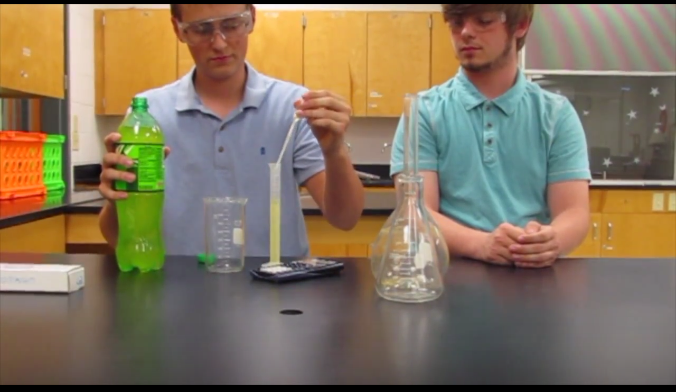
student safety video.PNG
The teams pulled from existing resources and created brand new ones. Many students embedded student-made videos into their Google Slide presentations. Alexis’s team worked hard to make their video entertaining. “We wanted it to be funny because ours was … about doing a write-up,” Alexis noted. “It’s a boring topic for some, so we wanted it to be funny considering our audience [was] teenagers.” As always, some of the biggest learning moments came as students reflected on their work. Hector reminisced, “Out of all of the things that I did that year, I feel like this had the biggest impact.”

Monday, November 9, 2015

More Than Just a Pretty Voice

Today, technology is advancing into every nook and cranny of our daily life.  The same can be said of our schools.  The use of technology in most classrooms is evident, even in the most surprising places, such as the Wilson Middle School Choir classroom. Choir teachers Mrs. Wilemon and Mr. Quinene were asked, “Has your instruction been dramatically different in a classroom where the students all have devices versus in a classroom where they didn’t?”
Mr. Q states, “It is great that kids can have their recordings to practice with them at all times. They can practice in the car, at home, or at school.  We can update them with reminders and news almost instantly.  We also can record assessments and submit them so we lose as little class time as possible.” 

Mrs. Wilemon replied, “I’ve only ever taught in this district where students all have devices so my instruction has not changed, but it is definitely different than when I was growing up in choir. The technology helps me assess in class much easier and it gives the students a greater opportunity to accurately practice at home with practice tracks. When students go home and practice their parts – it makes for a much more successful joint rehearsal."

Students use a variety of tools to enhance their learning in this music class.  Teachers allow the students to choose their voice recorder that they find the most beneficial and easy to use.  Some of the tools that students use are: Windows Sound Recorder, Voice Recorder, Audacity, and Windows Movie Maker.

“Technology is very important in choir for we use it to record and listen to ourselves so we can work on improvements.” states Halen. “This saves the students and teacher time so they do not have to listen to us one at a time in their office.”     

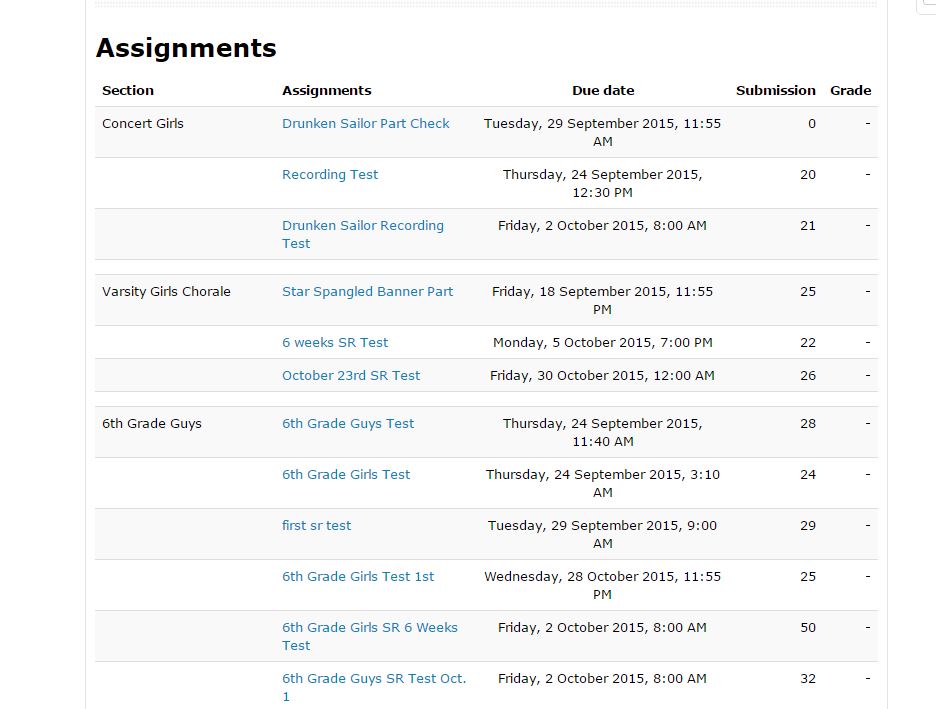
Emmarie likes that her teachers use technology and apps like Remind and Moodle to help her stay organized.  “Middle school students are busy so the text messages are great reminders to turn in assignments when they are due. I also like our it when our teacher creates an assignment dropbox in Moodle for us to turn in work - even from home. The teacher can grade and give us direct feedback in Moodle." 

Below is a screenshot straight from her Moodle page.  Notice the number of students using this feature. .”


Choir, Voice Recording, Audacity, Microsoft Movie Maker, Collaboration, Moodle, Middle School, Wilson Middle School, Feedback, Music, Electives

Student Olivia says, “ By using the recording apps of our individual voices the teacher can give us feedback to work on things. Many choir students use the application called Audacity to create a parody to a song; while another project that we are assigned is a lip sync video which was a very fun project where we used our video camera and Windows Movie Maker.”

Using technology in the choir classroom has so many benefits for students and teachers. Click below to here a sample of their work.  


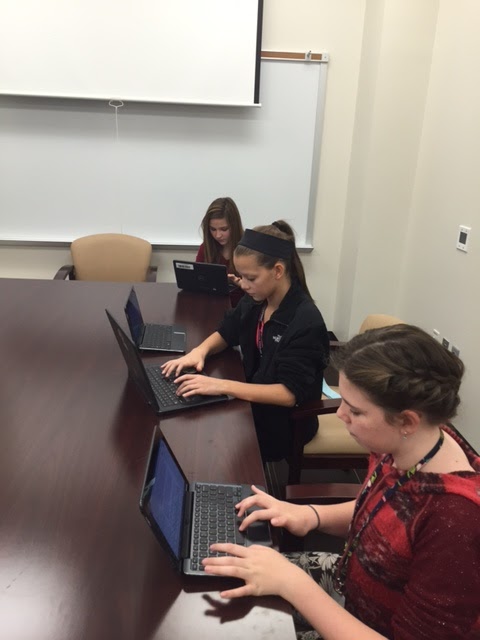
choir 1.JPGThe average person might think that technology in a choir room is surprising -  after all, what other tools would be required for music education besides a piano and some voices? However, by using technology resources available to them, these students have made their classroom come alive both at school and at home, making it easy to see that music and technology can work together in perfect harmony.

This blog post was written in collaboration with Wilson Middle School students Halen, Olivia, and Emmarie using Google Docs.