
Monday, September 26, 2022

Saturday, September 25, 2021
How Summer PD Impacts Student Learning!

“Implementing Hyperdocs was a complete push out my comfort zone. Relinquishing the control early in the school year was not something I was used to” comments Mrs. Spring, 4th grade at Nance Elementary. Kim Spring has not only been intentional about the professional development she attends, but also intentional about implementing her learning in meaningful ways with students. Two years ago, Kim helped co-lead “Delivering Engaging Lessons with Pear Deck.” This was a tool Kim learned and then implemented consistently with her students. Pear Deck wasn’t just a new tool for Kim. Pear Deck meant continual formative assessment, intentional student discourse, and even a way for students to create assessments for their classmates. By attending and leading Pear Deck sessions, Kim was able to maximize the use of Pear Deck to meet campus and district learning goals.
Last year, Kim decided to attend “Save Time and Give Choice with Hyperdocs” led by Instructional Technologists Shelly Hall and Kylie Lloyd. Immediately after the session, I received an email from Kim with her takeaways and goals for implementing a hyperdoc with her class. Designing a hyperdoc takes intentional planning. Mrs. Spring used backward design and considered her learning targets and desired outcomes as she created each aspect of her hyperdoc. Since this would be a self-paced lesson, she had to plan ahead for students.
During the 3rd week of school, Kim’s students experienced their first hyperdoc! This unit on Place Value was not only engaging and interactive, but also allowed for gradual release of the content and self paced learning. Gabriella, Tommie, and Abby were three students that specifically enjoyed this unit. Gabby mentioned, “I liked learning at my own speed and pace. I was able to take things one step at a time, but always had something I was working on.”

The unit started with students ENGAGING in the topic of place value through direct instruction and focused videos for students to watch. After students had a grasp on place value they were asked to EXPLAIN their learning in Flipgrid. The Flipgrid check in allowed Mrs. Spring to see who understood the content and who needed extra support. Mrs. Spring pointed out, “Flipgrid comes in handy as I'm able to hear the kids verbally explain their reasoning and see their work. I am able to leave feedback to them as well.”
As students progressed through the hyperdoc, they were asked to APPLY their learning. Mrs. Spring had students complete a self-paced Pear Deck to assess their knowledge up to this point. She pointed out, “I LOVE Pear Deck. It allows for self-paced lessons and I’m able to leave feedback at any given time. It helps me keep track of who has finished, so I know where each student is. It’s a great teacher sidekick!”
 |
| Instructor and Student Paced Pear Decks Throughout The Unit |
Next, students SHARE and REFLECT with their peers. They look at problems they’ve completed in their Stepping Stones book, along with the work they’ve explained in Pear Deck and Flipgrid to answer the following questions with others:
1) What was your favorite part of this unit?
2) Was there a part of this unit that confused you?
3) Show a partner how you explained place value to the millions on slide 4.
Lastly, students are given an opportunity to EXTEND their learning. Not all students will have time for this section of the learning, but it’s a great way to challenge students who have successfully grasped the content. In fact, this is a great way to differentiate learning for students. Students were given the opportunity to create their own Pear Deck to share with the class. This task required students to apply their learning by creating their own questions. Both Tommie and Abby pointed out “The most challenging part of this unit was creating the Pear Deck. It was tough making the questions.”
All in all, Mrs. Spring’s first hyperdoc was a success! “I love the independence of it all,” states Kim. “It was really neat to watch the kids take such quick ownership of their hyperdoc. I have a large group of students that are pretty above level in math. This helped with my fast finishers. They instantly went into their hyperdocs and got going!”
This unit is a prime example of the NISD Learning Framework and the intentionality that goes into a well designed lesson in NISD:
 |
| Click HERE to Enlarge Image |
Monday, November 18, 2019
Answering "Am I Doing This Right?" with Tech-Facilitated Feedback
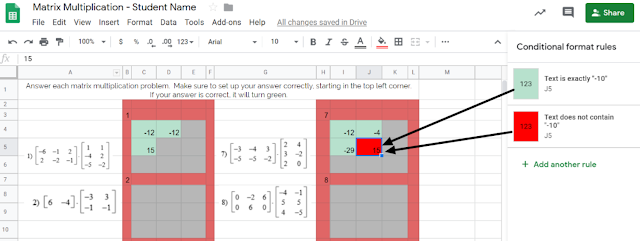
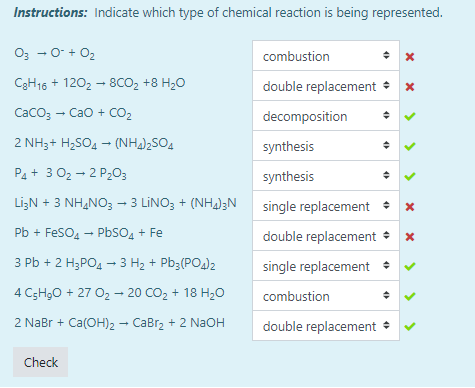 Another example of this automated immediate feedback is done through the use of Moodle quizzes when set to behave in Adaptive Mode, such as this example from Tiffany Mackerley's Chemistry class. This mode turns a traditional quiz into a series of formative questions that has a "check" button which allows students to immediately see which answers are right or wrong. Based on the immediate feedback, students can adjust their response accordingly; the teacher can additionally have it be set up to lose a certain percentage of points with each incorrect answer to minimize random, blind guesses.
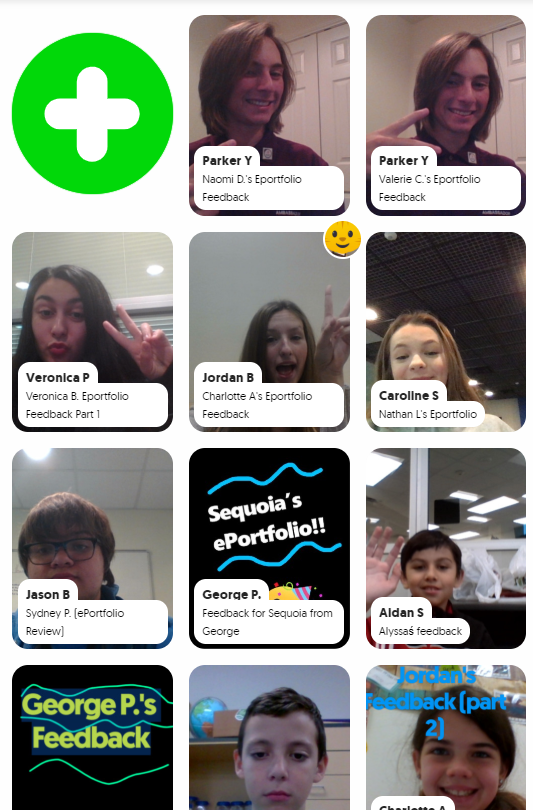 Opening the virtual-doors to your classroom does not have to mean you are connecting with people literally across the globe or are blindly matching with unknown audiences. Patti Hayes' 10th-12th graders at Steele Accelerated High School partnered up with Sandra Champion's GT 5th graders at Hughes Elementary School to review each other's ePortfolios and provide feedback to one another. Google Slides were used to pair up the students, collect written feedback, and link to a FlipGrid that facilitated introductions and oral feedback. This partnership benefited both audiences as the younger students were able to hear from more experienced students in this area, while the older students had their content viewed from true 'outsiders' which helped pinpoints things to be explained or clarified. For more information on this partnership, stay tuned for a blog post detailing this experience set to publish here on 12/9/19!
- Students use technology to seek feedback that informs and improves their practice and to demonstrate learning in a variety of ways. (ISTE Student Standard 1c)
- Use technology to design and implement a variety of formative and summative assessments that accommodate learner needs, provide timely feedback to students, and inform instruction (ISTE Teacher Standard 7b)
Monday, April 29, 2019
Raiders of the Lost STAAR

Other tools integrated into the tasks include: Prism, Pear Deck, Epic, News ELA, and a variety of GSuite tools (Docs, Slides, Forms).

