Showing posts with label google. Show all posts

Monday, April 8, 2019

How to Turn 6th Graders Into World Travelers


At Gene Pike Middle School, 6th grade World Cultures teachers Connie Garza and Dawn Goldstein want to do more than teach their students about other places -- they want to show their students the world. Consider for a moment that 2018 research discovered 1 in 10 Americans has never left their home state, for financial or other reasons. With this in mind, it's safe to assume not all of our students will have the opportunity to visit many of the far-off places they're learning about in school.

Still, we know that learning to understand other cultures and gaining perspective on how other people live is an important part of succeeding in our global society and in learning to be a well-rounded individual. Thanks to Google’s Virtual Reality (VR) Tour Builder, even if Garza and Goldstein can't fly their students abroad, they can still take them to places all over the world.

For context, Google’s Virtual Reality platform relies on Google Earth’s existing 360-degree footage, making it possible to virtually explore any place in the world through your computer screen or a pair of VR Goggles. What’s even better? Their VR Tour Creator allows people (in this case 6th graders) to design a virtual tour with stops anywhere around the globe and lets them embed their own photos or written details into the tour.

After explaining their task to students, Goldstein and Garza used student-led stations to guide their learning about Europe. During their stations, students used hyper docs and other printed and digital resources to learn about European countries overall, documenting what they learned in their “travel journals” and earning stamps in their “passports” for visiting each country. Throughout this step, students gained important insight into the countries and cultures that would ultimately help them build their tour during work-time.

A key success in this project is that by launching the project before introducing and researching the countries, Garza and Goldstein prolonged their students’ inquiry and created a crucial “need to know”. Instead of learning for the sake of learning (albeit a worthy endeavor), these students were learning with the motivation to design their dream tour through a European country, that would also highlight important geographical and cultural details of each place they visit. This created a personalized passion for their learning that inherently increased student engagement throughout the learning process of every country.

A major challenge in a project like this -- where students are focusing on only one from a list of topics they need to be experts on -- is making sure students master their overall learning about European culture and geography, while still highlighting the country they are most interested in learning more about. To address this, Garza and Goldstein made sure students visited each country through the exploratory stations, but they also gave students a peer audience. Because students would be sharing their projects with each other, they were motivated to do their best work; meanwhile, students were exposed to numerous European countries through their peers' student-created virtual tours.

One thing to remember is that you don’t need VR goggles to make Google’s Tour Builder interactive and exciting. Anyone can explore the tours online, and students can use the “hotspot” feature. For this project, they were asked to add detailed pictures, important travel notes, and fun facts about the culture and geography to make their tours more interactive. For example, one student used a hotspot near Italy’s Leaning Tower of Pisa to clarify that a modest dress code is an important consideration when visiting Italian landmarks. Ultimately, creating tours through Tour Builder is easy, but this "hotspot" feature lets students add reflective depth and learning to their creation. It is a feature that educators can rely on to make the task of creating more rigorous. You can see a student-created tour of Italy here: Example.

Through this project, Garza and Goldstein undoubtedly created a few travel-bugs, but even more, they gave students the opportunity to imagine themselves going on great adventures. They gave this group of sixth graders the chance to be (virtual) world-travelers.

Tuesday, September 11, 2018

A Recipe for Success: "Stringing" A Rhythmic Pattern


Learn.
Act.
Reflect.
Goal Set.

Repeat.


Is nailing down this process a Science or an Art? I'd argue it’s an Art - Fine Arts to be exact. Students in Gary Keller and Sessalie Shapley’s Orchestra class at Byron Nelson High School have perfected this process on a continual, weekly basis to improve students' overall abilities. One might think that Technology doesn’t doesn't have a logical place in an instrumental-based class, but that's far from the truth as this Orchestra class is fully dependent on the technology used in preparation for and reflection of daily performance.


Each class is infused with technology from start to end. For example, students are tasked with the responsibility of tuning their own instrument at the start of class each day; they use readily available, free, phone-based tuning apps such as DaTuner and InsTurner to put the accountability on themselves rather than the teacher to ensure the instrument is in the right key. This process is critical to harmonizing as an Orchestra and developing a natural ear for the correct sounding notes.


To continue in the lesson design, classes often provide traditional opportunities such as learning new music and practicing as a full Orchestra. However, the power of technology is truly evident in the individual practice times. During these times, students participate in the general format as follows:


Recipe for Success:
  1. Students create a video of themselves playing a specific song or section of a song determined by the instructor. During this time, students use a combination of their phone and their computer to have both the online metronome and video camera co-functioning. This video serves as a pre-assessment to create a base-line of performance and needs assessment for the week.
  2. Self-critique that video to identify one specific goal to work towards throughout the week. This then becomes the targeted focus for all practice times throughout the week. Topics of suggested focus include intonation, bow placement, vibrato, dexterity confidence, or other of choice.
  3. The student then creates an end of week video over the same content and again uses that as direct evidence to self-assess progress towards goals.
  4. Upload and reflect upon these artifacts in Google Classroom. The Orchestra instructors then review each student's performance to provide individualized attention and feedback focused specifically on the students' performance and self-set goal.
  5. Based on their self-assessment and teacher feedback, the student then goal-sets via a Google Doc for the following week to continually focus on targeted instruction and self-improvement.

Each of these weekly goal sheets provide evidence for the student to reflect up on their progress towards goals and make new objectives based on previous performance. Since the evidence gets uploaded to Google Classroom, students have a personal Google Folder within their own Google Drive which serves as a private portfolio that stores their yearly progress. Students then have the ability to select which pivotal pieces they would like to showcase within their published ePortfolio.

Assistant Orchestra Director, Sessalie Shapley, comments on the power of infusing technology into their classroom, "Google Classroom video recordings allow me to give feedback to every student based on what I see and hear in their recordings. It is a far more efficient use of time letting the recording and grading happen outside of class instead of one at a time, in class, while all of the other students are waiting;" furthermore, "The video recording assignment allows and even encourages students to record themselves multiple times in order to get their “best” recording" which is the ultimate goal: student-driven success fueled by continual practice in perfecting their art. Best of all, the power of technology has helped Mr. Keller and Ms. Shapley build connections beyond what would be traditionally capable with a large Orchestra on a time-restricted class period as Sessalie continues, "The goal sheets and comments have given me several opportunities to discover something about the student’s expectations and other musical talents, gifts and thoughts, which then allowed for deeper discussion about their playing and their musicianship."

As a natural final step, students reflect on their year in an open-ended format. The power of reflection, goal-setting, and improvement shine through in the following student final responses:

Student 1:
“I thought that the goals were a great way to stay conscious of our playing abilities - to constantly be reminded of our strengths and weaknesses so that we can improve on them over time. I also believe that the exercises we were given are great practice strategies for improving many aspects of musicianship like dexterity and intonation.  I think I have certainly seen evidence of our goals in action as the progressed. Some of the goals on the goal sheets did not always pertain to me, but still having to look at them on a regular basis caused me to think more upon how I can always channel my actions in class and practice towards furthering the goals and the overall quality of our orchestra.”


Student 2:
“This year I have heard and felt so much progress in my playing. This was the first year I took private lessons, and I think that was extremely beneficial by itself. But beyond that I have felt so much more confidence in my playing. This was the first year I made it through a solo contest without crying, and the first year I came out of an audition room feeling proud of myself. And confidence alone has made a world of difference in my playing. I have also noticed a lot of progress related to our goals and goal videos. I didn’t realize it in the beginning, but when we came back near the end of the year and redid the dexterity video, it was actually really cool to find how much easier it was for me to do and how much clearer I sounded than in the beginning of the year. It was also useful to see the goals and realize that it’s okay to experiment with the bow and with the left hand, and just that everyone is doing what they can to make beautiful music in the outcome. I have seen so much progress this year in my playing and how I feel about it and I hope to see even more in years to come.”

The presence of technology has empowered these students to find value in the daily struggle of learning, trying, and occasionally failing all while appreciating their own growth that would otherwise not be as apparent strictly as perceptions and memories.

This intentional goal-setting and reflection process meets the following Student ISTE Standards:
Empowered Learner: Students leverage technology to take an active role in choosing, achieving and demonstrating competency in their learning goals, informed by the learning sciences.
  • 1a: Students articulate and set personal learning goals, develop strategies leveraging technology to achieve them and reflect on the learning process itself to improve learning outcomes.
  • 1c: Students use technology to seek feedback that informs and improves their practice and to demonstrate their learning in a variety of ways.
This also exemplified the following TEA Music Level 1 TEKS in which the student is expected to develop processes for self-evaluation and select tools for personal artistic improvement (6c).

Monday, September 11, 2017

From Consumers to Creators: Students Design Curriculum

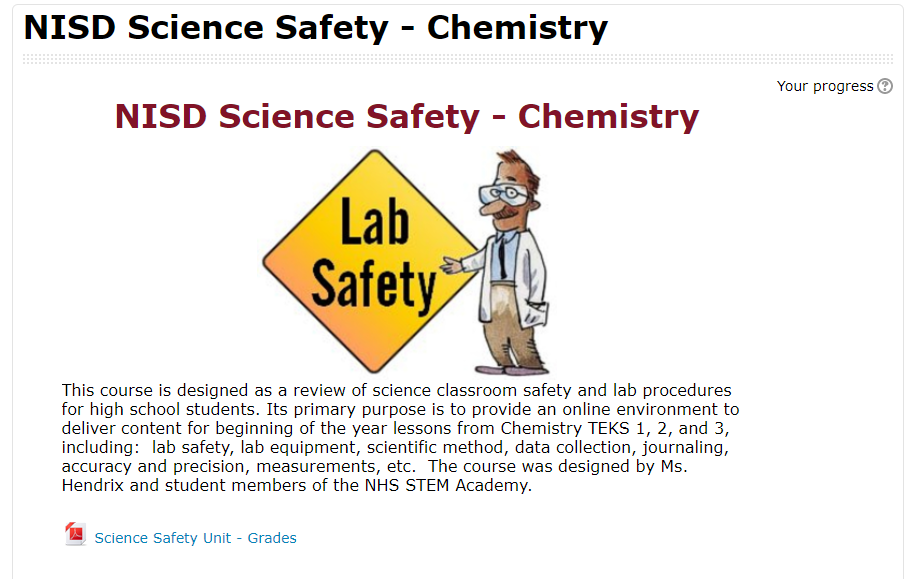
Tired of the traditional two-week review of safety rules each year, Ms. Hendrix at Northwest High School decided to put students in the driver's seat of their learning. Her chemistry students were tasked with creating an online, self-paced "Science Safety Education" course that caters to high school students and includes videos, presentations, and assessments. Student Alexis noted they were basically designing curriculum.

One of my favorite aspects of this project is the student ownership of their work. Hector said that his time spent in this project felt productive because he knew it was going to be put to use. Students were creating, all while knowing that there would be a specific audience. This project enabled student choice while staying within the teacher's required parameters and TEKS. Giving up control of an assignment can be scary for teachers, but the ownership and genuine learning that takes place as a result is invaluable to students. Hector added, “It’s cool because [what we created is] actually going to help someone later.”

labsafetymoodle.PNGStudents were ultimately able to redefine their learning using video editing software (WeVideo, iMovie App, and Adobe Spark), Google Drive and Slides, and various Moodle features to collaboratively teach future classmates.

Essentially, each team of students was responsible for a different Lab safety and procedure topic. There were many topics to be covered like journaling, recording scientific data, creating charts and graphs, and the history of science. Each team had to create a note-taking presentation resource, a video, and various assessments for their unit. The teams collaborated to culminate everything in a final product for the next year’s science students to use at the beginning of the school year.

Ms. Hendrix was sure to leave the actual creation of the course to the students, but did help them format it into Moodle so others could benefit from their hard work. Payton said, “[This project] made me reflect on how I learned as a sophomore, and I was able to apply that for other students.” In creating the course, students had to think critically about how people learn, what type of learning sticks, and what resources and content would be best for their intended audience. Everett added, “...we had multiple people who learned different ways in our group, and so each person was able to contribute differently.”
student safety video.PNG
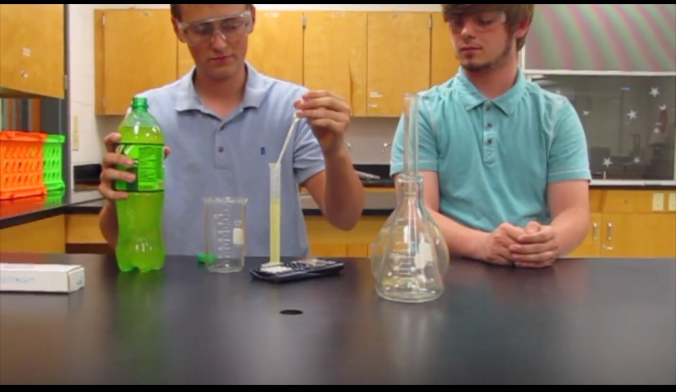
The teams pulled from existing resources and created brand new ones. Many students embedded student-made videos into their Google Slide presentations. Alexis’s team worked hard to make their video entertaining. “We wanted it to be funny because ours was … about doing a write-up,” Alexis noted. “It’s a boring topic for some, so we wanted it to be funny considering our audience [was] teenagers.” As always, some of the biggest learning moments came as students reflected on their work. Hector reminisced, “Out of all of the things that I did that year, I feel like this had the biggest impact.”

Monday, November 7, 2016

Mucking Through Historical Blogs

Students in Mrs. Proudman's class have recently created blogs from the perspective of historical investigative journalists from the end of the 19th century.  These journalists looked into the dark side of the so called Gilded Age in American history, often dragging topics into the light for others to see, earning them the moniker of "muckrakers."  For this project, each student was assigned their own muckraker to research and learn about.  But instead of writing a report or a standard presentation about their subject, the students used Blogger to create blogs about the journalists.  "I really liked making the blog," said Carlos, a student in Mrs. Proudman's class.  "It made it more fun because we were able to use our imagination more and make it more of a story than a report."

Student working on the Blogger site
According to the project instructions on Mrs. Proudman's example blog, students had to imagine they were going on a "Ride-A-Long" with their journalist as they investigated an issue of the time. Students then created a blog with multiple posts to document that journey, including biographical information about the journalist, photos or pictures from the trip, and transcripts of what happened.  This allowed the students to explore the time period and the subjects in a more immersive way.  "The project was very interesting," said Carlos.  "It allowed us a chance to time-travel back and see their own views, how things looked like to them."  A good example is this blog on Samuel Hopkins Adams, which writes from a perspective of a third person traveling with Mr. Adams.   As the students wrote their blog posts, they took time to ask themselves "What does it feel like? What do you see? What do you smell?"  Some of the blog even took this a step further and wrote their posts from the first person view of the muckraker themselves, such as this blog on Nellie Bly.  The beauty of this project is that not only did it give students a chance to use their imagination to explore the time period, but it also allowed them the choice of how to present and relay that information.  They could write from different angles, include pictures, videos, or anything else they wanted on their blogs.  Students even took the time to comment on their peers' blog posts to leave both praise and constructive feedback.  Take a look at some of the blogs linked above or some more examples below, and enjoy your trip back in time!

Blog on John Spargo
Blog on Lincoln Steffner

Tuesday, May 31, 2016

Google Drive Classroom

Students in Mrs. Gierisch's 2nd grade class at Wayne A. Cox Elementary have turned their classroom inside out.  They were given the opportunity to test out a class set of Chromebooks.  The students had never logged into Google, and their teacher had only used Google Drive a little bit.  After 3 weeks these kids were on fire.  They are now using Google Drive daily.
  At first, they just practiced their Google log in, then slowly they explored adding folders, Docs, Slides, and Draw.  Mrs. Gierisch also taught them the importance of their email.  Through a shared Google Doc they can access a link straight to their NISD email.  They have practiced checking it daily.  Students have always come into the room each day and completed morning work, only now their work might be sent through email or even posted in a shared folder from their teacher.


Example of Morning Work

Students First Shot at Google Slides
                           

Over the last month, these students have learned so much! For example in Science, they learned about Kiddle.co and researched different stages of a butterfly lifecycle. Then worked in groups to collaborate and create this google slide to present their learning. Last week they were even confident enough in their latest learning of Google Slides to present at our district's Night of No Limits.  Google Drive has changed the way these students learn!