Showing posts with label Music. Show all posts

Monday, October 23, 2017

Pear Deck: Music to My Ears


Imagine being immersed in a learning environment where large groups of students are constantly being monitored for mastery of music literacy concepts.  Kayla Gentry, music teacher at Cox Elementary, is using Pear Deck to achieve this goal. In Mrs. Gentry’s class, third through fifth grade learners have an opportunity to show their understanding of both rhythmic and melodic grade level concepts each time they have a music rotation with her.  
Mrs.  Gentry believes Pear Deck is enhancing her students learning opportunities by providing them with an engaging way to respond to how they read and hear music in her room.   Pear Deck offers 5 interactive question types which allows teachers to ask all learners for their answers, opinions, and ideas. Students are able to answer the question on their own device and for Averi, a 5th grader in Mrs. Gentry’s class, this is one of her favorite features because our teacher can “know what we are struggling on without failing in front of the class.”


From a teacher’s perspective Mrs. Gentry loves that  Pear Deck allows you to display student responses instantly so they can discuss correct answers and misconceptions as a class. Also, Pear Deck saves a copy of each individual student's responses to the teacher’s Google Drive allowing the teacher to monitor individual student progress.  Vincent, a learner in Mrs. Gentry’s music class, likes Pear Deck because “I’m a little shy and Pear Deck allows me to share my answer.”  Another learner from Mrs. Gentry’s class says Pear Deck is a great experience because she likes when the session asks about her individual mood.  “If we aren't having a great day it could affect how we learn.”


Through the use of Pear Deck Mrs. Gentry is empowering her learners to take an active role in their learning experiences while using technology.  Students are able to demonstrate their understanding of music literacy concepts in a variety of ways and use their session take aways to set personal learning goals in music.  Pear Deck has been a transformational tool to help Mrs. Gentry customize her learning environment in ways that support the learning process for her students.

ISTE Standards

Empowered Learner

Students leverage technology to take an active role in choosing, achieving and demonstrating competency in their learning goals, informed by the learning sciences.
1a  Students articulate and set personal learning goals, develop strategies leveraging technology to achieve them and reflect on the learning process itself to improve learning outcomes.
1b  Students build networks and customize their learning environments in ways that support the learning process.
1c  Students use technology to seek feedback that informs and improves their practice and to demonstrate their learning in a variety of ways.
1d  Students understand the fundamental concepts of technology operations, demonstrate the ability to choose, use and troubleshoot current technologies and are able to transfer their knowledge to explore emerging technologies.

Monday, November 9, 2015

More Than Just a Pretty Voice

Today, technology is advancing into every nook and cranny of our daily life.  The same can be said of our schools.  The use of technology in most classrooms is evident, even in the most surprising places, such as the Wilson Middle School Choir classroom. Choir teachers Mrs. Wilemon and Mr. Quinene were asked, “Has your instruction been dramatically different in a classroom where the students all have devices versus in a classroom where they didn’t?”
Mr. Q states, “It is great that kids can have their recordings to practice with them at all times. They can practice in the car, at home, or at school.  We can update them with reminders and news almost instantly.  We also can record assessments and submit them so we lose as little class time as possible.” 

Mrs. Wilemon replied, “I’ve only ever taught in this district where students all have devices so my instruction has not changed, but it is definitely different than when I was growing up in choir. The technology helps me assess in class much easier and it gives the students a greater opportunity to accurately practice at home with practice tracks. When students go home and practice their parts – it makes for a much more successful joint rehearsal."

Students use a variety of tools to enhance their learning in this music class.  Teachers allow the students to choose their voice recorder that they find the most beneficial and easy to use.  Some of the tools that students use are: Windows Sound Recorder, Voice Recorder, Audacity, and Windows Movie Maker.

“Technology is very important in choir for we use it to record and listen to ourselves so we can work on improvements.” states Halen. “This saves the students and teacher time so they do not have to listen to us one at a time in their office.”     

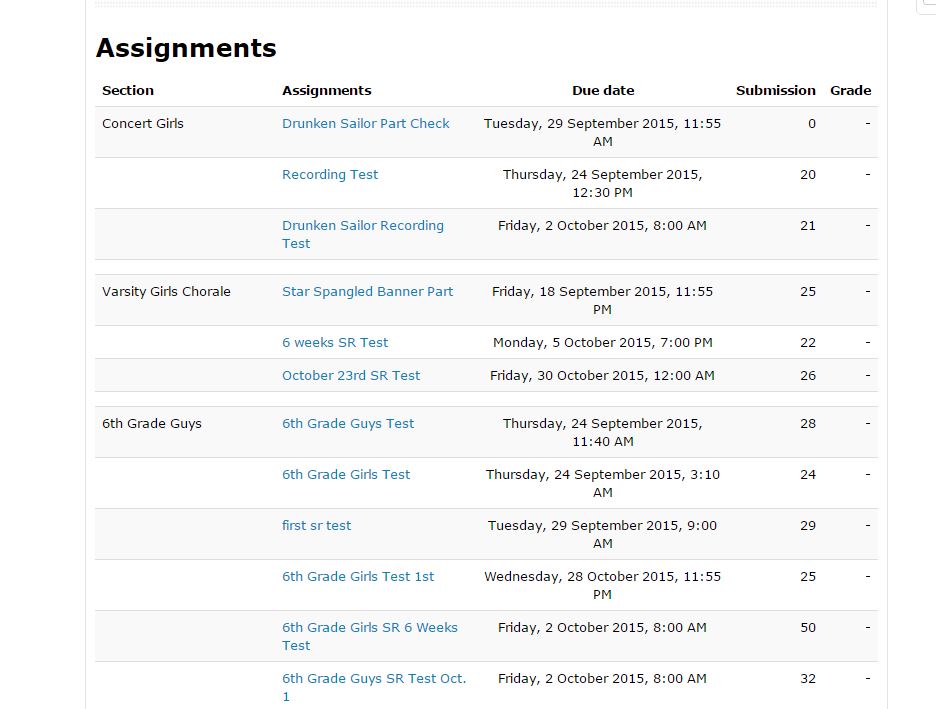
Emmarie likes that her teachers use technology and apps like Remind and Moodle to help her stay organized.  “Middle school students are busy so the text messages are great reminders to turn in assignments when they are due. I also like our it when our teacher creates an assignment dropbox in Moodle for us to turn in work - even from home. The teacher can grade and give us direct feedback in Moodle." 

Below is a screenshot straight from her Moodle page.  Notice the number of students using this feature. .”


Choir, Voice Recording, Audacity, Microsoft Movie Maker, Collaboration, Moodle, Middle School, Wilson Middle School, Feedback, Music, Electives

Student Olivia says, “ By using the recording apps of our individual voices the teacher can give us feedback to work on things. Many choir students use the application called Audacity to create a parody to a song; while another project that we are assigned is a lip sync video which was a very fun project where we used our video camera and Windows Movie Maker.”

Using technology in the choir classroom has so many benefits for students and teachers. Click below to here a sample of their work.  


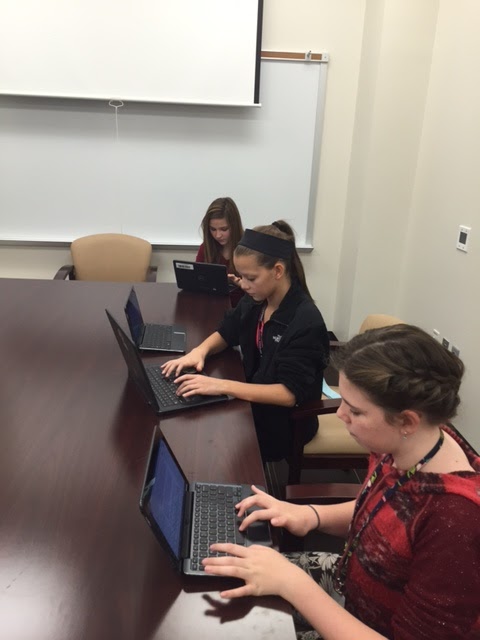
choir 1.JPGThe average person might think that technology in a choir room is surprising -  after all, what other tools would be required for music education besides a piano and some voices? However, by using technology resources available to them, these students have made their classroom come alive both at school and at home, making it easy to see that music and technology can work together in perfect harmony.

This blog post was written in collaboration with Wilson Middle School students Halen, Olivia, and Emmarie using Google Docs.