
Showing posts with label screencast. Show all posts

Tuesday, February 11, 2020

Monuments & Mysteries: An Innovative Jigsaw In Language Education


At Northwest High School, AP Spanish teacher Ginger Cline is doing more than teaching a language. She works hard to truly connect her students to the cultures of the people who speak the target language -- that takes intentionality and innovation. Fortunately for her students, she is committed to both.

In addition to language, culture can be found in the stories told and monuments recognized. Whether a globally-celebrated landmark or simply a local treasure, monuments hold meaning, and by learning about them we can learn more about the culture and ideas that they represent. That said, it would be impossible to teach every student about every meaningful monument across Spanish-speaking cultures. That’s why for this assignment Mrs. Cline put a few engaging twists on a tried and true method -- the jigsaw method.

The traditional jigsaw method works like a puzzle. First, students take on the role of investigator and teacher; they work in small groups to understand and become experts on a part of the overall collection of information before then teaching their small part to their peers. Even though students are initially only responsible for learning and teaching one part, through the presentations at the end, all students have the exposure to and opportunity to learn all of the material. Because students have become experts on part of the information with the purpose of teaching others, this process gives students ownership in their learning.
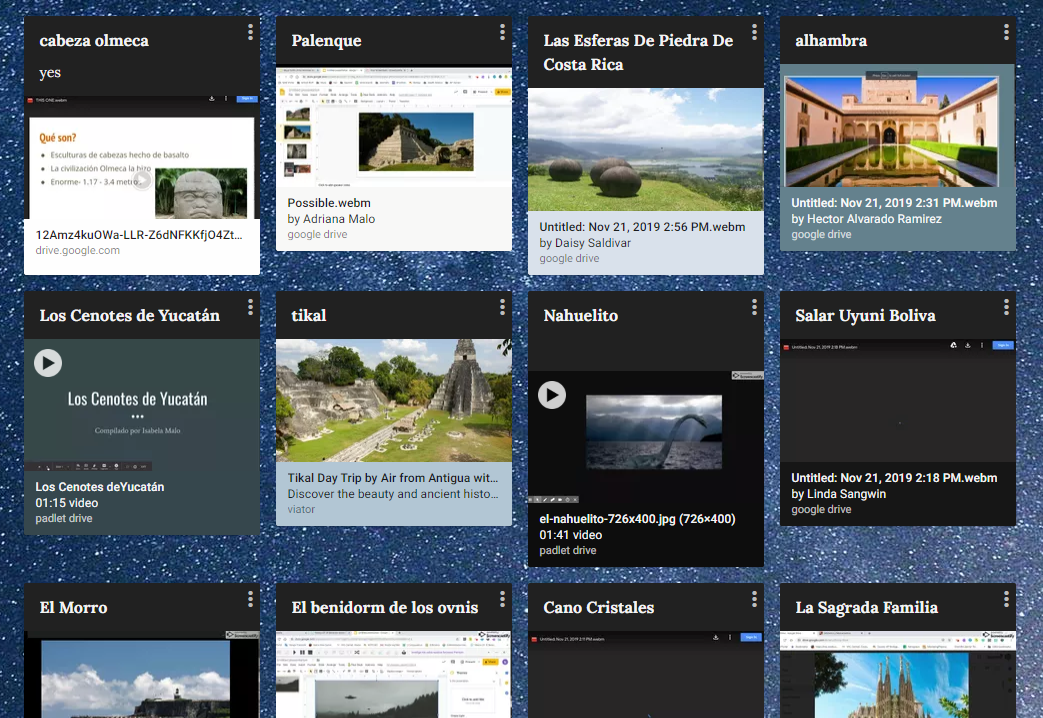
screen grab of Padlet
But more than exposure, Mrs. Cline also wanted her students to create and to have a cross-class collection of student-created resources that they could look back on for this information. That required some creativity on her part. Here is what they did:

Students selected a monument they were interested in and were tasked with creating a screencast about that monument in their target language (Spanish) that both introduced the monument and explained the story behind it. Then, students shared their screencasts on a collaborative Padlet. By having students create screencasts in their target language, Mrs. Cline was able to assess each student’s language learning through an authentic product.

Preview of a Bingo Board created by Mrs. ClineThe next step was to bring the learning together. Through Padlet all students could access and watch each video, but Mrs. Cline motivated them to do so by creating BINGO boards based on the videos students created. Playing BINGO together not only ensured that students would watch the videos, but that students’ had an authentic audience in their peers. Students could also see the relevancy in their purpose for creating -- knowing someone will see your work and find value in it makes learning more meaningful.

Mrs. Cline’s Mysteries and Monument Bingo is a reminder that you don’t have to reinvent the wheel to be innovative, but you do have to push the boundaries of tradition. She started with an established, sound teaching strategy -- she kept the most valuable parts and then skillfully integrated technology to create a deeper and more meaningful learning experience for her students.

Monday, May 1, 2017

Annotation Videos for the Win


Eaton High School students are using features on their Chromebooks to take an active role in their learning. One method to capture their understanding is video; examples include students recording themselves talking through their thinking, recording each other conducting interviews, creating screencasts, and so much more. This article features a unique method of using digital tools to explain their understanding of processes: a digital whiteboard combined with a screencast recorder. Two classes, Geometry and Chemistry, use this strategy to enable students to collaborate on how to solve a problem and then verbally explain the solution while annotating to show details step-by-step.

In Geometry class, students work in groups to create their own word problem to solve a missing component of a right triangle using trigonometry functions. Each group rolled dice to find two numerical components and drew a playing card to determine if the trig function is basic trig or inverse trig. Given just these three simple components, students constructed a unique word problem to introduce a scenario with a missing piece that needed to be solved. Students then worked through solving the problem, each group member providing part of the solution in the video. Once complete, each group submitted their video in Moodle and the next day each class watched all the videos to verify accuracy and vote on the winning video of the class. This activity provided an opportunity for students to be creative in their learning and provide peer feedback on their work.

Geometry Video #1

Geometry Video #2

In Chemistry class, students work together to predict the products of a chemical reaction. Each group is given only the chemical reactants and must combine several steps: identify the type of reaction, predict the chemical products that will be formed, and balance the equation. After first working through the chemical reaction on paper and getting it verified by the teacher, students then recorded their solution using the whiteboard and screencast tools, each student explaining a portion of the solution with their reasoning. Once complete, each group added their video to a shared class Google Slide, in which each slide represented one chemical reaction. This activity provided students the opportunity to work through several steps of a solution from beginning to end, demonstrate their understanding, and contribute to a class set of video explanations. This collective document was then available to all students as a review to help them work through similar problems while preparing for an upcoming exam.

Chemistry Video #1

Chemistry Video #2


These activities are aligned with ISTE Student Standards:

1. Empowered Learner: Students leverage technology to take an active role in choosing, achieving and demonstrating competency in their learning goals, informed by the learning sciences.
1a. Articulate and set personal learning goals, develop strategies leveraging technology to achieve them and reflect on the learning process itself to improve learning outcomes.
1c. Students use technology to seek feedback that informs and improves their practice and to demonstrate their learning in a variety of ways.

6. Creative Communicator: Students communicate clearly and express themselves creatively for a variety of purposes using the platforms, tools, styles, formats and digital media appropriate to their goals.
6a. Students choose the appropriate platforms and tools for meeting the desired objectives of their creation or communication.
6b. Students create original works or responsibly repurpose or remix digital resources into new creations.
6d. Students publish or present content that customizes the message and medium for their intended audiences.

Visit www.iste.org to learn more about the International Society for Technology in Education (ISTE)

Monday, September 26, 2016

Remixing the Retake


When students do not perform as well as they would have liked on their first attempt of an assessment, they can request a "reteach-retake" for another opportunity to learn the content and demonstrate their understanding. Traditionally, quiz and test retakes are modified forms of the original assessments, either on paper or as a Moodle quiz. As future ready creative communicators, we want students to (1) choose the appropriate platforms and tools for meeting the desired objectives of their creation or communication and (2) create original works or responsibly repurpose or remix digital resources into new creations (ISTE Student Standards 6a & 6b). What if students were given the option to decide how they demonstrate their learning, using any tool available?

Math students at Eaton HS are taking this approach. Instead of repeating the assessment in a similar format as the original assessment, students are utilizing technology to demonstrate their learning, given the grading rubric and a deadline. These constraints dictate the destination; students decide their own path how they get there, with great success.

Student quiz retake sample 1:


"My mom recorded the video as I talked through it and showed what I was doing. The video retakes makes it easier because you don't have to be at school to do it; you can do it anywhere. I feel like I learned it better than a paper retake because I was able to explain it; to explain it you have to know what you're doing." ~Algebra II student

Student quiz retake sample 2:
"We didn't have to do every single problem, so we worked them together. Each student separated their own problems in a box and worked through the problems and answers. We used the drawing tool to insert boxes and lines, including a number line. I felt like I understood the problems better than when I do a normal quiz retake because we helped each other work though the problems."
~Algebra II Student

Student quiz retake sample 3:


"You get your paper test back and all the questions you got wrong are marked wrong. So I went to the sketchpad website with a stylus and wrote the problem I got wrong, showed how to work the problem, and showed the right answer at the bottom. At the same time, I recorded myself speaking through the Chromebook what I did wrong, why I got it wrong, and how to do it correctly. So I know in the future how to do it correctly." ~Algebra II Student

Using their choice of technology to demonstrate their understanding in a different way has resulted in increased engagement and understanding, meanwhile building skills students need to become creative communicators.

-----------------------------------------
Tools used in the student samples above:

Other resources: