Showing posts with label Clara Love Elementary School. Show all posts
Showing posts with label Clara Love Elementary School. Show all posts
Monday, September 11, 2023

Monday, October 28, 2019
Building Collaboration, Creativity, and Critical Thinking One Block at a Time

Before jumping right in with technology students planned a storyboard on paper with their group that focused on the character, the time period, and the trials of this historical figure. Then, students had to determine each group member's role by deciding which group member specialized in creating the character, background, and additional props and animations. All students had an active role in participating with this project but the most successful groups had high-functioning teams who were able to work together and think critically to create their finished product. Finally, one team was selected as an Expo 2019 submission and then also selected by the campus for their learning experience to be showcased at Expo 2019. The girls presented the project to families and guests who played their game and discovered firsthand how their learning guided their creation.
 Clara Love Elementary GATES educatory, Kristy Schluter decided Bloxels was the perfect platform for her second grade story writing project. Students took the time to create and plan their characters, setting, and plot for their story before they turned it into a video game. Next, Kristy reached out to her campus Instructional Technologist, Jillian Phillips, to learn more about Bloxels. Jillian had seen the experience the student at Cox Elementary designed and she put Kristy in contact with the Cox Elementary gurus!! She set up a time for Clara Love’s second grade students to Zoom with Cox Elementary’s third grade experts. The third graders were able their peers in 2nd grade how to use Bloxels. Jillian also set up a Flipgrid where our Clara Love and Cox Elementary students could ask and answer questions virtually throughout the unit.
 Kristy’s second grade GATES students loved every second of the design process involved with Bloxes and believed this was a wonderful learning experience! Designing video games through Bloxesl is fun for the students and relatively easy for them to use. Students were 100% engaged and learned a lot by trial and error. Bloxels has endless options for creating intricate rooms and pathways for students who want to go above and beyond. Mrs. Schluter believes these types of learning experiences are important because they provide opportunities for students to be in control of creating the content and sharing it with an authentic audience. Students loved having so much creative freedom and the ability to see their ideas come to life in their very own video games. Both of these projects integrated elements of coding, ELA, math, and STEM into a totally student-centered PBL that combines imagination, creativity, critical thinking, technology, and problem-solving skills as they design a video game.
 Kristy’s second grade GATES students loved every second of the design process involved with Bloxes and believed this was a wonderful learning experience! Designing video games through Bloxesl is fun for the students and relatively easy for them to use. Students were 100% engaged and learned a lot by trial and error. Bloxels has endless options for creating intricate rooms and pathways for students who want to go above and beyond. Mrs. Schluter believes these types of learning experiences are important because they provide opportunities for students to be in control of creating the content and sharing it with an authentic audience. Students loved having so much creative freedom and the ability to see their ideas come to life in their very own video games. Both of these projects integrated elements of coding, ELA, math, and STEM into a totally student-centered PBL that combines imagination, creativity, critical thinking, technology, and problem-solving skills as they design a video game.
Tuesday, March 27, 2018
Accepting the Invitation to Innovate Play

Jessica LaBar-Twomey is a Kindergarten teacher who has made it her mission to prioritize play for play for children around the world by promoting #InnovatingPlay. The idea of combining play with technology for early elementary students is a concept first grade teacher, Sarah McCown, at Clara Love Elementary was willing to pursue for the math unit on 2D shapes. Jessica LaBar-Twomey’s blog post “I play with Design and Creation: #InnovatingPlay Through Math” was the perfect experience to support Mrs. McCown’s learning goals for her students.
 Mrs. McCown’s first graders were working on their 2D shape unit in math and one of the skills is to join shapes together to make a new shape. First graders love to build and create with any manipulatives you give them. Mrs. McCown wanted to give them the opportunity to "play" and be creative, while still working with shapes. She asked her students to create an object (or scene) by joining pattern blocks. She gave them a bag of pattern blocks and allowed them to create anything they wanted on their desk. Once they were finished she took pictures of what they created, while they explained their work.
 Students in Mrs. McCown’s class then turned their creations into a stop-motion video using the Stop Motion app. Mrs. McCown scheduled time with the campus instructional technologist to work with the kids one-on-one to create a stop-motion video. The students loved turning their shape creation into a stop-motion video. Mrs. McCown felt like the technology enhanced the learning experience for her kids because they were able to take something they created in class and put it into a video for all to enjoy. The app allowed others to see step-by-step how the students created their scene out of pattern blocks.
 When Mrs. McCown reflected on the experience with her kids she shared, “All of my students enjoyed the time they were given to "play" and create using pattern blocks. When you allow kids the opportunity to create anything they desire, you give them the chance to work on their level to make something meaningful to them. All of my students were proud of their work and were excited to explain what they made to each other. They marveled at each other's work. It was a great learning experience for all!”
Monday, May 15, 2017
Peer Feedback on the Rise!
Third Graders in Mrs. Carpenter's Class at Clara Love Elementary recently began conversations on Main Idea. Students spent three days learning about what a main idea was and how to determine the main idea of a piece of text. In order to get a temperature check on her students to determine their level of understanding, Mrs. Carpenter set up a Collaborative Google Slide. Together as a class, they focused on an article and then students found the main idea of any paragraph or section that they chose.

Mrs. Carpenter created a slide template with 2 colored boxes: something I've learned and something I'm still confused about. She took some time with the class to model how to add a new slide using the template. They had to complete one green box about something they learned, one red box about a misconceptions, and then comment on at least 2 others red boxes.
 Students went right to work discovering main ideas, determining the new material they had learned, questioning their understanding to take it deeper and helping others find answers to the questions they still had. This assignment not only held students accountable for their own learning, but also allowed them to give and receive immediate feedback. The teacher was able to gage where everyone's understanding was not only on their own new learning and misconceptions, but also on the feedback they were able to give.
Following this activity, Mrs. Carpenter also set up collaborative Google Slides for poetry. Check back to see how they advanced in their understanding of the templates and commenting feature of Slides.

Mrs. Carpenter created a slide template with 2 colored boxes: something I've learned and something I'm still confused about. She took some time with the class to model how to add a new slide using the template. They had to complete one green box about something they learned, one red box about a misconceptions, and then comment on at least 2 others red boxes.
 Students went right to work discovering main ideas, determining the new material they had learned, questioning their understanding to take it deeper and helping others find answers to the questions they still had. This assignment not only held students accountable for their own learning, but also allowed them to give and receive immediate feedback. The teacher was able to gage where everyone's understanding was not only on their own new learning and misconceptions, but also on the feedback they were able to give.
Following this activity, Mrs. Carpenter also set up collaborative Google Slides for poetry. Check back to see how they advanced in their understanding of the templates and commenting feature of Slides.
Tuesday, October 11, 2016
Riddle Me This
Second Graders at Clara Love Elementary are pros at justifying the number riddles that they wrote. The students in Mrs. Melbourn's class have been working on ways to represent numbers. They have spent time working on whole number representation and relationships such as: odd, even, place value, comparing, and ordering.
To demonstrate their understanding of a whole number's position, they created Number Puzzle Flip Books. After creating their flip book, students took a picture of a blank hundreds chart and created a voice over in Seesaw as they justified their thinking about the position of their number within the hundreds chart.
After adding their videos to their Seesaw Class, they spent time creating QR codes for their video to be placed with the Flip Book. Linking their work to a QR code allowed students to share with their authentic reasoning with an audience.
Alex, a student in Mrs. Melbourn's Class, shared that having an opportunity to record his voice to explain his thinking helped him really think through exactly what he was telling his audience. He went on to say, "It helped me kinda count and cross them out and helped other people kinda to learn. Then they know that 50 is an even number, because its 25 and 25."
To demonstrate their understanding of a whole number's position, they created Number Puzzle Flip Books. After creating their flip book, students took a picture of a blank hundreds chart and created a voice over in Seesaw as they justified their thinking about the position of their number within the hundreds chart.
After adding their videos to their Seesaw Class, they spent time creating QR codes for their video to be placed with the Flip Book. Linking their work to a QR code allowed students to share with their authentic reasoning with an audience.
Alex, a student in Mrs. Melbourn's Class, shared that having an opportunity to record his voice to explain his thinking helped him really think through exactly what he was telling his audience. He went on to say, "It helped me kinda count and cross them out and helped other people kinda to learn. Then they know that 50 is an even number, because its 25 and 25."
Monday, September 28, 2015
What am I an Expert On?
Second graders in Mrs. Baker's class at Clara Love Elementary were asked, "What is a skill that you can do very well? Is there something you know a lot about? What is something that you can teach others?" To begin the class discussion Mrs. Baker created a class Padlet board (via a URL) that allowed students to collaborate and post their thoughts from their own desk on their own device. As you can see students got really creative posting.

Bailey liked using Padlet because, "When everyone's names came up and I saw the topic and not a lot of people had the same idea and it was so cool how much everybody learns and knows about a topic."
Bailey stated, "Then we gave feedback by going to your partners work making comments and then we give a glow or a grow. It was cool because you don’t actually need to talk you just send your feedback to them from the computer. It was easy and fast and super fun all while staying on a Level 1 - which is no talking in the room."

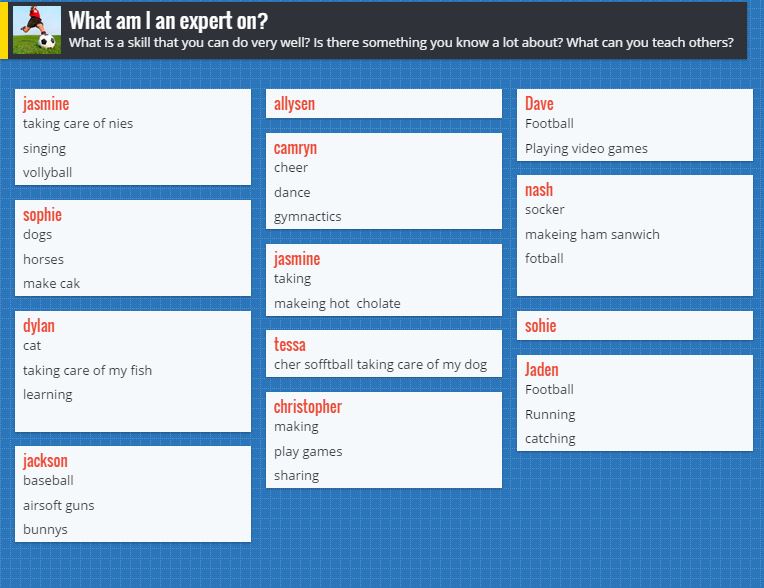
Sophia states, "I would use Padlet instead because it helps me so to stay organized and I can have better handwriting and easier to write and read."
Bailey liked using Padlet because, "When everyone's names came up and I saw the topic and not a lot of people had the same idea and it was so cool how much everybody learns and knows about a topic."
Mrs. Baker then used the Padlet board to group students with similar interests to begin the writing piece of the project. Students then using another interactive and collaborative tool call Google Docs. Each group had a lead person that started the document and then shared it with the other team members and the teacher. Students were so excited to begin to write!
"We used google docs for writing what we were an expert on and shared it then commenting feedback to our friends so they can check over and fix their google document. We did that by sharing with our friends," said Tessa.
Bailey stated, "Then we gave feedback by going to your partners work making comments and then we give a glow or a grow. It was cool because you don’t actually need to talk you just send your feedback to them from the computer. It was easy and fast and super fun all while staying on a Level 1 - which is no talking in the room."
Google docs can allow you to write and collaborate with other classmates either in the room, in another grade level, or even around the world. As you can see the creativeness of this assignment kept the students engaged and enthused about their writing.

When Mrs. Baker asked Sophia what she liked about this type of writing assigment she concluded, "I loved it because it is fast and easy and much more funner than paper. We can fix it easier than erasing and rewriting it all over with the help of our peers as they gave us feedback for corrections."
This article was written in Google docs in collaboration with Bayleigh, Tessa, Sophia, and Mrs. Catherine Baker
This article was written in Google docs in collaboration with Bayleigh, Tessa, Sophia, and Mrs. Catherine Baker
Subscribe to:
Posts (Atom)